
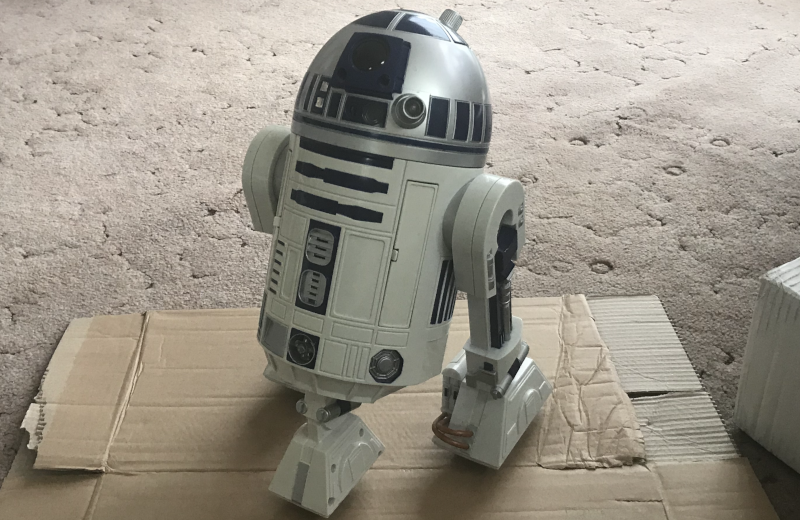
While it is fun to get toys that look like your favorite science fiction props, it is less fun when the electronics in them don’t measure up to the physical design. [Steve Gibbs] took a Hasbro R2D2 toy robot and decided to give it a brain upgrade along with enhanced sensors. You can see a video of the robot doing its thing and some build details below.
In this case, the toy from Hasbro was not working at all, so [Steve] saved it from the dumpster. Instead of a repair, he decided to just gut it and rebuild it with modern electronics. The ultrasonic sensor on the forward toe is a dead giveaway.
The robot responds to voice commands better than the original and can play sound effects and clips from Star Wars. You can also control the robot with a phone app. The new or upgraded sensors include microphones, a PIR sensor, a photoresistor to sense light, a smoke and CO2 sensor, a computer vision camera, and, of course, the ultrasonic range finder.
Some motors and the original speaker are in use, but R2 now sports additional LEDs and servos. All the extras required some surgery on the plastic body. Instead of regular batteries, the ‘bot now uses a LiPo battery, so the old battery compartment was cut out to make more room.
Even if you aren’t a die-hard Star Wars fan, this is a fantastic project, and May the 4th is right around the corner. These toys aren’t cheap, but if you can score one with bad electronics, you might be able to find something cheap or — like Steve — even free.
These toys are popular hacking targets. Now [Steve] needs a pit droid.












i have a huge robot controllable by radio signals sent from a board that plugs into an Apple II. It’s as tall as a five year old and uses lead acid batteries to drive its huge motors. it has no sensors and essentially just follows direction info via wireless — and would quickly fall down the stairs if operated near any. imagine what kind of gut-remodel i could do with that!
I want to do this with a Darlek
One of the first computer controlled “robots” I ever saw was a late 1970s vintage remote controlled R2D2 robot. Someone had connected the remote control to the casette port stop/play output of a TRS-80 model 1. They had also connected a light sensor to the TRS-80, with the sensor mounted to the robot.
The way the remote worked was that the robot always went straight forward when powered on. Pushing the button on the remote cause it to run in reverse, which also turned a small guide wheel. In reverse, the robot always turned in a circle.
The program on the TRS-80 read the light sensor, and set the robot turning. When it found a bright light, it switched to forwards and moved to the light. If the light disappeared or got dimmer, it would do another search and correct course.
I saw that in a copy of 80 Micro about 1981.
As coincidence would have it, my brother had a remote controlled car that worked the same way, and I had a TRS-80 model 1.
I wrote a program to give commands to the car: go forwards so far, turn left, go so far, turn right, etc. You could program a whole long sequence like on a Big Trak. It could even stop. By slowly switching between forward and reverse, the car would sit still, quietly “ticking” with each pulse from the transmitter.
Since it was my brother’s car, I couldn’t permanently attach anything to the remote. We just taped it down and used a 9V battery clip to put the cassette control in series with the original battery clip.
We took the whole rig to a meeting of the Explorer’s Club where we were members. The Explorer’s Club was all about computers. That meeting, everyone brought their computers and something special to demonstrate.
We programmed the car to drive around the room, doing loops around the table legs and the chairs.
At first it was fine, but as more and more 1970s era computers were turned on, the radio control got to be quite erratic. The computers back then weren’t properly RF shielded, so they were effectively jamming the radio signals.
Hadn’t thought of that in years.
Ha! Found it. The September, 1981 edition of 80 Micro has the TRS-80 controlled R2D2:
https://archive.org/details/80-microcomputing-magazine-1981-09/page/n115/mode/1up
His was a lot more sophisticated than mine. He used the expansion box port to build a real interface and controlled TWO remote control channels – one for turn and one for forwards.
I only used the cassette tape play/stop output. My brother’s RC car only had one channel.
I’m just starting a project similar to this but not R2D2 since I don’t happen to have one in stock.
The idea is to hand all the sensor data over to AI and let it decide what the robot should do given a basic set of goals. There will need to be some positioning/location trickery (in my case I think I can use beacons) but I bet a strategically placed webcam would do it. All the logic will be offboard.
First make it work, then make it Dalek :-)
I think we’ll start seeing a lot of this as people seek to attach OpenClaw to the real world.
oh fun, just did the same thing with a hasbro R2D2 twi weeks ago
It is FEBRUARY.