
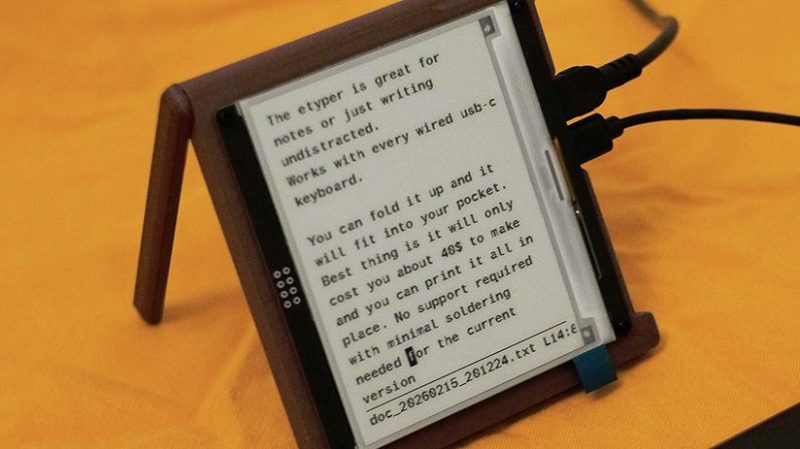
A modern computer can be a great productivity tool. It can also be a great source of distractions. To solve that issue, [Quackieduckie] built the e-typer—a device for writing without distraction.
[Quackieduckie] refers to the device as a “low-cost e-ink typewriter” which lays out the basic mode of operation. It consists of a 4.2 inch e-ink screen, combined with an Orange Pi Zero 2W running the Armbian operating system. It’s set up to boot straight into a document editor so there’s no messing around with other software that could get in the way of productivity. The components are all wrapped up in a tidy 3D printed housing, which includes a foldable stand so you can prop the screen up wherever you happen to be working. [Quackieduckie] built the device to work with any USB-C keyboard, probably figuring that those eager to maximize productivity will already have the typing device of their dreams on hand. Code for the project is available on GitHub for those eager to replicate the build.
We’ve featured similar builds in the past, often referred to as “writing decks.” They’re becoming increasingly popular as people look for distraction-free, ad-free tech experiences. A great example is this clamshell design with an integrated keyboard. If you’re building your own productivity aids in your home lab, don’t hesitate to notify the tipsline!












“Works with every wired usb-c keyboard”. Weirdly enough, I have never seen a USB-C keyboard or mouse in the wild, nor converters from female USB-A to (male) USB-C (the other way around I have plenty).
Much to my shock when it arrived the emergency replacement for my 122 key terminal keyboard failed* is a USB-C device that came with both C-C and A-C cables. If one of the cheapest actually mechanical keyboards is now USB-C I expect most folks that have needed to buy a halfway decent keyboard for typing in the last few years will have seen one.
I think the teensy running soarers converter let out the magic smoke but still haven’t had the chance to check and the new motherboard sadly doesn’t have PS2 so digging out the spare regular model M and finding a converter seemed too much hassle.
I’ve never seen one with a C cable for host included in the box. Though i have seen plenty of both keyboards and mice with detachable cables that use USB-C on the peripheral itself and coming with a A-C cable. So I would assume you could use a generic USB C-C cable.
Just impractical for most as USB-C is still pretty rare as connectors on the host go. You are lucky if you got like 2-3 of them and they often got specific roles like DP Alt-Mode or USB4.0.
I own both a keyboard and a trackball with USB-C connectors, as well as both genders of A-C. It’s not on the thrown-in-with-the-computer keyboards, but it’s out there.
What does Eschews mean in the title?
It is being used to mean “evades”.
Eschew:
https://www.merriam-webster.com/dictionary/eschew
I have thought about using an old laptop running Wordstar to reduce distractions when writing. I guess I’m old.
I’ve done exactly that with a 2020 Thinkpad. Debian headless server install, tty only and numerous choices of editors including running dosemu2 and WordStar, WordPerfect or MS Word for DOS. There’s also a Unix version of WordPerfect that has been patched to run under Linux and numerous cloudsync tools that run with most major services at the cli. It’s pretty hard to go down a rabbit-hole if all you have is elinks2 to browse.
2002 you mean?
Me doing modern computing on a 2011 ThinkPad.
Thinking the same thing!
I have a Thinkpad from 2018 or so that’s still a pretty capable (and heavy) daily driver.
Armbian seems like a lot of software to run an editor. This looks like a neat device to run EDDE, the editor and file system of the Canon Cat. It was made to run on bare metal. In fact an emulator for 68K could run it from the ROM images. Hmmmmm.
I need this but with zsh or bash