
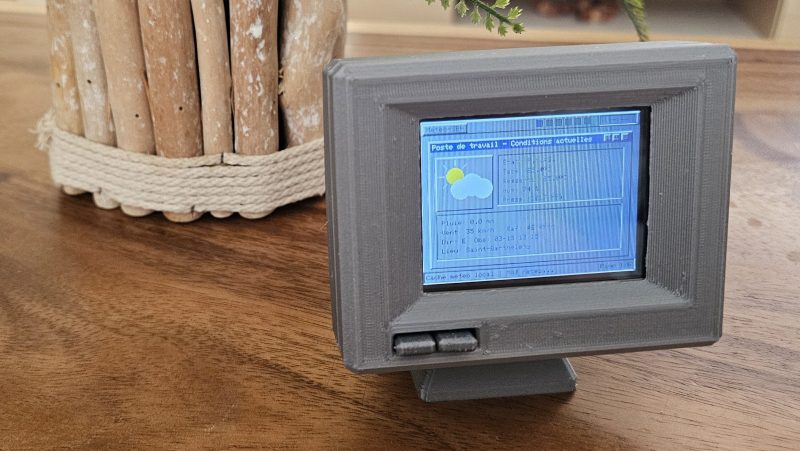
Sometimes you really need to know what the weather is doing, but you don’t want to look at your phone. For times like those, this neat weather display from [Jordan] might come in handy with its throwback retro vibe.
The build is based around the ESP32-2432S028—also known as the CYD, or Cheap Yellow Display, for the integrated 320 x 240 LCD screen. [Jordan] took this all-in-one device and wrapped it in an attractive 3D-printed housing in the shape of an old-school CRT monitor, just… teenier. A special lever mechanism was built in to the enclosure to allow front panel controls to activate the tactile buttons on the CYD board. The ESP32 is programmed to check Open-Meteo feeds for forecasts and current weather data, while also querying a webcam feed and satellite and radar JPEGs from available weather services. These are then displayed on screen in a way that largely resembles the Windows 95 UI design language, with pages for current conditions, future forecasts, wind speeds, and the like.
We’ve seen some fun weather displays over the years, from graphing types to the purely beautiful. If you’ve found a fun way to display the weather (or change it) don’t hesitate to notify the tipsline. Particularly in the latter case.












>attractive
>3D-printed
There are also people who will find 350+ pounds hairy grannies attractive. Doesn’t mean that’s sexy for the general population.
Not grepping ‘attractive’ but thanks for the imagery. No need to kink shame, Mr. Genpop, more for me!
When it comes the print quality of this mini monitor, I will admit that I like the design.
Yeah I really uh
so like you -can- get good looking prints but for some reaaon so many 3d printing… “enthusiasts” really suck at it like this guy. Gheez. It’s rough
PETG was a little hard to tune correctly, and no more PLA to do it more cleanly.
I already ordered some, but can’t wait 3 to 4 weeks to receive it.
That looks more like Windows 3.1 or maybe XDialog than Windows 95 to me.
kinda giving wince/winmo?
This is sorta-close to how Windows 95 looked like. Windows 3.1 used comparatively tall title bars with two flat buttons on the right. Windows 95 had a narrow title bar with a cluster of three raised buttons. Then, Windows XP went with bubble-style, rounded title bars.
The reason it looks off is that it’s using the wrong typeface and the edges of raised / sunken elements are rendered wrong (https://hackaday.io/project/205193/gallery#4d6d178b0ba08b4756fcef3cb45e4826).
It looks like a Win16 application (say winhelp.exe) or text-mode application (say command.com) on XP i586 (if running a visual style).
Because that’s when the deformed classic window decoration appears on real Windows.
The design was still evolving, now it’s more Win95 like 😉
https://hackaday.io/project/205193/gallery#ac8730ff0d55568cee702b4f3158540c
So it crashes regularly?
Sometimes but not as regularly 🤣
I don’t know if this is just a local problem (though I’d be surprised if it was, in NYC), but one issue I’ve had with open-meteo is that its forecast numbers and even current conditions can be just insanely out of whack with weather.com, the NOAA, and every other source I can find. (I’m talking often 10°F or more difference, particularly overnight winter temps when the numbers are low, but not as low as THEY think.)
Right now, open-meteo is telling me it’s 35°F out / feels like 29°F. Weather.com says it’s 40°F out / feels like 35°F. Their two-hourly forecast predicts 54°F at 1pm, 60°F at 3pm. Weather com’s forecast temps are 50°F, 53°F. (So, open-meteo can get it wrong in either direction.) Past experience indicates weather.com is going to be closer to reality.
I’ve noticed that you have to have the elevation set correctly in open-meteo. For some reason, the default API call thinks my local elevation is 2800m instead of 1600m at the default settings.
Hmm, I’ll have to check that, thanks. For the most part NYC is no more than a few meters above sea level, so if it’s handing out forecasts for way up above us that certainly could be the issue.
Hmmm…. unfortunately, that’s not it. The response shows the
elevationit’s using as22, which assuming that’s in meters is about right for NYC. But still thetemperature_2m,temperature_2m_min,temperature_2m_max, etc. (which they document as reporting data for “2m above ground”) are way out of whack.Slightly LESS out of whack, it seems like, if I request data from the
/v1/gfsendpoint (“GFS & HRRR Forecast API / Global GFS model combined with hourly HRRR updates at 3-km resolution”) than if I send the request to the “automatic”/v1/forecastendpoint. The responses I get from/v1/forecastare even MORE out-of-whack.That makes me think the problem is that they’re poisoning the highly-dependable (for a region like mine) NOAA forecast data by aggregating in other models from other countries / services, trying to be DarkSky but apparently not having their insanely well-tuned weighting and aggregation algorithms to work with.
Though… you may be on to something, about their elevation scaling throwing numbers off for at least some regions. They have a whole post about it on Substack (“Improving weather forecasts with elevation models”). One clue I gleaned from that was that you can include as a parameter in the request
elevation=nan(I guess that’sNaN, akaNot-a-Number, lowercased for some reason), and it will disable all of their elevation scaling for temperature values. So, that might be interesting as a debugging approach.Unfortunately, in my case including
{elevation: "nan"}in the request parameters changes theelevationvalue in the response from22to24(which I guess makes sense, if their forecast data is for 2m above ground), and a couple of the numbers shift one way or the other by at most0.1. So, it appears elevation is not involved in the issues I’m seeing with them.I was really hoping it was just that simple, but alas. Thanks for the pointer, though!
It just needs the Ryan Farish music from The Weather Channel
https://www.ryanfarish.com/ryanfarish.com/Artist.html
Computers need data
Humans need experiences
I actually miss AM WEATHER….I have the pointing sticks Joan Von Ahn and others used.
I don’t know who got the map
The CYD has a vertical ‘phone’ display, by mounting it horizontal the display quality is really bad on most viewing angles. Since even the original demo on the boards gets this wrong and almost no one used vertical CRTs back in the days let’s just pretend it adds to the retro charm.
It’s not as bad, only viewing from the left at 45° mess up with the display but it’s ok.