
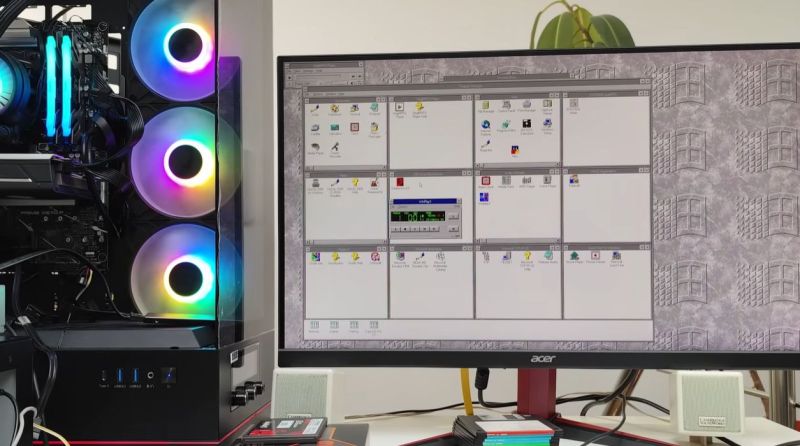
Although Windows 95 stole the show, Windows 3.0 was arguably the first version of Windows that more or less nailed the basic Windows UI concept, with the major 3.1 update being quite recognizable to a modern-day audience. Even better is that you can still install Win3.1 on a modern x86-compatible PC and get some massive improvements along the way, as [Omores] demonstrates in a recent video.
The only real gotcha here is that the AMD AM5 system with Asus Prime X670-P mainboard is one of those boards whose UEFI BIOS still has the ‘classic BIOS’ Compatibility Support Module (CSM) option. With that enabled, Win 3.1 installs without further fuss via a USB floppy drive from a stack of ‘backup’ floppies that someone made in the early 90s. [Omores] also tried it with CSMWrap, but with this USB to PS/2 emulation didn’t work.
Windows 3.1 supports ‘enhanced mode’ by default, which adds virtual memory and multi-tasking if you have an 80386 CPU or better. To fix crashing on boot and having to use ‘standard mode’ instead, the ahcifix.386 fix for the responsible SATA issue by [PluMGMK] should help, or a separate SATA expansion card.
For the video driver the vbesvga.drv by [PluMGMK] was used, to support all VESA BIOS Extensions modes. This driver has improved massively since we last covered it and works great with an RTX 5060 Ti GPU. There’s now even DCI support to enable direct GPU VRAM access for e.g. video playback, with audio also working great with only a few driver-related gotchas.












Could also try Geoworks Ensemble:
https://github.com/bluewaysw/pcgeos
3.11 and 3.11 looks more or less what most linux desktops looked like when I tried a few a couple of years ago. I know that there now are a bunch of pretty nice looking environments out there, but nah… (Compiz was very cool back in the day though). From what I remember I liked the Win2000-look the best and when XP was released I enabled the win2k-look on it for several years before embracing the XP-look.
I’m confused, what are a few years, and what did you try? From my view that was true in the late 1990ies to early 2000s, with many alternatives even than. Sure, probably there are still environments which intentionally mimic the 3.11 look because someone loves it…
More likely they are emulating CDE or something ancient like that.
What distro defaults to such a thing though… that’s a great question!!
I remember KDE 1 or 2 in Mandrake Linux back in 1998 being basically the same interface as Win95/98.
I’m kinda old and time flies quickly. It feels like it was just 3-4 years ago I abandoned win and went Mac. But that was 2012/13 – so 14 years ago. And it was probably about that time I tried a bunch of desktop distros the last time, but as I remember it they all felt clunkier and less polished even compared to windows – which says a lot. Even if Apple is locked down and not as open Linux or even almost windows nowadays, it’s a smooth, fast, polished and beautiful experience using macOS. (I spend 8 hour working as a dev plus a couple of hours a day for my own amusement on my laptops so I enjoy the smoothness and retina screens)
does anyone remember knopix? that was i think around 2005?
Of course!
And AFAICT it’s still active (at least in some way): http://www.knopper.net/knoppix/
Sure. There also was AFU-Knoppix, a version made for Amateurfunk (amateur radio, AFU refering to HAM)! 😃
It had been featured in magazines such as Funk, Funkamateur and CQ DL.
The version 3.7 available in 2005 was popular, I think. It had the iconic KDE 3.x desktop manager. Version 6.0.1 also was known.
The distro was available as CD-ROM ISO image in German, Englisch and Italian.
Some links, because hard to find..:
German/Englisch version:
http://db0smg.afug.uni-goettingen.de/ftp/afu/knoppix_afu/
(This might be the last mirror being online.)
More information on AFU-Knoppix:
https://web.archive.org/web/20051228105501if_/http://www.afu-knoppix.de:80/
http://www.iz4bbd.net/articoli/ari/live-ham.html
“3.11 and 3.11 looks more or less what most linux desktops looked like when I tried a few a couple of years ago. (…) that was 2012/13”
I wish you were right. With all my dislike for MS their windows decorations on Win3.1 or Win95/98 are my all time favorites (I had my own colors set – mostly black, white and orange). I even had my Slackware KDE3.2 decorations set to Redmond theme and never embraced XP theme.
I took a look at Ubuntu and Fedora released on 2012 and they hardly reassemble Redmond theme so maybe I am not getting what you meant.
Now only if we had a Windows 3.1 style on a Windows 2000-ish UI…
You mean a theme softwaresuch as WindowBlinds? Or Style XP?
I could do with an article explaining what the different looks are of Win 3.x/95/NT/2000/10/11 because I keep rreading about them but I am clueless!
Win 3.11 set the standard, resizable windows, minimize/maximize, had good multimedia capability for its time (mpeg, cd playback, wave files), so many great games. Everything after is a reshuffling of essential elements, 95->XP saw little changed GUI wise.
It also featured limited compatibility to Win32 applications via Win32s compatibility layer at the time.
The first emulators ran on Windows 3.1x, too. Such as Apple Win, Virtual MSX or PC64 (Win port).
More information here: https://tinyurl.com/4tu6xuf7
Windows 3.1x also made it into both Windows NT and OS/2.11 and OS/2 Warp.
Here, it runs the 16-Bit Windows applications on top of DOS emulation.
In Windows NT it is called WoW (Windows on Windows), OS/2 calls it Win-OS/2.
The first Windows to feature multimedia was Windows 3.0 MME, though.
Aka “Windows 3.0a with Multimedia Extensions 1.0”, which was an OEM release bundled with early multimedia PCs.
The plain Windows 3.0 didn’t support audio or video by default.
Except maybe FLI/FLC animations (Flick animations) via Autodesk Animation Player.
Creative Labs provided a proprietary Sound Blaster driver, also.
It was called “sndblast.dll” (win30.zip on SB Pro floppies) and Windows games/applications had to be written to use it (Maxis RoboSport used it, for example).
The ancient driver still works on Windows 3.1x, if the default audio drivers of Windows 3.1x are removed.
Free Win16 games can for example be found at http://win16.page/
What makes Windows 3.1/WfW 3.1 also interesting is that it can still run on 16-Bit PCs using 80286 microprocessor. Just like OS/2 1.3 can.
Windows 3.0 can run on 8086 PCs in Real-Mode, but without EMS memory board its use is limited.
The sndblast.dll driver is 8086 compatible, too and can be used on XTs.
(An early Windows 3.1 Beta still has Real-Mode kernal, too, but lacks EMS support.)
I never used windows V3. It looked fancy but did not bring much advantage, and the software I had was all for DOS anyway. From what I remember you could not even drag a simple icon onto the desktop. Simple and logical things like that were still missing. windows 95 was quite amazing. And despite the many crashes (Daily was no exception) it was worth while to use. It was also the OS I had when I discovered the Internet, and graphical web browsers. But after a while the many crashes became an ever bigger nuisance. This dragged along until Windows 98-SE. With the updates that was a pretty solid performer. And after that, very little improvements were made. Sure, there are plenty of small things that make things a little bit more comfortable, but all changes after that are minimal, and definitely not on par with what you would expect of 30 years of development in the personal computer industry.
I think you just looked at it a bit wrong.
With Win3 what counts as the desktop today was just a full screen taskbar – meaning if you minimized all windows you just saw a blank “desktop” with one icon per running+minimized program (running programs were only visible on this “taskbar” when they were minimized).
The desktop where icons could be moved around was the main Win3 “program manager”(?) window.
-> Maximize that “program manager” window leaving just one row of icons of the background “desktop” on the bottom and it was conceptually pretty close to Win95 to Win7 (yes, even win7 could easily look like Win2k).
But in that “program manager”-desktop you could only move groups around – inside and in-between those groups program icons could be moved around freely (“.pif” files I think).
Most people did. That’s why they changed it in Windows 95. People got confused when they minimized a program and it vanished behind the Program Manager which they had previously maximized to full screen. “Where did my program go?”. Then they started a new instance…
Windows 95 indeed was very crashy. Also did depend on the version (RTM, A, B, C) and the hardware.
Surpringly, the original release ran rather fine on plain AT style 386/486 PCs with ISA or VLB bus, I think.
More advanced things like PCI, APIC/ACPI, APM BIOS or AGP caused more stability issues.
AMD K5, K6 or Cyrix chips weren’t 100% intel compatible, also.
That caused issues with certain device drivers (chipsets of plain ISA motherboards ran on generic standard drivers).
Windows 98SE had shipped with updated drivers that fixed most compatibility issues, even on older hardware.
About Windows 3 desktop..
Early OS/2 and GEM Desktop had similiar limitations at the time, I think.
Same goes for Atari ST’s TOS (=CP/M 68k plus GEM Desktop) or Amiga OS (AmigaDOS plus Workbench).
The only mainstream OS that comes to mind that featured files on desktop was MacOS (System, with Finder).
Not even X11 environments on Unix had featured that, I vaguely remember.
Back in Windows 3 days having desktop wallpapers was still new.
Windows/386 needed third-party software to make that happen.
Windows 3.0 MME added screensavers, which previously were sold separate (Magic Screensaver, After Dark etc).
Here’s an episode of The Computer Chronicles that features Windows 3:
https://www.youtube.com/watch?v=YewNEAIkbG4
What am I missing here? At the 1 minute 22 second mark, the screen says “Starting Windows 95”.
Hi there! That’s likely because MS-DOS 7.x is used.
MS-DOS 7 had been edited to say “Starting Windows 95” or “Starting Windows 98″ instead of ‘Starting MS-DOS”.
That’s because MS-DOS 7.x was meant to be a part of Windows 9x. It was never sold standalone.
The reason for using MS-DOS 7.1 instead of MS-DOS 5 or 6.2x is FAT32 support.
FAT32 can handle partitions with Gigabytes of storage.
MS-DOS 6.22 uses FAT16B and is limited to 2GB per partition (unless patched, then it’s about 3GB) or 8GB in total (multiple partitions).