Fixing An Expensive Amprobe Cable Tracer With Mystery Fault

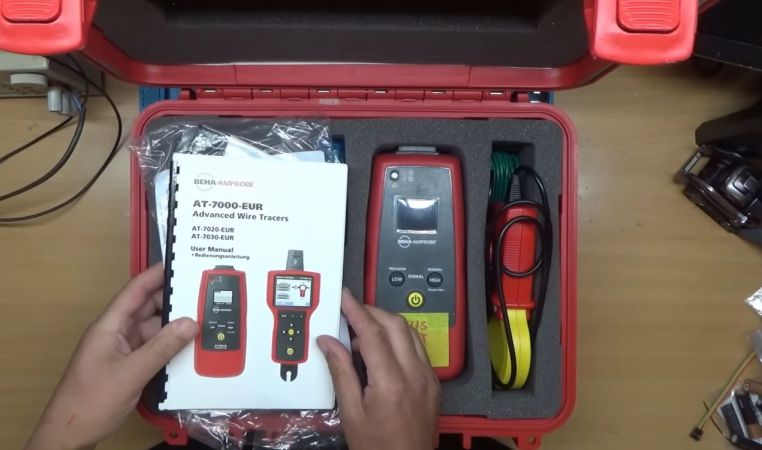
Perhaps the most annoying kinds of faults are those that involve expensive equipment that just sit around in a cupboard, only for them to just stop working at all. Such was the case with the £2,000 Amprobe cable trace kit that [Tom] bought for work-related purposes. After sitting around unused for a few years, the signal generating part of the kit refused to power up at all, with Fluke’s service department wanting at least £600 to even attempt a repair after already having had [Tom] cough up £70 to even get this quote.
Subsequently he instead sent it to [Buy it Fix it] on YouTube for an attempted repair, which at the very least would be a less costly option. These systems use a signal generator connected to the cable, with a separate detector wirelessly tracking this signal. By itself that doesn’t sound too complex, but as it turns out it wasn’t quite so straightforward to diagnose.

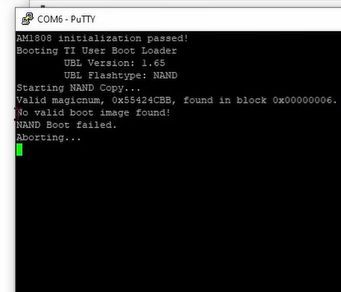
After eliminating a basic power or display issue, the SoC’s boot sequence was traced, including reading from the 128 MB NAND Flash. At first glance the unit appeared to be trying to boot and work as normal, which was confirmed after finding a serial port and seeing the log output on it. This showed that the NAND Flash’s boot image failed validation due to apparent corruption.

After desoldering the TSOP 48 Flash package and stuffing it into a reader, at first glance the data on it looked fine. After a tragic detour with Google’s Gemini chatbot that led to a lot of wasted time, the solution that the human intelligence came up with was to crack open the tracer unit in the set and ogle at its firmware, in particular the bootloader.

Comparing the two Flash dump files, there were a few flipped bits in the bootloader section, likely due to cells in the Flash having lost their charge. Writing the generator’s Flash with a corrected image led to it booting up happily again into the Linux 2.6-based firmware, seemingly no worse for wear. Of course, one has to consider here that the NAND Flash IC clearly has a few leaky cells in it, so replacing it with a fresh one could be a good idea for a long-term fix.

Continue reading “Fixing An Expensive Amprobe Cable Tracer With Mystery Fault”

Reverse Engineered Grill Controller Gets Open Firmware

If you are a regular reader, then the odds are you have taken apart an electronic gadget, either for a fix, or simply because your curiosity got the better of you. Once inside, it’s all but impossible to help yourself from doing at least a little reverse engineering. That’s what happened when [PRBS23] took a look inside a MasterBuilt Gravity 800 Grill for a simple wire fix. But one thing led to the next, and now open source firmware for the grill is freely available!

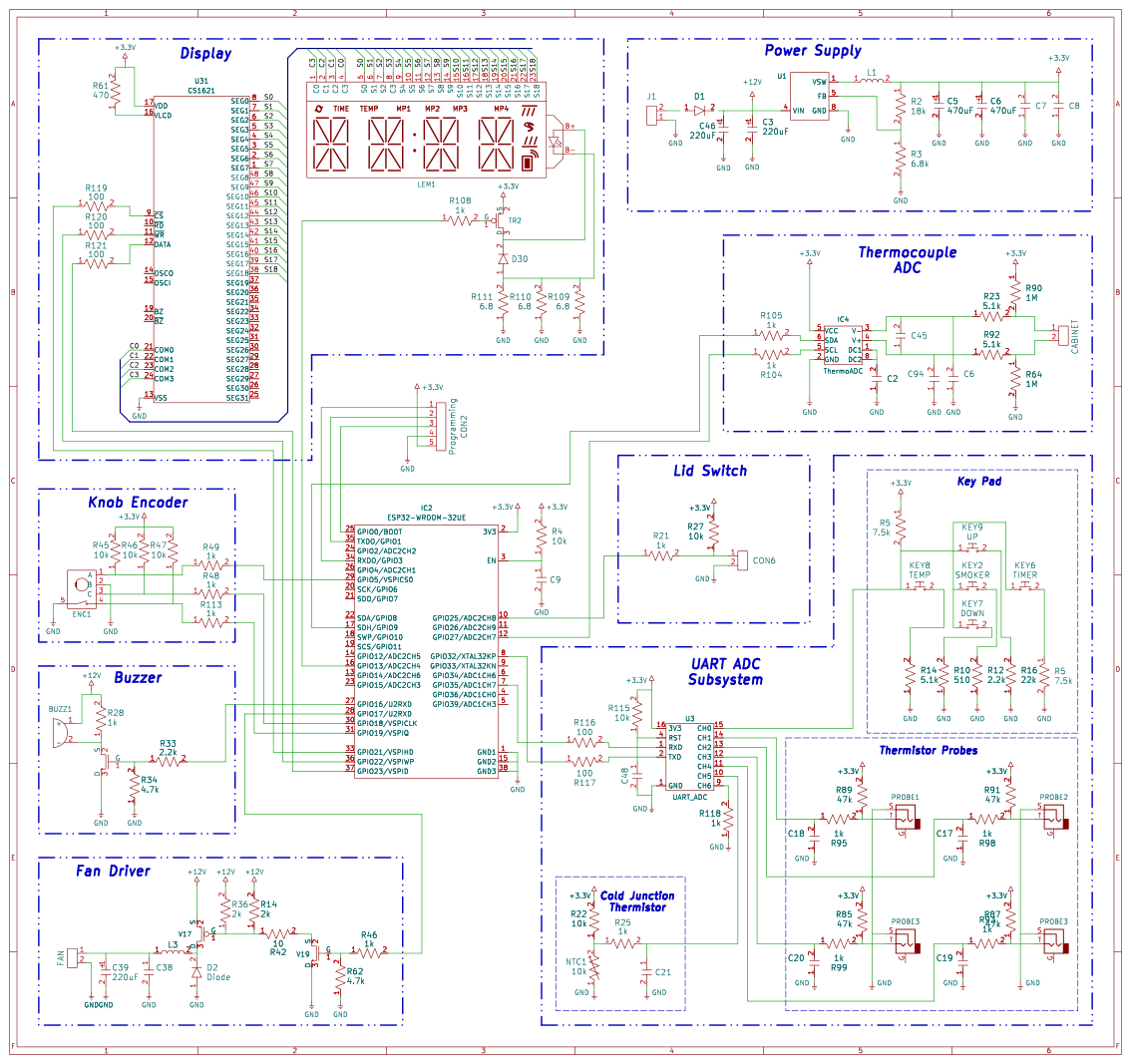
Control board schematic.

The first order of business in creating the firmware is reverse engineering the original controller. Opening it up immediately reveals an ESP-32 and a well-labeled programming port. The rest of the control board is equally simple, including connectors for four thermistor temperature sensors, lid open/close switch, fan driver, 16 segment LCD, piezo buzzer, and some physical inputs.

The thermistor along with the physical inputs are connected to a 16 pin chip, interfacing with the MCU over a 9600 baud UART connection. [PRBS23] cannot determine an ADC chip meeting these specifications, so the most likely answer is a cheap MCU programmed to act as a simple analog fronted.

The neatly labeled programming header is used to quite easily dump the firmware with the espflash utility. Analyzing this dump reveals a rather strange ADC correction function used by the original firmware. The necessity and overall utility of this function remains unclear, does corrects a maximum of around 40 degrees Fahrenheit.

Most of the other features ended up being at least somewhat easier. The CS1621 segmented display driver is reasonably well documented with datasheets making its implementation far easier. Likewise, the other odds and ends were implemented in a far more normal manner compared to the thermistors.

All this reverse engineering work got tied together into a neat little firmware package. It comes with over the air updates PID controlled temperature, and a real-time web interface. This also isn’t the first time we have seen an IoT device liberated from proprietary firmware, and this remains one of our favorite uses of reverse engineering!


A BIOS For Your ESP32-C6

An old-style PC BIOS served the function of a bootloader in loading the operating system kernel, and of an API in providing a set of standard system calls through which software could interact with the hardware. Though it as been long-ago superseded by operating system level calls and UEFI bootloaders, it was a simple and easy-to-understand firmware for the PCs of the day.

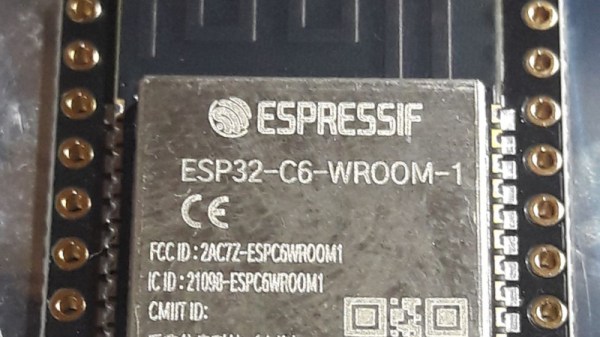
Microcontrollers usually don’t have anything quite like a BIOS because their software is more often compiled as-is without the need for one. But here’s [Rompass] who has bucked that trend, with a BIOS for the ESP32-C6.

Of course this isn’t the PC BIOS we all know, and you’ll not be running DOS on it. Instead it’s a subsystem that serves the purposes outlined above and provides an environment for dynamically loaded executables from RAM rather than an operating system kernel. The executables are compiled in the normal way for the ESP32, and can be loaded over the network if necessary.

We don’t know how popular a firmware like this one will become, but for us it’s symptomatic of how the line between a microcontroller and a microprocessor is becoming blurred. The next few years are going to continue this trend, as inexpensive microcontroller application processors such as the C6’s P4 bigger brother move into the mainstream.


Header image: Popolon, CC BY-SA 4.0.

Hackaday Links Column Banner

Hackaday Links: May 24, 2026

If your first-generation Chromecast was acting a little wonky this week, don’t worry. Contrary to fears online, the 2014 device hasn’t been excommunicated by Google. In a statement to Ars Technica, a rep for the search giant explained that the issue, which was keeping the devices from being able to stream video from services like Netflix, was temporary and should now be resolved. That said, the OG Chromecast hasn’t officially been supported since 2023, so it’s not clear how much longer they will remain operational. Google be Google, after all.

After resisting for years, this week, Mozilla finally relented and brought Web Serial to Firefox. While there’s been some debate about the wisdom of letting the Internet directly talk to hardware gadgets, anyone who’s flashed Meshtastic or configured their Betaflight-powered drone from the browser can attest to how convenient it is. In the announcement, Mozilla acknowledges that “most folks won’t use this API”, but points out that the “community of builders and tinkerers” (that’s us!) is sure to be excited about the news. They’ve even teamed up with Adafruit to ensure their web-based microcontroller workflows are compatible in Firefox 151 and beyond. If you give it a shot, let us know how it goes.

Speaking of hardware support, the Linux Vendor Firmware Service (LVFS) recently picked up a couple of big-name sponsors. As reported by It’s FOSS, this week, Lenovo, Dell, and HP have signed on as Premier-level sponsors to the tune of $100,000 per year. For those unfamiliar, LVFS offers a central repository where hardware vendors can upload firmware updates. On the client side, fwupd can be used to pull these updates down automatically without having to hunt around on each vendor’s website. The experienced players don’t need a service like LVFS, but it’s certainly one of those quality-of-life improvements that make the desktop experience a bit more accessible.

Continue reading “Hackaday Links: May 24, 2026”

Hacking Hard Drive Firmware

You probably flash new firmware on a variety of devices regularly, even though that’s rare for non-technical types. But what about your hard drive firmware? Most of us don’t want to touch our operating drives, so unless you are dealing with surplus drives or have a special project in mind, you may not think much about the firmware running your spinning rust storage. [I Code 4 Coffee] uses hard drives in an unusual way to exploit Xbox 360s, and wound up reverse engineering some drive firmware with an eye to making changes.

The analysis started with three hard drives and an SSD. Looking for people who’ve done similar work wasn’t as productive as you might think. There isn’t much call for modifying hard drive firmware, and what data there is can be outdated.

One thing that was available was firmware dumps taken with a PC-3000 data recovery tool. What follows is a deep dive down the hard drive rabbit hole. There are backdoor vendor commands and connections to the diagnostic RS-232 port on some drives. You can find the technical artifacts on GitHub.

We learned a few things, and we bet you will too. Another way to get into the hard drive’s firmware is via JTAG.

Open-Source eink firmware

Pocket-Sized E-Ink Gets A Firmware Upgrade

Not so long ago, e-ink devices were rare and fairly pricey. As they have become more common and cheaper, some cool form-factor devices have emerged that suffer from subpar software. [Concretedog] picked up just such a device, and that purchase led to the discovery of a cool open-source firmware project for this tiny gadget.

[Concretedog] described the process of loading the firmware, which is just about as easy a modification as one can make. You plug the e-ink display into your computer, visit a website, and can flash it right from there. Once the display is running the CrossPoint Reader firmware, it unlocks some new tricks on this affordable reader. The firmware lets you turn the device into a WiFi hotspot and upload books wirelessly, or it can connect to an existing network to add files that way. It also enables rotating the display and KOReader syncing if you have multiple devices you read from.

We love seeing the community step in and improve devices that are hardware-wise good, sometimes great, but come up lacking in the software or firmware department. Thanks [Concretedog] for sharing your experience with this device and the cool open-source firmware. Be sure to check out some other projects we’ve featured where a firmware swap breathed new life into the hardware.

Upgrading An Old Macbook With An Old Processor

The Core Duo processor from Intel may not have been the first multi-core processor available to consumers, but it was arguably the one that brought it to the masses. Unfortunately, the first Core Duo chips were limited to 32-bit at a time when the industry was shifting toward 64-bit. The Core 2 Duo eventually filled this gap, and [dosdude1] recently completed an upgrade to a Macbook Pro that he had always wanted to do by replacing the Core Duo processor it had originally with a Core 2 Duo from a dead motherboard.

The upgrade does require a bit more tooling than many of us may have access too, but the process isn’t completely out of reach, and centers around desoldering the donor processor and making sure the new motherboard gets heated appropriately when removing the old chip and installing the new one. These motherboards had an issue of moisture ingress which adds a pre-heating step that had been the cause of [dosdude1]’s failures in previous attempts. But with the new chip cleaned up, prepared with solder balls, and placed on the new motherboard it was ready to solder into its new home.

Upon booting the upgraded machine, the only hiccup seemed to be that the system isn’t correctly identifying the clock speed. A firmware update solved this problem, though, and the machine is ready for use. For those who may be wondering why one would do something like this given the obsolete hardware, we’d note that beyond the satisfaction of doing it for its own sake these older Macbooks are among the few machines that can run free and open firmware, and also that Macbooks that are a decade or older can easily make excellent Linux machines even given their hardware limitations.

Continue reading “Upgrading An Old Macbook With An Old Processor”