
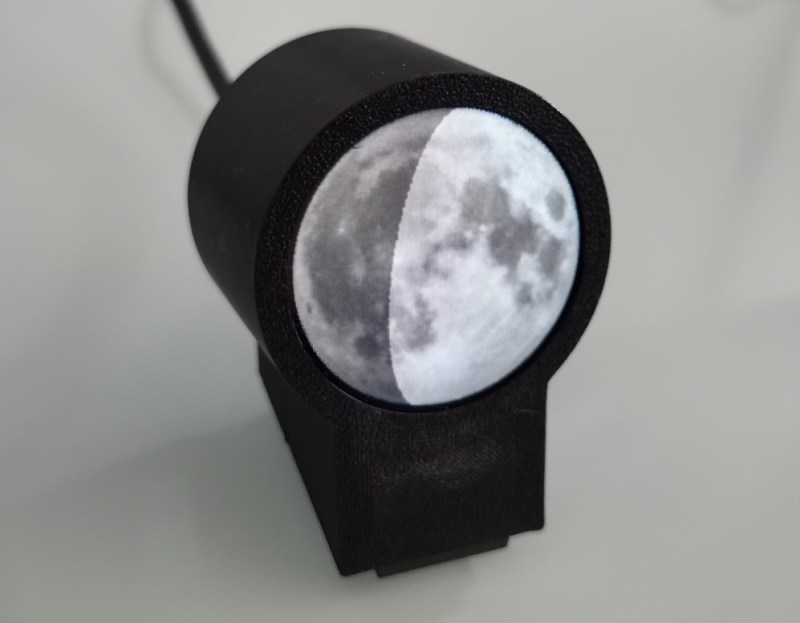
Most people take the Moon for granted, not considering its slow cycle where the sun gradually illuminates different parts of it. A recent project from [Karsten Mueller] helps you keep our nearest celestial neighbor in mind by putting a tiny version on your desk. (German)
The device itself is made with a circular display, an ESP32-S3, and a simple 3D printed case. But the interesting part is the software — it’s not just a moon phase display, it actually takes your local time, latitude and longitude into account. The resulting image is an approximation of what the moon looks like if you were to look at it, even if you wouldn’t actually be able to see it, such as when it is obscured by the Earth or barely visible during the daylight sky. Initially the project actually used a photograph of the Moon that [Karsten] personally snapped, but there’s also an option to pull the imagery from NASA.
The original write-up is in German, but there’s also an English page for the project on Hackaday.io, and the source is available on GitHub if you’d like to put one together yourself.












Looking with a microscope, we should be able to see the American Flag and Rovers left from earlier missions
The incredible flex of having the highest-resolution display on the entire planet sitting on your desk doing something completely trivial
Many years ago I threw together a Rexx script that would do a simple character-graphics display of current moon phase on a text terminal. Turned out to be surprisingly straightforward. Find Julian day number, subtract reference new-moon date, divide that duration by the length of a lunar cycle, take fractional part as current moon phase, and apply to circle. Obviously on a 24×80 screen the result was going to be a bit sloppy, so any math errors would be essentially invisible. Good enough for GUI.
A full moon rises at sunset, with each subsequent rise occurring ~50-minutes later each day/night.
These truths are self-evident. But it’s astonishing how few people notice that. Even fewer understand. Yet they still can figure out how to make babies.
I don’t want to overshare here, but in my experience making babies has never been conditional on my knowing the times of moonrise and moonset. Maybe if I was trying to make a baby with a werewolf?
Though the moon travels across the sky from east to west, most will be astonished to learn that it rotates in an easterly direction, the same direction as the Earth. – Just fascinating!
Not where I live it doesn’t. Username definitely does not check out.
Cool! What planet do you live on?