
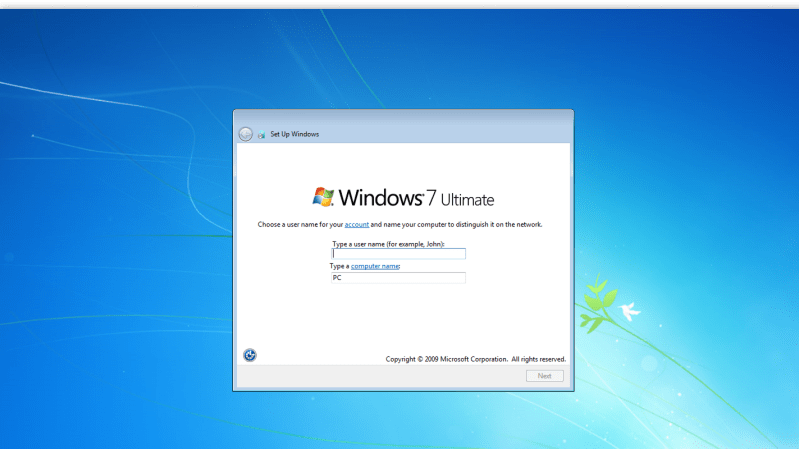
Do you want to go back to an era when Windows was… simpler? Back when things worked, before the AI and the bloat took over your hard drive and RAM space in equal measure? You might like to give Classic 7 a spin (via The Register).
From the drop, we should state that Classic 7 is not Windows 7 at all. Instead, it’s a reskin of Windows 10, specifically, the IoT Enterprise LTSC version. This is a particularly attractive version of Windows 10, as Microsoft has promised long-term support in terms of security updates until 2032. It also strips out annoying consumer-focused bloat like the Xbox gaming overlay and Cortana, and it eliminates forced feature updates that have become the norm in modern Windows installs. Combine all those niceties with the clean and simple feel of the recreated Windows 7 interface, and you have a beautiful operating system that has everything you need and nothing you don’t.
There are, of course, some hurdles to jump over; you’d need to find an appropriate license for this version of Windows and all that jazz. But if you long for the days before Microsoft so cruelly eviscerated the Start Menu and started making everything worse, you might find that Classic 7 is for you.
[Thanks to Stephen Walters for the tip!]












” There are, of course, some hurdles to jump over; you’d need to find an appropriate license for this version of Windows ”
In other words DOA
There are ways. Easy ways.
If you live in the UK or EU then you can now legally buy LTSC licenses from third party vendors.
Just make sure you use one which supplies the paperwork to go with it.
Paperwork? What do you mean? The key?
Proof that it was original sold in the UK/EU, i.e. Not a ‘grey market’ import.
A written statement from the original purchaser declaring it is no longer in use. For OEM licenses, that the original hardware is no longer in use or has been physically disposed of.
etc…
Found it! (I think): https://archive.org/details/en-us_windows_10_iot_enterprise_ltsc_2021_x64_dvd_257ad90f_202301
Is this before they changed to key algorithm?
No idea but what I’m using works. Google microsoft activation script. HaD will prob delete this post but there you go.
gray market keys.
So by far the most used keys in the world then.
At this point, it’s still just Windows, and that means I’m not interested. Let’s go ahead and bring Mac hardware into this as well: If it doesn’t run linux, I’m just not interested. I still like reading the articles and leaving crappy comments about it all, but I’m never going back to a non-open source OS. Never.
Most people (not us geeks) can do everything they want on an web browser. That covers email, social media, watch TV/netflix/hulu/youtube, news, gov’t activities, banks, bill paying.
Some people need a system that can run their game, crafting/hobby hardware/software, 3d printing workflow, connect to smart devices, accounting/budget. Many of these are not web and require windows/macos/linux/phone apps. Some are on more than one. People also don’t want to change their workflow.
I love being able to use a 10 year old laptop that I can buy used for $100 and run an up to date web browser and security fixes. That means Linux. And once I learn opensource tools, I can change my workflow and not need to relearn again. Gimp and Darktable for photograpy. Inkscape can be used for embroidery,vinyl and laser cutters. Steam is becoming more capable.
There is a project adapting printer & scanner drivers to web with WASM running Linux in the browser.
Many consumer devices have a phone app and no web. I’d love to see a phone emulator for those.
It’s the 95% illusion – that the majority users’ needs are so simple they can be covered by a dumb web browser, while the other 5% is preserved for the “true geeks”.
The reality is a sliding scale. The average person is 95% likely to get their work done in a web browser, but the same person also has a 5% probability of the opposite. If you count one task per day, you would encounter 1-2 cases every month where they cannot complete the task, or the task would be more effectively accomplished otherwise.
The value of a good operating system is to have a low threshold and a low learning curve between the basic everyday usage with the 1-5 apps you generally use, and doing whatever else that needs to be done in the special case. This is especially true for the “most people” use case: if your operating system drops the casual user to a CLI or forces them into editing configuration scripts every time they need to do anything other than browse the web, that’s a bad operating system.
cool story bro.
I don’t understand why we need cortana and all the bloat in the first place.
People want an OS that just works without all unnecessary stuff.
Windows 7 did that. For most people they just used it to get online.
Then we got cortana, and now AI. There’s an old expression. Less is more.
In the case of Windows 7 compared to 10 and 11, this is indeed true.
We don’t.
But the vast majority of purchasers, both ‘domestic’ and corporate, always want ‘bigger and better’, despite the fact that few, if any, of them will ever use more than a small portion of the included ‘features’.
Fortunately, for those of a more technical nature there are tools such as NTLite which can strip the majority of the bloat.
I personally don’t think so. It’s much more about vendor lock-in. Microsoft really believes that if they put Copilot in everything, people will stay with that and never go to the competitors like ChatGPT and Claude. It worked with Internet Explorer, they’re now trying to repeat that trick with Copilot.
Looking at how Apple is handling this, I see that Apple is more or less giving the user the option to choose the AI of their liking and trying to build in support for all AI platforms that are out there. Apple seems to have learned the lesson and is trying to avoid the expected future law suits.
But not Microsoft. They’re just going for it at full speed with eyes closed, like Microsoft tends to do. We can surely expect at least a few EU lawsuits with billion-dollar fines for Microsoft, somewhere in the next 5 or 10 years.
I’m sure that Apple will still get a few lawsuits and fines as well. But comparing their growth-path against that of Microsoft lately, Apple’s has been phenomenal while Microsoft’s is quite stagnant. At least that’s how it looks from my perspective.
Microsoft is already facing lawsuits totalling approximately 100 billion dollars over their licensing, particularly in relation to ‘cloud’ vendors.
Since the C.A.T. rejected their appeal – with a number of rather pointed comments about their US style legal shenanigans :) Those cases are now going forward and are expected to succeed.
I believe that people don’t necessarily want ‘bigger and better’, but they are convinced by society and entities selling products that they want ‘bigger and better.’
Seller: Mr/Ms Average, you really want this new barely upgraded item! The one you have is terrible compared to this new model!
Mr/Ms Average: Oh, okay!
I agree. No mater the product – cars, computers, TV – they add more to create impression of progress to justify new purchase.
From my German perspective it’s also in parts because of Microsoft being an US company that acts US-centric.
Which in turn affects the business model, the way of doing marketing and business.
In the US, I guess, it’s common practice that consumers are being won by feature creep, superlatives and aggressive marketing.
In US ads I’ve seen online (both new and vintage),
were there had been very un-subtle writing being used in how to reach “consumers” (I don’t like that term, we’re no sheep).
It often was empty marketing blurb about enhanced productivity, pictures of happy faces with a fake smile, talk about user-friendliness etc.
It was (is) a form of propaganda, in short. Which my German mind is very sensitive about.
Over here, I think, users are more amazed by honest, creative or humorous ads.
Like for example, ads that tell how much more the new programs had been optimized for a PC.
What new software standards or APIs they do support now.
The typical marketing bla bla bla is also okay, if it’s toned down.
Like using small written sentences instead ones that occupy 2/3 of a magazine page.
We’re not that stupid, after all. We don’t need things to jump straight into our face, we have the attention span to read multiple lines of text with information all alone.
Just like how the Japanese would have, I think.
modern advertising is totally nazi-adjacent. the same bag of psychological tricks to lure in the masses to support dictators works just as well in convincing them that they need (insert product here).
Most all marketing is empty. The proper function of marketing is to tell consumers that a product or a company exists, so consumers could make informed choices about what to purchase.
Modern marketing has many problems:
First problem: it’s psychological manipulation attempting to entice consumers to buy against their own rational interests
Second problem: marketing agencies and ad-brokers are abusing businesses by selling them ineffective and pointless marketing, using the same psychological manipulation that they apply on the consumers.
Third problem: companies use marketing to block each other and smaller competitors, for example by buying all the billboards in town, or outbidding for the Superbowl half time spot. They’re using money for harm: to dis-inform consumers.
In result, the overwhelming mass of marketing effort goes against the interest of its target audience and users, and merely ends up wasting money. The only winners are the advertising agencies and brokers who serve little to no useful point for the public.
No very very few want ‘bigger and better’ in the OS they are using. Almost every time people show absolute disinterest in the toys they are told are ‘better’ where that subjective opinion is derived from corporate promotion more than customer need. And for bigger, yea pretty rare to find anyone excited about the bloat. People want an OS that works and gets out of the way unless providing something they asked for.
They want OS that works but will buy the one that is marketed as better. Show people netbook and thay will say it’s garbage. But remove storage option and make it cloud dependent and now it’ featured with future and you can charge more. Even though at first not a single Chromebook could compete with a netbook with WinXP/Linux in terms of workflow reliablility.
Note that every time Microsoft releases a new version, it will get abysmal market share against the two previous until they deliberately axe support and force people to switch over.
In my experience the only group that continually pushes for ‘bigger and better’ are applications software developers. They’re constantly on the update treadmill and drag others along with them because they tend to have corporate’s ear (they’re the computer “experts”, after all). Since they’re usually the one group in a company that can be relied on to be both late with their deliverables and invariably short a few promised features they probably think that something like Windows is normal for software. (I belong to the hardware/firmware end of things where being a bit short on functionality will not only be obvious to the testers but it causes problems with product certification. The stuff just has to work.)
My wife retains her death grip on the Windows 7 installation that came with her machine. Yes, its obsolete, yes its has to be carefully protected against ‘accidents’ and so on but it is always a bit surprising when you use it to find just how smooth and functional it is. It really is a nice version of Windows. Here you can tell that engineers weren’t involved with its ongoing development because the engineering maxim has always been “If it works don’t mess with it”. It should have been possible to keep W7 going indefinitely — there just wasn’t any money in it.
There is a never to be fixed bug where plugging in a drive with a linux partition (sorry I can’t remember exactly which one) instant crashes Windows 7.
I ran 7 for a ridiculously long time, I had USB3 and NVMe patches added and migrated it from SSD to SSD for over 10 years and 5-10 computers, it has since been converted to Win10, and maybe Win11 soon.
This is what we are saying now.
When Windows 7 came out, we said the same things about XP.
2000 before that.
NT4 before that.
Ad infinitum.
(I don’t actually have an egg in this basket, I’m just old enough to have actually lived history and young enough not to have forgotten some of the nuances yet.)
Microsoft needs to be SUED….
Turning off the last option to activate software you have paid for is criminal.
CLASS ACTION LAWSUIT.
I have 7 machines that if i have to reinstall the OS, they can’t be activated.
I can’t Activate my Flight sim X anymore…
I lost a HD in a laptop and i have a KEY, but the laptop is garbage because i can’t ACTIVATE.
MICROSOFT has to release activation tools for the PRODUCTS they ABANDON to the public.
I have spent Thousands in this crap, None of it is worth a busted phone anymore because MICROSOFT needs to be sued for ripping off people WHOLESALE over this EULA crap.
If MICROSOFT does not release to the wild a KEYGEN and activation tool…. then THEY SHOULD BE SUED.
Feeling better now ?
If you’re talking about W7, the activation servers are available.
Alternatively, you can use a local KMS server. There are a plethora of guides online which can help.
Stop lying….
Even the telephone activation for win 7 is gone.
Just TRY it.
Without linking your computer to a new MICROSOFT ID, You can’t do it….
That fact of removing the last option to activate on END OF LIFE software demands they FIX this.
Sue MICROSOFT… Call your buddies and get it on together….
Ah the artistic rage, always funny.
To be honest, I find it rather sad.
But it is now clear from their reply that it’s about the ‘artist rage’ and not W7 activation.
That’s the thing with kabuki: it’s not supposed to be funny, yet…
ever heard of massgrave.dev ?
still online, so it may be MS’s fuse to not make people angry :)
I know that’s an introduction text and it’s totally legit and fine, too.
But I can’t help but think that this was “just yesterday”.
I mean, sure, mathematically it’s about 20 years since Vista/7 came out.
On other hand, though, nothing much happened in IT. Nothing groundbreaking new, I mean.
– At least not when compared to the 80s or 90s (and 70s),
when everything was new and when technology was evolving so fast.
I mean, even Windows 98SE and XP don’t feel that old yet (unlike 95 or 3.1; though WfW 3.11 was supported until late 2008).
They have all the fancy hardware support already (Firewire, USB, Plug&Play etc) and traditionally most software of the 2000s requires “98SE/Me/2000/XP/..” (plus MacOS 8.6+, Linux 2.4+).
Windows 9x was supported until 2006 and I know of users who kept it until early 2010s when XP retired. That’s about 15 years ago.
Other users kept XP using up to 2019 by using POS ready 2009 updates.
Windows 7 users had official support until that very year, too.
And 2019 in turn is merely ~5 years ago. So still current era, basically. :)
All of this feels so weird!
In some ways yes, others very much no. When Win 7 came out we could still be on a single core processor. NVMe and WiFi (and yes even Bluetooth) have made massive strides, 5ghz was a big tipping point. When Win 7 came out 480p was a good resolution for Internet streaming. Win 7 was little more than a coat of paint on Vista to start with. A middle in the story of Microsoft (intentionally?) making poorly received OS and using them as scapegoats. See Windows Me and Win 8/8.1 for other examples.
Waiting eagerly for Steam Frame and hoping, probably foolishly, that my current Samsung Galaxy Fold 2 with the same processor will support Steam with x86 translation.
I’m still on Windows 7. And I love it! Even with Office 2010.
Never had a virus for 25years, I actively manage the firewall, list new processes, have honeypot port, behind double NAT.
Never wasted a minute with OS updates.
It’s not for everyone, it’s for 100% productivity.
Similar with me. I have a Sony VAIO VGN-C2Z, which I bought in 2004. It has a C2D T5500 and only 3GB memory. I replaced the hard drive with an SSD and have it running fine with Windows 7.
Would you believe that I still use this laptop today? Of course it’s slow in really CPU-intensive tasks, and if I use apps that need lots of memory, switching between apps becomes a bit slow. But I use it in my electronics lab for all sorts of productivity things, and even for accessing the internet. And I have an old but really nice extension dock for it, with keyboard, mouse, serial and parallel ports, which actually still supports a lot of the old tricks that people used to do with parallel and serial ports (like the “JDM” PIC programmer).
Great productivity tool, coupled with Windows 7. Best buy ever, to be honest. :)
I must admit I’m still using it on this machine. A Phenon II X4 which I built over ten years ago :)
Sadly even this has come to the end of the road and I now need to upgrade both the hardware and the software :(
It’s not going into the eWaste though, I’m going to re-purpose it as a Kodi based media centre. Hopefully a quiet one if I can get it to undervolt and/or underclock stably.
Sorry the Phenom line is a waste of PC parts, can move to a free-$20 motherboard and a $3-20 Xeon processor with more performance, re-using the rest of your parts/RAM.
Xeon e3 1225v3 or 1226v3 is a good place to start, 1240/1241v3 is basically an i7, ~$10-13
I see a Z97 board with 16GB of RAM for under $20 going on eBay. (I generally steer toward a B250 OEM Lenovo or Acer board for $15 and use Coffeetime to mod the BIOS and put an i5 8400 or better in it, although you can get E2136 Xeon to work as well now, between an i7 8700 and 8700k for performance)
Full disclosure I have built dozens of AMD (486, 586, Athlon, 754, 939, AM2, FM1, FM2, AM3, AM4, AM5, even the wacky server CPU in an AliExpress special motherboard for a giggle), Not to mention Cyrix MediaGX and Centaur 3. Intel from 286-386,486, Pentium/MMX, P3, P4, Core Solo/Duo, Core2 Duo, Core i Gen1-14 and Core Ultra.
My background is somewhat similar but not so heavy on the Intel parts. In this case I already have the machine so re-purposing it will only cost me some time and keeps it out of the waste stream.
Just because you didn’t find one, doesn’t mean it not there (;
Than it doesn’t really matter.
Security by ignorance?
I find the nostalgia for Windows 7 interesting.
For me it was Windows 98SE or maybe WinXP SP2. It’s hard to make those a daily driver these days as the latest browsers for them aren’t really up for the current internet.
I must admit, I didn’t use Windows 7 a lot outside of work where I was just focused on specific applications. So maybe my opinion is off but from Vista up until I realized that it was no longer practical to use XP (due to that browser issue) I thought Windows peaked with XP and everything after that was just bloatware trying to be relevant.
No one nostalgic for Windows ME.
ahem
https://www.vogons.org/viewtopic.php?t=47562
Personally, I liked the design of Me when it was new, because it had Windows 2000 system files.
DOS based utilities such as ScanDisk were replaced by native Windows versions, also.
The network stack and the USB pen drive support was better in Me (no more driver installation for each new USB medium).
The shiny hologram CD was cool, too!
It also had a copy of the Windows 9x driver library on HDD.
Well, the WDM drivers, at least. VXD drivers were largely removed, Windows 99SE had a more balanced ratio of VXD/WDM.
Also, Windows 95/98 often asked for the Windows CD while Me rarely did (advanced users had the files mabnally copied to HDD).
Stability of Me was an issue, though. Mainly because it was sold as update/upgrade for an existing Windows installation.
A concept which never worked very well as we all know.
If Me was installed from plain DOS onto a freshly formatted HDD, though, it was okay.
During installation Windows Setup then would ask for a CD with Windows 3.x or Windows 9x system files and start from scratch..
Now about the bad things:
The removal/hiding of DOS start-up files (there’s a patch).
Windows Me was deployed by makers of OEM hardware in such a way that it couldn’t be enjoyed.
There was the BIOS dongeling, I remember, that prohibited that the Me CD could be used on different or upgraded hardware.
It was a precursor to how XP would check for hardware changes that would trigger a Windows re-activation eventually.
Besides that, Windows Me was clearly a consumer release (I dislike that term).
Because unlike Windows 98SE, it had no semi-professional tools like Personal Webserver anymore.
Windows 98SE was a good compromise of both the advantages of DOS/NT line.
It was meant for desktop PCs in offices and homes alike, while Windows Me targeted family PCs.
I remember win2k system files being an early selling point that quickly stopped being talked about when we realized that just got us reduced compatibility with existing consumer applications and most certainly did not get us Win2k’s stability.
Replacing DOS scandisk (and defrag) or for that matter getting rid of the boot to dos option entirely really pissed me off. Windows scandisk often would not complete because some background process would interrupt it. And Windows defrag always left a bunch of the system files fragmented because it wouldn’t touch them.
I ended up using a win98 boot floppy with the 98 versions of those utilities just for maintenance purposes.
Also, “boot to DOS” was a lot better for some games that were still out at the time.
Increased support for pen drives??? If you owned any pen drives back then when such things were still fancy, new tech then you were significantly richer than I was!
Hi, I had to buy an USB 1.x model for school. It was 16 or 64 MB in storage capacity, I think.
On other hand, I remember that I couldn’t get hold of an MMC for an older PDA (Siemens IC-35) at the time, though.
They were quite pricey at the time.
I think they were sold in camera shops at the time, because digicams used them often.
The USB pen drives (aka USB sticks) were sold in Media Markt or Saturn stores.
Hi, yes. To advanced users like you and me it surely was very useful.
From a stability point of view, the messy autoexec.bat and config.sys did cause lots of stress, though.
PC service hotlines had a hard time helping users with such broken config files, though.
Because installers of devices such as soundcards or CD-ROM drives required DOS based init programs etc.
In principle, by removing these disturbing factors, stability would have been increased.
For example, HDDs, DOS network drives and other drives would nolonger end up
running in “16-Bit compatibility mode” (fallback via DOS or BIOS code) because only native Windows drivers would be in control.
That idea wasn’t so bad, thus.
If only DOS support on Windows Me desktop would have been ehanced in exchange to that (something like an built-in VDMSound).
Unfortunately, in reality, the older and less stable VXD drivers had offered things like Sound Blaster emulation on Windows.
WDM drivers, as proposed by Me, didn’t. Users would have to manually install Windowsx 98 drivers to get such features.
Hi, I think I feel similar overall.
I liked Vista’s futuristic design, but XP felt more like home.
Windows 98SE by comparison just felt “normal” at the time (look&feel).
Except for the occasional blue screens and error dialogs.
And the missing software firewall (XP SP2 was such a blessing here).
About the browsers.. I think missing SSE 2 support in many retro PCs is a problem,
because the 32-Bit builds had their compiler flags set for using it.
The OSes Windows 98SE/XP as such could run later Win32 builds of Firefox or Chrome, I think.
KernelEx and One Core API were used in the past years to run them on 9x and XP. With varying success (glitches etc).
Before that, Opera browser was popular among users of older OSes.
Windows 3.1x users used Opera in the 2000s, too, I think, because it was the most modern web browser left.
Calmira, the Win95 Explorer remake for 3.x, was also popular among some users.
I liked Program Manager more, though. Reminded me of Windows NT 3.x.
PS: Windows NT’s (or OS/2’s) stability was such a relief when “growing up” with DOS-based Windows versions, I think.
In late 90s and early 2000s, malware from the internet was such a threat.
At home we had used external dial-up modems (RS-232 and USB) with a power switch, because dialers were so scary.
Imagine paying a fortune of a telephone bill just because the PC would suddenly connect to the internet via an expensive phone number when being left unattended.
That was a nightmare scenario in the days of dial-up modems and ISDN.
(Were I live 0190 numbers often were used to scam users).
At the time, a PC was still directly exposed to the internet, which was very archaic (no firewall/port filter/NAT).
It wasn’t until DSL that router modems became the norm.
Well, were I live, at least. I heard the US also had simple DSL modems/cable modems without (!) any router functionality.
So here, Windows 98SE/Me without third-party firewall must have been in danger at the time.
Also, system files could easily being overwritten on DOS-based Windows releases.
Windows XP restored known-good system files when applications tried to do that (except if in safe-mode maybe).
Antivirus software guards also worked a bit better on NT line, I believe.
Modems without built in routers are still available here and I prefer them greatly!
The internet was originally designed as a 2-way street. Everyone connected could use it to serve content, not just consume it. I very strongly believe that is how it should always be.
We had a cable modem for a few years from AT&T. It had a built in router. Much to my surprise it did allow for port forwarding. Much to my dismay it’s port forwarding was buggy and would often only work for a day or two and then I would have to go into the setup and configure it all over again.
It did have a feature where you could specify one ip on your lan and it would forward every port to that device. That was the only way that was reliable. So I connected an aftermarket consumer grade router to it and my LAN to that and set up the forwards there. Yuck!
I won’t use an ISP that forces me to use their router ever again. I like my OPNSense router with it’s built in VPN server so I can connect to the LAN on the go. Besides that I have web and ssh forwards. Those must work or the ISP isn’t getting my money!
With real computers, sure! Unix machines, for example.
The problematic combination of unprotected Windows 9x PCs or Mac OS 8/9 Macintoshs and a direct internet connection wasn’t exactly ideal, though.
These were consumer systems without self-protection. They were easy prey.
It’s like them wearing no armor but a Hawaii shirt in a dangerous area.
Except for the problem where there are many more people on the internet than bandwidth to your personal web server. Then add the constant traffic from everyone who’s deliberately trying to bring your server down, to mess with you or just because.
It means you need to use middle-men services like content distribution networks, which breaks the whole idea of a free open internet anyhow because you’re relying on third parties who have the power to decide whether your content is reachable, and who are subject to regulation and coercion by governments.
It was a cool idea, but it wasn’t practical. Now the internet is cable television 2.0.
slmgr rearm then reset the registry key.
bit apparently removewat is apparently available for Windows10.
I think I’ll just stick with Win7 and Linux. Who knows what they’ll call the next version of Windows let alone what the ram usage might be.
Microsoft recommends 32GB RAM for a pain-free Windows 11 experience. Quite tone-deaf given the ridiculous RAM prices.
the article says “back when things worked” and then goes on to talk about w8ndows. I’m confused.
Dear Satya Nadella
Please take note that MS is missing out on a HUGE opportunity. Please consider developing and maintaining a stripped down fork of windows. There are MANY users who would gladly pay a premium for you to rollout a rollback that looks and acts like XP but supports modern games, software, internet protocols etc.
sorry, that’s not how any of this works. it’s a lesson in economics 101. Such a “rollback” option would undermine their Win 11 sales. Not only would it be wildly popular, but so popular that fewer people, possibly a lot fewer, would ever upgrade to Win11, and undermine whatever Win 12 they are developing for the future.
When a company gets near monopoly status(even if it’s just in desktops), supply and demand becomes the enemy, not your friend. You must manipulate the demand, in order to sell products profitably, and for OSes, that means Windows 11. This is what IBM failed to do in the desktop PC world. No matter how premium their products were, the “clones” were good enough for the majority of users. If IBM tried selling discount PCs, they would just lose to those who could do it cheaper. Also, the desire for WinXP is to also really to ignore how simple and intuitive Linux has become. If people don’t want free, that’s on them.
I disagree that it would hurt windows 11, 12, 13 sales as the users who would want to pay MORE than windows 11, 12, 13 price for the option to have a retrolook/feel would be the sort of people who in many cases wouldnt have upgraded anyway.
Additionally, The “Windows Generations Edition” Im proposing could essentially be a WIndows 11. 12. 13 license for accounting purposes because it would be that newer core with features disabled, added back in, wrapped in a retro skin.
I’ll have to check it out.
So far, I’ve been using “Classic Shell” – eventually the project went out of development and someone picked it up and ran with it as “Open Shell” – since some post-XP version of windows changed the UI enough for me to become apoplectic with rage. Brings back the older UI and has been stable for me.
My wife and I are still rocking Windows 7 on our daily drivers. It just works for what we want in a PC. There is just no compelling reason for us to upgrade at all. If we are forced to upgrade at some point, it will be linux. I’ve used Windows 10 and 11 at work. Windows 11 is unbearable – even basic tasks are now a struggle. Windows 10 is usable, but still more bloat. I can do with Windows 7 because it simply does what I want it to. I have an RPi webserver and Windows 10 on a media server that’s laggy as heck, but my OS of choice in this house is Windows 7.
11 with a debloat is fine, returning the Win10 right click menus and un-installing all AI makes it work.
If you haave never tried Win 10 LTSC you are doing yourself a disfavor. It’s nearly Win 7 from a UI perspective, just still getting Security updates.