
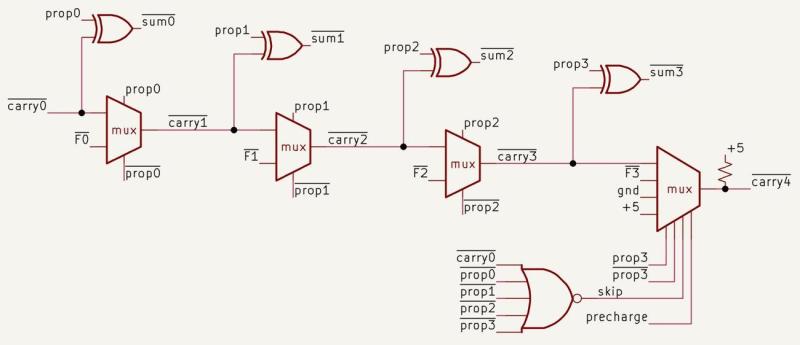
As simple as the concept of adding two numbers appears at first glance, doing it in the 1970s in Intel’s 8087 FPU with its 69-bit adder was still a tall order. This is namely the core feature that many features like tangents, cosines and exponentiation rely on, so it had to be basically perfect. In a recent die-level analysis of the 8087 [Ken Shirrif] dives into the structure, layout and functioning of this ‘beating heart’ of this piece of semiconductor history.
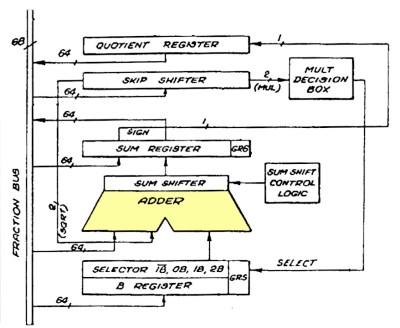
Although anyone can build a simple binary adder out of off-the-shelf parts including 74-series logic ICs, the problem is to make it fast so that the 69th bit doesn’t have to wait for e.g. a carry to trickle all the way through the preceding bits. The main way that this is solved is by breaking addition into 4-bit blocks, reducing the problem by a factor of four, along with an optimized Manchester carry-chain carry-lookahead implementation.
The main advantage of this variation of a carry-lookahead is that it reduces the number of required transistors, without sacrificing too much performance. Later on Intel would switch to the faster, but more transistor-intensive Kogge-Stone adder.
Implementing this entire adder with NMOS technology and wiring it all up to the rest of the die required a lot of ingenuity on the side of the Intel engineers, as previously noted this adder is effectively always used in any operation at some stage. This necessitates many surrounding registers and in turn circuitry to manage these, with part of the complexity handled in microcode and part in silicon.












I had a few of these on machines I built back in the day. A math coprocessor – whodathunk?
Same here. 8086 with the 8087. Real SMOKER :)
Nanocomputer exponentof variable sizes.
unisigned byte1 char[0];
unsiigned bytes2 char[1];
unisigned bytes4 char[3]; / c long
unsigned bytes7 char[3]; / gcc c long long
unsigned bytes8 char[7]; / gcc c long long
unsigned bytes16 char[15]; / In hardwaere for 64-bit hardware arithmetic – even on Celeron N3050!|
/ Basic 128-bit presion for Nanocompter.
unsigned bytes32 char[31]; / 256-bits
unsigned bytes64 char[63]; / 512-bit arithmetic.
unsigned bytes128 char[127]; / 1024-bit arithmetic.
More added as needed.
AI Overview
The ARM11 microarchitecture is a 32-bit RISC processor with a base ideal CPI (Cycles Per Instruction)
of 1. Nearly all single-cycle, register-based 8-bit, 16-bit, and 32-bit instructions execute in 1 clock
cycle under normal conditions.
However, there is no single static number, as performance depends heavily on memory and
pipeline haSingle-Cycle Execution: Simple 8-bit data operations (e.g., standard addition or logical operations)
take 1 cycle.
…
ey Architectural & Technological Improvements (1985-2026):
Massive Speed and Bandwidth Increases: By 2026, time-interleaved ADCs have enabled extremely
high-speed, multi-GS/s (gigasamples per second) conversion with relatively small footprints, such as
7-bit, 175 GS/s converters for communication systems.
The 8087 truely completed any 8088/8086 system (true co-processor).
Besides the NEC V20/V30, it was what could have boosted a slow PC/XT system the most.
Too bad it was so rarely used besides business and CAD/CAM software.
Despite most mid-80s compilers having 8087 support, a math library and an x87 emulator.
Imagine how it could have helped with certain games and simulations!
If only the developers had cared more.. The x87 NPU could be emulated on 80286 and higher systems, so its use was future proof.
It also supported integer calculations besides floating-point, if memory serves.
By late 80s, when 286-based PC/ATs became the norm, PC/XTs and Turbo XTs were becoming entry class PCs.
Same time, the old 8087 was becoming more and more affordable, too.
So a Turbo XT with an 8087 could have beaten an slower 80286/80386 without NPU.
– If software devs would have had taken advantage of 8087s..
For some reason they didn’t, despite the x87 NPUs being not too uncommon to be found in “boring” office PCs running Lotus 1-2-3.
PCs which were found at work place and which were not seldomly used to play some games too (let’s remember “boss key” in Larry and other games of that era).
FPU, not NPU. No one is running neural networks on an 8087.
An NPU specialises in parallel computations, like matrix multiplications. An FPU primarily accelerates floating point operations. The 8087 only does one at a time
Hi there! I think NPU used to mean numeric processing unit, an alternative and lesser used term in place of FPU (floating-pount unit).
Though it’s technically not exactly same thing (FPU refers to floating-point math specifically). Both are math co-processors, though.
MPU (mathematical processing unit) was technically another possibld term,
but in practice MPU was already taken by the MPU-401 MIDI interface. :)
https://en.wikipedia.org/wiki/Floating-point_unit
Hi there, a long long time ago, NPU also used to standard for numeric processing unit.
It was lesser used than the FPU term, I think. Both are terms for math co-processors.
MPU acronym (as in math processing unit) was already taken by the MPU-401 MIDI interface, I think.
https://en.wikipedia.org/wiki/Floating-point_unit
I point out that 64 bit numbers are smaller than they used to be! Interesting thread!
And the “Comment of the Day” award goes to Doug!!!!
I had an 8Mhz 8088 and a fairly simple CAD program. Sample drawing took 38 seconds to draw. Added an 8087… time dropped to 7 or 8 seconds. [Later bought 386/33, time dropped to 1.5 seconds. Had a roommate with 486/25… and draw was about 0.5 second.]