
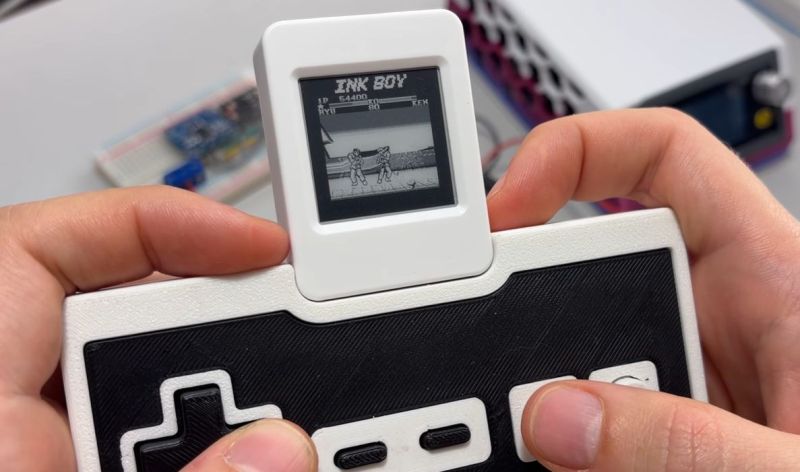
Although e-paper displays are famous for being low-power and lasting essentially forever if not damaged physically, the recent push to drive even cheaper e-paper displays at a framerate like 30 FPS for a decent monochrome gaming experience does raise a few questions. The first being what this does to the power usage of these displays, and the second whether this will wear out the display in short order. To investigate this, [Bo Made It] set up a few experiments.
Subject of this test was a Waveshare ESP32-S3-ePaper board, which had previously been demonstrated running a Game Boy emulator at 30 FPS. With this software running, the board consumed on average about 115 mA, which would run down the device’s 400 mAh battery in about 3.5 hours. From here key was to isolate the power consumption of the display itself, with the system minus the display updates consuming about 90 mA.
 Running the frame calculations for the greyscale mode without rendering to the screen pushed that up to 107.6 mA, with even in the 30 FPS greyscale mode the display thus only consuming about 7.4 mA, which is vanishingly small. Clearly the low-power claims of e-paper remain intact even at higher framerates.
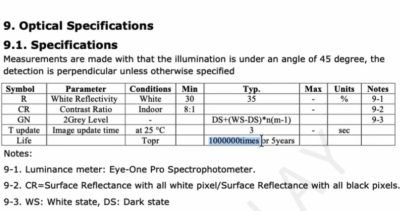
As for lifespan, one datasheet gives the typical lifespan as one million updates. This would translate to about 9.3 hours at 30 FPS, though that assumes a full display refresh. Since a smart driver only updates changed pixels, obviously this will be longer, but the question is how much longer, and what will degradation look like?
After running 2.16 million frames of a custom endurance test featuring repeating patterns, some ghosting was apparent, but repeated refreshing made this go away again. This means that so far no permanent damage has been detected within the no doubt conservative limit provided by e-paper manufacturers.
It should be noted that Waveshare itself also recommends against running such high-FPS applications on their device, meaning that this is definitely one big longevity experiment. If actual damage occurs, this means that obviously this won’t be covered under any warranty.











Awesome, now if the cost of these displays could come down from the stratosphere. The types of usage I want require a large area and infrequent updates, although a good refresh rate would be important on occasion. (Think mostly static with occasional interactivity.)
Yeah it is annoying… Is e-ink particularly challenging to manufacture? I have no idea about that process, I never thought about it till now
Have you considered other similar technologies that are already used for large panels (e.g. bus schedules)? Electrochromic displays, cholesteric LCD… The second one isn’t that much cheaper actually
This is an interesting result. It definitely is not universal. The Dasung and Bigme 13.3″ e-ink monitors cannot be powered off a single usb-c connection that is providing the video signal. They both require a second external power supply. Even without front-light these displays use much more power than an equivalent sized tft lcd portable monitor (all of which can be powered off the single usb-c connection from the computer). Testing a Bigme 13.3″ e-ink, power draw, even idle (with no front light) was around 10W with any screen updates driving it quickly up to 14-17W. The manufacturers recommend, and include 30W power supplies for the displays e.g., displaying video at high frame rate with front light at max brightness.
remember that eink displays don’t include a backlight. When comparing to other display technologies, subtract backlight power usage for a more fair comparison.
how does power usage scale with screen size? I would expect that larger screens would draw much more power (on a full refresh at least)
how consistent is this power draw? 7mA average sounds good but is it really mostly 0mA with sudden spikes?
“…remember that eink displays don’t include a backlight. When comparing to other display technologies, subtract backlight power usage for a more fair comparison…”
Why? These other displays that require a backlight are basically unusable without it, so it makes no sense to exclude the BL power consumption from the measurements.
“As for lifespan, one datasheet gives the typical lifespan as one million updates. This would translate to about 9.3 hours at 30 FPS, though that assumes a full display refresh. Since a smart driver only updates changed pixels, obviously this will be longer…”
Well, a smart driver can prevent the eink state toggling for full refresh (the “erasing” action), but if there are moving images (like in the cool GB demo), even the smart driver can’t prevent the required pixel update.
Also, I don’t think the eink screen wearing is aggregated, as neighbor pixels can’t replace a damaged one. If a pixel burns out, it’s out. IMHO the lifespan is per-pixel.
Just to make it clear – as a hobbyist I’m also interested in eink displays for my own toy-projects, and I would love to see a durable eink display option as much as you do.
PS: I don’t remember seeing a worn-out eink still. Maybe the damaged pixel stops reacting and gets stuck in some dead state, I don’t really know. If someone can share photos of a damaged eink, please do so.
I want to see a test that doesn’t do smart updates and just crudely refreshes the whole screen at 30fps for a few hours, see what happens..
Exactly, this should be the ultimate wearing test.
Sample size of 1: I was also interested in this. Earlier this year, I had a brand new “control” eink display + driver board running known waveforms. An associate stress tested another identical display + driver board for ~24 hours, sending all sorts of waveforms to it, not all correct, and using global refreshes (not damaged rectangle refresh). At the end of it there were noticeable black specks from e-ink particles which had adhered to the front and would not come off. The overall effect was lower contrast, like dirty newsprint. It was still usable. Extrapolating this, I assume overworked eink displays will get foggier as time goes on. I suspect being gentle with waveforms + refreshing only damaged rectangles will give much better longevity.
Dunno how those e-ink particles or their drivers work but maybe something like the old degausser tools can help “force” refresh/free stuck pixels?
External capacitive charging (alternating?)?