
Inside Air Traffic Control

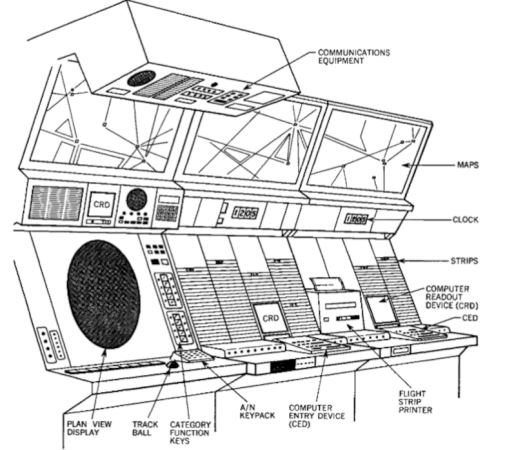
It is a movie staple to see an overworked air traffic controller sweating over a radar display. Depending on the movie, they might realize they’ve picked the wrong week to stop some bad habit. But how does the system really work? [J. B. Crawford] has a meticulously detailed post about the origins of the computerized air traffic control system (building on an earlier post which is also interesting).

Like many early computer systems, the FAA started out with the Air Force SAGE defense system. It makes sense. SAGE had to identify and track radar targets. The 1959 SATIN (SAGE Air Traffic Integration) program was the result. Meanwhile, different parts of the air traffic system were installing computers piecemeal.

SAGE and its successors had many parents: MIT, MITRE, RAND, and IBM. When it was time to put together a single national air traffic system the FAA went straight to IBM, who glued together a handful of System 360 computers to form the IBM 9020. The computers had a common memory bus and formed redundant sets of computer elements to process the tremendous amount of data fed to the system. The shared memory devices were practically computers in their own right. Each main computing element had a private area of memory but could also allocate in the large shared pool.

The 9200 ran the skies for quite a while until IBM replaced it with the IBM 3083. The software was mostly the same, as were the display units. But the computer hardware, unsurprisingly, received many updates.

If you’re thinking that there’s no need to read the original post now that you’ve got the highlights from us, we’d urge you to click the link anyway. The post has a tremendous amount of detail and research. We’ve only scratched the surface.

There were earlier control systems, some with groovy light pens. These days, the control tower might be in the cloud.

Playing Air Traffic Controller With Software Defined Radio

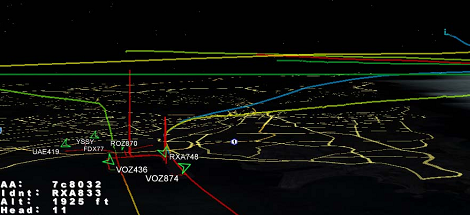
Being an air traffic controller is a very cool career path – you get to see planes flying around on computer screens and orchestrate their flight paths like a modern-day magician. [Balint] sent in a DIY aviation mapper so anyone can see the flight paths of all the planes in the air, with the added bonus of not increasing your risk of heart attack or stroke.

[Balint]’s Aviation Mapper uses software defined radio to overlay RADAR and ACARS messages from aircraft and control towers in an instance of Google Earth running in a web browser. After grabbing all the radio data from a software defined radio, [Balint]’s server parses everything and chucks it into the Google Earth framework. There’s a ton of info, pictures, and explanations of the inner machinations of the hardware on [Balint]’s official project page.

Right now, Aviation Mapper only displays planes within 500 km of Sydney airspace, but [Balint] is working on expanding the coverage with the help of other plane spotters. If you’re willing to help [Balint] expand his coverage, be sure to drop him a line.

Of course, [Balint] is the guy who gave us a software radio source block for those cheap USB TV tuner dongles. Just a few days ago we saw these dongles receiving GPS data, so we’re very impressed with what these little boxes can do in the right hands. [Balint] says his Aviation Mapper application will work with any GNU Radio receiver, so it’s entirely possible to copy his work with a handful of TV tuner dongles.

After the break, there’s two videos of [Balint] sitting at the end of the runway near the Sydney airport watching arrivials come in right above his head and on his laptop. It’s very cool, but we’d be interested in an enterprising hacker in the New York City area copy [Balint]’s work.

Continue reading “Playing Air Traffic Controller With Software Defined Radio”







