Hey, it’s the 43rd anniversary of men first walking on the moon. Here’s some stuff we found to celebrate that. Fun trivia: for Apollo 11, [Neil] and [Buzz] didn’t go more than 200 feet from the LEM.
This is so incredibly sad

Remember Heathkit? A lot of cool kit-based electronics came from them. They’re out of business, but you can get all the Heathkit swag you can imagine from the repo man. A ton of stuff from the old Heathkit headquarters is being auctioned off in Byron Center, Michigan this Tuesday, July 24. Notable lots include a HE-Robot and a nice pair of o’scopes. If someone wants to pick up one of the catalog lots for us, we’d be thankful.
Troll Physics: ‘What is with this guy’ edition
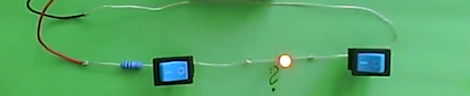
We’ve seen [Fredzislaw]’s LED trickery before. The first time was a crazy 3 LED circuit, the reveal of which showed two AC power supplies in a battery connector. This time, [Fred] has two switches and an LED. Turn one switch on, the LED lights up. Turn that switch off and flip the other one, the LED still lights up. Turn both switches on, the LED goes off. Your guess is as good as ours.
Prototyping with a key fob remote
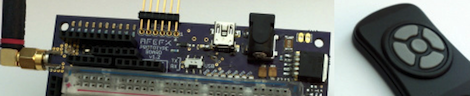
[Gary] wrote in to tell us about the dev board he’s been working on. It has either a PIC or AVR on the back side, broken out into 0.1 inch headers on the front. There’s a small solderless breadboard and an on-board RF link that uses a five-button key fob remote. Seems very useful, no matter what side of the PIC/AVR holy war you’re on.
Consumer Alerts: Software defined radio
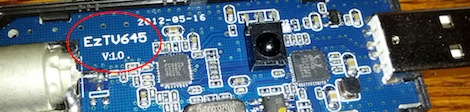
Over on the RTLSDR subreddit, [photoscotty] bought this TV tuner dongle from Deal Extreme and received the inferior EZTV645 tuner. Unsurprisingly, Chinese manufacturers will just grab whatever is available, put it in an envelope, and ship it off on a slow boat from China. [photoscotty] is trying to return his dongle to DX, but until Sparkfun or Adafruit start selling these things (yes, there’s a market now get on it) you’ll have to be careful out there.
Wouldn’t this feel terrible against your skin all day?
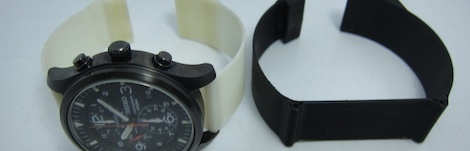
[Colin] printed a watch band on his Makerbot. Apparently Shenzhen humidity didn’t play nicely with his nylon strap, so [Colin] made his own out of plastic. It’s flexible and has a neat looking clasp, as well as an awesome demo for what a 3D printer can actually do. Thingiverse files here.