Squeezing Fluids With The Right Peristaltic Pump For The Task

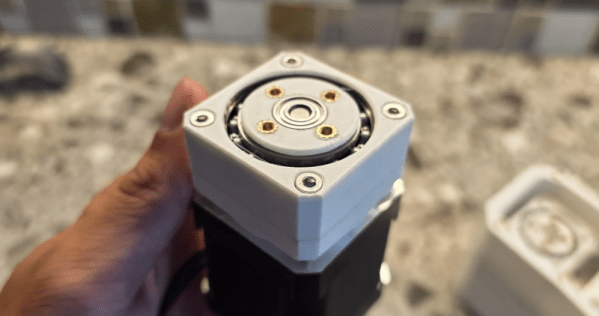
Peristaltic pumps are a very simple and effect device for transferring fluids without said fluid ever coming into contact with any part of the pump mechanism. At their core they involve a mechanism squeezing fluids through compressible tubing, but there are various implementations of such a mechanism that all have their pros and cons. In a recent article by [T. K. Hareendran] over at EDN these types are discussed and when you’d want to pick one over the other.

Also known as a roller pump, these positive displacement pumps have been known since the 19th century, finding uses in industrial, medical, research, agriculture and many other fields. Each of these fields have different requirements with the use of a peristaltic pump as a dosing pump being a specific application whereby e.g. a stepper motor can be used to provide exact dosing.

For industrial settings the typical rollers that compress the tube are replaced with shoes that provide higher pressures and endurance, with overall a bewildering number of motor types and tubing materials available. Depending on what your project needs, you may opt for continuous flow, fine control over dosing, the ability to reverse the flow, etc.

Unless your project is particularly rugged, a roller-based mechanism should be fine, while silicone tubing is great for biocompatibility and PVC is a cheaper tube material option. If you intend to transfer certain kinds of chemicals that will react with each of these there are some more exotic tubing options available as well.

We have previously covered projects that use a peristaltic pump for rather interesting things, such as DIY pharmaceutics, in a home-grown flow battery, not to mention creating DIY peristaltic pumps from first principles.

Five Different Styles Of Cardboard Hinges

One doesn’t generally associate cardboard with structural components like hinges, but [Itoshige Studio] assures us that you can absolutely create hinges out of this ubiquitous material. In total the video covers five different designs, ranging from the simple and straightforward to an interlocking tab design that approximates a typical steel hinge with paper rod to keep both sides of the hinge together.

Simple paper hinge. (Credit: Itoshige Studio, YouTube)

The most simplistic hinge is unsurprisingly just a strip of craft paper, which is also demonstrated as the hinge for a wooden box in lieu of the typical metal hinge. This same principle is then demonstrated for a fancy cardboard box.

From here the designs get increasingly more involved. First a seamless hinge variation, and then a kamichoban hinge design that’s inspired by traditional Japanese room dividers and furniture, using panels that are interconnected with overlapping sections to create a fascinatingly flexible hinge that can fully fold either way.

The flush hinge design is somewhat like the craft paper hinge, but significantly fancier and probably sturdier, while also looking pretty good on something like a cabinet. Finally the interlocking tab hinge is effectively a cardboard version of the hinge design that’s found on every room’s door, with a similar level of flexibility. This is obviously the trickiest one to assemble and get right, but it has its own charm.

Considering that all of these examples use regular corrugated cardboard that we get shipped to our homes by the truckload, the cost to try these examples is your time plus some basic tools and glue. The author also sells a book that contains templates – in addition to digital versions – for these hinges and other designs, if you’d like to enjoy the 100% paper experience.

Continue reading “Five Different Styles Of Cardboard Hinges”

How To Kill Humidity Sensors With Humidity

An often overlooked section in the datasheets for popular humidity sensors like the BME280 and DHT22 is the ‘non-condensing humidity’ bit, which puts an important constraint on which environments you can use this sensor in. This was the painful lesson that [Mellow Labs] recently had to learn when multiple of such sensors had kicked the bucket after being used in a nicely steamed-up bathroom. Fortunately, it introduced him to sensors that are rated for use in condensing humidity environments, such as the SHT40 that’s demonstrated in the video.

This particular sensor is made by Sensirion, and as we can see in the datasheet it features a built-in heater that allows it to keep working even in a condensing environment. This heater has three heating levels which are controlled via the I2C interface, though duration is limited to one second in order to prevent overheating the sensor.

Of note is that you cannot take measurements while the heater is operating, and its use obviously increases power draw significantly. This then mostly leaves when to turn on the heater as an exercise to the engineer, with [Mellow Labs] opting to start the heater when relative humidity hit 70% as a conservative choice.

In the comments to the video other options for suitable sensors were pitched, including the Bosch BME690 which is similarly rated for condensing environments. All of which condenses down to the importance of reading the datasheet for any part that you intend to use in possibly demanding environments.

Continue reading “How To Kill Humidity Sensors With Humidity”

Noctua Releases 3D Models, But Please Don’t Try To Dupe The Products

Noctua wants to make life easier for fans of its…fans. To that end, the company has released a bevy of 3D models across its various product lines, all available to download for free.

If you’re not familiar with the company, Noctua specializes in high-quality cooling systems for the PC market. Its hope is that by freely providing 3D models of its components, it will aid aftermarket companies and DIYers that wish to integrate Noctua fans into their gear. In the company’s own words, these files are made available for “mechanical design, rendering, or animations.” They will let people check things like mountings and fitment without having to have the parts on hand, or to create demo visuals featuring the company’s products.

Don’t get too excited, though, because Noctua has already thought ahead. The company has specifically noted these parts aren’t intended for 3D printing, and critical components like fan blades have modified geometry so as to not compromise the companies IP. You could try and print these models, but they won’t perform like the real thing, and Noctua notes they shouldn’t be used for simulation purposes either. They’re intentionally not accurate to what the company actually sells in that regard.

That isn’t to say Noctua is totally against 3D printing. They have lots of parts available on Printables that they’d love you to try—everything from fan grilles to ducts to anti-vibration pads. Most are useful accessories—the kind of little bits of plastic that make using the products easier—that don’t threaten Noctua’s core product line in the marketplace.

If you’re whipping up a custom PC case and you want to kit it out with Noctua goodies, these models might help you refine your design. It’s funny how it’s such an opposite tactic to that taken by Honda, in terms of embracing the free exchange of 3D models on the open Internet. It’s a move that will surely be appreciated as a great convenience, and we’d love to see more companies follow this fine example.

Thanks to [irox] for the tip!

Rack Cage Generator Gets Your Gear Mounted

Sometimes, as hackers and makers, we can end up with messy lashed-together gear that is neither reliable nor tidy. Rackmounting your stuff can be a great way to improve the robustness and liveability of your setup. If you find this appealing, you might like CageMaker by [WebMaka].

This parametric OpenSCAD script can generate mounts for all kinds of stuff. Maybe you have a little network switch that’s just a tangle of wires on your desk, or a few pieces of audio gear that are loosely stacked on top of each other and looking rather unkempt. It would be trivial with this tool to create some 3D printed adapters to get all that stuff laced up nice and neat in a rack instead.

If you’re eager to get tinkering, you can try out the browser-based version quite easily. We’ve featured similar work before, too—many a maker has trod the path of rackmounting, as it turns out.

A man's hand is holding a thin wooden board, which runs between two vertical metal plates. On the board are two glasses, one filled with water. A computer screen is behind all this, showing a series of white bars. The series of bars shows two peaks.

Using Capacitance For Extremely Sensitive Proximity Sensing

Capacitive displacement sensors span a wide range of resolution, from the touchscreen sensors which can only detect displacement as a binary state, all the way to the sensors in semiconductor fabs which measure down to nanometers. The sensor [Matthias Wandel] built with a Raspberry Pi Pico lands somewhere in the middle, providing both sensitive measurements and an absolute scale.

The idea is that the amount of overlap between two metal plates should be detectable by measuring the capacitance between them. Reaching any kind of usable resolution would require a very precise measure of capacitance, around the picofarad range. [Matthias] realized that the Pico’s GPIO pins have an inherent capacitance, and can have a pull-down resistor set, essentially creating an RC circuit. [Matthias] would set a pin to a high-level output, then switch it to an input. The amount of time the pin takes to switch from high to low indicates the RC constant, which includes the capacitance attached to the pin.

When attached to a metal plate, the Pico was sensitive enough to detect the plate’s capacitive coupling to [Matthias]’s hand through a thick wooden floor. To measure capacitance between two metal plates, the Pico measured how well a voltage signal applied to one plate was coupled to the other plate. This was sensitive enough to measure the slight change in the dielectric constant when [Matthias] waved a piece of ABS pipe between the two capacitor plates. Making actual position measurements was tricky, since capacitance changed with both X- and Z-axis shifts in the plates.

Digital calipers use similar capacitive sensors to make their measurements, as [Matthias] knows from his experiments in hacking them. If you’re interested in more details, check out this teardown of some cheap digital calipers.

Continue reading “Using Capacitance For Extremely Sensitive Proximity Sensing”

Using Metal Screws In Plastic Parts

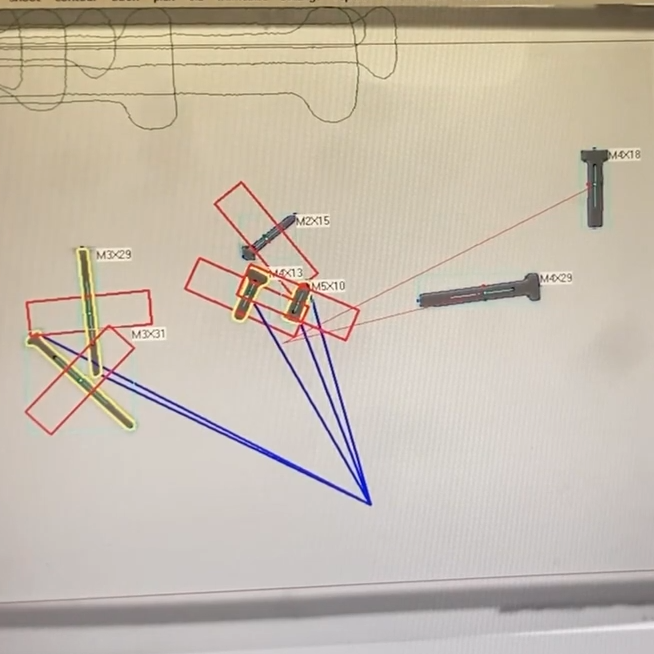
Machine screws aren’t made for wood or sheet metal, they make specific screws for those applications. You probably also know there are special screws for plastic. But did you know there are at least two distinct types? In a recent video, [Lost in Tech] show us different types of plastic screws, including thermal camera shots of screws driving into 3D printed parts, along with tests using a torque driver.

We have often used “any old” screw in printed parts, which usually works OK. We’ve also used threaded inserts or captive nuts, classic choices. One of the issues with screws or inserts is that you have to get accurately sized holes in your 3D prints.

In addition to learning about the types of screws and how best to accommodate them, he also developed a free web-based tool that does all the math for you.

Of course, there are cases when you do need a threaded insert. In particular, the plastic screws will tend to wear the plastic each time you insert them. If you expect the screw to go in and out many times, this might not be the right technique for you. On the other hand, if you think you might remove and replace the screws a few dozen times over the life of the part, this might be attractive.

We’ve covered self-tapping screws in plastic before, but, as the video shows, not all of them are created equal. And, of course, there are always heat-set inserts.

Continue reading “Using Metal Screws In Plastic Parts”