
Radio Cabinet Media Center

old-time-radio-mediacenter

[Jon] picked up an old Philco radio from a pawn shop for $81. The electronics were shot and the controls had seen better days. So he set to work giving this old beast a makeover, turning it into a beauty of a media player.

The face plate for the controls had seen better days. His solution was to replace it, which gave him more options for mounting a display and controls. A menu system was implemented on the LCD display using a PIC18F4450 microcontroller. The chip also takes care of the three rotary encoders for the user interface and integrates the whole thing with the PC backend.

We’ll be the first to admit that a full PC is overkill in this situation. That being said, this was slow, unused system that is seeing new life. But is it worth the added noise and energy costs? Who knows, we think this leaves a lot of room for future revisions. Perhaps an NAS and wireless controls via iPhone or a similar device?

We’re a bit disappointed that [Jon] didn’t do some work to get better sound out of this. With a great big cabinet like this, the right speakers with a tube amp will produce some sweet sound. Certainly most things would be better than just using a pair of computer speakers. We’ll keep our eye out for an update that adds a tube kit to the project.
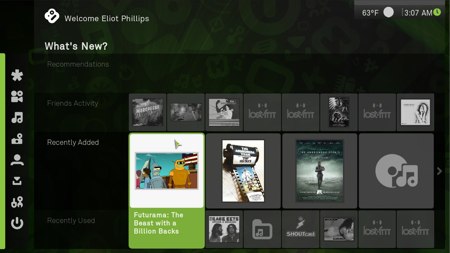
Hackit: Boxee Now On Windows

Boxee, the free media center management and streaming application, is now available for Windows platforms. We’ve been following the developments of Boxee since we first announced its alpha this time last year. At that time, it was only available for OSX with promised Ubuntu support. We were a bit skeptical about the interface noting, “Unfortunately all the dynamic resizing, animated, sliding, floating info boxes make it behave like the zooming user interface’s retarded cousin”. Our interest in Boxee was almost entirely based on it being a fork of XBMC, the media center project developed for initially for hacked Xboxes. It was interesting to see Boxee become the interface of choice for hacked Apple TVs and then go mainstream with a big push at CES.

Have you been using Boxee as your media center? What do you love/hate? What about alternatives like XBMC, Plex, or MythTV?

Control Media Center With Programmable IR Receiver

This IR receiver based on ATtiny13 microcontroller is used to control a Media Center box via a remote. The circuit is powered by 20 pin ATX connector pin 9 “+5VSB” because it is the only pin that is powered when the computer is off, or in standby. The receiver is programmed to accept the codes from the remote by holding down the switch while pressing the remote button. The circuit can use “Girder” or “PC remote control” as controlling software on the Media Center.

How-to: Windows Media Center On A Leopard Network

We’ve been using Microsoft’s Media Center for a few years now and have grown to like it a lot. We’ve also noticed that more and more Apple computers have shown up on our home network and decided it was time to get everything working together smoothly. Follow along as we walk you through the hoops we jumped through to get everything cooperating. Continue reading “How-to: Windows Media Center On A Leopard Network”

XBMC Cross Platform Beta Released

It’s been a big week for the XBMC team. They announced the release of their first cross platform beta in preparation for a full release in October. XBMC started as a media center project for the original Xbox, but has expanded a lot since then. The new beta works on Linux, OSX (Leopard and Tiger), Windows, and Xbox. They’ve created XBMC Live, so you can get XBMC up and running quickly either by booting from the CD, from a flash drive, or using it to install to a disk. People have been writing add on apps too, like the XBMC Remote for iPhones.

This summer we covered both Boxee, a social version of XBMC, and Plex, the original XBMC OSX fork.









