Browser-Based Image Inpainting Runs Locally, If One Doesn’t Mind A Big Download

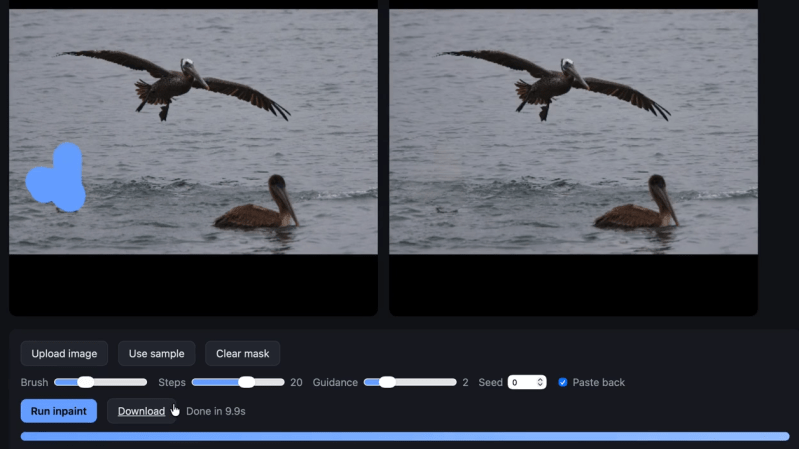
[Simon Willison] ported the Moebuis 0.2B image inpainting model to run locally in a web browser.  The web tool simply requires a user to provide an image, mark a section of it to be removed, and the model will do it’s best to patch up the missing area. The project was handled by Claude Code as an experiment in how things in the AI coding world have evolved, but more on that in a moment.

The existence of this tool shows that it’s possible for this kind of image editing to be done on the client side, running entirely locally with no reliance on remote services or server-side GPU resources. The online demo (GitHub repository here) is available if you want to try it out, but be warned it triggers a 1.27 gigabyte download of the required model on the first run.

What’s also interesting is [Simon]’s write-up, because he used the project as an opportunity to learn what has changed in the realm of AI coding agents. [Simon] is a software developer but in this project he didn’t personally write any of the code. One may think that means he didn’t learn anything other than how to use the tools, but that’s not quite true.

He learned it’s possible to convert a PyTorch-based model to ONXX, that the converted model can run in supported browsers using local WebGPU acceleration, and that the CacheStorage API will work on large files. Last but not least, he learned Claude Opus 4.8 is capable of handling such a project pretty much autonomously, and even created an informative document explaining the underlying architecture.

One may consider AI coding agents to be disasters waiting to happen, but it’s also true that the landscape is changing quickly, and write-ups like [Simon]’s give a helpful peek at those developments.

Try Image Classification Running In Your Browser, Thanks To WebGPU

When something does zero-shot image classification, that means it’s able to make judgments about the contents of an image without the user needing to train the system beforehand on what to look for. Watch it in action with this online demo, which uses WebGPU to implement CLIP (Contrastive Language–Image Pre-training) running in one’s browser, using the input from an attached camera.

By giving the program some natural language visual concept labels (such as ‘person’ or ‘cat’) that fit a hypothetical template for the image content, the system will output — in real-time — its judgement on the appropriateness of such labels to what the camera sees. Again, all of this runs locally.

It’s maybe a little bit unintuitive, but what’s happening in the demo is that the system is deciding which of the user-provided labels (“a photo of a cat” vs “a photo of a bald man”, for example) is most appropriate to what the camera sees. The more a particular label is judged a good fit for the image, the higher the number beside it.

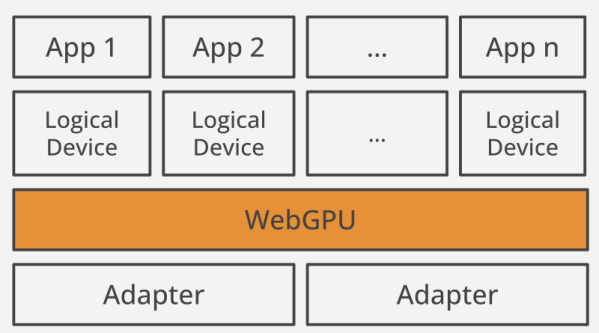
This kind of process benefits greatly from shoveling the hard parts of the computation onto compatible graphics cards, which is exactly what WebGPU provides by allowing the browser access to a local GPU. WebGPU is relatively recent, but we’ve already seen it used to run LLMs (Large Language Models) directly in the browser.

Wondering what makes GPUs so very useful for AI-type applications? It’s all about their ability to work with enormous amounts of data very quickly.

WebGPU… Better Than WebGL?

As the browser becomes more like an operating system, we are seeing more deep features being built into them. For example, you can now do a form of assembly language for the browser. Sophisticated graphics have been around using WebGL since around 2011, but some people find it hard to use. [Surma] was one of those people and tried a new method that is just surfacing to do the same thing: WebGPU.

[Surma] liked it better and shares a lot of information in the post and — oddly — the post doesn’t use WebGPU for graphics very much. Instead, the post focuses on using GPU cores for fast computation, something else you can do with WebGPU. If your goal is to draw on the screen, though, you need to know the basics and the post links to a site with examples of doing this.

Continue reading “WebGPU… Better Than WebGL?”