
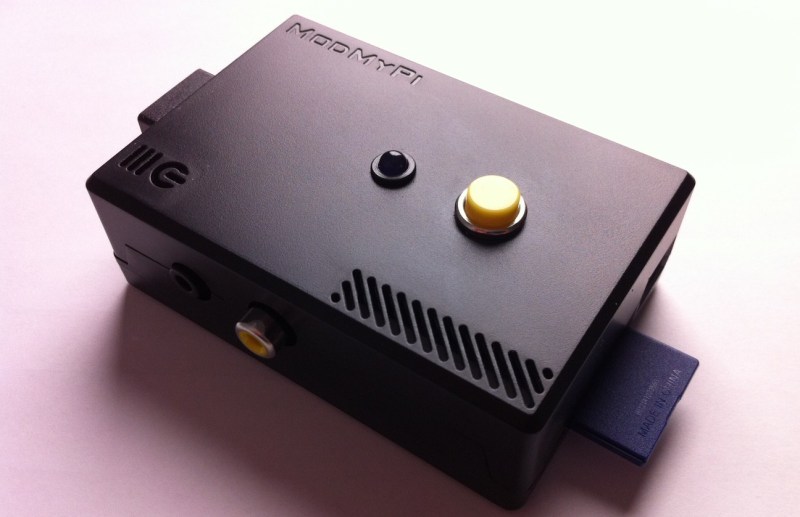
[Michael Clemens] was looking for gifts for his Grandmother’s 90th Birthday. She is visually impaired and loves to be able to listen to audiobooks. The problem is that she doesn’t really get the hang of using electronics. He made things easy by building her a one-button audiobook player.
The Raspberry Pi board is a perfect solution for this project. It’s cheap, it has an audio port, it has storage for the books on the system SD card, and it runs Linux. The last part is key as it made things very simple when [Michael] started pulling together the various components.
When the RPi is powered up it drops immediately into a Python script which loads the audio track and places the music player daemon in pause. The yellow button seen above works as a play/pause button when clicked. If the listener misses something she can hold the button for more than four seconds to go back one track. Loading new books is easy too. [Michael] copies the files onto a thumb drive with a special volume label. When plugged into the RPi USB port the script automatically copies the book and starts playing when the drive is removed. He included a video demo on his project page linked above.













First it was Arduinos used to blink LEDs in place of 555’s.
Now it’s crappy SBC’s with buggy hardware, used to do things that can be done with a $10 used mp3 player, a little bit of soldering, and a couple of (probably) discreet components.
Siiigh…onwards and upwards.
+1
NO! mp3 players are good for music but NOT for audio books because of the sorting of titles – ie item10 gets listed (and hence played) before item2. You can get around this several ways but it’s a pain to have to do. This is a great solution to a problem that, as far as I am aware, has never been properly addressed.
In addition an mp3 player’s tiny and awkward controls are useless for audio books especially when listened to at night.
Address by OP…solder a single button to it…also sorting isn’t an issue…try using naming like 001, 002….009, 010, 011….099, 100, 101 …. 999
Yes but renaming a lot of files is a pain in the backside
I, for one, am very pleased to see these types of submissions. This is a neat, little, well documented project that may be helpful to those who are looking to set up simple interfaces for various computers/controllers.
There have been many projects on HaD that were over the top or even complete failures, but it’s still great info for a great many people.
+1
+1
Classical case of overengineering…
And I did the same for my grandma 5 years ago.
Put a modified rockbox image on one of those $3 mp3 players from hongkong and soldered a 20c button to it.
Didn’t think 10 minutes of work were even worth taking a picture.
What’s really cool here, and isn’t being discussed (otherwise to be referred to as “The Real Hack”) is that bad-ass case he built! HaD: Tell us more about that, and less about how he wasted a Raspberry PI.
@sdfsf: Thanks for the token elitist prick comment..
He built a specialized device that works for his grandmother’s needs.. His grandma doesn’t give a flip if the underlying hardware has some bug that surfaces under certain conditions and this audio-book player isn’t going to be sold in stores as a mass market device.
It got the job done and he documented the process which helps others. Next time just skip the post instead of adding an asinine comment as you did here.
…A level of retort to match your creativity in names. nacs is right. Those making the critical comments obviously don’t get it. You think you do…but you don’t. So don’t waste the response space.
A player like this is good for my blind aunt. Plus use the hardware later by swapping out the image. It’s easy quick and reuseable.
This looks like a very clean and simple use for the RPi. I like the ease of use given the user in mind. I had something similar I wanted to do for my 18 month old son. He loves watching videos of trains and rocket ships. My idea was to create a wall mounted display with a couple big arcade buttons that would play a pre-loaded video. I could hang this in his room and he could go press a button to watch videos instead of pounding keys randomly on my laptop.
I love things like this. Good for him, his grandmother must be so happy and so proud of him.
Love it, simple, cheap, very useful and greatly improves the quality of life of an old person by giving her again access to something she loves.
Love it. This could even be a real product. Perhaps one could use RFID to select which book to read. If you place the tags themselves in real books, you’d have a cool system where you put a book near the magic box and boom you’re listening to the audio version.
Or include a cheap webcam or barcode scanner to get the ISBN.
that is a great idea
Maybe overkill, but nevertheless, an excellent and useful build. kudos.
Definitely overkill… But that enclosure is a beauty.
And if she wants to read a different book for a while, how does one fast-forward back to the point where they stopped?
I wondered that, but after having a read through the actual site, turns out it only plays one book at a time, so if she wants to listen to another one for a while, someone would need to bring over a USB stick.
I also wondered about the fast forwarding, but it remembers where you were, so that’s a bonus. I wonder if it’d remember where you were over multiple books, or if you would have to finish a book before starting a new one. That’s fine though, as some people prefer to finish the book they’re on.
I love the idea. And for those saying it’s overkill, have you ever priced anything for the vision impaired? A quick 2-second search suggests you’d pay $300 and over for an audio book reader made especially for the blind.
I agree with some of the people above about pairing it up with RFID cards if she wanted to read more than one book at a time. You could make each one a different texture (e.g. Leather, carpet, bumpy, smooth etc.) and simply touch the card to the machine to start playing.
But if she’s happy with one book at a time, this is perfect.
Audio book readers for the visually impaired are amazingly expensive. Some of the units you see (no pun intended) are extremely pricey.
There is a program that supplies free players and navigable books to the blind and physically handicapped:
http://www.loc.gov/nls/
It uses the on-board audio jack, which only produces crappy sound because it’s forcibly down-sampled to 11 bits.
The RPI is a bad choice for this kind of device.
Nice build.
BUT…a single button makes for a far more complex human interface than 3. I hate devices where you have to hold buttons for specific times. Lets not go back to the days of 1980’s Epson printers, 2 buttons to do everything.
Over engineering maybe, but I’m sure this guy wanted more of a challenge than soldering a button onto a 10$ mp3 player…
The build is admirable and well done.
I you would want to make things simple and cheap, then am simple micro can play .wav files from an sd card and put out pwm which is good enough for audiobooks.
Apart from the fact that the beagle bone could probably decode video while displaying it on a huge rgb led matrix, nice build. Just a little overkill, in fact an atmega328+enc28j60 would be plenty to serve a webinterface and show something on a one color dot matrix display.
Guys, using a powerful development board to accomplish a simple task isn’t “over-engineering.” A project built on a dev board isn’t a fully engineered product… It’s a prototype. A hack. You’re using a pre-engineered building block that you are comfortable/confident/familiar with.
You know what *is* over-engineering? Obsessing about using the perfect development board for a prototype. Optimizing before you’re done. Worrying about minutia instead of hacking.
Great hack!
Something I’d encourage every HAD reader to try once is to record a Digital Talking Book for a vision impaired loved one. OBI is an Open Source program that helps you record a book, break it up into chapters / sections / etc. for ease of playback.
http://www.daisy.org/project/obi
I found a local history book on a subject that interested my wife’s grandmother, so I recorded it for her using OBI. It took a few hours to read and produce the recording, and when it was done I had a great Christmas gift.
What a nifty project. My question though, is; Will/Did Gran enjoy it? :)
Could someone please help!? I bought the Raspberry, loaded the OS, built the hardware (buttons and led, etc)…. but I have no idea how to impliment the “Python Script” or how to download the other “software” used to make this work.
If some one could please help me out it would be greatly appreciated!! I need to have this finished before Christmas. I would even be willing to pay for your help. This is a very important Christmas gift for my bild grandmother
Dan
dangraves25 @ gmail.com