
Raspberry Pi boards are no longer constrained – these days, you can get a quad-core board with 8 or 16GB of RAM to go around, equip it with a heatsink, and get a decently comfortable shop/desk/kitchen computer with GPIOs, cameras, speedy networking, maybe even NVMe, and all the wireless you’d expect.
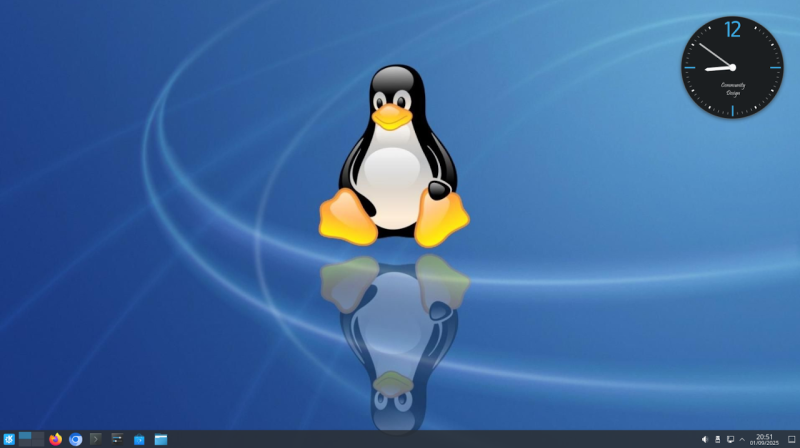
Raspberry OS, however, remains lightweight with its pre-installed LXDE environment – and, in many cases, it feels quite constrained. In case you ever idly wondered about giving your speedy Pi a better UI, [Luc] wants to remind you that setting up KDE on your Raspberry OS install is dead simple and requires only about a dozen commandline steps.
[Luc] walks you through these dozen steps, from installation to switching the default DE, and the few hangups you might expect after the switch; if you want to free up some disk space afterwards, [Luc] shows how to get rid of the original LXDE packages. Got the latest Trixie-based Pi OS? There’s an update post detailing the few necessary changes, as well as talking about others’ experiences with the switch.
All in all, [Luc] demonstrates that KDE will have a fair bit of graphical and UX advantages, while operating only a little slower, and if you weren’t really using your powerful Pi to the fullest, it’s a worthwhile visual and usability upgrade. For the regular desktop users, KDE has recently released their own distro, and our own [Jenny] has taken a look at it.












adafruit says they wil sell me a 16GB pi 5 for “only” $160
you’ll find that a lot easier to stomach if you don’t ask ebay about NUC 16GB first
At the time of writing (about two weeks ago), you could 🥲
Do you mean “KDE plasma” when you say “KDE”?
Im a KDE guy, that was around the time plasma was created, made the logo of it… Call it what ever you want, it’s not important.
OK, this is obviously engagement farming. I mean, the discussion which desktop environment to use is discussed with an almost religious devotion and is only topped by the fanatical discussions caused by the heretics that prefer emacs over vim ;)
I don’t really see any advantage of KDE over most other DE described in the article, maybe the unified configuration panel, that one is indeed nice. The icons in the task bar, the desktop switcher that is available in e.g. LXDE and many others, heck even in XFCE (which I really don’t like). And installing KDE in Debian could really easily be done just by selecting the appropriate “task” – the easiest way to do this is admittedly by using aptitude (don’t get me started on that tool). You don’t even have to reboot the machine, you are not updating the kernel.
It’s because Raspberry Pi OS sucks, GNOME sucks, and KDE is just better.
The reason Raspberry Pi OS had to exist was because the hardware was so anaemic. The Pi 5 is quite a capable device, so there’s no need to use their bargain basement OS anymore.
Well it is also because Pi uses ARM processors. They still need devicetree blobs to function. As long as there is not a good functioning ARM EFI that is commonly used we have that issue. The thing is, when the Pi came around not every distro wanted to do a custom build for their hardware. Now a few distro’s do, but it is still a custom build for the Pi’s. If there would exist a commonly used EFI for ARM we could build a more universal ARM build of distro’s that could work on the Pi 5 with a Broadcomm and the same build could work on a Qualcomm.
Ofcourse processing power of the first Pi’s also is something we should think about regarding distro’s not wanting to do a custom build; But for the future it would be really nice to have an open source EFI we could compile for a SOC so it could run a standardized ARM distro.
“devicetree blobs” – they need blobs, DT is open source, always has been, it is just config file, also special bootloader, as Broadcom chips in RPI boots in weird way when first it boots the video core and than the arm core and you need firmware for the video core which is not open source.
If you want “clean ARM” than there are multiple choices for example Allwinner A64 – thanks to major community effort it runs mainline kernel without any blobs, the only non open source thing would be BL1 but it is tiny and most likely just slightly modified ARM version ( https://github.com/ARM-software/arm-trusted-firmware/tree/master/bl1 ) – it has to be binary as it is in ROM of the chip.
There ale plenty of boards with A64 – for example https://www.olimex.com/Products/OLinuXino/A64/A64-OLinuXino/open-source-hardware – fully open source including kicad design files
Orion O6 and other Arm boards based on the same CIX CD8180 SoC, already have a UEFI BIOS
Both major desktop environments are going to drop X11 support, though. Cool, right?
Isn’t XLibre the future?
Hm. Not sure, is it being supported by KDE/Gnome?
Note the Raspberry Pi OS desktop switched to Wayland by default a while ago as well.
There’s a number of advantages. Muscle memory from an environment you use daily, a UI style that doesn’t look intentionally 2010’s, modern UX principles making this particular the DE all that less obtuse, miles better configurability, and yeah better software support given it’s a leading DE. I’ve used LXDE on various Pi’s a fair bit, can’t deny, I’ll switch away any time I have the opportunity. It’s good software, just not for me, and given that KDE is a leading DE, it’s obvious a choice that a number of people will take, too. Seen any of those stylish cyberdeck builds, by people with an eye for hardware that looks good? I do seriously doubt that everyone building those machines, actually desires theirs to be running default RPi OS LXDE, when so many other options exist – so it’s only fair that someone points this one out, and that we cover it.
I download a small kde example program (gnome too)
compiling it and run valgrind
every program have a memory leak
simple program x11 no have memory leak
Using any Raspberry Pi as a desktop and being serious about it raises so many red flags I don’t even know where to start.
How about just listing one red flag? If that’s not too hard then try another, and so on.
What red flags? I found it more than usable for the little I use a GUI for.
As for KDE, I might try it on the RPI although the default DE is really sufficient. I been using my 500+ without a hick-up lately. Running Trixie. That said, I use KUbuntu on all my laptops/desktops/server as it works for ‘my’ workflow. DEs are a personal thing. No right or wrong.
I hate raspi because it’s so closed / proprietary, because the proprietary parts are poorly-designed and a moving target for hackers, because it makes too much heat when idle, and because people keep using it for the worst things…for mobile devices even though it’s not remotely suitable for mobile, and in end-user devices with a microSD card permanently installed that it logs to and kills after a year. Just a real catastrophe of an ecosystem in a lot of ways.
But still, it’s a great device for a lot of use cases. The price isn’t as competitive as it once was but it’s a heck of a lot of instructions per second and gigabytes of RAM and everything. If you think “desktop” means latest wintel box from Dell then you’ll be disappointed but if you think “desktop” means “a computer that runs off AC power and has a separate keyboard and monitor”, it’s got lots of promise. I’d almost say it’s the one thing it’s genuinely good at!
All depends on your use case. But in my life, i use one big computer for “compute server”, mostly “make -j 8”. And for all my other needs i have a pile of diverse computers each one of which uses less compute / RAM than even a raspi 4b.
Are those flags as red as the chassis for the Raspberry Pi 400 and 500, an explicitly desktop-purpose Raspberry Pi that sells well enough for them to keep making new versions?
Can we agree that “a lot of people buying something” and “solid technical solution” have less in common than marketing tries to tells us?
Let’s start with the single green flag: it has GPIOs. I do use a lot of RPis exactly for that since the Model B 1. Headless Linux+GPIOs is a very powerful combination and for a decade the Pis were the only cheap option available. It’s mostly the B 4 these days but I have a reference B 1 where I test all software and it almost always is still good enough.
But they were never good with any interactive GUI stuff. Even pure Debian with i3wm is sluggish. And I do not know a less demanding window manager.
All the Pis are seriously underpowered in terms of CPU and (default) storage compared to even the worst 80×86 machines and AMD siblings. I just decommissioned some old 32bit family laptops and they were oh so snappy the Pi never even got close.
The Pi5 is a bit better but once you add storage etc you have a dongling mess even Apple would be ashamed of. For half the money you get either a nice palm sized enclosure strong enough for a 2x4k media center or a Intel board with a RP2040 on board for all your GPIO needs.
That’s it? A list of known issues that aren’t actually issues for some people?
It’s good to be sceptical, and not to just rush to get on the bandwagon, but some people are perfectly happy with their choice. The point is that they have a choice.
You asked, got an answer and still are unhappy? What did you expect?
Anyway, people will take drugs like Heroin and be happy with it. It still isn’t one of the better choices one can make. If you really have the choice and still use a Pi as your main desktop and are serious about it, well, be happy. Just don’t tell anyone about it outside of Pi Addicts. =)
It takes a hack to switch desktop environment on Linux these days? Things went seriously wrong.
A Raspberry 5 16GB goes for about €150. I can get a PC mainboard with an AMD Athlon X4 860K and 16GB secondhand for €30.
They perform about the same. Except the Broadcom’s TDP is about 15W, while the Athlon’s is about 95W. With the Athlon, I can add a video card of my liking, while with the RPI I will have to go for the onboard graphics.
Based on that, I value of the second hand AMD Athlon combination about 7 times higher than the Raspberry PI 5 16GB.
If I check what I can get secondhand for €150 with 16GB, I find a INTEL i7-4790k, MSI Z97, 16GB RAM combo. That performs more than twice as fast as the Raspberry PI 5.
So, I don’t get the whole price point of the Raspberry PI 5. It is way too expensive for what you get. A Raspberry PI 5 with 16GB should cost no more than €100 euro. But at that price I probably still wouldn’t buy it, and feel that €70 is more realistic.
It is funny, but I just don’t recall (memory could be bad though) a regular PC motherboard being credit card sized and without a large heat sink weighing in at several pounds when all said and done not counting the power supply, video card, and such…. Anyway, why price is a deciding factor is crazy. I can stuff a RPI 5 in a little lego case, power relays, leds, motors, hook up a camera or two, sit on a robot for the brain, or etc….. You see, it is how you are going to use it which matters! Small enough to velcro on the back of monitor if you do want to use as a desktop (and it is capable enough for normal use)… Most people that have an RPI do more than just use it as a desktop though. Most adults will have a full blown workstation to work ‘with’ RPI boards in their projects. I know I do. I bet most RPI users are into robotics, makers, into 3D printing, students learning about automation and control, learning about Linux, etc. Ie. Just having fun with the small machine. Doesn’t have to be the fastest desktop machine on the block so to speak or even have to have a display for that matter. Use as a simple headless file/media server in the background — out of sight, out of mind. Very versatile.
I don’t understand people that use the Pi as a desktop. On Amazon, you can get a mini PC that is way more capable and it comes with keyboard and mouse. You can get a HD portable monitor for 80$ canadian. At 160$ (USD?) it’s not worth it. Also, the mini PC comes with a 250gb ssd. No need to buy external storage. It was cool 15 years ago when it was 35$…
From raspbian lite trixie i do :
sudo apt-get install kde-plasma-desktop kwin-wayland libpam-fprintd sddm xdg-desktop-portal-kde
After installation for use with wayland:
sudo mkdir /etc/sddm.conf.d
File /etc/sddm.conf.d/wayland.conf:
”
[General]
DisplayServer=wayland
GreeterEnvironment=QT_WAYLAND_SHELL_INTEGRATION=layer-shell
[Wayland]
CompositorCommand=kwin_wayland –drm –no-lockscreen –no-global-shortcuts –locale1
”
If you want autologin with file /etc/sddm.conf.d/autologin.conf:
”
[Autologin]
User=MyUserName
Session=plasma
”
And launch the graphical environment at startup:
sudo systemctl set-default graphical.target