
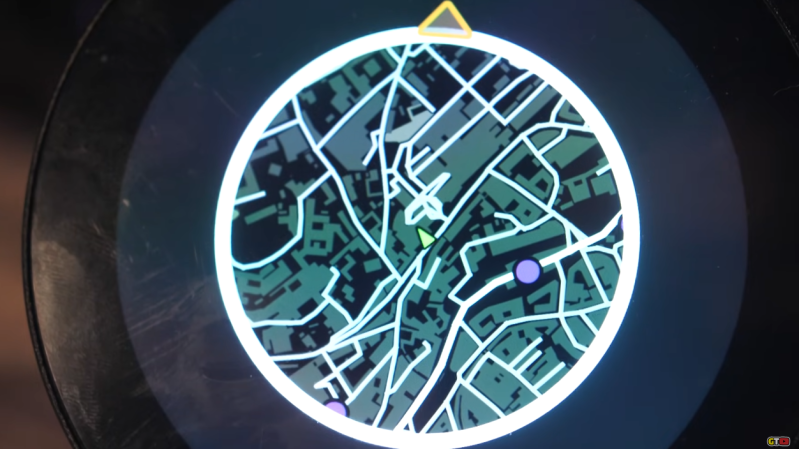
When driving around in video games, whether racing games like Mario Kart or open-world games like GTA, the game often displays a mini map in the corner of the screen that shows where the vehicle is in relation to the rest of the playable area. This idea goes back well before the first in-vehicle GPS systems, and although these real-world mini maps are commonplace now, they don’t have the same feel as the mini maps from retro video games. [Garage Tinkering] set out to solve this problem, and do it on minimal hardware.
Before getting to the hardware, though, the map itself needed to be created. [Garage Tinkering] is modeling his mini map on Need For Speed: Underground 2, including layers and waypoints. Through a combination of various open information sources he was able to put together an entire map of the UK and code it for main roads, side roads, waterways, and woodlands, as well as adding in waypoints like car parks, gas/petrol stations, and train stations, and coding their colors and gradients to match that of his favorite retro racing game.
To get this huge and detailed map onto small hardware isn’t an easy task, though. He’s using an ESP32 with a built-in circular screen, which means it can’t store the whole map at once. Instead, the map is split into a grid, each associated with a latitude and longitude, and only the grids that are needed are loaded at any one time. The major concession made for the sake of the hardware was to forgo rotating the grid squares to keep the car icon pointed “up”. Rotating the grids took too much processing power and made the map updates jittery, so instead, the map stays pointed north, and the car icon rotates. This isn’t completely faithful to the game, but it looks much better on this hardware.
The last step was to actually wire it all up, get real GPS data from a receiver, and fit it into the car for real-world use. [Garage Tinkering] has a 350Z that this is going into, which is also period-correct to recreate the aesthetics of this video game. Everything works as expected and loads smoothly, which probably shouldn’t be a surprise given how much time he spent working on the programming. If you’d rather take real-world data into a video game instead of video game data into the real world, we have also seen builds that do things like take Open Street Map data into Minecraft.
Thanks to [Keith] for the tip!












Great build and aesthetics. The work that went into the map design is just incredibly awesome. Massive kudos.
For context: personally I am a “North is Up” navigator with a dislike for rotating maps .
In this case though I consider the build a fail: if the map does not rotate it is not a (Need For Speed) game mini map. So all the nay-sayers he talks about in the intro were totally right. They are not atheists, he is a blasphemist.
Started watching the video and dude is very proud of doing something others told him was impossible. My guess is others considered compute required to rotate 800×800 map and deemed it infeasible on ESP32. @17:00 he finally confesses rotation is tanking performance and settles on static map. Personally Im quite surprised after looking up esp32-p4 variant, its dual core 400MHz, should have no problem smoothly rotating 800×800 worth of tiles.
Thus great looking project, but overall 1:1 NFS map this is not.
If rotating the whole map is a problem (don’t really see how it would be but don’t know the implementation of course) extracting the area around the car and rotating that instead would be pretty trivial, but potentially slower given that there have to be another copy of data map -> surrounding area.
The per pixel cost should be pretty trivial unless the data needs filtering to look good.
Round display itself is 800×800, whole map is most likely much much bigger.
The issue is more to do with the LVGL buffering implementation (which is what I used in this first iteration). Even when you utilise the PPA and matrices options of the P4, rotation still seems to max out around 4fps due to the way it compares the buffer frame by frame. I’m only rotating what’s on screen, but it’s still computationally heavy it seems. It’s not terrible and kinda fits the >20 year old aesthetic, but it’s not great.
Currently looking into getting vectors going on it, but it’s a much bigger task, as well as decoupling the markers and a few other things that will effect performance both positively and negatively.
Still quite a lot to do, but it’s been a fun challenge so far
Your out of fast memory.
Then it becomes a bandwidth problem, IIRC the screen and external memory share the SPI bus.
Which is also where your big map lives…Optimize that memory access…
If you ignore the corners of the screen and use a ’round buffer’ you can keep a single working frame in internal memory…just.
Have a CPU (or thread if using an OS) preloading big map data into remaining scrap of fast memory while the second one scales and rotates and renders into your fast frame buffer.
Perhaps find a way to stop updating the useless screen corner data every frame while serving the visible data from fast memory.
Remember it’s:
‘Premature optimization is the root of all evil.’
Not:
‘Early optimization is the root of all evil.’
Don’t play ‘need for speed’…but many similar.
Shouldn’t the map scale w speed?
Would require a OBD2 connection and getting speedo data.
Bet that’s already done.
The obvious answer – just rotate the screen, it is a round screen, there are high pin count slip rings available, then it’s “just” a matter of adding a nice motor and compass module.
(half serious, but would look very cool ;) )
I was just thinking that!! Silly, but super cool!
There was always an option to leave the minimap fixed.
The comments already indicate him that he should save the maps in vectors, and render it in the device as it would be far easier for the hardware.
Or “rotate” the screen by using three pixel movements as in this video which i find rather interesting
https://youtu.be/1LCEiVDHJmc
Nexr version: Physically rotate the screen.
That was my thought as well
Great project, i can see a version of this on my motorcycle with a destination indicator around the edge of where i want to go. The only thing that puzzles me is running a modified version of the script (for 18 hours) that doesn’t output the tiles smaller than 881 bytes, instead of just removing those from the directory.
Just keep driving north. Problem solved!
what do you mean by calling nfs: undergroud 2 retro??????
Question, how is that different from a Garmin or Tomtom?
What about 5-star indicator? :-)
Doable.
Detect flashing lights and SDR to tap into cop radio.
Also audio chopper detector.