
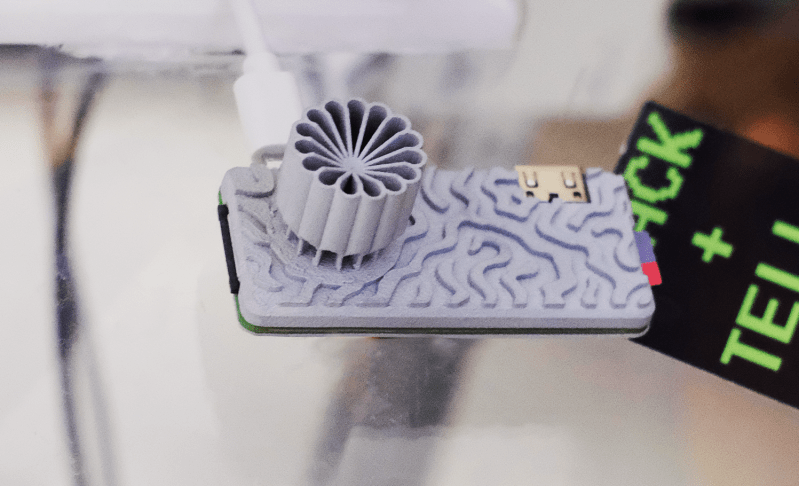
If you started with computers early enough, you’ll remember the importance of the RAMdisk concept: without a hard drive and with floppies slow and swapping constantly, everything had to live in RAM. That’s not done much these days, but [Quackieduckie]’s solar powered Pi Zero W web server has gone back to it to save its SD card.
Sustainability and low power is the name of the game. Starting with a Pi Zero W means low power is the default; a an SLS-printed aluminum case that doubles as the heat sink– while looking quite snazzy–saves power that would otherwise be used for cooling. The STLs are available through the project page if you like the look and have a hankering for passively cooled Pi. Even under load [Quackieduckie] reports temperatures of just 29.9°C, less than a degree over idle.
The software stack is of course key to a server, and here he’s using Alpine Linux running in “diskless mode”– that’s the equivalent of what us oldsters would think of as the RAMdisk. That’s not that unusual for servers, but we don’t see it much on these pages. It’s a minimal setup to save processing, and thus electrical power, with only a handful of services kept running: lighttpd, a lightweight webserver, and duckiebox, a python-based file server, along with SSHD and dchron; together they consume 27 MB of RAM, leaving the rest of the 512 MB DDR2 the Pi comes with to quickly serve up websites without the overhead of SD card access.
As a webserver, [Quackieduckie] tested it with 50 simultaneous connections, which would be rather a lot for most small, personal web sites, and while it did slow down to an average 1.3s per response that’s perfectly usable and faster than we’d have expected from this hardware. While the actual power consumption figures aren’t given, we know from experience it’s not going to be drawing more than a watt or so. With a reasonably sized battery and solar cell– [Quackieduckie] suggests 20W–it should run until the cows come home.
This isn’t the first solar-powered web server we’ve seen, but this one was submitted for the 2026 Green Powered Challenge, which runs until April 24th.













The heatsink likely cost more than the pi. The zeros do not need active cooling or heatsinks, especially for something as non-demanding as a webserver
lololololololol
Unless he’s sending it to outer space or into a particle accelerator, using it for something truly mission critical, or expecting multi-year uptime, the odds of memory corruption causing any actual problem are infinitesimally small.
(hell, given that the server is only using 80mb of storage out of ~400mb of ramdisk, if you were that worried about ram integrity, you could use the extra ram to store multiple copies or data checksums and do on-the-fly testing)
Well, yeah… running a little dingus like that off solar is easy… a couple 18650’s will keep it running all night (probably a couple days if the clouds roll in).
Now… the real trick would be running a proper webserver on a real machine (read: not a RPi or Arduino-class device), spinning rust and all that.
The odds are not as low as you’d think, we just don’t measure it because you need ECC for that.
A few years back some researchers typosquatted some variants of “microsoft.com” that were one bitflip off and tens of thousands of computers tried to connect per day. That’s remarkably high when you consider that every single one of them must have not only experienced a bitflip, but experienced a bitflip in the extremely specific spot that was holding the web address.
A recent test by firefox found similar results, where 10% of crash reports were a ram problem, which rose to 15% directly attributable to bad ram once “ran out of ram” cases were removed. Further, they found that half were repeat offenders who likely had bad ram hardware they knew nothing about, while the other half were due to particles from space.
So what, the odds of that ram bit flipping etc is pretty low, made lower by that hefty heatsinking, and for good measure its running from a Ram disk, but the data must be on the SD card to populate that ram disk, so a failure can be pretty trivially recovered.
Absolute worst case it falls over hard enough to not recover on its own and a reboot will recover it, which for a tiny solar powered personal website really isn’t a problem. It is not some service that is actually making
The odds are not as low as you’d think, we just don’t measure it because you need ECC for that.
A few years back some researchers typosquatted some variants of “microsoft.com” that were one bitflip off and tens of thousands of computers tried to connect per day. That’s remarkably high when you consider that every single one of them must have not only experienced a bitflip, but experienced a bitflip in the extremely specific spot that was holding the web address.
A recent test by firefox found similar results, where 10% of crash reports were a ram problem, which rose to 15% directly attributable to bad ram once “ran out of ram” cases were removed. Further, they found that half were repeat offenders who likely had bad ram hardware they knew nothing about, while the other half were due to particles from space.
I didn’t say it didn’t happen, or wasn’t potentially impactful when it does – but even if you assume 100% of firefox crashes are due to bad ram it doesn’t actually mean much when the program runs for most users for a few thousand hours between errors, if it errors at all – 100% of the blame of 0.00001% of the time in use being disrupted (or whatever it actually turns out to be).
Also ‘bad’ Ram as a rule is actually bad when being pushed hard and hot, and generally still only at the one dodgy address/row but quite probably works flawlessly on your well cooled test bench. This Pi is doing neither hard or hot use of that ram, plus the ram is from a generation with rather larger feature sizes on the silicon that actually makes dumping enough energy into it to trigger a bit flip vastly harder than the smaller nodes of higher speed and denser memory.
Yes genuine ECC is nice to have, and if you are doing serious work with lots of compute time that will be wasted in an unrecoverable memory error you’d be a fool not to have it, or some other checksum/recovery methods but for this…
The “small hardware” premise ignores the interaction term (Γ), the non-linear overhead that dominates the energy profile during a phase transition. Efficiency isn’t scalar; it’s a structural relationship. True sustainability requires energetically coherent correctness, aligning software logic with physical trajectories to minimize thermodynamic tension and respect Landauer’s limit. I have written a paper on this only this week, look me up on X if you want to know more about it. We have been applying it’s principles in our business and while reducing the energy budget of a computational task generally increases the time required to complete it (and vice versa), addressing structural inefficiencies, such as thread contention or massive cache interaction overheads (Γ), can simultaneously improve both energy efficiency and execution speed. This boils down to a need to not use Linux when bare metal programming will suffice for a specific, relatively narrow, task.
“Alpine Linux running in “diskless mode”…”
Or for Debian Linux flavors:
1) Boot with the toram boot parameter. This copies the entire system to RAM, allowing you to remove the USB drive while in use, which mimics Alpine Linux’s diskless mode.
2) Alternately,
a) Stop the current swap: sudo dphys-swapfile swapoff
b) Uninstall the swap file: sudo dphys-swapfile uninstall
c) Disable the service: sudo update-rc.d dphys-swapfile remove
d) Purge the manager: sudo apt purge dphys-swapfile -y
After rebooting your Raspberry Pi Zero W, verify that the swap is gone by running:
free -m
The “Swap” row should show 0 for total, used, and free space.
Caveat: SD-card must be installed to start-up/reboot
’tis been a long time since I messed around with the Raspberry Pi’s, so some info may be dated (wrong.)
FreeBSD is even simpler:
Change “rw” to “to” for / in /etc/fstab. /var and /tmp get automatically converted to ramdisk-like mount points and you don’t worry about wearing out your eMMC chip.
I use it all the time on Beaglebone Green nodes.