

The 2000s was a decade of great change in the computer industry. The world had grown accustomed to corruptible floppy disks, blue screens of death, and achingly slow load times. In a few short years, all of that would change, as USB drives, better operating systems, and faster processors brought forth a new age of stability and speed.
Amidst this era of upheaval, Microsoft introduced a new technology. It was intended to increase performance on the cheap to a new generation of machines, but it would turn out to be little more than a gimmick that never really caught on. Let’s explore the easily-forgotten legacy of ReadyBoost.
Boost or Bluster?
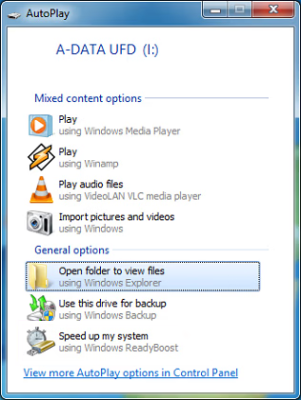
When Windows Vista was launched in 2006, it was built to make the most of new technologies that were rapidly becoming mainstream in the industry. Chief among them was flash memory. The USB flash drive had risen to prominence as a defacto solution for removable storage, while digital cameras and PDAs had made Compact Flash and SD cards familiar items to many.
Microsoft engineers realized that this presented an opportunity. While flash memory was still only available in relatively small capacities at the time compared to magnetic storage, it had a special advantage of its own. NAND flash could offer far quicker reads for random access compared to spinning magnetic hard drives, which were subject to the mechanical limitations of their rotational speed and how quickly their heads could seek across a platter. Thus, the idea for ReadyBoost was born—to use cheap flash storage as a cache to speed up random disk reads.
ReadyBoost had some basic requirements. It could only be activated on USB flash drives or other removable flash media with a capacity in excess of 250 MB. That was the minimum cache size, with a 4 GB maximum size in the initial Windows Vista release. One could decide to dedicate a device to ReadyBoost, or only use a segment of its total storage capacity.
Only a single device could be used at a time for ReadyBoost in Windows Vista, formatted in FAT16, FAT32, or NTFS. The drive in question would be tested to determine if it could achieve 2.5 MB/s read speeds for 4 kB random reads, as well as 1.75 MB/s write speeds for 512 kB random writes, in order to make sure it would be fast enough to work as a higher-speed cache. Similarly, access times had to be below 1 ms for the device to be of use.Any space used for cache could not be used for storing files. The ReadyBoost cache itself was stored as a file called ReadyBoost.sfcache.
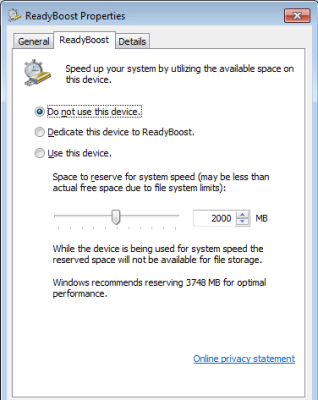
ReadyBoost could be enabled on a range of flash media, as long as it met the above minimum specifications. USB flash drives were an obvious choice, if you didn’t mind having a dongle hanging off your PC or laptop all the time. Microsoft also noted that SD cards could be a convenient solution for permanently parking a ReadyBoost cache in machines that had a card reader slot. You could also use CompactFlash cards, too, if so desired.
Approaching the time of release, Microsoft engineers noted that random read performance on flash drives was 10 times quicker than hard disks. However, on larger sequential reads, HDDs were still going to outperform most USB 2.0 flash drives available. Even in 2006, it was noted that the ReadyBoost system would make the biggest difference under high disk use and low free memory conditions. On machines with lots of RAM and during light usage, it didn’t help as much.
ReadyBoost was just one of a range of technologies that was implemented in Windows Vista to aid performance. Microsoft also developed ReadyDrive, which was intended to hurry along boot times with the aid of newly-developed hybrid hard drives that combined magnetic storage with non-volatile flash memory. There was also SuperFetch, which assessed which applications were most commonly used and preloaded them into memory to allow them to load faster. These technologies were both a little more background in operation, though.
Microsoft gradually improved ReadyBoost over the years. Windows 7 brought upgrades, allowing the use of up to eight devices with a cache capacity of 32 GB each—putting the total cache size maximum at a hefty 256 GB. The algorithm behind ReadyBoost was also improved, while newer, faster flash memory and interfaces aided performance further. The technology persisted through later Windows versions, until it was eventually deprecated and eliminated in Windows 11 version 22H2. One suspects this was because use rates were so low that it didn’t make sense to maintain the feature any longer.
How much difference ReadyBoost did make in the real world? While the basis of the technology was sound, it’s not exactly clear how many users actually bothered to use it. The impact was theoretically greatest on systems with slower magnetic hard drives and low RAM. This became increasingly less relevant as the industry moved towards larger amounts of RAM and SSDs as standard. For most Windows users, it remains a footnote in the operating system’s history—an interesting curio that helped in some edge cases, but was perhaps not a gamechanger except for the weakest machines out there. In the end, it couldn’t compete with the tried-and-true method of just having faster primary storage and more RAM in the first place. It might have helped out a bit back when underpowered netbooks were struggling along and RAM in excess of 2 GB was a luxury, but today, ReadyBoost just doesn’t make sense when every PC out there has a blazingly fast SSD under the hood. The times changed, and the world moved on.












Another questionable technologie: HDD with SSD-Cache.
Mine was as slow as an HDD is. SSD-Cache was a waste of energy and my hard-earned money.
Hi, you mean SSHDs? There are at least two types, I remember.
One has a dedicated flash part that is reserved for an OS supporting it (such as Vista) and the ones with a learning algorithm.
The Momentus XT was the latter and required many reboots to learn which sectors are accessed the most and thus should be in the cache.
Defragmentation of the HDD caused the cache to forget, if I remember it correctly.
https://en.wikipedia.org/wiki/Hybrid_drive
https://www.youtube.com/watch?v=GtnGpcZNPHc
PS: There also were other solutions like an HDD-SSD combiner device.
It used the SSD to cache the boot sector and the beginning of the HDD (the sectors counting onwards).
For the rest, the HDD was used.
I remember testing one back in the day, and it was faster than just an HDD, but not as fast as an SSD, as you’d expect. The real issue for us was that the increased price over an HDD didn’t quite justify the speed increase, so we went with spending more for SSDs in the machines that required them and HDD for everyone else.
Era: Win7, 4GB RAM and 2,5inch spinning disk. A 16-32GB SD did make a noticeable but moderate improvement. And there was a good ‘placebo’ effect for little money for users of PCs saddled with mandatory corporate crapware. A usable size SSD was a big NO from BigCorp, but SD cards disappered in the noise.
Microsoft has the worst names for things. Both “Windows” and “Dotnet” are difficult to use in a search engine context. At least “ReadyBoost” is a searchable term, though it reminds me of “RemoteReady,” a tech for concealing a tiny three-axis magnetometer inside a clip attached to a propane tank fuel gauge. (Or, that’s what I think it is, though Googling that term hasn’t produced many results.)
they are also notorious for renaming systems that do the same function and may in fact be the same system. i figure they do this to force everyone to reup their certs. i barely recognize windows anymore.
Remember Windows RNA? (Renamed Network Architecture)
You may not recognize it, but Jet is lurking in Windows 11.
It is undead.
Windows 3 lives on as windows installer.
Undead everywhere.
Same as any old OS.
Should be a Peter principle corollary.
The older an OS gets, the more ‘working at level of incompetence’, hidden cruft accretes.
Term limits for OSs.
Reboot the Linux kernel!
Bold prediction:
In 2050 FreeRTOS will require 256 GB RAM to run, installer will be 10TB.
Windows I get it. But Dotnet ?
I like the idea of ReadyBoost. The system is caching disc data in ram all the time. This seemed to be a way to cache on a SSD as well.
But I suspect this was not implemented the way I think. As I recall there where sync issues with power cuts.
Try using bcache (not bcachefs) as a write-through cache for any other driver, array, etc. works great.
You can scoff, but I got real, ACTUAL speed improvements using – never ReadyBoost – but SuperSpeed SuperCache, which was kind of like the inverse of ReadyBoost now that I think of it.. if you had a hefty amount of RAM you could approach access speeds like as though everything was on a ramdisk.
i manually put my commonly used files — root and my frequently-used large projects — on an SSD (my spinning rust is all shingled / slow). I’d like to think it speeds things up but tbh everything lives in RAM cache anyways and when something flushes that cache everything is unbelievably slow. so i’m not sure it makes a difference
I thought this concept was absurd. 60 GB SSDs were affordable during this time. Though it took a conscientious effort to organize data between a HDD and an SDD, to keep the SSD from getting full.
My first SSD was 16 GB, it was the largest one I could afford at the time.
It was about big enough for a basic Windows XP installation
(needs 1,5 GB, but applications need a few GBs, too. Also, 1/3 pf storage should remain unused).
However, XP booted very slowly on it, even with the alignment fixed for 4K sectors.
XP had no Trim function, also. The garbage collection of the SSD had to figure out how to keep things running smooth.
The old Sandforce controller didn’t like XP for some reason.
Windows 7 later worked very quick with same SSD, but it was too small to be usable.
When SSHDs (HDD SSD hybrids) were new in 2007 or so, they had 256 MB of SSD cache.
The Momentus XT had 4GB of SSD cache.
This was in a time of proper SLC flash, before cheap MLC, TLC etc became mainstream.
That 16GB SSD would still fit a Linux installation with lots of programs today if you used BTRFS with compression enabled.
I have some chromebooks that have 16gb and have Antix running swimmingly on them with more than 3gb of free space. It is tight but still doable in 2026
Uh, that was a trip down memory lane. Iirc I did the very same thing. Got an Mini-PCI SSD to put my Linux root on. Noticed that I can’t boot from that drive and had to do sone shenanigans to get that working.
Then hybrid disks came about and I swapped the other disk over.
Was it worth it? Likely not, I always maxxed out RAM and rarely shut down the system. So everything that was used frequently just lived in RAM.
So you had a larger than average, expensive ssd (in 2006 anyway) that you had to manage the split of data yourself, and think this plug and play speed boost is absurd? A time when 99% of new computers didn’t have an ssd.
Wow, 2006. I see from the article that this existed in Vista, which I avoided like the plague. I became aware of SSDs and Readyboost when I switched from XP to Windows 7 in 2010. I was blissfully running XP with 10,000 RPM HDD. SSDs had become pretty affordable in 2010. I convinced a few people I knew to upgrade. It brought me joy, to see others witness most dramatic speed boost ever.
SSDs were new at that time and were awfully expensive making them NOT affordable especially a 60 GB SSD. These days those SSDs no longer exist and the enormous ones are equally if not more expensive and unaffordable.
ReadyBoost absolutely could boost games. I had a fast flash drive I used with a Dell XPS laptop (what a Radeon x300 gpu, I believe) running (of all things) Doom 3, and with the flash drive, game load time was cut in half (I measured it several times.)
Did anyone ever make a ReadyBoost-only thumbdrive with RAM instead of Flash? It would be even faster and never wear out. Even better would be something that plugged directly into the motherboard’s USB headers for internal installation.
I think what you are looking for is called is a RAM module.
No, that would be the same as the read caching that modern OSes already do but with extra steps.
On the contrary, right before I switched to SSDs, I played Minecraft from a RAMdisk for the added performance, as AMD had free RAMdisk software. It was pretty cool.
Intel Optane?
Pretty different use case though. Readyboost let you repurpose e-waste (free usb sticks) for a small performance increase.
If you are spending money for a RAM-based product then it would be silly to bottleneck it though the USB interface.
I think notebooks with low RAM expansion were the main problem back then.
Upgrading RAM wasn’t as easy as buying an USB flash drive in the super market.
Sometimes the notebook RAM wasn’t accessible via trap door or it was in a special form factor.
Hi, what you are refering to is a RAM disk device.
Uses same physical interface as an flash ROM but uses RAM chips with a backup battery instead.
That basic concept was used in old video game cartridges from the 90s.
Say, Gameboy or SNES. They had “battery backed RAM” for game saves.
There also were EPROM/ROM simulators that used RAM chips.
They had same pinout as EPROM chips but on RAM basis.
A write-protection switch prevented overwriting by the system it was used in.
Some simulators also could remain connected to the programmer,
so develops could update the simulated “ROM” anytime they wanted.
Your idea of an USB pen drive with a RAM chip (and a battery) would have been quite useful in some applications.
Like for quickly sharing large files in an office environments between co-workers.
Because here, the drive is not a permanent storage medium.
Data loss due to an eventually battery failure (after months) wouldn’t been an issue.
It also would have been good for testing purposes.
To measure USB throughput of an OS.
ReadyBoost was terrible in actual usage, because even if the flash drives had better random access speeds, the host-initiated nature of USB meant that the best use case for those drives (lots of small reads) also ate up tons (considering the CPUs of the day) of CPU cycles. So it might free some RAM and cause less swapping to a hard drive, but at the expense of using lots of CPU, so overall breaking even in raw performance, if not a net loss in perceived performance.
It would be interesting to see the workloads that Microsoft used to get the [up to] 5x speed-ups that they claimed, because as someone who tried everything to get his dad’s Vista machine to cooperate, I never saw real-world improvements from ReadyBoost.
Could have been exacerbated by having a Pentium 4 (NetBurst FTL!) in that system, since the CPU was always heat-soaked up and not appreciating being asked to constantly set up USB transfers. But this just shows why using USB for random access is just the wrong tool.
The best use of ReadyBoost was to use a fast flash drive to cache stuff like games to decrease load times vs slow laptop hard drives. I mentioned this specific use case upthread. I want to say (it has been 20 years) that Doom 3 loaded in under 20 seconds with ReadyBoost vs over 45 without.
I never tested the use for ongoing performance, because Windows managed what was actually copied to the flash drive. Theoretically stuff like large videos, textures, and so on could benefit. I wouldn’t expect much from most non-gaming apps, though.
Typical half-assed solution to a non-problem. Flash memory is indeed fast to read and so can substitute for disk storage. Read only disk storage, that is. It really only becomes viable for hard disk replacement if its given a journaling file system and its relatively large for the amount of writable storage actually used.
Micosoft has never really solved the problem of it pummeling its storage (and it also has fixed storage areas on disk). This eventually impacts disk performance and so overall system speed (the disks will replace areas that are showing excess errors but it impacts seek times in mechanical disks).
I understand the purpose of ReadyBoost.
If we go back to mid-2000s and the Longhorn/Vista development it makes sense, I think.
Vista was very complex and the average PCs were all underpowered (some basically being upgraded Win98 PCs).
Especially laptops at the time were underpowered. Slow 5400 RPM HDDs, low RAM.
They had issues running an up-to-date Windows XP SP2/SP3, even.
The idea of ReadyBoost then was to use comparable cheap USB pen drives as a cache for system files.
So swap file usage on slow HDD could be reduced.
Looking back, the idea wasn’t dumb at all, given the available hardware.
Unfortunately, Firewire flash drives didn’ t exist and USB 3 wasn’t available yet.
If USB 3 would have been available, all the resource intensiveness of USB 1.x/USB 2.0 wouldn’t have been an issue.
But sadly, USB 3 hardware was hard to get in early 2010s, even.
I’ve checked many local PC shops in my city for USB 3 hardware but there was none.
Even the tech-savy employees had no clue about USB 3.
I then ordered an NEC USB 3 controller card and an external USB 3 HDD chassis from a foreign land far away.
Back then I couldn’t believe how backwards western IT was.
Outdated USB 2.0 hardware everywhere, which relied on polling and bulk transfers. No DMA feature etc. So sad! 😢
It seemed as if the good stuff was only available in the far east via small indie companies.
The only thing that might been available at the time might been some DOMs for eSATA port.
These then could been plugged into eSATA port at the back of a late 2000s motherboard, similar to USB pen drives.
(Using IDE DOMs or CF IDE adapters would have worked, too, but
I don’t know if Windows would have them allowed to be removable drives to be used by ReadyBoost.
Because Compact Flash cards support three different i/o modes.
Programmed I/O, memory-mapped and True IDE.
And using an USB card reader wouldn’t been much better than just using an USB thumb drive.)
But USB itself eats a lot of the benefits in this usecase.
Indeed. USB 1.x and 2.0 were never meant for such things. Firewire was, rather.
Classic USB was intended as a cheap interface for low-speed devices.
Such as USB mice and keyboards, printers, scanners..
Webcams and video capture by contrast (pun intended) were meant to be used via Firewire.
That’s why Apple on Macs rightfully limited webcam and DV support to Firewire models (initially in the early OS X days).
The frame rate, overhead and stability was much better with Firewire.
USB webcams always lagged and caused high CPU usage.
Even parallel port models from the 90s were better here.
In principle, Classic USB was like the ADB port found on Macs.
They too were low-speed ports mainly designrd for keyboards, mice and joysticks.
Some vendors later produced other devices for ADB, though. Like modems.
Just like USB was used for USB floppy drives and USB card readers, flash drives etc.
Thing is, these new device classes originally were competing with 1,44 MB floppy speeds.
The oroginal USB was not intended to compete with, say, SCSI.
SCSI was the interface of choice for external HDDs, fast CD-ROM drives and high-speed streamers.
But by mid-2000s merely USB remained popular in PC industry, so there was no real alternative to USB for thumb drives.
Except for Firewire. USB 2.0 rivaled Firewire 400, while USB 3.0 fought back at Firewire 800.
Best there were were some CF card to Firewire adapters.
They offered way better perfirmance than USB card readers.
Delock and Sandisk produced one, I think.
They were mainly used by Mac users, though, I guess.
There’s also Intel’s Turbo Memory, a much-maligned caching “solution” that caused more problems (random BSODs) for zero benefit
This did have some benefits back then especially on laptops, because a low-cost laptop hard drive would struggle so incredibly badly with random access especially when normal people didn’t run disk defrags. And you were almost certainly going to be swapping virtual memory to disk and back to an extent, if your system was low spec and not very well stripped down. Turning off the aero gui features in vista was enough to make for a decent speedup in those days.
+1
Yes and no, it depends, I think. The way I remember:
Aero Glass was heavy, yes, but it was rendered by GPU – not CPU.
So by using Aero Glass, the GUI ran on the graphics cards and the CPU had less work to do.
It also fixed graphical glitches. Problematic 16-Bit applications looked properly with Aero Glass turned on.
However, on other hand, Vista kept a local copy of video memory in RAM.
So if Aero Glass and the GPU used much video memory, the PC RAM was being utilized more, as well.
Which in turn slowed things down again.
Back then I was making a RAM disc on graphic card and set the Swap file to it. Very noticeable. Or simply move swap file to drive D away from C.
Back in the late 80s/early 90s, it was possible to use a video card’s framebuffer RAM as conventional DOS memory.
It increased RAM from 640KB to up to 736 KB, at cost of some video modes (often, only text-mode and CGA remained).
Worked with Hercules card (original, not clones) and VGA cards.
The drivers were hercumb.sys/umherc.sys (IBM DOS 6/7) and vidram.com (Quarterdeck QRAM and QEMM).
This may seem pointless at first, but it wasn’t meant as a permanent solution.
Borrowing video memory rather allowed running large applications that were needed only sometimes. Such as a compiler/linker.
Those tools ran in text-mode at the command line or in a simple IDE (like MS-DOS EDIT).
“640K ought to be enough for anybody”
Readyboost was a thing pre SSD and worked pretty well if the machine was actually that bad off memory wise. I never had any issues with it. If ya unplugged the usb by mistake, then it just went back to its old self. Honestly a pretty helpful addition in those times. I am glad to see the folks at HaD remember it as it should be: a fairly useful transition program when software and hardware were about to make a big leap. At the end of the day ya wouldn’t even need it if manufacturers didn’t shove so much bloatware on there. HP can eat a fatty as can outdated Norton lol. I had to deal with so many family and friend machines with those issues. Readyboost did help them. Now it is really not available in the menus unless you have a mechanical hdd and probably less necessary since there is less Bonzi Buddy and flash games that never stop running without a browser lol. Not sure why Zoe decided to put the descriptive blurb with a negative leaning title and a bowl of warm milk as the evidence of it either working or not. Kinda sloppy. But at least ya got in the proper Windoze tone for HaD.. https://en.wikipedia.org/wiki/ReadyBoost
This approach peaked with Intel Optane hybrid storage on laptops. One M.2 card hosted a x2 lane NVMe drive and a x2 lane Optane. Optane offering much lower latencies. PCIe 4.0 x2 has a theoretical bandwidth of 4GB/s, which is still decent enough today, especially if the Optane half is lowering your latency.
All it technically needed was x2/x2 bifurcation and an (11th gen?) Intel processor. But in practice it was mostly relegated to OEM laptop configurations.
https://www.youtube.com/watch?v=tSUMBeaaiOo
Optane no longer being produced means that tech is gone for good, sad because PCIe 5.0 would have allowed for 8GB/s, indeed PCIe 5.0 x2 drives are now available on the market.
Some niche uses:
I have used readyboost quite a lot; not with slugish pendrives but with USB 3.0 attached SSDs instead. It helped a lot when I needed to work on laptops which still had a mechanical HDD. I was not going to keep them, so internal drive upgrade was not an option.
Similarly, at the time when 32 bit windows was still a thing (albeit a fading one) and computers began to get more memory than the operating system could address, it became possible to use a ram drive together with readyboost and get some benefits from ram above 3GB limit, which could not be used otherwise. It used to be great for retro computing using modern PCs; today virtualization is a better option.
I literally used this until recently in windows 10
It made an hdd feel like an ssd
Like after booting I noticed no major hiccups
Granted I always used 1-2 32gb drives, 32-64gb
But I always did overload the ram and gaming is heavy on random reads
It is sad, windows 11 is demanding everything people don’t care about and removing everything they do
Secureboot? 99% of people who understand it refuse it
Online-only account? 100% of experts say bad idea
Cloud only software? All power users demand a local option
Storage? All intelligent people demand mostly local
Gaming? All gamers demand owning and running local for 99% of games
Your phone and Cloud are and eternally will be a terrible substitute for local compute and Storage, always, eternally, because physics
It can be a convenient backup, but a desktop os that works exactly like a phone with keyboard and mouse? How about absolutely never
I to this day install Win 11 as a local account. It is a decent enough daily driver, I add some settings to get the proper right-click menu back (from win95-win10) and debloat it of all bundled apps/links to web versions of office.
I have been a heavy windows user since 3.0/3.1. Does anyone else remember getting a window lost off-screen? I have a memory of walking a schoolmate through retrieval on the phone from 1997 or 1998.
Anyone else remember re-starting Explorer hourly on Win95A, daily on Win95B, weekly on Win95C and every other month on Win98? Lol, that and searching for stable SiS or VIA chipset drivers; I’m getting noatalgic.
RAM Disk is not an installation procedure.
Back before PCs were popular 1 MB was a dream.
Commodore 64 and Apple //e along with TRS-80, and Amiga were popular for their era.
Nowadays, many programs seem to load almost instantly compared to those early systems.
Those early systems though loaded their programs, and only their programs.
Windows has become this huge behemoth of an OS loading things you don’t want, didn’t ask for
and don’t need. Windows 7 wasn’t too bad. This garbage MS has out today is nothing like the
systems before it. It’s just my opinion, but if Microsoft Windows is to be the one-all beat all OS,
then it seriously needs to get back to basics, put the start button back to where people expect it
to be and stop trying to be something its not. There are programs and setting that will move it
back, but why should you have to? Why should you have to debloat your OS and work to get
rid of things you don’t want or didn’t ask for? People wanted (and had) an OS that just WORKS.
The more hoops you make people jump through, the more they’ll be driven away.