

In our search for the unusual or interesting among the world of operating systems, it might seem unexpected that today’s choice for a Daily Driver is the latest version of Microsoft Windows. Aside from Hackaday perhaps having a larger than average percentage of viewers using Linux based operating systems and generally catering to open source enthusiasts, there’s hardly anything special about Windows, is there?
Oddly for me there is — because while it’s a common enough OS for the masses, the last time I had a Windows computer it ran XP. That venerable OS is a world away from today’s Windows 11, and thus as someone who’s exclusively sat in front of a GNOME desktop for much of the last two decades, it’s an entirely new operating system.
There’s no doubt that it will make a Daily Driver, because of course I’ll be able to do my work on it. Where the interest lies is in seeing what Windows has become. Is it still a useful general purpose operating system, or has it become the locked-down walled garden of crapware that its detractors warn you about? Time to dive in.
A Secret Windows Machine
I have had a Windows partition on this machine since I bought it back in 2024. It’s an ex-corporate laptop from a reseller, and those machines always come with a too-small flash drive and a Windows install. So when I bought a new much larger drive for my Linux install I dropped the Windows partition on it too. After all, you never know when you might need Windows for something, right? Two years later and I’ve never touched it, so my first task in my Windows 11 is to run a system update. I timed the start to 16:30, and left it running. I have a gigabit fibre connection so it should be quick, shouldn’t it. At 19:16 I was finally able to use the computer, but even then Microsoft wasn’t quite finished. There were a slew of permissions choices where I had to opt out of their various data slurps, and their offers and mail.
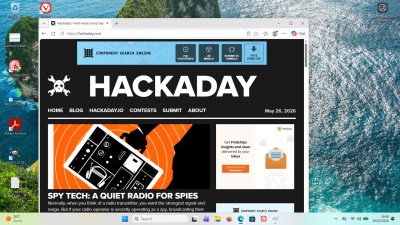 Coming back to the Windows desktop when your last experience was XP with the Windows 95 theme is a bit of a shock. You instinctively head for the Start menu in the bottom left corner and instead find a widget box full of news feeds and stock tickers you don’t want. Closer inspection shows they’ve chased a macOS style interface with a Windows logo on the bottom bar as the Start menu roughly where Mac users find their folder full of apps.
I’m trying to approach this think as a Windows user would, so instead of heading off and downloading open source installers as you might expect, I’m off to the Microsoft Store. Although Redmond has its hand on my shoulder I was able to find GIMP without issue, so the basic requirements for my normal daily use is sorted without any drama at all. It’s the ancient version 2.1 though, so it was off to gimp.org for the latest version. Installation was the same as any Windows install back in the day, there’s no locking down here.
Crapware’s a Bit Different
So I’ve got a Daily Driver, what are my impressions. After so long away and having missed the debacle of Windows 8’s Metro interface, I think the desktop interface is actually pretty good. It’s kept up with the times in a way macOS — with its barmy top-corner menus which just don’t work in a world of 4K screens — hasn’t. As to the commercial aspects of the OS, I was expecting it to ask me for a Microsoft account and it hasn’t, so that’s a plus. But the thing I had forgotten about was the ubiquity of nag screens. I haven’t had to click a “No, I don’t want to upgrade to your premium version” button in a very long time, and here I am suddenly having all manner of software wanting my attention. No Adobe Acrobat, I don’t want to give you any money! And then there’s the AI. Nothing in my Linux install is trying to offer me AI services, but it seems everything is here.
My jaunt into Windows land will be over when I’ve finished writing this piece, and I guess it’ll be as long again before I revisit this partition. Updating it took nearly three hours, and it’s constantly nagging me for paid upgrades, offering me news stories from sources I don’t like, and trying to push AI services on me. But is it a walled garden of crapware? That’s a more difficult question to answer. I’ve not had to enter a Microsoft account to use it, and I can install the software I want, so it’s not become the walled garden its detractors will tell you it has. The crapware though? Less clear cut.
This is a reseller laptop, so at least in theory, its original drive should have been wiped or even destroyed as part of a corporate data security scheme. So the reseller puts a cheap drive in and gives it a basic Windows install. It’s completely vanilla Windows 11, which is where it differs from many new laptops. There is no bundled software, no nagware, no commercial anti-virus, and no dubious-value security package. It’s as clean as Windows gets, but even so, there’s still too many features being pushed on me that I simply don’t want. It may not have old-style crapware installed, but the crap is still there.
So my final impression? This trip into Windows-land has been interesting, and I’ve found an OS better than I expected. But it’s reminded me again of the reasons why I moved on from dual-booting Windows XP all those years ago, with a lingering feeling that I still don’t quite own it.
Windows 11 then, it’s a daily driver for millions of people, but I still won’t be one of them.












It’s microsoft, what were you expecting?
Losers waste their life tinkering with dual-booting, broken bootloaders, broken GRUBs etc.
Chads simply press F12 or F2 during boot.
Press, or mash frantically along with F10 and Delete because you can’t remember which sodding one it is?
or F1… or Enter… or Esc… just a menu, por favor
rolling head over keyboard during boot
I have a spreadsheet printed out at work with the BIOS and boot menu keys for a bunch of different vendors. HP is the Most Wrong (F10 for BIOS, really?), but it seems no one can settle on the One True BIOS keys.
Esc was the one I always hated. If you pushed it frantically enough, you would push it again when the menu actually showed to close the menu again to boot your default OS and start all over again.
Server side then RDP in, or PXE boot. Course hardware is available so another minimal machine should be workable.
Real Chads add the kernel boot to their Windows EFI bootloader. Or press F7 because they are on a GPD Ryzen device ;)
Once you opt out of all of the intrusive features, Windows 11 really isn’t as bas as other OS user make of it.
I am forced to use it because of the software tools I need for work are only available for Windows, and in general it is plain sailing, and rarely needs a reboot.
Linux is still a compromise, and it requires way too much fiddling to make simple things work, and a general lack of a consistent experience. I am past the age were tinkering is fun. Linux is not there yet, but I am confident it will (Before the fanboys comment, yes, I have tried Linux Mint).
Meanwhile Macs I know are good quality machines, and they are stable, but something about them make me feel like I am trapped in a cage.
Same here. Forced to use win at the company (CAD packages don’t run on anything else), using it on my NUC at home, too, because it came with it. Don’t have a private M$ account.
TBH I had it crash (bluescreen) once since I bought it, that is >1yr ago. Still don’t know what triggered it. Before that on my W10 machine I can’t remember if/when it had a bluescreen.
The other NUC (streaming, connected to a TV) and a laptop run on Linux, though.
The windows machine I was assigned at work blue screened the first day.
I have mostly mac and a couple of linux machines.
That’s most likely a bad company build than windows itself.
Can you list like… one example? In my experience It Just Works and has for like ten years.
My home PC has a 10,5 year old install that sorta kinda works but has it’s quirks. I was very pleasantly surprised when I installed kubuntu on a handmedown laptop and it just … worked.
Only one example?
I run Kubuntu 26.04.
It is not unusual that after some upgrade, the next time I boot, I won’t get into a graphical desktop, or the taskbar is missing, or something else. Rebooting it a few times usually fixes it.
I have two identical monitors connected. If I don’t remember to switch them on before waking the computer from sleep, most of the times they both show the same desktop, instead of each monitor its own desktop.
Conky occasionally decides to start on my left monitor instead of on the right, as configured. A quick killall conky && conky & is needed to get it back to where it needs to be.
Connecting a phone over USB is hit and miss whether the data will be accessible.
NFS drive in Dolphin: sometimes works, sometimes doesn’t. While trying to access said drive, Dolphin will lock up and / or crash.
Trying to connect a BLE label printer over Bluetooth required me to edit some obscure config file for Bluetooth, but next reboot it does not work anymore.
I have been using Linux since 1997. I used to compile my own kernels. I love Linux dearly and never want to go back to Windows, but it is a tough love.
PS Accidentally clicked Report comment instead of Reply. Can there be a confirmation question for reporting comments please?
Having two monitors with different DPI settings (not resolution) is extremely difficult or not possible. Say one 1080p monitor and then a 4k monitor.
I have that now and it just works. It’s actually even worse, one is 4:3 then other 16:9. Different DPI, different resolution, different screen ratio, and I didn’t have a lick of trouble. Maybe you need to update some drivers?
What distro and what version? Wayland or X11?
I cannot change my laptop’s screen brightness on the login screen. Bad if you open your laptop up outside and the last time you used your laptop was at night indoors with the screen set to 2%.
Touchpad scrolling is very inconsistent between apps, in terms of sensitivity, smoothness, and momentum (wow, touchpad scrolling without momentum is exhausting!) For example I might be able to fiddle with it to get it work fine in Firefox, but in Libreoffice Writer, one pixel of scrolling will jump a couple lines (i.e. insanely sensitive and jumpy), and on Discord, momentum will not work.
I installed Pop OS on a laptop and found that after a few minutes, clicking will just stop working until the next restart. Like, I could move the mouse around, but couldn’t click on anything. Switching distros helped.
I do realize the big complaints I have are laptop-specific. Maybe on my desktop everything will just work.
Touchpads are terrible in general, I use tracknub or Logitech mouse.
sound beyond the ” i hear sound from yt, so everything is fine”. alsa, pulse audio, jack pipewire, oss. its a big mess.
i finally have my setup working now, but is eas not a smooth ride at all. alsamixer, pavucontrol, qjackctl, carla, cathy. and audacity does not help either.
Not OP but I can provide an example. I just recently tried out Bazzite (which I love btw. Anyone who was holding on to Windows because of gaming, it’s safe to switch now.) And while there was 0 f-ing with it to get installed and playing stuff, once I started doing nerd stuff with it, I had to figure out which of the 6 different install methods was the right one to use to install my software. Whereas with Windows, you just download the thing and double click on it. (Or, if you hate yourself, download it from the windows store I guess.)
Printers. But that’s a printer thing.
Well, normally the setup forces you to login, but the seller quite possibly used a bypassOOBE command.
Good seller :+1:
And/or this laptop – “from 2024” per the article – is using one of the earlier versions of Windows 11 that still had a “local account” option during OOBE (it’s been a while since I installed 11 on anything, so I apologize if I’m confusing that with Windows 10)
Yeah, I had to do a bit of creative work to bypass the Microsoft account creation on my Windows 11 laptop, too.
I am using YUMI (Ventoy) for my install media and it has OOBE settings automatically built in; just drop your ISO in the folder and it works.
That or RUFUS.
The big change since XP in the crapware department is that crapware used to be added by cheap hardware vendors, so you could get yourself a crapware free machine simply by installing a standard version of Windows. Nowadays, Microsoft unhelpfully includes all the crapware in the standard Windows build. So you always have to clean up a new install, regardless of where you got your Windows from. Unless you can get hold of a licence for LTSC of course – crapware free machines are only for Enterprise customers.
Thank you for your sacrifice.
I’m enjoying Win 10 Enterprise IoT LTSC. It’s really stripped down, shockingly bare compared to a standard Win 11 install.
There are scripts available to nuke most of the annoyances (search for ShutUp10).
Kudos to you for trying it, and I’m not surprised to hear you won’t be sticking with it. 11 came out as I was retiring, and the constant thread from 2000 on was increasing non-OS messages, which got worse with every new (enterprise) edition of Windows. The updates are particularly annoying, and seem to take way more time than they should (comparing them to Linux updates which take a few minutes, max, and don’t interrupt your work).
Always good to have a spare laptop:-) and thanks for buying a recycled one, which is my preference as well — off lease corporate laptops are usually low cost and in good condition.
Remember, Windows 11 (and Win 10) have forcible mandatory automatic updates… unlike Linux which stays how you like it (or the out-date Win 8 and Win 7 did too), anything pleasant about Win 11 could be wiped out on any given tuesday. Sooner or later can come the tuesday where they push a “patch” which does force an MS account, or which turns on (with no way to switch off) everything you’ve had to laboriously opt-out from.
Enterprise versions don’t require an MS account because the assumption is there that you’ll be connecting to an Active Domain, so they’ll never force that on enterprise versions.
And it’s very easy to change your version to Enterprise (LTSC). There’s an account, ironically on Github, that makes available a rather clever powershell script that not only activates your installation, but also lets you change version.
I didnt like 11 at all when it came out. It was entirely too worried about the UI vs actually doing things and trying to shove bloatware down my throat. But with a couple of tweaks, things are fine now. I think I still like 10 better overall, but I see what they are trying to do with 11. Our enterprise systems are an entirely different beast. Everything tamed, happy, and quiet. Bless imaging.
Running Server 2025 here, with the Desktop Experience, on an old Skylake system whose Windows 7 install finally died. I have to say that I’m grudgingly impressed; it’s like Windows 11 but with 95% of the annoyances removed, and performs pretty well even on this 10-year-old hardware.
I use a corporate stripped down version of 11 daily and I can’t find a damned thing.
Cloud endpoint with nagware for premium services.
windows 11, kinda like windows 7 but with the 15+years of useful gui developments removed for your convenience. Money for old rope, and they know it.
Yah what comes on those office machines vs the crap they put on the shitty laptops they sell to consumers… very different beasts. Both are Windows. They look the same. But so much more crapware comes on the stuff they sell consumers!
Maybe updates are different, but for a new machine I bought recently, I had to have an account with Microsoft to bring it up. The straw that broke me was when I tried to create a limited-access “child” user on the system and Microsoft demanded I supply the account’s email address. I’ll be condemned to Dante’s seventh level of hell before I give my child’s email address to Microsoft. I formatted the disk and installed Linux. Problem solved. What irks me is I had to pay for that OS just to get the hardware. (Yes, I know I could have purchased bits and built up a system, but I wanted something I could just plug in and go. That didn’t happen). I wish I’d found a vendor who just shipped their NUC-ish device with Linux installed. It would have saved me a lot of time.
Good to see this column alive. This OS choice was unexpected like Spanish Inquisition.
“I’ve found an OS better than I expected.”
May be you just didn’t give it enough time? ;-)
Jokes aside you made two important points:
1) “Updating it took nearly three hours” – this is something I don’t get with Windows for like 20 years. Updates take from few minutes to “end of your patience”. Updates are downloaded and require you to reboot – once you do, you may expect progress bar before it reboots and after it reboots. My record was to switch off my PC before going to sleep and find it still “might take some time” in the morning. I remember people were closing their laptops putting them to bag to find them discharged because of updates.
2) “widget box full of news feeds and stock tickers you don’t want” and “constantly nagging me for paid upgrades, offering me news stories from sources I don’t like” – decades of private data collections to offer me better adverts ends up in giving me whatever is (or they want to be) popular anyway. And MS is not exception – nearly all services I used fed me with the same crap no matter how often I mark it to be not interesting.
yeah i am blissfully windows-free for decades now but during rona lockdown, wife’s employer forced a windows laptop onto her. it was a fairly expensive high-end laptop (from the perspective of someone who is happy on a $150 laptop right now). and apart from being horribly hot and loud and with no battery life when it was on and in use, it was all of those things too while it was off and stowed! it would wake itself up while the lid was closed, just to run windows updates.
on my laptops, if i stop typing, the laptop stops doing work (unless i’m running a media player). it really is as simple as that. that’s the bare fundamental for good battery life, good responsiveness, and thermal comfort. i expect that a windows laptop will keep doing useless crap in the background — updates, antivirus, spyware, “indexing” — but working even when it was powered off, on top of that!! that was a bridge i never expected to cross.
Power Off does not shut down Windows anymore on laptops. Shift + clicking on Power Off does. You can’t make that garbage up :)
Linux/BSD is freedom from such insane decisions by vendors. With 100 distributions, you can always find what fits you.
“I’m trying to approach this think as a Windows user would, so instead of heading off and downloading open source installers as you might expect, I’m off to the Microsoft Store.”
What? Does anyone actually use that?
i’m talking about a land i’ve only seen through binoculars so i hope i’m wrong but i think there’s some like “windows home s edition” that comes with all the budget laptops now that only runs software from the microsoft store?
There is, you can convert it to regular, but a diskpart clean command from the shift-F10 menu on the installer for Win 11 is much faster. I just buy a $6 key for Pro in case I need to run gpedit.msc
disappointed not to see WSL mentioned. s/think/thing.
Tiny11 – the only way to fly!!!
ewwww. gross.
I bought a “refurbished” PC from a reseller last year and it didn’t ask for a microsoft account either. It came with what I assume was a pirated version of windows 11 that seemed to have a lot of the bloat removed. I never gave it an internet connection, so maybe it was just waiting to download it.
I just wiped the drive and installed Linux after running some tests to make sure the PC was working correctly.
How the F*** can we be at Windows 11 and they STILL haven’t fixed these bugs from Windows 95:
when you change the extension of a file, the system acts like you just did a click-select of a rectangle the size of Wyoming.
Desktop icons randomly move around on certain unpredictable occasions, giving lie to the desktop being a metaphor for ANYTHING AT ALL.
I found the answer to the moving icons. I should have wrote it down. It was something stupid like zoom or scaling settings. I changed it, then changed it back to what it was and it hasn’t happened since.
How the F*** can we be at Windows 11 and they STILL haven’t fixed these bugs from Windows 95:
when you change the extension of a file, the system acts like you just did a click-select of a rectangle the size of Wyoming.
Desktop icons randomly move around on certain unpredictable occasions, giving lie to the desktop being a metaphor for ANYTHING AT ALL.
I have 5 different OS’s installed around the house and only 1 is Windows-11 which is installed on 8 systems* from Dell, HP, Microsoft. All Win-11 machines are fully patched with the 5-2026 patches. I do not complain about any of the various OS installs because I purposefully installed what I required on the hardware; thus, matching my software requirements to the OS onto the hardware. In another life, I would add Unix, Novell, NT, HP-UX, IBM-AIX to the mix.
This entire article is meaningless tripe; no benefit gained.
Any technically competent person can tame a mature OS to function as required for the task at hand. Complaining about shifting icons or applications pre-installed on a new commercial machine is easily corrected either by technical competency or by a bit on research online to nail down the specific solutions.
*Note: dedicated tower hardware for photography, for 3D, for interfacing with old ( > 20 year) digital scanners, for eMail, for home data server, and one for finances. One Microsoft Surface Pro is next to the couch for Internet browsing and file downloading ONLY and has a VPN.
Used and refurbished hardware is inexpensive; you can get 5 retired corporate machines for the price of 1 new high-end system.
Having specialized roles for Windows really helps to simplify my world. With the exception of photography all machines are repurposed notebooks because notebooks are so compact and my HP Laserjet and HP color inkjet are network hosted. My PhotoShop license is on the mini-tower with a small UPS as a safety net.
Separating needs to separate hardware avoids software/OS conflicts and updating concerns. It also prevents the need to have a massive storage drive since the machine is single-purpose.
Absolutely all data is routinely backed-up to the 4T network spinner. Any machine could take on a separate temporary role should fate send a notebook to parts-only heaven.
Any competent person also can build a rocket from scratch.
Thanks for the article Jenny. If W11 hasn’t asked you for a MS accounts may have to do with its version (a pro/corporate version, instead of the Home version peasants have). It could also be the fact than the previous owner did set up the Windows partition with some shennigans to enable local only accounts.
We do a ton of work with different software applications and we run both Windows and Linux machines. Windows is a disaster. We have locations all over the planet, we put computers on locations that are far from humanity, often without even a human present. These computers have to run at all times. An example is measuring buoys we made for use in the arctic/antarctic circles to measure a ton of things, from salt levels, waves, wind, co2, oxygen etc. The computer in there that monitors everything needs to be able to run without anyone present. And I just can’t trust Windows with it.
The office IT people love Windows and it just terrifies me for several reasons. I already need to keep older versions of Windows 11 images around to install computers as the new ones require you to login with Microsoft. That doesn’t work when you put the computer in the middle of nowhere. Computers are also incredibly slow with Windows. Painfully slow. I got a normal desktop with a 7th gen i7, a bunch of RAM, an SSD, whatever. It’s running Arch (I’m using Arch BTW) and it’s been running fine for many years. It’s incredibly fast, snappy, responsive. It’s great. I also have a laptop. General laptop from IT. Core Ultra 7 165H, 64GB RAM, Intel Arc videocard. That’s running 11. Now you’d think that would be fast right? Wrong. It’s slow. It’s painfully slow. I just had a fresh install done, no corporate nonsense on it, just a clean Windows. Just doing basic stuff, ctrl+r cmd enter and you open a command prompt. It takes time. Running ping takes time and you can see the letters go from left to right. It’s infuriating. Try opening something like Word and it takes 2 minutes. Opening a tab on a browser takes time and you can see it load. All because of Microslop Defender. And that WSL? Oh no don’t even try. Trying anything in WSL just put’s Defender at 100% CPU usage for as long as the WSL image is running. And the updates. The horror. I’m used to just run pacman and it takes a minute and it’s done and if it did a kernel update, you reboot the system and it’s working fine. But just a random Windows update, it takes forever, it randomly installs when you don’t want it to. It’s just trash.
And all the stupid choices. I can put 3 identical machines next to each other, booting the same ISO i cloned to three different USB drives, and I have 3 different installations running with different menu’s. Why? Why do they do that? Zero consistency. Why can’t I go into settings, network, ethernet, and just easily modify the settings? No you can’t as of 25h2, not even all my interfaces are visible (at the moment, only 1 out of 5 adapters is visible). No it’s just trying to piss me off. The only way to actually modify the network settings I need, is to do ctrl+r, then type in ncpa.cpl and enter. Then I end up in a hidden menu that does allow me to modify things the way I need to.
The nagging as well. You go to settings, notifications, and then what. Oh right, the only useful option there is, is hidden under additional settings.
Every update, things change. Every update, things you need to do are in different places. You can’t actually find anything using the start menu because the moment you start typing it’s scrolling the internet for a solution when you just want to find the file on your computer. Even in the settings menu’s there are things that if you click them, you randomly opens Edge and searches for whatever you clicked. If it’s even on your computer and not hidden on a onedrive or something. Because it might be or it might not be. Every file is a schrodingers file. A file in my documents might be there or not. Because I go to documents and because of work it’s my onedrive. But some apps store files in the actual c:\users\name\documents and that’s not synced so you manually have to find it.
I’m going to stop here before I write a bunch more pages.
That’s a textbook definition of an embedded system. Why would you even consider putting a desktop system (Windows) on it?
Sometimes you get equipment which is supported by Windows only. But than you really should go for Windows server or something I guess.
Debloat it and turn off telemetry, it’s not as bad as all that.
Sure thing. Until the next “update” which reverts everything.
Well, yeah. Windows is the (enshitified) toy OS for desktop users, not something you run for reliability.
As of May 2026 (latest available Statcounter data), here are the desktop OS market shares:
United States
Windows: ~58.6%
Apple’s macOS (combining OS X + macOS): ~25.3%
Linux: ~3.4%
Chrome OS: ~3.7%
Unknown/Other: ~9%
Notes for US: Apple’s share is significantly higher in the US than globally or in Europe, often exceeding 25% when OS X and macOS are combined. Linux recently crossed the 5% mark in mid-2025 but appears slightly lower in the latest monthly data.
Europe
Windows: ~61.8%
Apple’s macOS (combining OS X + macOS): ~19.2%
Linux: ~3.7%
Chrome OS: ~1.4%
Unknown/Other: ~13.9%
Notes for Europe: Windows holds a stronger position than in the US, while Apple’s share is lower. Linux is comparable to the US.
“I’m trying to approach this think as a Windows user would, so instead of heading off and downloading open source installers as you might expect, I’m off to the Microsoft Store.”
Do we have statistics on this? I keep hearing things like this from people who self-admittedly don’t use Windows much. All the Windows users I know, myself included to the level possible, avoid Microsoft Store, except for subscription-happy subsection of gamers that use it exclusively for Game Pass or stuff co-bought with an Xbox. I’m a moderate because I will begrudgingly use it for drivers and such if they’re nowhere else; a few people and many businesses rip it out whole.
The last “…but I still won’t be one of them…” nails it.
My daily driver has been Linux Mint (after stints with older Ubuntu and Red Hat – the early ones). If i need to dial back I still have my trusty Sony Vaio PC that Just Works (still has old Vue-d’Espree render I use from time to time) or Power PC with Windows XP (because old versions of Propellerhead Reason only run on Windows or Mac). If I truly feel nostalgic there are Virtual Box versions of others, and if I need DOS 6.0 there is DOS Box running in the mentioned Linux Mint.
I am also NOT fond of “everything HAS to have online account”, nor I want to be milked for profit through the covert/cunning profit strip mining “software as service” idiocy. I also have throwaway email accounts for my cell phone and email strip-miners can go to h**l trying to figure out what my shopping habits are. What I need is SIMPLE RELIABLE AFFORDABLE (ideally FREE) things that Just Work. Windows-shmindows, if it means recompiling Unix V and go back to TUI, be it, I’ll resuscitate Lotus 123 and recompile it to run on ESP32-P4 if it comes down to it. (I am pretty sure it can even run off of budget hiking solar panel deal for months at a time, too).
There, my logic with the “daily driver”. Translation – if it cannot be scaled down to the nomad budget laptop kind of environment, then it should be ditched and forgotten.
I only install a local account and with a quick debloat plus changing the right click menu back to the old way it’s perfectly cromulant.
It’s not so bad.
Yes I have to remove copilot, and start edge once to turn off all of it’s data mining. But it’s not terrible, I’m fairly inured because I build cheap gaming computers as a hobby and install Win 11 2-5 times a month (sometimes 2-5 times a week). When the machine is cheap it pays dividends to debloat.
You can even turn off smart screen and the (useless) search indexing. I use Everything search by voidtools, it’s free and can ‘index’ the file attributes of a full 512GB NTFS partition in seconds, where you can then sort by attributes basically instantly.
Some German techsite bought a new fancy DELL XPS 13 with windows.
It had 8GB Ram and after booting 6GB was in use (of the 7.6GB available).
They have a picture of the taskmanager and it seems it’s all spyware/crapware that was bundled together with MS’s own spy/crapware.
They opened edge browser and with 10 tabs it reached 7.2GB in use (95%).
Good thing MS doesn’t rely on windows for profit anymore eh.
*good for MS, not for us
As a daily user of both I’ve come to two conclusions:
– Linux is making leaps and bounds in helping users.
Windows is making leaps and bounds in second-guessing them.
installing software with installers is very slow. I use Chocolatey to install all software on a Windows machine. Similar to apt.
From a clean install to having everything installed is one command and takes about 20 minutes.
installing software with installers is very slow. I use Chocolatey to install all software on a Windows machine. Similar to apt.
From a clean install to having everything installed is one command and takes about 20 minutes.
I had to set up a new Asus laptop for my father-in-law and wanted a clean install with all of the guff stripped away, including the M$ account to reduce my time as free tech support. I found Winhance (https://winhance.net/) and it was amazing!
After setting up and doing a quick, clean install without the crap, Winhance was the present that kept on giving. It has an extensive list of popular software that is easy to install with one click. It also installs scripts so that if M$ reactivates something with an update then it deactivates it again :)
Wonderful out-of-the-box experience.
I think we’re still in the software stone age – it’s like the choice of stones, bones, or wood.