
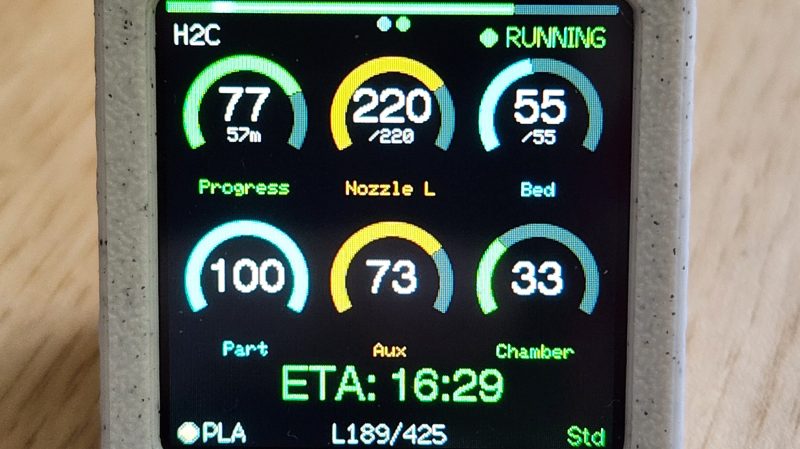
If you’ve got a Bambu Labs printer, it’s usually pretty straightforward to keep an eye on it via the onboard display or the various apps the company has released. However, if you want a dedicated display somewhere remote from your printer, you might like this build from [Keralots].
The project is based on an ESP32-S3 Super Mini, paired with a 1.54″ TFT display with a 240 x 240 resolution. It’s set up to talk to Bambu Labs printers over MQTT with TLS. It harvests status data and uses it to display a real-time dashboard with critical printer parameters display on arc gauges. There’s also plenty of live stats to pore over, as well as buzzer notifications if you want auditory alerts about what is going on. It’s possible to use with just about any Bambu Labs printer with a Bambu Cloud access token; otherwise, you can tinker with LAN Direct connections on certain models, but you might need to enable Developer Mode depending on your rig.
If you want to monitor your printer’s vital statistics at a glance, this project is a great way to do it. It breaks out the fundamental numbers in a clear and obvious fashion that’s a little easier to parse quickly compared to the interface of the official software. We’ve featured similar builds before, too. If you’re also paranoid about prints and using that to motivate you towards creating useful hardware, don’t hesitate to let us know on the tipsline.












would be even cooler if it gave AMS stats too, being able to see how much is left in a spool at a glance instead of waiting for the app to load up would be super useful!
It can. There’s a few display options and AMS is one of them.
Probably a better time than ever to have something in mind for talking to this brand without involving the vendor. Looks like it could be helpful for that.
It would seem to lend well to using repurposed car dashboard dials.
all the bad press bambu has right now really makes this post seem suspect
Someone needs to make a post showing how to install Klipper on one instead.
I’m using the printpoop one on a cyd (cheap yellow display) it has both cat or dog theme.
Reminder: DO NOT BUY BAMBU LABS PRODUCTS. They have zero respect for their customers.
https://www.tomshardware.com/3d-printing/developer-re-enables-3d-printer-features-that-bambu-lab-disabled-firm-promptly-threatens-legal-action-orcaslicer-bambulab-project-now-shuttered
https://www.tomshardware.com/3d-printing/louis-rossmann-taunts-bambu-lab-by-hosting-banned-3d-printer-firmware-fork-dares-usd1-billion-company-to-sue-him-more-creators-pledge-support-and-boycotts-snapmaker-donates-equipment-to-embattled-developer
Dont forget to fork…
I have an H2C printer and I’m not super happy that my files get streamed to BBL’s servers, but the printer works extremely well, so I can live with it. I don’t know why the files have to go to BBL if I access the printer via wifi. I have used the printer by plugging in a thumb drive with networking turned off and it works fine.
Can someone explain the issue that some developers are having with BBL in plain language? All the stuff I’ve seen is by those software devs and I can’t understand what they’re complaining about because they talk in terms that I am unfamiliar with.
It all sounds a lot like the makerbot stuff from 15 years ago.
Bambu used the existing open source PrusaSlicer code to make their BambuStudio application. But the only way to legally use that copyrighted code is to follow the terms of the license it’s published under, and BambuLab isn’t doing that. So they have no right to use that code and are basically stealing it.
Makerbot is not a bad comparison actually in the whole “Benefitted from community, only to spit on it”. Though this is seemingly getting worse over time.
The gist is that they are ignoring rules like that if you make something from Slic3r / Prusaslicer you are expected to say you have done so and just like them share the work for others to make their own versions from.
They tried to do neither, got called out, begrudgingly complied and ever since been low-key trying to sabotage those who are trying to make their own versions. Doing that really petty “Gotta do it via our cloud!! Cause security!!!” to try and keep OrcaSlicer down and are now aggressively trying to sue somebody into oblivioun cause they figured out how to get around the cloud requirement.
Man, with how much they love their community I would be very quiet about this project. They might try to come after you for improving their product.
There are lots of other brands that would benefit more from our participation than BBL. No offense to the authors solution/hack, but I feel uninterested in things that make Bambu better.