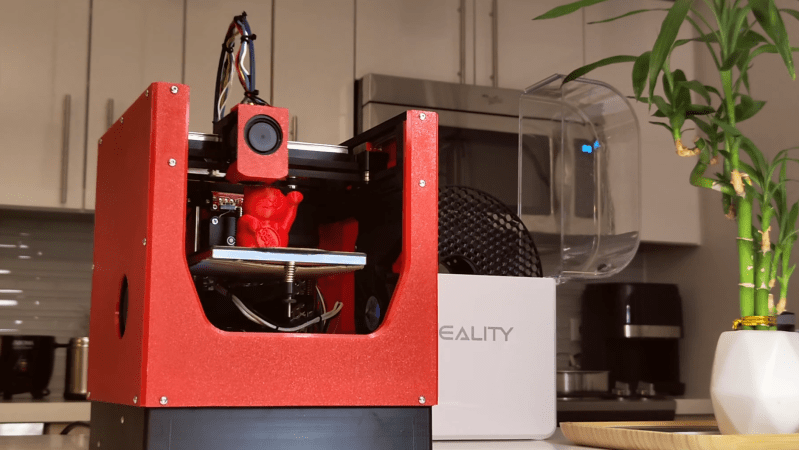
A small, orange 3D printer is shown on a desk with a filament dry box. The printer is printing a waving cat figurine. The printer is a CoreXY configuration, and the side panels are 3D-printed orange plastic.

3D Printing A Miniature CoreXY Printer

Although no longer so common as during the heyday of the RepRap movement, it’s easier than ever to build your own largely-printed 3D printer, with designs such as Voron’s delivering excellent quality. Nevertheless, there are still niches to be filled by new designs, such as [Alex Yu]’s mostly-printed Encore design.

The Encore uses CoreXY kinematics and linear rails for the X and Y axes. Its has no internal frame; the linear rails are mounted directly to the side panels, which were printed but provided sufficient rigidity. The printer is modular, and all the parts are designed to fit within a 225 mm print bed. The Encore itself uses a 120 mm bed, a Bowden extruder, and a lightweight Bambu-style hotend. The drive motors are NEMA 17 stepper motors, and they use sliding mounts for belt tensioning. The power supply sits behind the rods supporting the Z axis, and the controller board is in the base of the printer.

Building the printer was simple; tuning it, less so. The combination of a Bambu-type hotend with a Bowden extruder created some complications, and the hotend initially received too little cooling. [Alex] solved the cooling issues by using a stronger fan on the hotend, redesigning the ventilation shroud, and adding two inward-blowing fans along the sides of the build volume. After correcting some issues with Z-axis stability, the Encore produced some quite good-looking parts. [Alex] is still improving and documenting some aspects of the printer, but he’s uploaded his progress so far to GitHub.

We’ve seen some mostly-printed printers before, including a high-speed printer, one which printed all structural components, and one which was entirely 3D printed.

Continue reading “3D Printing A Miniature CoreXY Printer”

Turning An Old 3D Printer Into A Vinyl Cutter For Cheap

Replacing a 3D printer’s extruder with a cutting blade seems like an easy way to do things like vinyl cutting, but you cannot just put on any blade and expect good results. The right type of blade is called a drag knife and it’s designed so that it follows the direction in which you’re cutting. You can get these in dedicated vinyl cutting machines, as well as in the form of attachments for the likes of CNC machines. How to use them with an old Anycubic Mega S FDM printer is demonstrated by [Cocoanix 3D Printing] in a recent video.

For a bit more background information you can peruse for example this write-up by [Kronos Robotics], who goes through the steps of selecting the right blade, cutting mat and such for use with a CNC machine.

For the 3D printer in the video a Roland vinyl cutter style holder and blades were bought off AliExpress, for which then a custom 3D printed mount was designed, though you can often get a ready-made one off your usual 3D model sources. Following this you get into the hardest part, being the software and making sure you don’t cut too deep into the vinyl through its backing paper.

Fortunately most of the hard work here is done already by the Polycut project, which is precisely designed to help you turn a 3D printer or similar into a vinyl cutter or plotter. This takes in an SVG file and generates the appropriate g-code, after which you better have gotten your Z-offset calibration right if you want that perfect result. With all that in place it’s then actually quite easy to cut your very own vinyl without shelling out big bucks for a dedicated machine.

Of course, it’ll likely never be as fast as those machines, requires more calibration and have a more limited cutting space, but as it’s not a permanent modification and probably less crazy than putting a laser engraver module on a commercial FDM printer like the Bambu Lab H2D.

Continue reading “Turning An Old 3D Printer Into A Vinyl Cutter For Cheap”

Cookies, Baked The 3D Printer Way

Imagine for a moment that the Cookie Monster is going to visit, but all the cookie baking utensils in your house have been mislaid. The horror! Fortunately [Startup Chuck] is here with a video showing the process of baking cookies in a 3D printer, and as an extra treat he’s using entirely 3D printed utensils too.

The utensils are comprehensive array of all you’d need for serious cookie production, even going as far as to print a mixing bowl and beater for a KitchenAid mixer. There are scoops aplenty, and something we’re particularly impressed with, a spatula with a TPU blade. We’re guessing that FDM prints might not be the best for cooking because all manner of food could get caught in those layer lines and go off, but let’s face it, this is a bit of fun rather than a forever cooking project. We like the AI generated spork for its near-flatness, reminding us of our AI-generated breakfast. Finally he even prints a cookie baking sheet using nylon filament.

An enclosed 3D printer makes a surprisingly effective low-temperature oven, with the heated bed as the element. It works, and makes recognizable cookies, though they’re not browned. As entertaining as this experiment may be, we can’t recommend following his example — at the very least, moisture and food ingredients in your printer probably aren’t conducive to good future printing.

Continue reading “Cookies, Baked The 3D Printer Way”

A Status Screen For Bambu Labs Printers

If you’ve got a Bambu Labs printer, it’s usually pretty straightforward to keep an eye on it via the onboard display or the various apps the company has released. However, if you want a dedicated display somewhere remote from your printer, you might like this build from [Keralots].

The project is based on an ESP32-S3 Super Mini, paired with a 1.54″ TFT display with a 240 x 240 resolution. It’s set up to talk to Bambu Labs printers over MQTT with TLS. It harvests status data and uses it to display a real-time dashboard with critical printer parameters display on arc gauges. There’s also plenty of live stats to pore over, as well as buzzer notifications if you want auditory alerts about what is going on. It’s possible to use with just about any Bambu Labs printer with a Bambu Cloud access token; otherwise, you can tinker with LAN Direct connections on certain models, but you might need to enable Developer Mode depending on your rig.

If you want to monitor your printer’s vital statistics at a glance, this project is a great way to do it. It breaks out the fundamental numbers in a clear and obvious fashion that’s a little easier to parse quickly compared to the interface of the official software. We’ve featured similar builds before, too. If you’re also paranoid about prints and using that to motivate you towards creating useful hardware, don’t hesitate to let us know on the tipsline. 

Using A Nintendo Switch To Speed Up A 3D Printer

3D printers are almost never fast enough. [Cocoanix] had a Prusa MK3S with this very problem. He found it to be disappointingly tedious when completing even simple prints, and sought a way to make it faster. Thus, he grabbed a Nintendo Switch and got to work.

It might sound like an odd choice, and that’s because it is. There’s no special magic inside a Nintendo Switch that makes 3D printers faster – it’s just that the handheld console was a useful platform on which to run Klipper. As [Cocoanix] explains, Klipper is designed to run on faster general-purpose computers compared to the more limited microcontrollers used in some printers. It’s designed to off-load complex motion processing tasks to a faster CPU, while the printer’s onboard microcontrollers are freed up to simply handle the low-level tasks of driving the motors and so on. An older printer equipped with Klipper can often print faster, while implementing techniques like input shaping to further improve speed as well as print quality.

It’s worth noting that you don’t have to use a Nintendo Switch for this. It’s just a good hook for the YouTube video. Typically you’d use a Raspberry Pi or some other computer instead, but the fact it runs on a jailbroken console is amusing nonetheless. It’s also cool to see the results – in this video, [Cocoanix] got the Benchy printing time down from 90 minutes to just 8.

We’ve previously discussed the benefits of Klipper at length.

Continue reading “Using A Nintendo Switch To Speed Up A 3D Printer”

Three-Axis Camera Slider From 3D Printer Parts

There’s a great reason 3D printers are made with things like extruded aluminum rails and other commodity, off-the-shelf parts. These things are designed not only for ease of construction and prototyping, but they’re also fairly strong especially given how modular they are. And they are excellent platforms for other projects as well. [CNCDan] has been using plenty of on-hand 3D printer parts to build a three-axis camera slider to film parts of his other projects, and this video documents his build and the latest upgrades to this platform.

After sorting out some issues with underpowered motors by improving their gear ratios, he found that many of the sizes and clearances on the existing platform changed enough that he needed to redo other parts of the carrier, including the mounting plate. He cut a new plate from steel and pressed bearings in, and then started putting together the other axes including a quick release mechanism for his camera. With a camera that weighs about 1.4 kg, getting the motors to move the camera smoothly was its own challenge. He re-worked all of his driver code over the course of a few weeks and eventually got his new system working much better than the original version.

With everything said and done, the camera slider can be controlled wirelessly with a GUI on another computer. Everything runs on an ESP32, and the slider can support other cameras besides his heavier one, including smartphones. He notes that this wasn’t the easiest way to build a project like this, but worked for him eventually because he had the parts and tools on hand to make it work. He’s also put the project files up on a GitHub page for anyone interested. Camera sliders like these have some niche uses as well; take a look at this high-speed camera slider for some examples.

Continue reading “Three-Axis Camera Slider From 3D Printer Parts”

New Slicer Enables Horizontal Overhangs Without Support

There’s a rule of thumb when it comes to FDM printing that overhangs are really only possible to an angle of around 45 degrees or so. If you try to squirt out plastic with nothing supporting it, it just goes everywhere. However, a new slicer hopes to enable printing up to 90-degree overhangs with some creative techniques.

The software that enables this is called WaveOverhangs, and currently exists as a fork of OrcaSlicer. The idea is straightforward enough — using unique toolpathing to create rings of deposited material that fasten to those laid down before them in the same layer. Thus as the printer lays down a layer into bare space, the deposited plastic is, ideally, able to fix on to the supported edge. As the next ring is laid down, it grabs on to the cooled ring laid down before it, and so on. The idea is inspired by wave propagation, hence the name. You can see a demonstration of the software in the video below by [Cocoanix 3D Printing].

It’s still a very new technique. The slicer has a whole bunch of knobs to turn and two different algorithms. Get the settings just right and you can print horizontal overhangs successfully. There aren’t exactly presets yet, this is something to explore with trial and error. If you test it out, don’t forget to upload your results to the Community Gallery so the developers can see what works and what doesn’t.

We’ve explored how smart slicers can do amazing things before, too, particularly when it comes to things like bridging.

Continue reading “New Slicer Enables Horizontal Overhangs Without Support”