
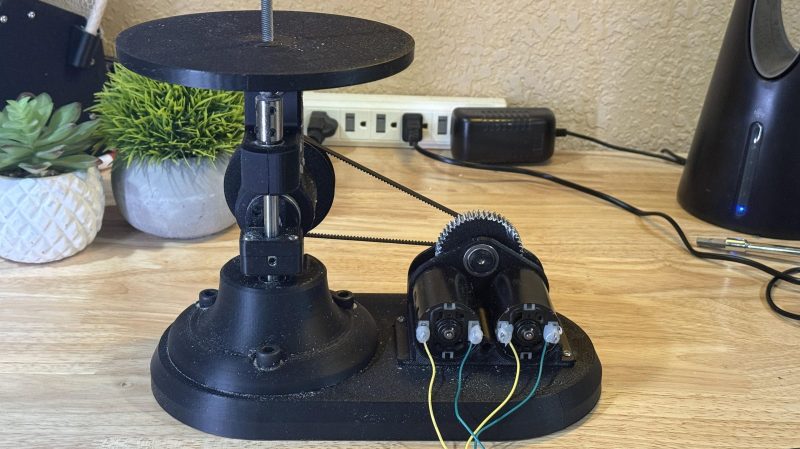
A die filer is a useful tool to have if you find yourself filing parts on the regular. It’s basically a machine that reciprocates a file up and down for you so you can focus on filing the part to your desired dimensions. They’re not commonly manufactured these days, so [Richard Huberjohn] set about building his own.
This die filer relies on a simple mechanism to turn rotational motion from a motor into reciprocating linear motion in the vertical plane. A rotating shaft is connected to a crank, which turns a pin in a slotted carrier attached to a linear bearing. As the wheel turns, the pin slides in the carrier, driving it and the linear rod up and down in turn. Attach a file to this, and you have a working die filer. In this case, the rotating shaft is driven by a pair of DC brushed motors, with output stepped down via a gearbox and then a short belt drive. Speed is varied with the aid of an off-the-shelf controller.
If you’re regularly filing small parts, a build like this could speed your work to a great degree. We’ve featured other DIY machine tool builds before, too. If you’re cooking up your own gear for the home workshop, don’t hesitate to let us know on the tipsline!












Blondihacks builds a diefiler from scratch too, in a highly detailed 10-part youtube epic: https://youtu.be/_g1F2O-kTNs?si=2tVyv97FMrdl6otK . All metalwork, so if you have just a 3D printer at hand not so easy; great watch though!
There are quite a lot of die filers on youtube. A simple search is a good start to get some inspiration:
https://www.youtube.com/results?search_query=die+filer
“Pask makes” has built one, “This old Tony” has bought a “professional version” and also some simple pneumatic auto filers. You can also buy a kit with castings for a DIY die filer, but I do find EUR 153 for 2 or 3 kg of cast iron a bit steep. I’d rather weld some pieces of steel together myself. That also gives you the freedom to make it to the size and features you want.
There is also a British magazine called Model Engineer and another one called Model Engineers’ Workshop. They have historically published various articles about making nifty machining tools. I don’t have a specific issue to point to but there is an index somewhere online.
A good use of AI is also to ask about books or magazines that have described what you want to make. You’ll get a really good list of pointers. Anna has a really good archive of interesting stuff and zlibrary is pretty useful too.
Dunno. Whenever I do that, I get books or articles that don’t exist, and when they do the article is just vaguely related. It’s just generating a plausible sounding answer, it’s not actually searching the text to verify that it’s there.
Have you tried recently? I was pretty bad in the past but I’m getting very acceptable results from Gemini.
You need to tell it that’s it’s “essential you use the most recently available information from reliable sources (only)”.
Yes. I tried to find the source of a specific quote, and got references to old books which had completely different quotes that merely shared a few words.
Does it lift the file on the reverse stroke? Proper file use dictates that otherwise the file wears down faster. Also use the whole surface not just one spot.
That’s a myth that has been debunked. It doesn’t seem to make much of a difference at all – for dulling or clogging the file – it just cuts a bit faster with both strokes.
https://www.youtube.com/watch?v=xbykic–SKA
I don’t know if it’s a myth or not. The video makes a valid point but only for this file/material/method combination. There are many variables. Some points to ponder:
He used a double cut file, does it apply with single cut?
The material was so soft didn’t register on the hardness tester.
When hand filing, the file can and does moves and rotate around all axes.
A good way to blunt a reamer is to run it backwards in the hole. All the material behind the cutting edge then does nothing to support the cutting edge and you’ll blunt it. It’s easy to see how a file could blunt in a similar way.
Personally I’d guess that high quality modern files don’t blunt in normal use but I’m sure the myth is based on reality.
Is there a reason why it would make a difference?
It’s plausible to break the cutting edge with harder materials and high forces. The reason why the reamer gets blunted is because it’s turning in a tight hole and the material has nowhere else to go – there’s no give. The die file, or the hand file, is not supported so rigidly on the backstroke.
i have no idea about the mythology of wearing out files…i’m not sure i’ve ever worn out a file?
i’ve taken to the one-direction methodology myself because it creates a more predictable result. I’m repeating and fine-tuning the one repeated motion to get the wear pattern i want on the work piece. It’s easier to be consistent if i’m not trying to refine two motions at once.
And from that aspect…if it’s mechanically identical strokes, i’m not sure it’s the same problem, as long as you can get the work piece oriented so that both strokes are desirable. (i’m not sure how much ‘wobble’ this mechanism has)
If the die file is slightly tapered and wider at the top, cutting on the pull stroke, it will automatically clear the hole it just made on the reverse stroke.
Apparently parallel machine files are cut with a neutral rake angle – the edge is at 90 degrees to the cut – which is supposed to help with the fact that it’s cutting both ways.
I’ve always wanted a desktop, hobby-sized reciprocating filer, basically a micro “Filz-All”, (sorry, Milwaukee! :), and now I know what they’re called and have ideas about making one. HAD can be useful.
They were replaced by belt sanders, because they are more simple, no?
No, die filers are for precise work. I’m tempted to make this and I have a big belt grinder. A 50x2000mm (similar to a 2×72 people use in America).
Just wished he provided STL’s instead of a STEP. Now I have to find out how to convert it.
Open in FreeCAD, select the body you want from the tree and go Menu: File > Export.
STEPs are the way: they model curves as curves so you get much better precision and you can open them in CAD and edit them more easily.
PrusaSlicer can now open steps directly, I can’t speak for other slicers, but there are plenty of convertor tools.
i was thinking the same thing except a bench grinder. i wonder if you couldn’t scratch this itch with a bench grinder with reduced / adjustable RPMs and a thinner disk
If you want a flat result you’re going to reinvent the surface grinder.
Just buy an old school unit, after measuring the table, unless very cheap.
Downside, largish, likely 3 phase power.
Upside, one of the ultimate multiuse tools.
Your bench grinder is the most dangerous tool you will use this week (90% confidence).
Always give the wheel a finger tap and verify the ring before applying power, stay out of the plain of rotation.
The last idiot to use it can kill you.
It would suck to lay there dying, knowing that idiot was you…