
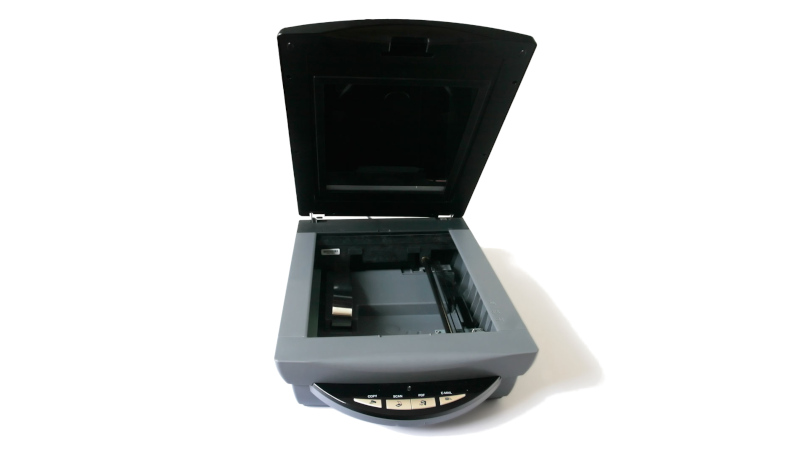
We have probably all at some point had to replace a peripheral not because it is faulty, but because it is no longer supported by our operating system. It’s especially bad for Windows users, but for older hardware this is increasingly a part of the Linux experience too. [George MacKerron] is here with what may prove to be a valuable technique to keep these devices active. He’s running a minimalist x86 computer in the browser, with just enough OS to support the device.
In this case the hardware is a USB scanner, and the resulting software takes a WebAssembly x86 emulator and adds a bit of glue software allowing it to use WebUSB to talk to the real-world hardware. It runs a minimal Alpine Linux environment with SANE — something that’s normal for Linux users but which has never been there on a Windows machine. The result is something which needs no installation, but can be run on any machine with a powerful enough web browser.
While such an approach might at first seem like overkill, we’re told it runs surprisingly quickly. In this case it’s for scanner, but we can see it could find a use with many other pieces of aged hardware.
If WebAssembly is new to you, we gave it a primer a few years ago.
Header image: Fir0002/Flagstaffotos, GFDL 1.2.












Golly…
The questions is not “does it works or not?” it’s “Why in hay was the support dropped in the first place!?”
We already hit the “it’s now a webapp”, so, what’s next? Fuzzy drivers? Where an AI tries to guestimate how the device works?
I successfully got my Minolta usb slide scanner running using a Windows NT instance in VMware desktop. On a modern Win10 box it wasn’t any slower than the original native NT setup.
Installing Vuescan usually gets my Minolta working again. That ‘generic driver’ really works.
I was able to install original minolta drivers from 1996 on Windows 10… No issues in general.
I’d guess support was dropped for some reason like:
unpatched security issue in ancient device driver, no financial incentive to spend man-hours patching it
little interest in compiling ancient driver against latest OS, no financial incentive to spend man-hours updating it
OS has dropped support because if they keep support for everything then the size of the OS balloons.
There’s always a maintenance cost in keeping stuff updated. VMs are a good solution.
Tried with a LiDE 210, got:
“Error, please reload
Failed to execute ‘open’ on ‘USBDevice’: Access denied.”
Will stick to VueScan, but was hoping for a free alternative!
Changed driver with Zdiag as suggested, and full page 600dpi 16 bits color scan took about 1-2 minutes. So useful for the odd scan but a bit slow if you’re going to do many scans. I suppose if you have a lots of scan and can live with low dpi, that would work fine too. And a lot cheaper than VueScan which is very far from free!
How does this compare to an app (potentially w/ OCR) and a modern-ish smartphone camera?
I have a Canon scanner that is still luckily supported on Linux (hasn’t been w/ Windows post-XP), but it seems to get less use due to how far apps/cameras have come on smartphones. I always thought I’d have a use for a flatbed scanner, so I’ve kept this around; but those cases seem to come up less and less. If my scanner had a tray to feed a stack of documents, maybe that would make it more worthwhile.
Cool project though; hope it helps some people with devices falling out of support.
A photo will have uneven lighting, uneven focus, and distortion. Also the document probably won’t be as flat as when pressed against the glass plate.
Ironically, I’ve found more use for a flatbed scanner recently, since it’s basically a the 2D version of the 3D scanners some people are creaming themselves over.
And for things like flanges, all you need is the 2D dimensions + depth, the latter can accurately be measured with some vernier calipers.
Hell, I’m even on the lookout for a A3 or bigger high-res one.
Scanography on a VIISAN 3120 A3 Flatbed Scanner.
At least they have perpetual versions, and three levels to pick from. Heaps better than Adobe.
NAPS2 is an open source scanner software for Win, Linux, etc.
It’s been around for a while.
It’s got the basic crop, de-skew, and other document correction features too.
It can also import and export in image or pdf formats.
And it even has a portable version.
the only thing it doesn’t do is use the automatic buttons on the scanners I use.
The OS still needs a driver, but I don’t know why anyone would use proprietary or even paid software for basic document scanning anymore.
NAPS2 is great! Has been my go-to for many years. Never been a problem that wasn’t contributed to OS being confused.
“for older hardware this is increasingly a part of the Linux experience too.” ???
whoa if true. citation needed. it would make a good story.
Citation, I guess the Kernel Mailing List. Support for 486 CPUs dropped. Support for NE2000 and compatible NICs dropped.
I think the main difference between Windows dropping support and Linux is that the onus is on the manufacturers to maintain support for newer Windows, and when they don’t things break. For Linux it’s mostly the opposite; things are supported as long as reasonably possible, typically as long as somebody maintaining the drivers has access to a device that uses the driver. Without a device to test the driver on, it’s hard to say the next kernel release hasn’t broken something, in which case it gets deprecated.
the claim is “We have probably all at some point had to replace a peripheral not because it is faulty, but because it is no longer supported by our operating system.”
Have you thrown away a 486 because it isn’t supported by the newest Linux kernel?
No but next time I’m at my parents’ house I’ll chuck it in the bin. I did forget to mention hardware supported by binary blobs, maintained outside the kernel. Then you’re at the mercy of the manufacturer to support future kernels. Nvidia being a particular one to watch, whilst there is the in-kernel driver, it’s not as fully featured as the binary blob, so when Nvidia ultimately drop support for a family of cards you either freeze your OS, throw it away, else use the workable but not quite perfect in-kernel driver.
You can make some good money selling that old 486 as a retro gaming PC now. I was rather surprised when I found out what they were going for. It wasn’t that long ago when you had to pay to get rid of one.
I’m surprised. Where wasn’t that long ago?
Here in Germany, they’re basically collectors items for about 20 years already.
They’re as rare to find on street/by the roadside as C64 or Amiga or NES are.
Same goes for CRT monitors and CRT TVs.
By early 2010s they were almost gone extinct (-> nolonger being seen in the wild).
Paying about 100€ for a small 15″ VGA CRT monitor in good condition or paying 50€ for a 486 VLB or VIP motherboard is a bargain, I would say.
If we consider how few are being left intact, I mean.
In 30 years a huge number had been ended up as e-waste already, after all.
Thus, it’s no surprise, at all, I think, that they go for such a price these days. It’s fair, I think.
The faster processors such as DX4, Overdrive or K5/K6-III are more worth than their motherboard alone.
A Pentium OverDrive for 486 motherboards is hard to get, for example.
Especially with built-in voltage regulator for 5v sockets.
Or until maintainers of such hardware are leaving/are being fired for whatever reason, maybe.
Well… the Linux kernel dropped support for 386 years ago and is about to drop support for 486. I cannot imagine actually using either as a daily driver today but I do remember when supporting all 386 and above was practically a part of the definition of Linux.
I hear the AMD K5 and Russian Baikal went away with 486. A K5 might have been almost usable for light desktop stuff… kind of a waste of electricity though.
The Intel 440BX Chipset EDAC was dropped. So all those PIIs and PIIIs you are still using might be a little less reliable maybe.
MFM hard drives have also been wiped from the kernel. We needed those right? Actually… I would like to have the ability to pop those in just to recover data. But that would also require an ISA slot with full IRQ support so… oh well.
Floppy disk and CD-RW support still exist but they are trickier to use than they were in their prime. I remember when with supermount and iso9660 r/w support built into the kernel I could pop either in and out and just use them with no mounting steps just like a floppy in Windows 9x. These days it’s 50/50 if you can even burn a CD without root.
Token ring network cards have been dropped. Anyone still using that?
Older ISA and PCMCIA network cards are being dropped. Now that… that does kind of suck. Ancient desktops are better space heaters than computers but it would be nice to be able to put a lightweight Linux on an old laptop. And those old 3COM ethernet cards… slow by today’s standards but they would keep your network going even if you had to patch your threadbare old ethernet cable with a wet noodle!
Kernel support for some of the old iconic ISA soundcards is gone, like SoundBlaster 16 and Gravis Ultrasound. I don’t know who is using a Gravis Ultrasound except maybe for some retro DOS gamers. But those Soundblasters… they are old and outdated on the digital side but I thought they always had much better amplifiers on the analog side. Some day when I am bored (hah, never) I would love to dig up my old AWE32 and compare it to modern hardware.
A lot of old ISA video and even PCI and AGP video cards are no longer supported. Of course your CPU can probably do graphics acceleration better than those could now but… they still count.
Those things are all really of interest only to retro enthusiasts or people reaching that age where nostalgia kicks in. It will happen to you if the bus doesn’t get you first!
Peripherals are the bigger thing for ‘normal’ people.
I hear CUPS is dropping all it’s traditional printer drivers and going to a pure IPP Everywhere model. So that means every printer before some time in the middle of the 20-teens is out. Now I can look at all that other hardware and say.. it’s so slow and so power hungry.. why care? But if my old printer still works I want to use it! Why generate landfill throwing it away? It’s not like printers have increased in quality over the years, quite the opposite in fact!
More in line with this article.. SANE. SANE seems to be holding the line, resisting the urge to purge old scanners so far. But that doesn’t mean all your old scanners are still easy to get working in Linux. Some required third party network libraries that are no longer under development and so have fallen off. Many distros are leaving out the parallel port support that SANE requires for old parallel port scanners. And systemd/udev “poetterification” has made it impossible to load the proprietary binary blobs that some old scanners required.
For old printers and scanners though… if it could ever run on a Pi I think I would just go with a Pi Zero and an old build of Raspbian. Cups can translate something generic like PCL or PDF to whatever your printer needs and even non-unixy OSs like Windows have SANE clients. If you are lucky you might find a version that is in a sweet spot, old enough to support your hardware but new enough to enable auto-discovery.
If you need a binary blob though…. I’ve been hoping that x86 compatible SBCs would drop in price but it doesn’t appear it is ever going to happen. I mean.. some of them aren’t THAT expensive but I’m not sure any are cheap enough to justify not just using an old laptop.
God this post made me feel old. Adjusting what loads in the 640k of memory on boot so I could get my sound blaster to work.
Hi! The 8-Bit Sound Blasters and the first SB16 (CT17xx) had jumpers for configuration and needed no drivers or init software to function (CTCM/CTCU).
They worked out of box on various OSes, such as OS/2 or *nix.
The utilities were later needed when ISA Plug&Play hardware became common.
There also were SB16 versions that were partially configured via jumpers and software. Half PnP, so to say.
Of course, some AdLib/SB software needed sound.com or sb-sound.com or sbfmdrv.com.
The ancient GameBlaster (CMS) had similar DOS drivers, I think.
Also, later soundcards needed DOS TSRs for SB Pro emulation.
PAS16 and WSS cards also needed some drivers/init programs, I think.
Btw, DOS is not quite dead yet or a relic of the past. There’s a healthy community of vintage PC owners.
New ISA cards and replicas of Sound Blasters, AdLibs or IBM PC/XT motherboards are still being made.
Some modern DOS/Win98 gaming motherboards are also made (ITX-LLAMA etc).
New DOS software is also being written to this day.
There’s the MicroWeb 2 browser for 8088 based PCs, for example.
Or a DOS port of, say, Python.
All in all, the DOS platform is as diverse as Unix/Linux, I think.
There were PC DOS, MS-DOS, DR-DOS/Novell DOS/Caldera DOS, DOS Plus, DIP DOS,
Datalight ROM DOS, Wendin DOS, PC-MOS, FreeDOS, Paragon/PTS DOS, Real/32, Concurrent DOS, Multitasking-DOS,
L3 (has DOS VM), DOS-C, X-DOS, ZDOS, RDOS, ST-DOS,
PDOS (16-Bit Public Domain OS was DOS compatible), EuroDOS,
and some OEM versions of MS-DOS (Commodore, Compaq, Zenith DOS etc) or derivatives of MS-DOS (DCP, Sigma Four DOS, AlphaDOS, LDOS).
Nowadays, there’s FreeDOS, PC-MOS/386 v5, SvarDOS, RxDOS, DR-DOS (the new one) etc.
And they all run on both classic and modern PC hardware, unlike Linux! 😝
Your comment is an interesting read / explainer, thank you. It’s kinda meta when the comment is longer more in depth than the article
This is the Hackaday comment section, and this is why a lot of people read Hackaday. The articles are good, but there are a lot of intelligent people in the comment section and it mostly stays cordial. Simple website, nice community, lots to learn, lots to love.
Wow, reading this comment was like revisiting my teen years. We couldn’t afford the latest stuff, so spent a lot of time trying to get older equipment set up. I remember having to specify the number of HDD heads, cylinders, etc in the BIOS. Trying to get IRQs set so they don’t conflict. Realizing that not all ISA slots were created equal, at least on our motherboard. So much stuff we just take for granted now.
Linux is now dropping even more than just 486 support. i686 is being removed, too.
https://pcper.com/2026/05/first-i486-support-now-linux-abandons-i586-and-i686/
I wonder where it will stop. When will Pentium IV or Core2Duo or Athlon 64 be dropped?
Or will it depend on age, as with Windows? Will merely the hardware of last 10 years be supported?
That’s poor, it’s industry standard hardware.
Emulators and the chipsets used in thin clients often support classic standards such as SB Pro/SB16 or WSS.
Some late Pentium III motherboards still had optional SB16 support in CMOS Setup.
SB16 is as relevant as AC97, I would say.
Hm. That’s bad. The 440BX is used as an emulated chipset in Virtual PC, incl. Virtual PC 2004/2007.
Exactly because it’s some sort of reference hardware.
The corresponding CPU can be much newer because of virtualization.
Seriously? WD1003 and IDE are the very fundamental HDD interfaces, they’re even being emulated by SATA.
Besides int13h, emulators usually do support them as a basic HDD interface.
It’s like dropping support for SCSI or PATA optical drives, I think.
I wonder how long it takes Linux until supports NVMe only. 🙄
Wait, so no support for famous S3 Trio32/64 anymore? DOSBox and Virtual PC use that!
– Qemu or Bochs use a Cirrus PCI VGA card for basic graphics support.
Plain VGA support/BIOS support for mode 12h is gone, too, I assume?
I second that. NE2000 support was the equivalent to SB16 support.
Many ISA/PCI ethernet cards could be accessed via NE2000, too, besides their native mode.
Other popular models were 3COM (EtherLink III) or that Intel ethernet card (Intel Pro/1000 MT Desktop 82540EM?).
Or PCnet-FAST III (AM79C973).
https://github.com/joncampbell123/dosbox-x/discussions/4698
https://www.lazybrowndog.net/freedos/virtualbox/?page_id=321
The more hardware Linux is dropping the more I wonder about the whole point of Linux.
In the past, Linux was often used to keep outdated hardware running.
Such as 15+ year old office PCs used in shops, schools or city administration.
Or Frankenstein PCs built from the kind of hardware that could be found at the roadside.
The geeks and nerds used Linux to run old, decomissioned server hardware for their hobby. Things like that.
Nowadays, it seems, Linux merely supports mainstream hardware anymore.
Anything just remotely exotic, such as non-AMD/Intel CPUs are nolonger being supported.
Older or simpler CPUs built in, say, Russia are not supported.
Looking at the AI (LLM) craze, it worries me that Linux nolonger can work with obsolete hardware that is being ignored by AI/LLM industry.
It’s same with RAM or SSDs. We now have a memory shortage, yet same time big Linux distros act as if memory was an infinite resource.
If you have good lighting, the “telephoto” camera on modern cellphones does a fine job of “scanning”. You can use the main camera, but their wide-angle view makes it difficult to avoid perspective distortions. As for holding things flat, something like Cricut low/medium tack cutting cutting board would work for small projects, or for big ones, a vacuum table would be worth building. Flatbed scanners were very, very slow. I wouldn’t want to go back to using them.
I have an old cannon “the ink costs more than the multifunction printer” that I never printed a single page with but have abused the automatic document feeder with over 10 years of tax seasons of documentation of my life and with the exception of rubber getting old it has been something that I would have paid ALOT more for. Cell phone apps are good for 1-5 pages worth. After that I’d rather use a feeder.
Cameras are typically used for scanning books. It works well if you have a tripod, decent lighting and something to hold the page flat. For loose pages, document scanners are a lot faster and more convenient, especially if it has an auto feeder.
“…which Claude helped me write…” No thanks.
What? You comment is the only mention of Claude on this page. Did a comment disappear or is there a bug moving comments between posts? I’m confused.
Check the original web site. Claude is mentioned at least once there.
This is definitely overkill when a wasm build of SANE already exists. https://webscan.goncalomb.com/
C program that Claude helped write. …
“I must apologise that I haven’t so far open-sourced any part of this that I don’t have to. Mainly that’s because I think this would be an awesomely sticky web property for a printer consumables firm to integrate with their sales site. And I’d much prefer it if they paid me to white-label it for them, rather than just forking a repo and getting it all for free.”
Man thats some gall right there.
The guy admits he used Claude to write it for him. But he thinks some “printer consumables firm” is going to pay him for it? Why wouldn’t that firm just type a prompt into Claude themselves?