
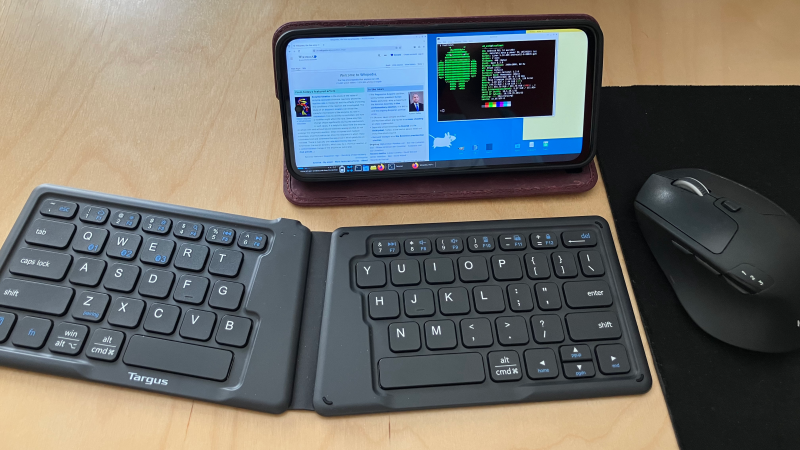
In some parts of the world it’s common for cell service providers to sell new phones at a price significantly below market value, with the caveat that these phones are locked to that service provider alone. It’s questionable whether this practice is good for consumers, but as [Gabriel Broussard Korr] notes, it’s an opportunity for hackers: since it’s possible to run a Linux environment on these phones, they make an inexpensive source of quite powerful computing hardware.
In this case, [Gabriel] was using the Moto G Power 2024, which has 128 GB of storage, 12 GB of RAM, and costs less than $50 when carrier-locked. Rather than trying to install a mobile-oriented Linux distribution (such as postmarketOS), [Gabriel] installed Termux, a terminal emulator which provides a Linux environment within Android. Before doing this, he set up the phone and configured a number of settings for a better Linux experience. Since automatic updates can interfere with these settings, and since none of the provided settings effectively disable these, he used NetGuard to block Internet access from the updater app and from Google Play services.
The next step was to actually install Termux, as well as an X11 extension and an app which exposes an API for Termux. The desktop environment (XFCE in this case) was installed through Termux, and [Gabriel] wrote a shell script to go through the steps of starting it. XFCE worked well on mobile devices because of its full-desktop zoom capability. Even running Linux indirectly, the experience was smooth; [Gabriel] found that GIMP, Shotcut, and VS Code all performed well.
It’s not quite the same set of software, but we’ve previously featured a guide to setting up a similar Linux environment using Termux and AnLinux. Lindroid provides a similar containerized Linux environment; on the other hand, you can also use postmarketOS to make a server from an old phone.












“Termux, a terminal emulator which provides a Linux environment” — despite the name, I find it more useful to think of termux as an encapsulated Linux environment with a terminal emulator. There have been some past discussions here in Hackaday of using this as a way to turn a spare phone into an IOT device, but yeah, it’s more versatile than it may appear at first glance.
Standard reminder re old phones with gel cells eventually posing a possible fire risk; one of those past articles suggested opening the phone and replacing the original battery with one less likely to fail soon or catastrophically. I have several old phones I should probably do that to if I’m going to keep them around.
It was news 10-years ago. Hackydoo seems to be on shuffle nowdays.
A pattern.
At least stick it into a 3d printed case!
https://www.printables.com/model/1724826-slidexdeck-sliding-keyboard-cyberdeck-case
When you have one ready for him, send it to him.
Nope.
I think it’s a bit harsh, another article that dropped today is about ReadyBoost which is not only 20 year old, but has been dropped from the latest Win11. It got quite a bit of engagement, 31 comments. So, it’s not really about “news”. Personally I’m very interested in vintage computing, I really like projects that recreate old Altair, Kenbak-1, Cosmac Elf or Dec PDPs. I like stories about Japanese Pocket Computers, Elektronika computers from the USSR, etc. Also articles about old Unix releases and I wouldn’t mind seeing more about vintage mainframes, COBOL, OpenVMS and the like. Sorry I may be overcompensating with ideas, but I think it’s a whole lot more helpful than posts that amount to “this sucks”. I suggest putting an effort to bring up some ideas or just don’t post at all. Anyways I read for comments more than articles, and low-effort criticism bothers me more than recycled “news” articles. Which makes me think, how about an article on what made Usenet great. Users weren’t spoon-fed hackery back then, it was the community interacting. If the internet dies it won’t be from AI, it will be because users just stop caring.
Are you sure this comment is about running Linux on Android?
Pretty useless to run a Linux on such a small screen.
But if you want to use an external screen, you’ll need a smartphone that supports usb3 +Dp (Moto G Power 2024 does not).
And you won’t get this unless you buy a higher end smartphone (Samsung S line and not A line) that kinda defeats the cheap scenario.
About 25 years ago there was a Linux PDA, the Agenda VR3.
From what I’ve read, the reviews were mostly positive.
But that was from a time when Linux didn’t yet require the specs of a super computer too boot.
https://en.wikipedia.org/wiki/Agenda_VR3
Maybe if held closer to the face it can be usable. I’ve been meaning to test positioning a phone on one of those gooseneck holders, and then Remote Desktop into my PC. At a much closer distance a phone appears to the eyes to be a larger monitor. I suppose not for people with poor eyes though.
Try that Google cardboard device for VR. It will hold your phone right in front of your face. 👀
I REALLY want to adapt this project into “world’s worst AR”, where it overlays the desktop on top of a video stream from the camera. It’s just a bit of a pain to access the camera from Termux
There are screen magnifiers for phones. Some of them are pretty cheap, but I don’t know how well they actually work.
it works but reduces the brightness – same amount of photons spread over a wider area.
“when linux didnt require the specs of a supercomputer”. excuse me? im running modern linux, such as mint, on hardware thats older than me! do you even know linux?
It’s been pointed out to him on literally dozens of occasions here that he knows nothing about Linux, yet he continues to post the same nonsense endlessly.
Given X11 and ssh, you can run this as a dedicated device displaying just the app controls, and do the actual setup / development work remotely from another machine. Not everything needs a large screen directly attached.
And actually I’ve found working directly with termux isn’t bad. But then I “grew up” with 24×80 text screens and still use the command line/shell heavily.
That’s not what I would call a (desktop) Linux (what is depicted in the screenshot), it’s more a TERM emulator, you don’t even need a Linux for this use case.
You need the sandboxed Linux if you are not willing to bypass Android security. Termux provides that, relatively efficiently.
at the end of the day, my argument is pedantic-semantic, but i still want to point out:
these small devices run linux. that’s what they do. for the most part, every small device that isn’t ios is linux. it is very much worthwhile to run linux on small devices.
True but they also limit access to that Linux instance. Running a sandboxed Linux environment inside these gets you most of the capability of running on the bare metal without having to jailbreak or side-load.
I’ve driven a USB screen from my old MotoG Power and newer Moto phones, using external power from a PD-capable Anker power bank. You won’t run games this way, but it is OK for videos, basic browsing and terminals with ssh sessions.
You’re using the wrong approach, you should get a Fresnel lens sheet and put it in front of the phone so you have one of those computers from the movie Brazil
ha ha, you beat me to it (see my comment below)
The solution is simple. Ever seen Terry Gilliam’s movie Brazil?
https://www.reddit.com/r/vintagecomputing/comments/1ia5u6i/a_little_off_topic_but_how_about_the_data/
Gotta love all these opinionated people saying that this article is “old”, or use case irrelevant (to them). I might kindly remind people that to say, younger, less experienced people this main fact be brand new knowledge and/or a use case.
You’re right, I think. I guess there are two sides of the medal, so to say.
There are young people who (must) grow up in smartphone era and earlier people who experience a sense of déjà-vus every couple of years.
What should the latter group do now? How should it react?
Trying to keep quiet and negate that certain trends happened before multiple times? 🤷♂️
I mean, it’s a bit as if eyewitnesses of history are being encouraged that they shouldn’t share what they had experienced.
Everything is a cycle. Started with Service Provider’s Mainframes to personally owned PCs then back to Service Provider’s data centers for “cloud” or AI workloads. Now we are seeing Local AI on PCs. Given enough time the cycle completes.
Hear hear. I love ICYMI articles. Working in the comms department of a small foundation building humane software, it’s amazing how often people miss big articles with important notes about the progress of your work, then complain that you never share about the exact thing that article was about. It’s not our job to ensure people consume all our content, but occasionally reposting is a nice courtesy.
The 90s called, they want their sim-locks back.
Was it not pretty common to have really cheap prepaid phones which are locked in to a single operator and you could not put any other sim in them?
Seems the american market now discovered this to themselves.
Has been circumvented multiple times and banned from EU markets. For the good. Phones can be freely exchanged and you can move to the cheapest operator whenever you want to.
Willing to pay a bit more for the hardware, if I can save on the long run.
In the 80s/90s, there also were laptops with a special connector for a docking station.
My 1988 Compaq SLT 286 had such a thing, for example.
It allowed using the laptop “on the go”, while using it at home/workplace as a full-featured desktop computer with VGA monitor, keyboard, ISA expansion etc.
https://en.wikipedia.org/wiki/Compaq_SLT
Some laptops from the 80s and 90s had a special connector for a docking station.
That way, users at home/workplace could use a VGA monitor, keyboard, mouse and expansion cards.
The Compaq SLT line from 1988 had an external docking station, for example.
https://en.wikipedia.org/wiki/Compaq_SLT
For $50 I can get an old optiplex with 16GB, and have a much better linux experience, or a windows experience if I want, with a real display and keyboard. Plus I don’t have to get mixed up with a “carrier”.
You don’t need a carrier unless you want cellular service. As the article says, the point here is that carrier-locked phones with decent power are available cheap, often free.
Where from Felix. I got the local thrift shop and for $5.00 I got a striped horse kind of phone that gives me a EssD number (so it will run a new esim) but won’t even upgrade to android 13.
I don’t get it.
Why build the little machines wit esim capability.
6 g as well…
Ye so any help with a cellular provider who doest need a Sim tray I would be stoked
yeah it’s not a one vs the other duking it out in the abstract plane. it’s the real world where we can chose between the two depending on our needs or whims! it’s awesome imo
Can’t carry that one in your pocket though.
As of this you said, this is really nothing very new — termux has been providing a useful sandboxed Linux environment on top of Android (without needing to break Android or side-load) for quite some time now. As Hackaday has previously reported.
But some of the details about setting up x11 and blocking updates are useful field reports if one wants to use the device primarily for this purpose. As is the reminder that fairly powerful phones which aren’t in use because the owner no longer uses that carrier are widely available cheap / free.
Pointers to more of the past articles would have been appropriate. As would a pointer to the article which mentioned that sufficiently old phones may be a safety risk due to aging lithium cells, and suggested that if we were going to repurpose them it might be wise to open them up and replace the gel – pack cell with something that had better long-term stability.
Grump. I still gotta learn to proofread better when mistyping on phone. I touchtype too well and got out of the habit; autodefect requires more care. I’ll learn, eventually….
I’l just point out the reason the performance is so good is the phone’s already running Linux, so there’s nothing indirect here. Termux does like a chroot jail sort of setup (in modern terms a lightweight container) so the distro can even think it’s running some things as root.
Really the loss of not having true root is
a) No kernel updates (the phone has a phone-optimized kernel anyway).
b) No tweaking with system settings like cache etc. (well that could be a real one but they’re probably set well by the vendor anyway.)
c) Typically regular users are restricted from servvers on ports under 1024. So no ssh on port 22, you’ll have to use 2222 instead. And probably real time priority, nice above level 0, etc. are restricted, which is probably not a big deal.
To be precise, it is using proot-distro, which is using proot instead of chroot.
I have been hacking around proot-docker shell script for a while:
https://github.com/mtseet/proot-docker
I know I’m late to the party, but I just recently discovered proot after getting a new android tablet recently. Proot-distro is pretty cool so far, got me a functional Debian shell, which is pretty rad to have running through termux. I didn’t know about proot-docker at all, but you’ve inspired me to dig in. Thanks!
I’d love to see a full article here about all things proot, I’m sure plenty of people don’t know these don’t exist, or who would benefit. Seems like a powerful set of tools for Android folks without root.
Off topic, but just saw your website and then FFII.org. That is some seriously good stuff, you all are doing amazing work there!
Yeah that would need an HaD article to put some light on the legal hacking that our politicians make in order to impose software patents on us.
the limitation that really kills it for me is that it can barely interact with android itself. To like present an app that complies with android GUI expectations, to start or receive intents, GPS/geofencing, SMS, notifications, wake/sleep, android file/media storage, etc. You can get to these things from the commandline unix side of the phone, but it’s an uphill battle and the terrain keeps changing. So there’s a whole list of tasks where it’s “just like a big linux box” and it only has a few caveats but then there’s all the sort of things i really want to do on a phone, and it’s almost impossible, you’re better off actually treating it like an android machine and using the android SDK (which itself is sometimes uphill / changing terrain).
Netguard should come bundled on every phone. And Marcel should get all of the money this would save for everyone (advertisers are not “people”). Be sure to enable the Hosts feature and enjoy a peaceful quiet phone “experience”. Thank you Aaron Beckendorf for the article, I’m a casual Termux user and after reading this I’m interested in pushing that up a notch.
Only problem I see is keeping charged, and not killing the battery.
Battery life has been disgustingly good so far— smartphone batteries seem to have improved significantly in the past few years. I’m sure the performance will degrade at some point, though.
this is, IMO, the most amazing fact about mobile arm cpus. If they are spending most of their time idle, they barely sip any power. 15 years ago when i started in this space, the CPU was always powered up but it was usually executing some sort of HALT or WFI (Wait For Interrupts) instruction, and it would wake up a couple times a minute…and if you woke more often than that then you’d feel it. But modern android is garbage by comparison…none of the vendors bother to track down the waste. It is waking up multiple times per second to do nothing, and doing huge bloated operations for a few microseconds before it goes back to sleep. and even so, it doesn’t get warm, it doesn’t eat battery. You can see it if you run logcat on an idle phone.
And that’s the standard by which like the popular Linux SBC ARMs from broadcom / rockchip / allwinner etc really fall flat, they will truly be idle and still get hot.
Anyways the upshot is if your linux environment is idle — like a shell session blocked waiting for stdin or a daemon blocked on select() or accept() — it really doesn’t use any battery power. You don’t need to do anything special to get good power management.
The phones are not that far ahead the SBCs in efficiency. They have about 3x bigger batteries than phones from the 2011 – 2016 era without the same increase in runtime.
I checked 0.5W idle from a radxa zero on KDE Plasma. That’s 20 hours idle on a 3000mAh lithium cell.
Ironically the SBCs are derived from TV Box reference designs by allwinner, amlogic, rockchip and friends, so they are not even trying to be efficient. If the manufacturer shipped their ubuntu image with the fancy-schmancy power management firmware, you could actually suspend to RAM without a full shutdown and run the damn thing all day off of a powerbank.
0.5W idle is huge compared to phone CPUs. if you have 0.5W in your pocket you will feel the heat. there’s no cooling solution that can dissipate 0.5W across the geometry of a phone without causing physical sensation.
the overall efficiency when both are executing instructions is probably similar (i don’t really know). but the minimum idle consumption of all of the SBCs is miserable and i haven’t yet found an exception. it’s a huge gap at the minimum side, and enormously disappointing as a hobbyist.
y’all missed his point. You need to limit the battery’s charge to 80% or else it’ll degrade from being plugged in constantly. I used Advanced Charging Controller (requires root / Magisk) on my old phone. Some Android distros have this feature in the settings.
What keyboard is that in the photo?
“Targus Ergonomic Foldable Keyboard”, I got it for $11 on ebay. Surprisingly good for what it is.
Termux is awesome for terminal access, I use the nix-on-droid variant all the time.
For gui based tooling, I prefer localdesktop, which is basically an android app that implements a wayland compositor, then boots an arch os inside it.
only valid till september
I can’t wait till phones that support usb-c passthrough charging and hdmi adapters get to this pricepoint. I use an small adapter on my Pixel phone that lets me power it over usb while interacting qith it using a full-sized mouse, keboard, ethernet port. and hdmi monitor.
the specs on this device listed here are wrong, these only have 8GB of RAM & not 12GB as mentioned
Good catch. It’s 8GB + up to 8 more with the native “RAM boost” setting (which just adds some swap), but I’m not sure why I said 12.
Went ahead and bit the $30 bullet after reading this and picked up the lower specced phone mentioned in the linked article and ran through the setup. Process was pretty seamless and I guess I’ll finally get around to building a “cyberdeck” case once I settle on a hinge design
Being able to do this with first-party support is what I’m most excited about once the current generation phones would be shoved in a drawer.
Pixel 8 and later phones have an official “Desktop Mode” that doesn’t need developer options turned on, and can enable Android Terminal which literally installs Debian using Android’s virtualization framework.
These phones also have DisplayPort alt-mode enabled.
AND the phones have proper modern battery health management that can disconnect charging at a %% to drastically improve long-term battery life when left plugged in.
This includes the cost optimized “#a” versions of Pixels too.
If we can’t have Mainline Linux running directly on the hardware, I hope we get some usable de-Googled ROMs with Desktop Mode and Android Terminal fully working.
With all the first party development Google has put into this to make ChromeBooks into Android Desktop machines, I hope we are quickly approaching the point where a normal user can just dock their phone and use a Keyboard + Mouse + Monitor + Devices with little to no friction.
Or a LapDock for mobile use.