
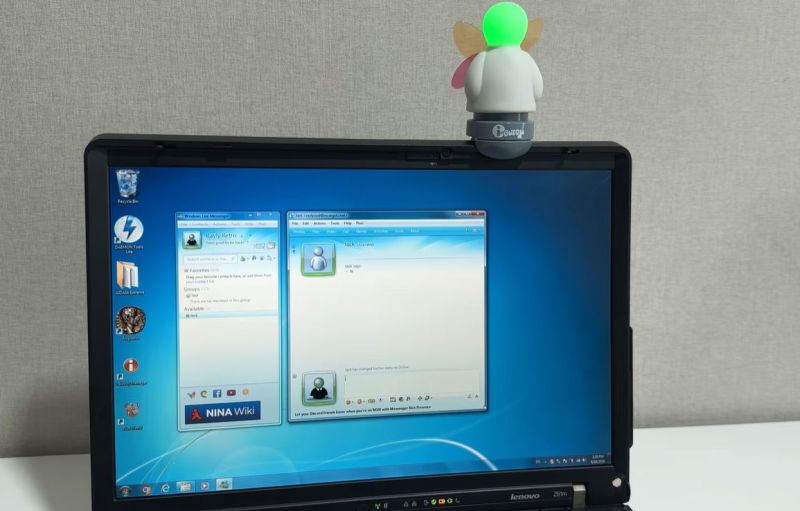
Some of our esteemed readers were not yet out of diapers back in 2013 when Microsoft decided to put MSN Messenger out to pasture, but the memories that this instant messenger’s (IM) interface and notification sounds have left are hard to erase. This also includes some of the weirdest accessories that this IM spawned, such as the USB-connected i-Buddy. Recently [Rayly Retro] got his mittens on a new-in-box one to revive alongside an era-appropriate Windows 7 PC.
What the i-Buddy gets you is the ability to light up the head in seven different colors, twist the torso and flap the butterfly wings, all of which can correspond to certain events in the MSN IM or for more general notifications, as set by software running on the connected PC. Interestingly, this i-Buddy is recognized by Windows as a USB HID, so no special driver is needed. A range of ways to program it exist too, including a .NET-based library from back when it was still being sold for around $20.
Although the MSN Messenger network’s servers have long since been dumped into an e-waste dumpster over at Microsoft HQ, an alternative exists in the form of the Escargot service using which a range of official clients can work again.
In the video it’s demonstrated how to create a user account with the Escargot site and how to patch the messenger – here Window Live Messenger 2009 – before signing in. With that step completed, getting the i-Buddy up and running is next. This took a lot of struggling, since the version of the i-Buddy software that comes with the device didn’t like Windows 7 much. Fortunately an old forum post led to a download of version 2.10, using which the gadget jumped to life, happily lighting up and flapping its wings.












That character with the glowing head reminds me of Gyro’s Little Helper.
Not as cute as him, unfortunatelly.
This brings back memories. For the longest time, I had my IRC client set to flap this thing when someone mentioned me. Luckily I was able to dig up the code I wrote for this thing. This was before I even had a Github account!
But here it is!
https://github.com/misel228/iBuddyControl
I haven’t tested it and the code is so old it can drink beer in Germany. So there’s no garantee it’ll work right away. But if you have one and want to get it going, feel free to fork and PR, etc.
Thanks for your service! Much appreciated
Im still running Windows 7, it’s free from AI and ads.
Good for you! It’s also good for legacy software and some games (thus maybe not as useful as running XP). In any case I hope you’re not connecting it to the internet and you still use an antivirus on it (ClamAV for example).
I second this.
The internet is dangerous and old OSes are full of security holes or vulnerable to exploits.
So in addition, using an external firewall/packet filter for another layer of protection might be worth a thought.
Just for sake of being cautios.
That can be an old router or a Rasperry Pi.
PiHole software does block all the nasty stuff, for example.
What, daily running, for general use? Not to fanboy here, but i do think Linux + wine is the better option for you. Except if you have some weird machine control or DRM software that doesn’t work on Wine. Running 7 in a VM might be better then.
Man, those were some times.