
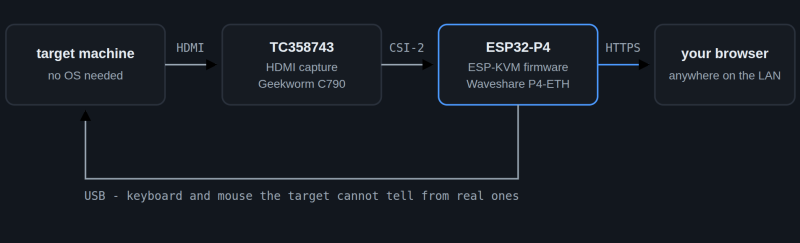
[Evgenij Spitsyn] spotted a KVM build on these very pages some time ago. That inspired their own build, leveraging the versatility of the ESP32-P4 microcontroller.
The concept is straightforward. Named the ESPKVM, the device is designed to hook up to a computer’s HDMI and USB ports. It captures the video output, while presenting itself as a standard keyboard and mouse device. In this way, it allows remote control of the machine over IP. It achieves this feat with the aid of the Toshiba TC358743 HDMI-to-CSI bridge, which is essentially the video capture hardware of the build.
The video output of the machine is streamed in MJPEG or H.264 format. The device is capable of serving up storage from a micro SD card or the onboard flash, as well as handling things like power/reset control and wake-on-LAN. All in all, it’s a very complete package, and full of useful features. Just don’t use it over the public internet yet — [Evgenij] notes it hasn’t been reviewed for potential security holes yet, even though it has some basic authentication features baked in.
If you’ve got an ESP32-P4 ready to go with a TC358743 HDMI bridge, you can actually head over to the ESPKVM website and flash the code right in your browser to get going. Meanwhile, if you found this build interesting, you might like to scope out the one that inspired it. If you’re cooking up similar utility hacks, be sure to notify the Hackaday tipsline.












That’s amazing. I’m going to get the parts for this. I have a computer that I built as a super low power home server. The problem is that it refuses to boot unless there is a display attached and no BIOS settings to change that behavior, so for a while there is a old monitor that I wanted to throw out ages ago on top of the machine, just so it can boot. This solves two problems at the same time.
There’s a solution for that. Have a look for “dummy monitor connectors” It saves having a monitor plugged in, if low power was the aim.
I was not aware of that product existing. I’ve never seen this problem before building this PC. This seems like a project that is more fun though. Might try both. Thank you!
Nice. I love finding weird niche solutions like this to problems that almost nobody has, it’s satisfying
I use one to run a “VNC desktop server”. I did not want a virtual desktop without GPU support, but the system would not do it unless a monitor is connected. In the end that little dummy monitor dongle made it happen.
Unless you have the connectors handy and treat your time as free you are probably as well off just buying the purpose-build ‘dummy monitor connector’ (there’s a similar product category that does passthrough but imposes a particular, fixed, EDID to deal with KVMs and other systems that are fidgety about displays that come and go or have unexpected properties); but these are also very simple to DIY, except with displayport.
For VGA, DVI, and HDMI EDID is handled by a little i2c ROM and there are 3 pins defined for i2c chatter with the ROM. Since bad things happen to delicate LCD panels and backlight driver circuits far more often than to little i2c flash chips I normally just salvage chips with ‘real’ EDID data out of scrap monitors; you can also flash your choice of EDID data to a blank chip.
If you want a dummy monitor you can just hook up the chip. If you want to be able to connect real monitors but not have the computer do anything stupid when they aren’t there or in response to a monitor with wonky EDID you pass through the remainder of the lines but leave the DDC lines connected to your chip with your choice of EDID data. Works fine as along as the ‘fake’ EDID specifies something that the real monitor can handle.
Displayport is harder because EDID is handled over the AUX link; which is faster and more complex. Not necessarily beefy FPGA material; but not literally-baby’s-first-i2c stuff.
I have one of those NanoKVM in a drawer somewhere I wanted to use. But this is like an equal alternative. Make it run via esphome so you can also monitor it :D let’s see which one turns out to be cheaper!
Hmmm… Good idea on the monitoring – that’s going on the roadmap (temp, power state, viewers, uptime). ESPHome itself won’t fit (the firmware’s a big custom ESP-IDF app, not something that runs inside ESPHome), but I can expose the same telemetry over MQTT – which also works with Home Assistant if you use it. ;)
Hey, thanks for the heads up. Yeah Im trying to stay clear of Mqtt for the time being. I prefer native Communications ;) ( and too lazy to add more failure points)
As for esphome, it is also based on esp-idf, so in that sense .. Esphome can do webcams, so why not hmdi?
To bad the hardware is far more expensive then I’d want splurdge ATM. 35 for that HDMI to CSI is brutal. So the combined cost is almost the same as the nanokvm then. Which does come with a display, connectors etc and runs Linux (though that’s not a requirement of course(
Hey, small update – it’s actually done now :) It does Home Assistant over MQTT with auto-discovery, so it just pops up as one device: temp, viewers, resolution/fps/codec, HDMI signal, USB, target power (if you wired ATX), plus power/reset/Wake-on-LAN/restart buttons. No YAML to write.
On ESPHome: yeah, it’s esp-idf too, but the camera stuff there is for little sensor cams, not a TC358743 CSI bridge running through the hardware H.264 encoder with USB HID and a TLS web server on top. That whole pile just won’t fit inside ESPHome, so it stays its own firmware. And totally with you on the C790 – that’s the pricey bit, wish it were cheaper myself.
Cool solution to a persistent and widely seen problem. There are dozens of commercial solutions that do essentially the same thing of course (e.g.: JetKVM), but I always love a DIY solution. Curious about the relative costs of DIY vs the commercial alternatives.
15eur for esp32-p4-eth
25eur for c790
Amazon Netherlands asks 23 for the ESP and 35 for the C790. Aliexpress is weirdly enough even more expensive, after shipping and EU tax.
There’s sort of two tiers on the ‘commercial’ side. You’ve got the relatively old school, enterprise focused, outfits like Lantronix who tend to be $$$$(and, if you buy used, quite likely older models that expect browser Java and SSL ciphers that have been disapproved of for some time); and you’ve go the much more reasonable priced; but there-are-doubts-about-the-firmware-much-like-those-about-cheap-routers guys (GL.iNet, jetKVM, etc. who aren’t charging all that much of a premium vs. DIY once you count a case and shoving all the parts together; but how trusting do you feel?
Inbetween commercial offerings and total DIY is the PiKVM, which can be self-made or pre-purchased. I love mine.
https://pikvm.org/
I’ve used NanoKVM for years. I saw an ad for a Thunderbolt KVM with a nice OLED screen that backhauls with Wi-Fi and does power and display sourcing and virtual KB+M all over a single USB-C.
There are ‘portable monitors’ that are basically the inverse, a single USB-C cable on a Thunderbolt port provides the display with power and the hosts display out, and if the monitor has a touch-screen that is provided as input to the host too.
This is not a “KVM”, which is short for ‘KVM switch’, which is short for ‘keyboard mouse video switch’.
It is an ‘IP-KVM’ which is a totally different device.
Using shorthand of shorthand of shorthand eventually stops you from communicating the actual idea.
If a basketball announcer says ‘ball’ DURING a basketball game, it is safe to assume they mean a basketball.
If they say ‘ball’ in a sporting goods store they aren’t giving enough information to know what they are talking about.