
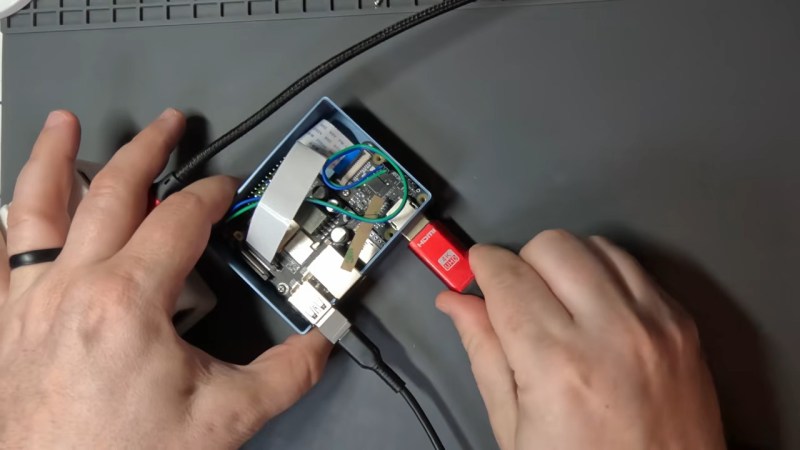
If you asked us to build you a KVM last week, we’d likely have reached for a Raspberry Pi. Now, thanks to [JonathanRowny], we’d seriously consider an ESP32-P4, because his IP KVM seems pretty capable.
He’s using the P4 hardware to its fullest, getting the supported 1080p graphics, and doing so in an interesting way– he’s got a commercial adapter board to try and translate HDMI signals to the camera input on his dev board. Conveniently enough, it’s the same ribbon-cable pinout as the RPi, which is not guaranteed by the CSI standard. Writing a driver to take that signal proved the hardest part– aside from the usual chip revision confusion that plagues this chip– and we can’t help but wonder if the client on the other side of the KVM-IP link might have an easier time doing the image processing that was required for a good image. Regardless, he’s got the code as it is now up on GitHub under the Apache license.
As of this this writing, there’s no audio, and ironically for an ESP32 project networking is wired-only– but much more importantly, there is no security. So it’s a work in progress, but great to see the P4 in the wild doing something other than emulation. Not that we haven’t seen the P4 at work before–the Tanmatsu handheld also makes use of Expressif’s most powerful chip for a handy little terminal. Between the KVM and the handhelds, we cannot help but wonder how many of the projects that were once the provenance of a Pi will get squeezed into these overpowered microcontrollers. Sure, they can’t even match the original Pi in horsepower, never mind a modern Pi5, but how many times have you seen a Linux SBC seriously under-taxed in a project like this?
If you’re swapping Pi for P4– or doing anything else interesting– please let us know on the tips line.












in other news you can get an hdmi -> usb capture device on temu for about $5. nothing amazing but plenty to use a laptop as a temporary head for a headless computer if you’re in the server closet. i wanted this so badly 20+ years ago and now it’s just a cheapo dongle
I use a HDMI -> USB device to connect my Rapsi Zero 2W device to my tablet when I make a change in the config which makes the Pi not connect to the network (and be inaccessible over ssh). Its a great device to turn your cheap android tablet into a portable HDMI display.
That said, I don’t think it would be good for a KVM use case. KVM by its purpose brings about a perception of reliability, at least more reliable than the machine its connected to. That’s why I’m not too sure about experimental hardware or jerry rigged solutions for KVM.
It’s just a proof of concept, not meant to be used for real. I might spend more time on it once the p4x modules are cheap.
You can get them very cheap from all the other usual sources too, including Amazon. I have used one for connecting the pi in my microscope and telescope to my laptop to use them portably.
I use the udb hmdi capture for that too.
But I also use it to loop the hdmi output of locked down laptops which stop you taking screenshots, back into the machine and then recording the video.
Because for the lulz of bypassing undeclared corporate spyware and gathering evidence for tribunal.
A P4 is a Pentium 4.
Yes that is what I thought first, as well!
And a KVM lets me control two P4 PCs with one PS2 keyboard and mouse, from anywhere within reach of those two PCs!
Nope, KVM is just KeyboardVideoMouse.
“KVM” alone is most often just nonsense.
“KVM switch” or “KVM extender” are the most relevant terms here (with or without “IP”).
“Nope.” Regular people who have to use KVM switches refer to such as a KVM without blinking an eye despite your aptitude for pedantics.
No need to be pedantic. A lot of people say “KVM” when referring to a KVM switch. I too thought P4 meant Pentium 4, not Pi4
I also read the headline that way.
Don’t be lazy…
This is an “IP-KVM” on an “ESP32-P4”.
Using shorthand will inevitably confuse people.
Type the 9 extra letters…
haha i don’t care but fwiw count me among the confused.. when i feed ‘kvm’ into my association engine what comes back is i guess what is called ‘kvm switch’, a selector box for your physical monitor and keyboard and multiple PCs at your desk
I was confused by the utility of this, but after watching the video, I get it now
You can try my implementation based on Jonathan’s project https://github.com/espkvm/espkvm ;)