
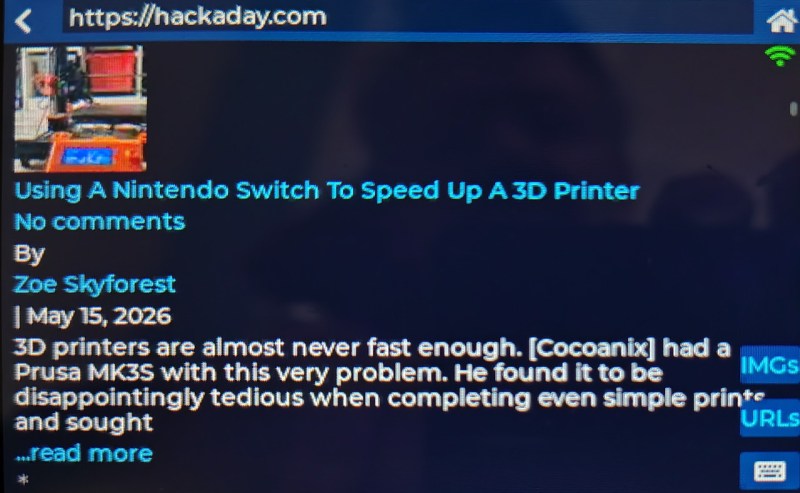
At the Hackaday Europe conference in Italy earlier in the year, we were shown a rather interesting device. The work of [Alun Morris], it was an ESP32-powered Cheap Black Display board, and it was running a web browser. Definitely an achievement.
Lest you imagine that it was sporting the latest and greatest in browser technology, we must disappoint you. The browser in question is a very basic text mode device, but it did happily retrieve Hackaday, which should be the only test a browser should need to pass.
Under the hood it’s running FreeRTOS, with separate HTML retrieval and tokenizing, and UI processes. It can fetch web pages directly, but there’s also a server-side proxy for difficult sites, and for creating image thumbnails.
An ESP32 is a powerful microcontroller, but it’s fair to say it’s not in the league of running a web browser and as far as we can remember this is the first one we’ve seen. We’re sure it’s a field with further progress to be made though, particularly with the more powerful recent chips in the series. This project however is a good start, and more importantly it can be yours for a few dollars on Ali to buy a dev board. What are you waiting for?












Maybe a more powerfull ESP32 could make a usable gadget. Like a S31 or P4+C6
Now we know. It’s easier to bring a web browser to a 240MHz ESP32 than an edit button on Hackaday comment’s section (not even a delete button)
It’s all in the intent – Espressif is just more customer-friendly, that’s all.
“Espressif is just more customer-friendly” not really – they delete any post I put on their forum that might be critical of something they do (ie like the esp32 development stack which has issues…..).
It’s not as easy as you think.
The plugin has to be secure, has to preserve anonymous/no-login posting, and cannot send your user info off to some sketchy 3rd party that none of us trust.
We have found methods that check off two of the three boxes. We actually dug pretty deep into one a couple years ago, but it was riddled with XSS vulnerabilities. We even offered to help pay the devs to fix them, but that fell apart.
If you know of one for WordPress that matches all three, we’re all ears!
Hey Elliot, you have a huge base of experience reading these articles. Lots of fans of the site. Is it possible to make an article poking the community to suggest solutions they make all the needs? Could even give one of the last hackaday what’s that noise t shirts out as a prize?
Wait, ew, this site is made in wordpress. Wouldn’t it be simpler to just do this site in “naked”? Even a convoluted and aged PHP stack would be more secure and less in the way than a customized WordPress setup.
Who needs an edit button? If you say/spell it wrong once, post an updated comment. As soon as you start adding edits people change the meaning of their comment, and replies attached to the original comment don’t make sense. Everyone makes mistakes sometimes, we don’t need to try to hide it.
I think that was pretty good logic before browsing via smartphone became so common. It is so easy to swype out really bad mistakes and quickly submit before realizing it.
I used to think it was really weird that HaD went with WordPress over SlashCode. I mean, it’s pretty much exactly what you made in WordPress but without having to customize it to get there.
I guess you don’t really take user submitted content to the extent “Slashcode” was written for but surely that is a simple flag to toggle off right?
So.. I just checked if that supported editing/deleting comments.
And.. I found it was renamed to Slash. Really, what is wrong with people? It’s like some people are developing for the Internet and yet have never used it themselves. Using a name that is a single English word? Yah, that’s great for searchability.
So.. anyway.. then I found that Slash seems pretty abandoned.
Weird since Slashdot still exists. Maybe they just reached the mythical ‘done’ point?
But look, SoylentNews continued their own fork. They call it Rehash. Ok.. Slightly better than Slash but really???
I see Slash[code]/Rehash was written in Perl. Ok. Maybe now I get why you didn't use it.
And it doesn't support comment editing.
It's so weird that this isn't a basic feature found all over the place!
To be fair, seems pretty consistent with the last time I was browsing the web on an 8MB machine with SVGA level graphics.
Hm. I think Netscape Navigator 2.0 in 1996 had more complete HTML support?
I mean, PC/GEOS has Skipper/Webmagick browser and runs on an 286 with 640 KB or more RAM (supports swap file, EMS, XMS)..
And to what I can see, these barebone www browsers can handle websites with frames, at least.
Then there’s Arachne, Dillo and the new MicroWeb 2 for DOS.
They all seem to run with 640 KB to 4 MB just fine.
Not sure what to make of this ESP32 browser, thus.
I hope it will continue to evolve, though. 🙂
With basic browsers that understand only a subset of html like this I don’t think it’s necessarily the browser that understands the most html that wins. It’s the one that fails the most gracefully on the html that it doesn’t understand.
Just look at lynx, links and elinks to see what I mean.
Now that I think of it, this browser reminds me of Minuet from 1994!
It had similar level of HTML support, but lacked input forms.
Minuet ran on dated 4,77 MHz PCs still found in universities, for example.
It supported text-mode, as well as Standard VGA and SVGA resolutions/color-depths (via VESA VBE).
https://en.wikipedia.org/wiki/Minnesota_Internet_Users_Essential_Tool
Oh, that’s sweet. Instantly recognizable as Turbo Vision, and WP says it was written in Turbo Pascal. Those were the days — simplicity!
+1 😃
Minuet still can render a few websites, depending on how backwards compatible the web server is (HTTP 1.0 or 0.9).
Examples: https://tinyurl.com/r4yh46hm
The search engine wiby.me can help finding classic websites, new and old.
Besides, Minuet can do E-Mail, Gopher, FTP and “Finger” etc.
It’s still cool to have on a vintage PC running DOS..
Or still useful for compatibility testing of new retro websites/web servers, maybe?
Besides dial-up, it supports simple DOS packet drivers such as ne2000.com.
(If someone is using dial-up, an ISP can be simulated using a modem and an Raspberry Pi using DreamPi software).
That’s your post on Vogons? I’ve got an account on there, too, if so.
Instead of doing the rendering inside the MCU it would be interesting to create a rendering “cloud” service. So the MCU only receives a Json with a bitmap of the rendered page, the frames for the clickable links and everything else (cookies, etc.) remains in the Linux server
With PSRAM it should be much more capable. Who remembers Arachne browser?
I hope work on a minimal host web client continues. I’ve built embedded UI/HMIs using all sorts of proprietary frameworks, every time wishing I could build a standard HTML/CSS/ES6 UI instead.
I think the current minimal web client host starts with a full Unix or Android operating system on an SoC, far in excess of what is required to run the rest of the web stack.
Recently I was working on developing an infokiosk that’s meant to be used with smart vending machines. After trying different solutions I found that the easiest and most awesome (in terms of special effects, like particles on button click, animated finger trace on screen or video window turning into physically simulated water on being closed) was to use UE5.
My first browser was LYNX (over Telnet). I would love to see that on a character LCD/OLED, with support for HTTPS.
An elegant browser, for a far more civilized age
.. so does it support the HTML tag ?
.. so does it support the HTML “blink” tag ?
One way where this could be useful is in home automation. Imagine a small computer (Raspi and such) serving web pages that control lighting, heating etc, and then a box like this shows the web pages and lets you select and control “things”. But to be useful, a 3 second load time for pages is not acceptable, but that’s probably due to the complexity of the web pages being loaded. Local cashing can also help.
Using a standard protocol has the advantage you don’t have to think up your own. It also makes it compatible with other devices, such as PC, laptop, tablet, e-reader, phone, etc.
TLS decryption is the bottleneck. If a site is http:// only it will load more quickly
Hmmm, AI console with audio I/O?
“but there’s also a server-side proxy for difficult sites, and for creating image thumbnails.”
What The Fudge? If you are going to off-load the hard stuff, why even pretend that the ESP32 is “running” a eeb browser?
It’s a fair point. ‘Difficult’ in this case means:
1. Sites that block access to requests. The proxy merely passes the HTML on.
2. I could have done the images without a re-sizing proxy but many would be too big or very slow (minutes for pages with many images) to download due to the decrypting of TLS.
To follow up my reply: Babe32 does work without a proxy or image resizer. It just makes fewer sites accessible and you see no images. Hackaday and Wikipedia work for example.
A nice work.
With basic browsers that understand only a subset of html like this I don’t think it’s necessarily the browser that understands the most html that wins. It’s the one that fails the most gracefully on the html that it doesn’t understand.
Just look at lynx, links and elinks to see what I mean.
In 2025, I played around with cURL on my WHY2025 badge (ESP32-P4) and thought:
“What’s missing is some kind of browser…”
And so, the Mini Browser for the WHY2025 badge was born.
It started in September 2025 with version 1.1 and it was recently updated to version 2.4.
See for yourself!
Links:
https://github.com/mactjaap/mini_browser
https://github.com/mactjaap/mini_browser/blob/main/Mini_Browser.jpeg
https://wiki.why2025.org/Badge