
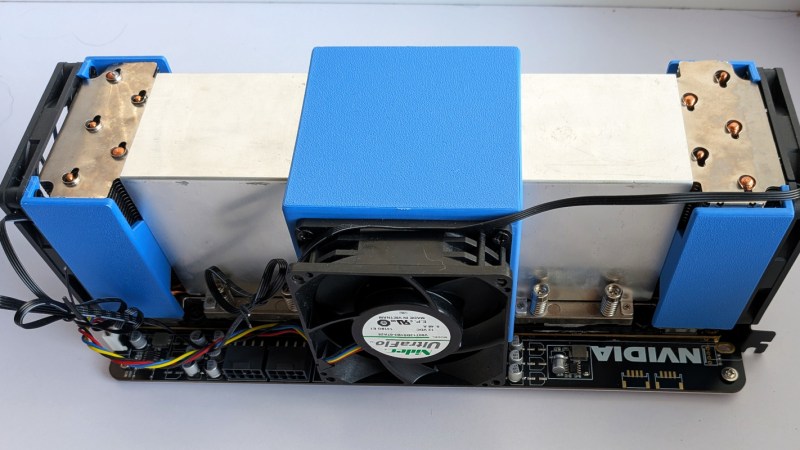
As we’ve seen many times before, there’s usually some way wrangle a bit more life out of what would otherwise be considered old and obsolete technology. Perhaps one thing that has been passed over by the masses a bit to early is older datacenter GPUs, which is understandable in one sense because of the rate NVIDIA is pumping out new ones, but these cards have plenty of useful life left in them for the average person, as [Andrew] demonstrates.
The cards [Andrew] is using are Tesla V100s of 2017 vintage. Despite being older hardware they have high-speed memory which allows them to run modern LLMs locally, competitively with online models. In this test, Gemma 4 26B and Qwen3 35B are run, with Gemma being a bit faster because it fits entirely in GPU memory and Qwen3 being a bit more capable but more hungry for resources. [Andrew] built a PCI card that can host two V100s, allowing these larger models to fit completely in memory.
Even though these don’t perform at the same level as the latest top-tier online models, they’re surprisingly capable and also have the benefit of running completely locally. This might be concerning for those looking at the global economy being propped up by companies that essentially have no moat for motivated users, especially as more and more datacenter hardware becomes available on the secondhand market. While this build by [Andrew] goes into detail on getting the software stack up and running, we recently featured another build using the same GPUs that focuses a bit more on hardware for those looking to get started with local hosting.












It’s built in Windows? I haven’t researched running my own LLMs yet but it’s on my list of things to do. Is this normally done in Windows? I assumed it would be Linux. He said he tried WSL first and it required using some stuff I don’t know anything about yet that was slower. Ok. Was it because it was WSL and not bare Linux? Or are LLMs actually Windows bound?
If it means running Windows this one just got knocked even farther down the future project list.
nah he’s got linux builds avail too. IDK why he’s got such a windows fetish, but from what I can see you could trivially point an agent at his blog and github and get a setup running on linux.
The LLM is not bound to a Platform. You can run it on Windows, Linux, your Smartphone.
As long as your Hardware supports it, or vica-versa, it will work. There are dumbed down versions with simplified weights, that need less memory. But a Smartphone with 16GB will do quite well.
That’s the main reason, and it primarily applies to these datacenter GPUs.
For the V100 (and other compute-focused nvidia GPUs), nvidia’s windows driver defaults to a special mode – TCC (“Tesla Compute Cluster”), which is designed solely for compute, not graphics acceleration.
TCC doesn’t support passthrough to WSL, so you have to force the card back to the standard Windows driver, which is slower. That’s WDDM, which stands for “windows display driver model”, I believe.
Consumer GPUs always run in WDDM mode, so this doesn’t matter. In my experience with the 2080 and 3090, they perform about the same in WSL as they do in Windows.
From what I understand, the Nvidia Linux drivers already provide the increased performance of “TCC mode”, so presumably straight Linux would be the best option for the V100.
correction:
on these headless cards, the alternative to TCC is not WDDM, but MCDM, “Microsoft Compute Driver Model”. It’s really just a scaled-down version of WDDM without the display features, though.
Confusing enough for you?
WSL is a virtual machine as well, so there is non-neglible performance penalty, for running an LLM model could be limiting
If you’re working with large AI models, there’s an advantage to going native Linux vs WSL (and potentially native Linux vs native Windows). It’s not “performance” per se, there’s just more free GPU and system memory available, so you can fit larger models or more layers into memory without offloading.
Otherwise, the difference is pretty minimal. not so much. For GPU-heavy AI work, my experience is that WSL usually runs +/- a few percent of native, within the the margin of error.
It’s not all rosy; CPU-bound tasks have a bigger performance penalty, up to 15% or so. And things that do heavy disk read/writes can be worse still.
So if you’ve got a dedicated linux box to run AI models, it’s likely the better choice. But if you’re stuck with Windows, I find running WSL is often still a better option than dual-booting linux or dealing with the hassles of running models directly on Windows.
Lots of good stuff in that post, and his blog in general!
Basically a duplicate of
https://hackaday.com/2026/07/22/industrial-gpu-adapted-for-the-desktop/
Perhaps this is the reason for the insistence on using Windows in this project, because it’s already been done with Linux. In a relatively recent post I supposed that if AI crashes hard, there may in the future be a huge surplus of these. Someone responded that these couldn’t be used outside of their specific purpose in data centers, and I’m glad to see that’s not necessarily true. If this compute can be decentralized and cheap, I think a lot of innovation would happen. It would be like the PC revolution all over again, a million software and hardware ideas as an outgrowth. Maybe I’m being a bit grandiose, but I need a silver lining to the story of AI data centers from megalomaniac billionaires which is much too close to dystopian science fiction that also came out of the time period.
IIRC a lot of the latest gen don’t use PCiE, so you’d need adapter cards, if that would even work. Sounds nice, though.
Currently all datacenter GPU’s use a socket called SXM. It is a socket that combines PCIe, NVLink and Power in two sockets. Even the newest SXM7 still uses plain PCIe5.0. The benfit is that the GPU’s can talk to eachother via NVLink, because PCIe 5.0 x16 is quite a Bottleneck for these GPUs. If you only have one GPU to run, then the adapter for PCIe and Power is all you need.
Also, if AI crashes hard and all the equipment becomes surplus, then the chassis will also become surplus. Just buy a full chassis and connect ethernet and Power. At least those will be industry standard, won’t they ?
I thought so at first, then I read it :) He has a lot of good stuff about actually getting benefit from this
What you’ll see is ready to go hardware on the market. Not as cheap as DIY, but still better than landfill fodder.
That’s what this is, the PCI-E adaptor PCBs are third party manufactured and were never offered by nvidia. The single card ones are quite cheap. The dual card ones barely make sense financially, but are still the cheapest way to get dozens of contiguous VRAM.
Nvlink gives 6x the bandwidth at half the latency of PCI-E, with next to zero CPU overhead.
Qwen3.6 35B is mix-of-experts, meaning it can be spread across CPU and GPU. No need for big chonkin data center GPUs. With a bit of tuning it runs smoothly for me on a Ryzen 5800x PC with 32gb RAM and a Radeon 6700 10gb.
My, how things have changed. Two years ago devs wanted to put desktop GPUs in my servers. Not they want to put my server GPUs in their desktops.
Does anyone know where he got the dual V100 PCIe carrier from? The article said something along of the lines of buying it from him, but there is no info whatsoever.
aliexpress
Colibri?