
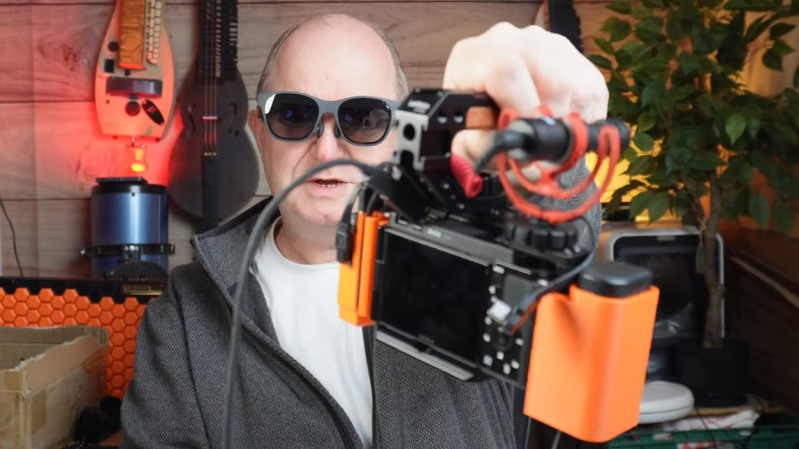
[John Dingley] has a Sony ZV-E10 camera that is excellent, but the design lacks a built-in electronic viewfinder. This means it relies entirely on its rear-mounted touchscreen for framing shots. This is troublesome because [John] often films in bright sunlight, and sometimes from a perspective other than normal eye level. His solution? Use a pair of XREAL video glasses as a handsfree viewfinder.
The XREAL glasses look a bit unusual, but they can be worn and used like regular sunglasses. They accept external video and importantly, allow the wearer to see the video feed while still having awareness of their surroundings. Seems like a perfect match for the camera, but as [John] discovered, there are quite a few implementation hurdles involved.
For starters, the camera and glasses do not speak the same format. The camera outputs HDMI via a distressingly fragile micro-HDMI connector, but the glasses accept video over USB-C (aka DisplayPort altmode). Connectors and cables and a converter will be involved, as well as a power bank because the glasses and converter will require a power supply. As any hacker knows, wires and connectors can eat up space very quickly.
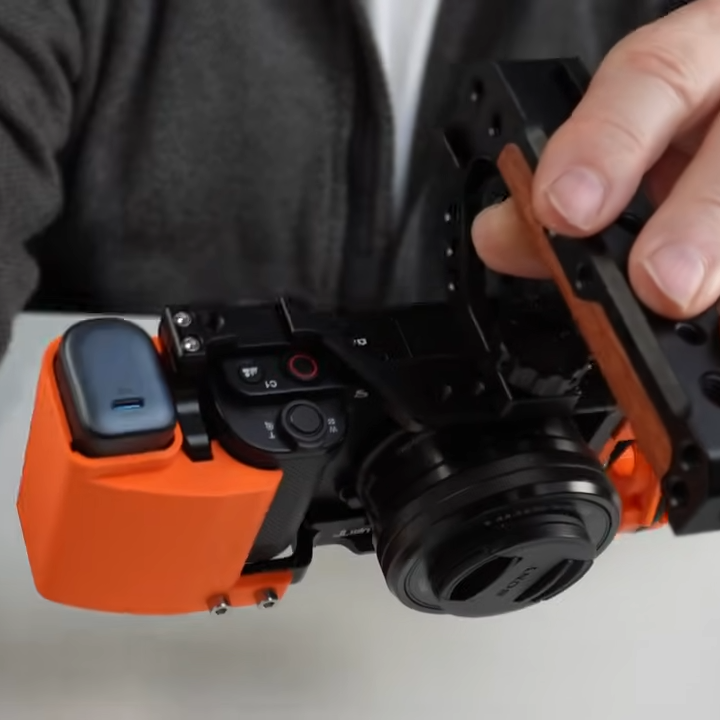
To solve all this, [John] carefully selected off-the-shelf components chosen to minimize bulk and designed a custom camera cage to hold things cleanly without obstructing the camera’s microphone port. The end result is very tidy package that presents a single USB-C connection point between the glasses and the camera, requires no hardware modifications or soldering, and even takes the strain off the fragile connector on the ZV-E10.
The finishing touch is putting a neck strap on the XREAL glasses, allowing them to be easily donned and doffed as needed while filming. Check it out the video, embedded just below the page break.
When it comes to filming vehicles it often makes sense to film from a low perspective. The camera has a handle for this purpose, but the process is much better now that the glasses can act as a viewfinder. [John] has a soft spot for vehicles, including self-balancing unicycles or monotracks of his own design.












I do this! Amazing technology to have a “120 in” screen in your pocket for fine detail checking. One $15 amazon special HDMI to USB DP adapter, which usually gets power straight from the HDMI input, and you’re looking at the world through your camera. Great build!
I have the Nreal Air, and it takes a special adapter to connect the USB sound card in the glasses if you want it working properly. I believe there is HDMI sound support, but I don’t know if my Firmware updates applied correctly, I do get 90hz and 120hz modes now though 🤷🏼♂️ and with the USB active sound works fine on SteamOS and Windows.
You can’t power those glasses from the HDMI port power, don’t be silly.
TL;DW: how to use a converter to get the camera’s mini-HDMI video to the USB-C DisplayPort for the glasses. He printed a couple of shells to house an HDMI digitizer and a power bank, then connected everything with the shortest cables he could find on Amazon. The video walks through the discovery and experimentation phases in minute detail, then explains the assembly process teeny step by teeny step.
The 20+ minute video would have been too long if it was a 10 minute video. But I understand a content creator’s gotta match the YouTube algorithm if he wants to eat.
I recently got a chance to try out a rail mounted cameras linked to a pair of Xreal Glasses.
I first tested a single camera mounted to a Remington tac13. It was a strange experience. It was somewhat disorienting having visual sighting while firing from the hip but it worked. Im sure with some time and practice it would feel more natural.
The second test was something I went into with a very negative mindset and it was as bad I expected it to be. The owner setup a system that took the feed from a wide angle helmet camera and two rail mounted cameras installed on a pair of Cabot 1911’s one in standard right hand design and one in their “south paw” configuration. The video was combined to place the helmet view stretched across the top 1/3 of the video feed and the gun mounted cameras splitting the bottom 2/3 between the two. It was completely disorienting and uncomfortable to try to move while swinging two pistols around single handed like some sort of movie character even without firing. I managed to squeeze off 2 or 3 rounds per gun before saying “thank you but NO” It was an interesting experience but not one I ever care repeat. I cant see anyone ever using that setup in any practical situation.
The owner/maker talked about trying to incorporate it into some sort of DIY Cornershot system as well, But I also always felt that to be a silly gun concept as well. In any case it was an interesting afternoon.
That really doesn’t sound practical. How is the latency? I bet that’s disorienting as well. Combining that with loaded firearms sounds borderline dangerous.
I think you’re better off using your eyes.
The single camera tac13 setup had zero perceivable latency.
The triple camera setup clearly had some lag. The disturbance of seeing three simultaneous moving images was bad enough to cause significant issue in its own. If you moved slow and steady it wasnt so bad, but at quick speed even if you kept your focus on a single camera things felt wonky. I would guess somewhere in the 25-75ms range.
I hasten to point out that there is no conversion required. Merely a USB C ID chip. Displayport has compatible HDMI signaling modes.
Is that true on the sink side? A lot of DP sources are the “DP++” variant that has an HDMI-compatible option with minimal adapter; seems to be more or less the rule at least for the first 1-2 outputs on typical computers; but here we have a pure HDMI source and a DP sink.