
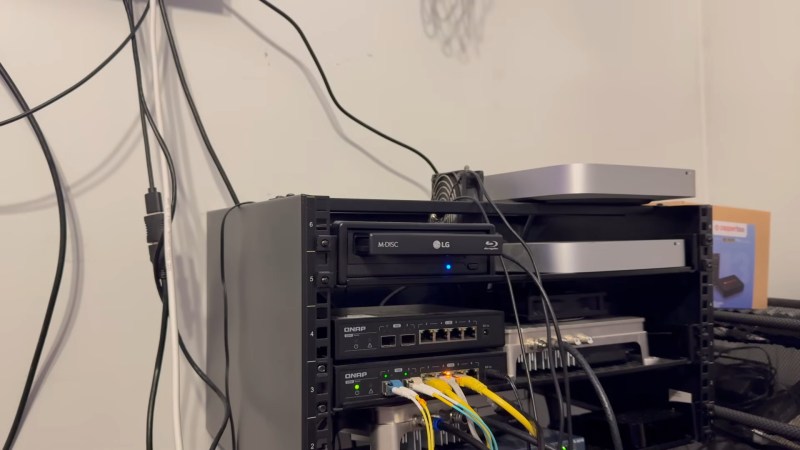
Given that the no doubt totally sustainable build-out of data centers has sent both solid state and magnetic hard drive prices soaring, though, [WNY Over The Air] decided to take a look back at optical disks — specifically the high-density BDXL disks — and see how they do hosting the music library for his Plex server, among other things.
Price wise, well, it’s going to vary depending where you are in the world and exactly when you look. But Blu-ray pricing is looking competitive to hard drives again, and that even goes for the long-lasting, archival-quality “M-disks” that are supposed to last 1000 years in ideal conditions. Of course if you’re playing with LLM Agents, having your precious data on a Write Once Read Many medium like Blu-ray also has the advantage of keeping the agent from wiping it out, which [WNY] takes pains to point out.
That might be obvious, but what’s less obvious is that once the disk has had its metadata queued by his media-streaming Plex server the M-disk is plenty fast enough for streaming music with no noticeable lag. That load time does happen every time you load in a fresh disk, but how often would you be swapping out 100 GB of songs? Even with lossless formats like FLAC, that’s a few thousand tracks. If you’ve already got a Blu-ray drive and are hard up for storage, it might make sense right now to move your music to an optical disk while waiting for drive pries to normalize.
The window where this makes financial sense might not last long, and we’ll be back to wondering where to store our data. All we can say is that’s probably not going to be audio tape, as cool as a reel-to-reel would look in the server room.












With Sony and Microsoft giving up on optical disks in their next gen consoles, I predict optical disks will become irrelevant. They won’t disappear. Some niche company in China will continue making USB ODDs for edge cases like some medical compliance stuff. However most sysadmins born in 2020s won’t even recognize the tech once they enter the job market.
I can’t wait for discs to just die already
Out of spite or genuine issues caused to you by their existence?
his father was killed by a blu-ray copy of Terminator 2. He got out of the shower and slipped on the disc then hit his head.
His dying words were, “I’ll be back.”
“Ow, my back”
Also known as Ending Man BS-500, comes with 999999999 backaches in one.
I actually think they’ll become cool retro tech. “Yeah 50 years ago we used to blast laser at plastic to listen to music.
Cooler than dragging rusty sticky tape over a Permalloy ring with a narrow slit cut in it?
Cooler than pulling a diamond through a squiggly groove molded into plastic?
If you ask me, part of what makes the predecessors cool is that they work as well as they do considering what they are. Compact Disc is futuristic in comparison – though I share your sentiment and hope you’re right.
Damn! And I just backed up my MP3 collection to punch cards. 6 warehouses full, but as long as they don’t get wet they should be fine.
Shoulda sprung for mylar, then you wouldn’t have to worry.
Sucks to be you, I got my wax cylinders all done. Next stop, Lonelyville.
I have some M-disk capable drives and have been pondering what the best use for them would be. By today’s insane standards even 100 gig isn’t all that much. And I’d probably want to buy and “archive” at least one spare drive…
I’m still actively annoyed that hard drives stopped having physical write-protect switches. And I still haven’t seen a cheap way to filter USB traffic to block write there; I’m sure it’s possible but haven’t had the cycles to investigate creating my own USB firewall.
Couldn’t you just restrict write-access to certain disks to admin-only users, then use a different account?
Yes, I am already using user-based privilege controls. But I really want a switch that no amount of software hacking can bypass, and physical presence is necessary. Ideal would be a switch on the drive itself, not even in the external drive cabinet… But I’ll take what I can get.
Failsafe systems fail by failing to fail safe.
What you’re looking for is called a forensic write blocker. I have one for SATA and another for USB devices. They seem pricey but after doing two simple data recovery jobs they paid for themselves.
Yeah, that would do it. Feels like the he kind of thing that could be homebrewed around a simple microcontroller, if one groks USB protocols… sorta surprised I haven’t seen one go by here.
On an ATA device, all you really need to do is trap all of the write opcodes delivered to the command register and abort them. Seems like this would be easy to do on a bridge chip (e.g. USB to SATA) and controlled with a “write protect” pin on the bridge chip.
There might be vendor-specific configuration that you can do to some disk drives that would effectively achieve the above on the drive itself, but good luck finding documentation on it.
One of the (few) advantages of the old ide disks – I had a switch on the write line to the front panel – nothing was writing to that drive unless I flicked the switch!
“what’s less obvious is that once the disk has had its metadata queued by his media-streaming Plex server the M-disk is plenty fast enough for streaming music with no noticeable lag”
LOL. How young is everyone. The original CD was designed to stream audio, you know. And since MP3 wasn’t really a thing, they had to stream UNCOMPRESSED audio data. Guess what, it worked without a problem.
Yes, I laughed at that since the bluray standard was intended to stream video and high definition audio.
Sigh. I’m not that old. I’m not that old…
The advantage a CD player has is that it’s reading the media at 1x and the data is processed and consumed continuously. The transport merely has to follow the spiral track all the way to the end. If there are any uncorrectable errors along the way then conceal them and keep going. On the other hand, reading a data disc means the drive must position the transport to the right part of the track to read the appropriate sector(s) requested by the host. Oh, sector 34489 had C2 errors? Gotta read it again…
Even 30 years ago the drives would read a burst of sectors at a time and cache them, and OSes would often implement read-ahead buffering since most of the time you were performing sequential reads anyway. Performance would take a serious hit if the transport had to move around a lot, and so it was smart to optimize the layout of the files to minimize this (such as when reading game assets during a level load).
A good comparison would be the inter-track delay when you set the CD player to shuffle the tracks. Now it must seek to the correct time index specified in the TOC for the next track to be played. It makes a best guess how far to jump and moves the sled, then it has to read enough frames off the disc to decode the time index from subQ and find out where it landed. If it’s not in the right spot, repeat the process until we get it right.
I have a soft spot for optical media. I remember feeling like hot shit for carrying my Slax CD to school and booting a distro of MY choosing on the school computers.
The teacher was worried I might break something (but that’s usually how it goes, doesn’t it?)
The real problem now days is data backup – optical isn’t big enough, cloud storage is too expensive and can be too slow to upload to..
Which strangely (for us older computer people) leaves us with tape (yet again…).. the tapes aren’t that expensive, but that can’t be said for the drives…