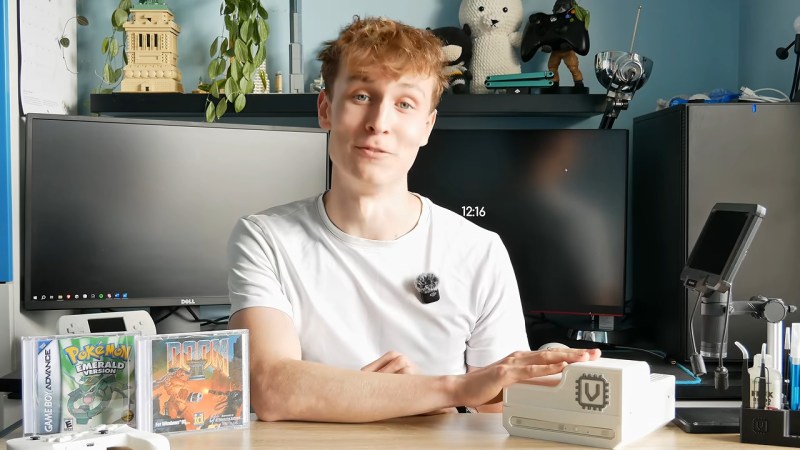
Giving The NES An Optical Data Storage Add-On

The introduction of optical media in the form of CDs meant a revolution in the world of gaming consoles, escaping the restrictions of a few dozen MB of storage and instead offering a theoretically infinite amount of storage through the miracle and tedium of swapping discs. After the SNES narrowly escaped getting a CD add-on and the N64 doubled down on cartridges, we can now at least get an impression of what it’d be like if the Nintendo Entertainment System had been gifted a CD add-on back in the 1980s, courtesy of a project by [Throaty Mumbo].

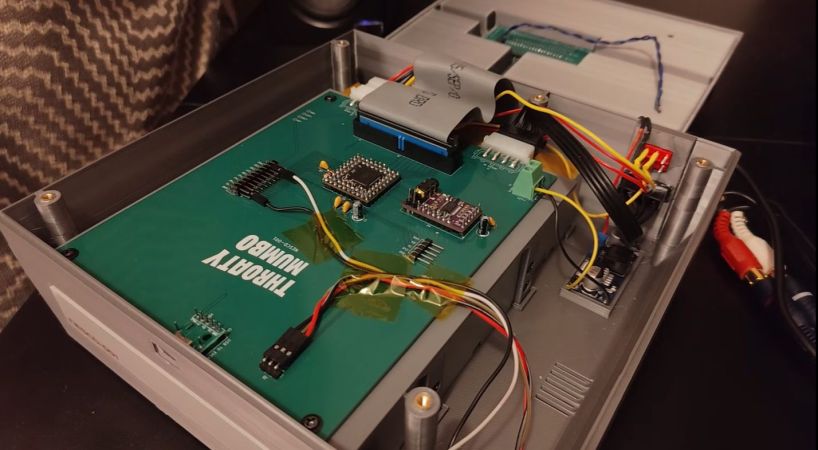
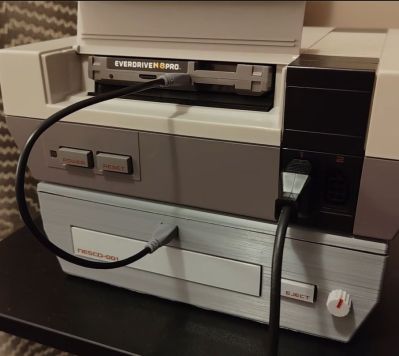
The NES future we could have had. (Credit: Throaty Mumbo, YouTube)
The NES future we could have had.

There’s also an accompanying video containing typical hijinks and a demonstration of this system. Initially [Throaty Mumbo] was going to make a SNES CD add-on to match that console’s initial prototype, but doing it for the NES seemed more fun. Obviously, since the NES is quite limited hardware-wise it was always going to be a struggle, even if the original front-loading NES conveniently has a mostly unused expansion slot.

On the custom PCB there is an RP2350B microcontroller that mediates between an Everdrive N8 Pro cartridge and an IDE CD drive, along with a PCM5102 audio DAC. The expansion port is hereby used to receive the audio samples on its audio mix input pin, along with power. After boot the game ROM is read off the CD by the MCU and streamed over USB to the Everdrive.

Combined with the previous work [Throaty Mumbo] did to revive the long-defunct Japanese online service for the NES, it’s an exciting time for fans of the iconic console.

Continue reading “Giving The NES An Optical Data Storage Add-On”

Encoding MOD Files Optically On Paper, Because Amiga’s Legacy Will Outlast M-Disks

All but a few of our very youngest readers are surely familiar with music formats that rely on optical disks. When we say [RobSmithDev] made a MOD tracker that uses an optical disk, then, you might be forgiven for thinking he stuck a bunch of MOD files onto a CD– MOD files being a format of electronic music that was conceived of on the Commodore Amiga that is still used to this day. A dedicated MOD-CD player might be a fun project, but it’s not what [Rob] did; his project is far more impressive and impractical, as he’s come up with a way to encode the MOD files on paper for optical playback. This way the Amiga’s legacy can be preserved longer than the paltry thousand years promised by the optical M-disk format.

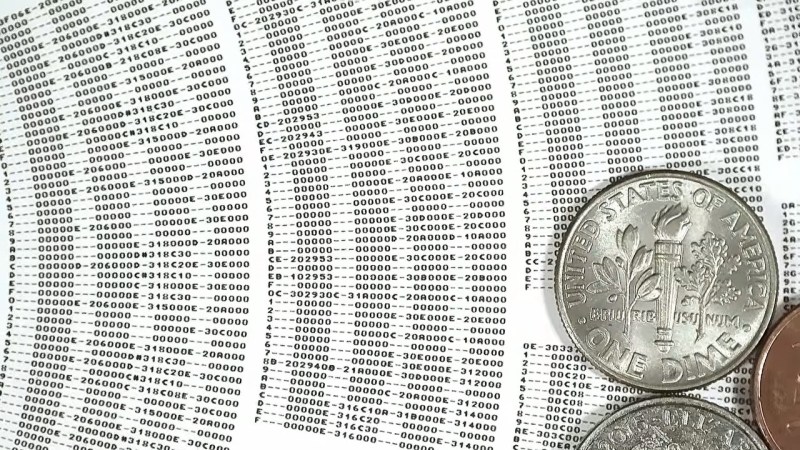
Zooming way, way in on the disk reveals that he’s actually printing the patterns of the MOD file row by row, just like you’d see playing it in a ‘tracker’ program. A MOD file, you see, does not encode music like a WAV or MP3. Rather, like with MIDI, it lists the notes the software reading the file — traditionally called a tracker — is to recreate. Unlike a MIDI file, though, you don’t have to store the same notes more than once: repeating sections are stored in patterns. So most of the disk is just a long list of hexadecimal numbers: several columns worth, one for each ‘voice’ or instrument playing in the song. Another difference with MIDI is that MOD files are self-contained in that they are supposed to contain the samples, which isn’t in evidence until you flip over the disk.

There’s no B-side to [Rob]’s album. Instead a QR-code like series of barcodes is used to encode the samples used in each track on the disk, as well as other information needed to recreate the MOD file, including metadata like title and artist, and the sequencing of the patterns on the front. Of course this means he needs two cameras on his physical mod player, one on each side, and steppers to slide them across the disk like a linear tracking turntable. The front is read via OCR of his modified Amiga “Topaz” font, while the rear holds the first 1084 bytes of the MOD file in a QR-inspired format [Rob] produced specifically for this project.

Unlike the last time we saw someone store music in QR codes, the more modest size requirements of modfiles — something that led to their use in keygens — means this player can store the music’s 8-bit sound samples without the OPUS compression [Rob] is using affecting fidelity. He’s working on another video to give the details of the player– as he works out the bugs, right now it can’t jump betwixt patterns on the disk as fast as some modfiles need–but we’re willing to hazard a guess he’s got a Raspberry Pi in there, and that it’s probably not running the Amiga-inspired AROS operating system.

Continue reading “Encoding MOD Files Optically On Paper, Because Amiga’s Legacy Will Outlast M-Disks”

Music Is Back On Optical Disk In This Plex Server

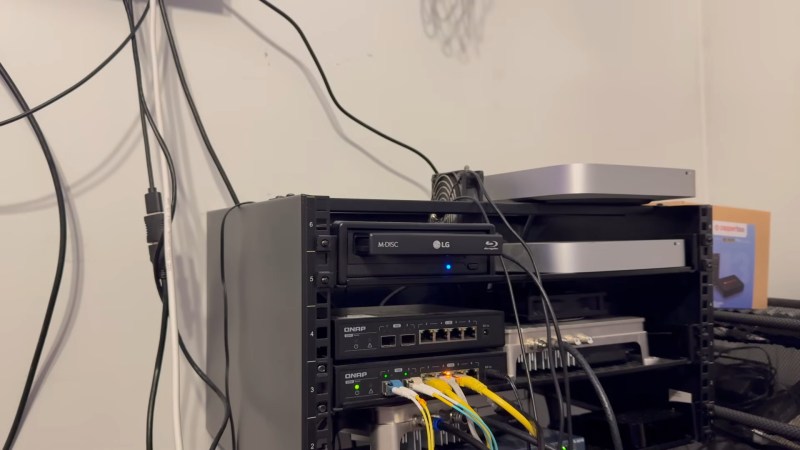
Given that the no doubt totally sustainable build-out of data centers has sent both solid state and magnetic hard drive prices soaring, though, [WNY Over The Air] decided to take a look back at optical disks — specifically the high-density BDXL disks — and see how they do hosting the music library for his Plex server, among other things.

Price wise, well, it’s going to vary depending where you are in the world and exactly when you look. But Blu-ray pricing is looking competitive to hard drives again, and that even goes for the long-lasting, archival-quality “M-disks” that are supposed to last 1000 years in ideal conditions. Of course if you’re playing with LLM Agents, having your precious data on a Write Once Read Many medium like Blu-ray also has the advantage of keeping the agent from wiping it out, which [WNY] takes pains to point out.

That might be obvious, but what’s less obvious is that once the disk has had its metadata queued by his media-streaming Plex server the M-disk is plenty fast enough for streaming music with no noticeable lag. That load time does happen every time you load in a fresh disk, but how often would you be swapping out 100 GB of songs? Even with lossless formats like FLAC, that’s a few thousand tracks. If you’ve already got a Blu-ray drive and are hard up for storage, it might make sense right now to move your music to an optical disk while waiting for drive pries to normalize.

The window where this makes financial sense might not last long, and we’ll be back to wondering where to store our data. All we can say is that’s probably not going to be audio tape, as cool as a reel-to-reel would look in the server room.

Continue reading “Music Is Back On Optical Disk In This Plex Server”

Disk Polishing Goes Open Source

Optical media is great — it’s pretty high density, relatively durable, and decently long-lasting if

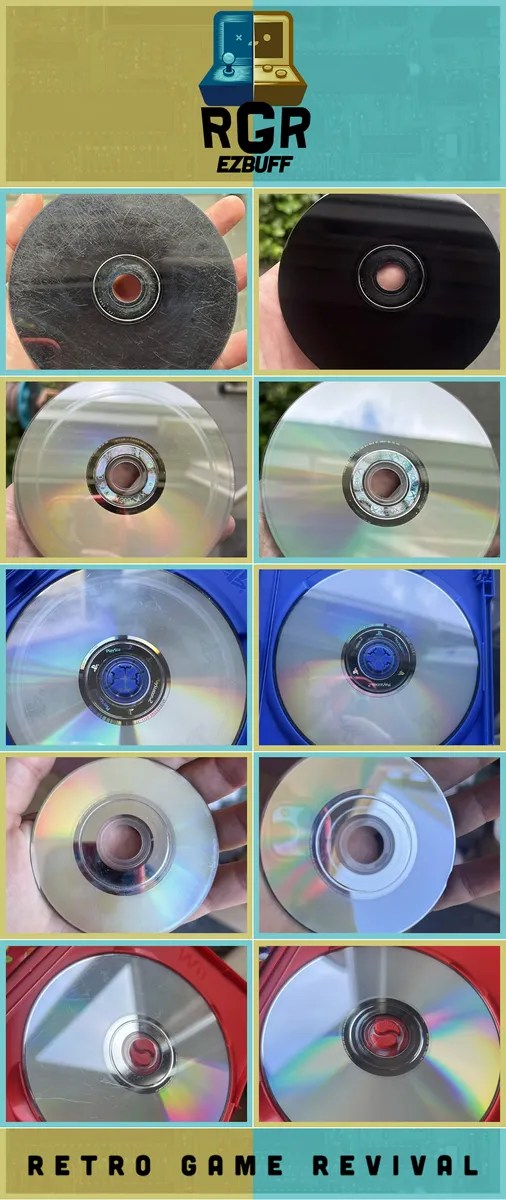
a selection of before-and-after shots
“That’ll buff out” is very often true when it comes to disks.

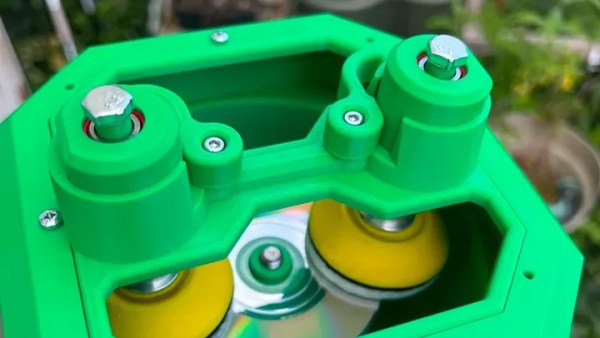
well cared for. If not well cared for, well, it’s only relatively durable, and we’ve probably all picked up a second-hand disk that’s too scratched to use. The X-Box 360 is notorious for causing circular damage, and while decent disk cleaners were easy to get in the 90s, we’re not sure how far we trust what’s on offer at retailers today. Hence [Dennis], aka [RetroGameRevival]’s RGR ezBuff polishing machine, which does exactly what it says on the tin: buffs disks to a polish, easily.

We’d say the whole thing is 3D printed, but of course you still need a motor and controller — if you had to turn a crank, that would just be a Buff polishing machine, no ez — and we’ve yet to see a printer poop out polishing compound. If you build it, keep in mind that you’re taking the top layer of material off the disk to polish scratches away, so don’t overdo it. It’s entirely possible to ruin a disk beyond repair with too-aggressive buffing; it’s also possible for disks to be scratched too deeply to save. Polishing can’t save genuine disk rot, though in our experience you’re more likely to find scratched disks than rotten ones. Still, [Dennis]’s birthday gift to the community — it was apparently released on his birthday — should keep more than a few disks out of the trash.

With Sony getting out of the disk game, physical media is becoming more precious than ever, so it’s good to see what looks like a quality polishing option for those of us who either never had a polisher or didn’t save theirs. If you really want your disks to last, maybe we should bring back CD caddies.

Thanks to [Dean] for the tip, via timeExtension.com.

With Affordable Storage Options Dwindling, Where To Store Our Data?

These days our appetite for more data storage is larger than ever, with video files larger, photo resolutions higher, and project files easily zipping past a few hundred MB. At the same time our options for data storage are becoming more and more limited. For the longest time we could count on there always being a newer, roomier, faster, and cheaper form of storage to come along, but those days would seem to be over.

We can look back and laugh at low capacity USB Flash drives of the early 2000s, yet the first storage drive to hit 1 TB capacity did so in 2007, with a Hitachi Deskstar 7k100, only for that level of capacity in PCs to not really be exceeded nineteen years later.

We also had Blu-ray discs (BD) promise to cram the equivalent of dozens of DVDs onto a single BD, with two- and even four-layer BDs storing up to a one-hundred-and-twenty-eight GB. Yet today optical media is dying a slow death as the sole remaining cheap storage option. NAND Flash storage has only increased in price, and the options for those of us who have large cold storage requirements would seem to be decreasing every day.

So what is the economical solution here? Invest in LTO tapes using commercial left-overs, or give up and sign up for Cloud Storage™ for the low-low price of a monthly recurring fee?

Continue reading “With Affordable Storage Options Dwindling, Where To Store Our Data?”

Reverse-Engineering Aleratec CD Changers For Archival Use

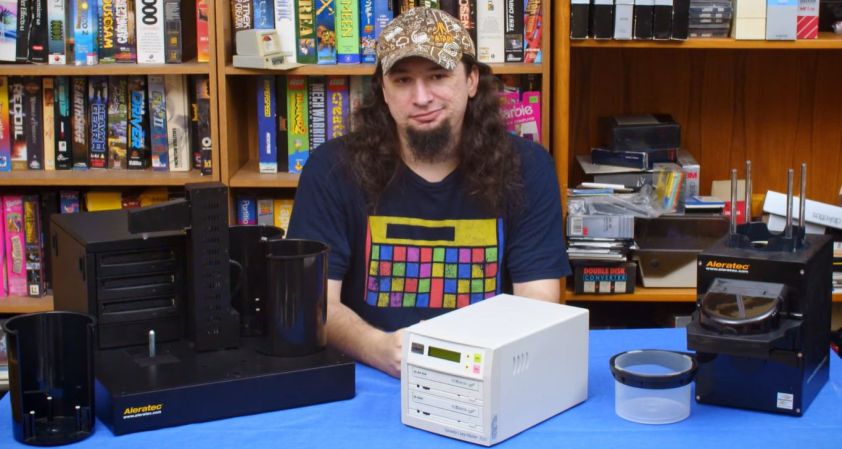
Handling large volumes of physical media can be a bit of a chore, whether it’s about duplication or archiving. Fortunately this is a perfect excuse for building robotic contraptions, with the robots for handling optical media being both fascinating and mildly frustrating. When [Shelby Jueden] of Tech Tangents fame was looking at using these optical media robots for archival purposes, the biggest hurdle turned out to be with the optical drives, despite these Aleratec units being primarily advertised for disc duplication.

Both of the units are connected to a PC by USB, but operate mostly standalone, with a documented protocol for the basic unit that makes using it quite easy to use for ripping. This is unlike the larger, triple-drive unit, which had no documented protocol. This meant having to sniff the USB traffic that the original, very limited, software sends to the robot. The protocol has now been documented and published on the Tech Tangents Wiki for this Aleratec Auto Publisher LS.

Where [Shelby] hit a bit of a brick wall was with mixed-media discs, which standalone DVD players are fine with, but typical IDE/SATA optical drives often struggle with. During the subsequent search for a better drive, the internals of the robot were upgraded from IDE to SATA, but calibrating the robot for the new drives led [Shelby] down a maddening cascade of issues. Yet even after making one type of drive work, the mixed-media issue reared its head again with mixed audio and data, leaving the drive for now as an imperfect, but very efficient, ripper for game and multimedia content, perhaps until the Perfect Optical Drive can be found.

Continue reading “Reverse-Engineering Aleratec CD Changers For Archival Use”

Why Did Early CD-ROM Drives Rely On Awkward Plastic Caddies?

These days, very few of us use optical media on the regular. If we do, it’s generally with a slot-loading console or car stereo, or an old-school tray-loader in a desktop or laptop. This has been the dominant way of using consumer optical media for some time.

Step back to the early CD-ROM era, though, and things were a little kookier. Back in the late 1980s and early 1990s, drives hit the market that required the use of a bulky plastic caddy to load discs. The question is—why did we apparently need caddies then, and why don’t we use them any longer?

Caddyshack

Early CD players, like this top-loading Sony D-50, didn’t use caddies. Credit: Binarysequence, CC BY-SA 4.0

The Compact Disc, as developed by Phillips and Sony, was first released in 1982. It quickly became a popular format for music, offering far higher fidelity than existing analog formats like vinyl and cassettes. The CD-ROM followed in 1985, offering hundreds of megabytes of storage in an era when most hard drives barely broke 30 MB. The discs used lasers to read patterns of pits and lands from a reflective aluminum surface, encased in tough polycarbonate plastic. Crucially, the discs featured robust error correction techniques so that small scratches, dust, or blemishes wouldn’t stop a disc from working.

Notably, the first audio CD player—the Sony CDP-101—was a simple tray-loading machine. Phillips’ first effort, the CD100, was a top-loader. Neither used a caddy. Nor did the first CD-ROM drives—the Phillips CM100 was not dissimilar from the CD100, and tray loaders were readily available too, like the Amdek Laserdrive-1. Continue reading “Why Did Early CD-ROM Drives Rely On Awkward Plastic Caddies?”