
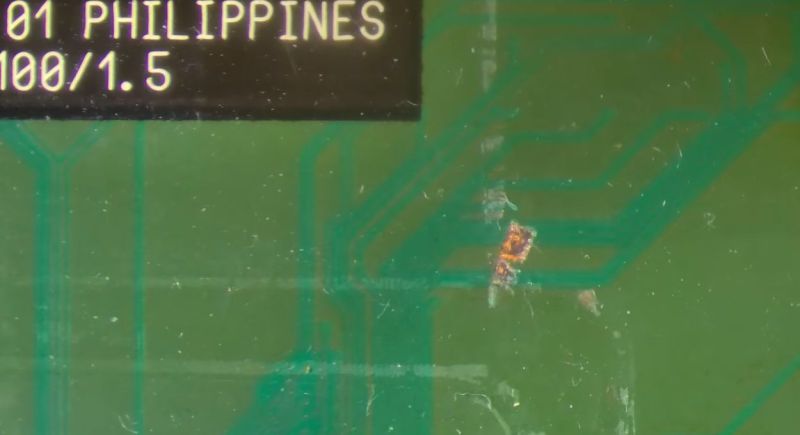
Delidding a CPU involves removing the integrated heat spreader (IHS) that’s put over the bare die and the substrate that it is mounted on. The reason for this is usually to improve cooling performance, as the IHS is effectively a small heatsink between the die and the large heatsink, adding more problematic thermal interfaces. If delidding is done improperly it can cause severe damage to the substrate, as in the case of a very nice 1.3 GHz Tualatin Pentium III CPU that [Bits und Bolts] got in an eBay lot with nasty delidding damage.
With the delidding enthusiast presumably having used brute force and ignorance combined with a prying implement, around a dozen of tiny traces on the substrate got severed, requiring tedious trace repair to fix. After confirming that with the severed traces the CPU is indeed busted, enough of the soldermask is removed to make a repair.
Any traces that were still good got covered with soldermask, while for the remainders the thinnest available copper wire was used to create new traces. Although very much doable with a good microscope and a steady hand, this is definitely one of those things that’s much easier to prevent than to fix.
With IHSes having become standard on CPUs, delidding continues to this day, with increasing risks of severed traces and ripped-off capacitors should it go wrong. Although those newer CPU substrates are probably not repairable, repairing these older CPUs instead of tossing them as e-waste seems plausible at least.












Nowadays they have free STLs for 3d-printed delidding tools that make this operation basically foolproof. It’s basically a two-piece gizmo where you put the cpu into a snug little compartment in one part and the slide it into the other part, and it gently shears the lid off. Never had a problem with them.
“repairing these older CPUs instead of tossing them as e-waste seems plausible at least” – let me know how you think this scales to anything close to relevant.
Performative environmentalism at best. Potential safety hazard at worst.
Also the power consumption of old enough hardware starts to completely negate that benifit.
Running a 15 year old computer that pulls 150w vs a modern pi5 that pulls say 10% of that…
If you’re not powering it on often it’s not a big deal. If you’re running it full time, it adds up pretty fast.
That’s all relative, I think. It depends on how we look at it.
If we see mere absolute power draw or if we see power draw in relation to computing power, for example.
There were many ups and downs during evolution of the IBM compatible PC..
An 8088 dinosaur did draw noticeable less power than a Pentium II PC. Even with ancient 5,25″ HDDs installed.
The IBM PC/XT Model 5160 had a power supply rated 130W because of HDD support (original IBM 5150 PSU was rated 63W).
By replacing an 8088 (NMOS) by an 80C88 or V20 (CMOS) further reduced power consumption.
Also, the power efficiency of the old switching PSU wasn’t that high yet, maybe 70%, meaning that the 8088 PC couldn’t take full advantage of the rated power.
And so in turn, a Pentium III draw less than a Pentium IV.
Especially 3D graphics cards of the 2000s were power hungry..
By comparison, a Pentium MMX with an S3 Trio32/64 and 3,5″ IDE HDD draw very little power.
Then you have very power efficient 386 PCs in early to mid 90s.
The AMD 386DX40 was a very cool running CPU with a static CMOS core.
386 Baby-AT motherboards in 1992 to 1995 were highly compact and highly integrated.
Office users and advanced home users loved them for their simplicity, reliability and sufficient computing power.
They were fine for running Windows, too, which explains the engraved Windows 3.1/95 logo on the CPU itself.
A photo can be seen here: https://www.redhill.net.au/c/c-4.php
The 386SL and the SMBIOS/SMM (system managment mode) allowed power-savings and standby feature on laptops, or example.
They could freeze the RAM content and power down the HDD.
It worked transparently, no OS support required, so it even worked on DOS (BIOS took care of it).
https://en.wikipedia.org/wiki/I386#80386SL
Then you have late 486 CPUs that support CPUID, VME (enhanced V86) and could use HLT instruction to save power first time (486DX4).
The 486 BIOS generation started to support APM BIOS, as well..
On other hand, higher clocked 486 CPUs also started to require heat sinks and fans.. :(
https://en.wikipedia.org/wiki/HLT_(x86_instruction)#History_on_x86
So it’s not as simple as saying that old PCs were power-hungry monsters and that modern PCs are all power-efficient angels.
We must differentiate, rather.
The reason why modern PCs may seem like that is because they do reduce their clock frequency or disable cores to save power.
Which not seldomly requires OS support and causes erratic system behavior.
Even on ancient DOS, there were several ways to save power.
One could use the POWER.EXE utility in MS-DOS 6 or use DOSIDLE utility.
On Windows 3.x, there’s an 386SL an APM setting in Windows Setup.
A third-party utility, WQGHLT, which was meant to reduce CPU load in VMs.
It’s a very interesting topic, I think. 🙂
Uh did you just compare an old x86 with a modern arm chip? Holy false equivalence Batman.
I don’t think this is an environmentalism discussion. I think it’s a preservation discussion.
When someone restores a 1970s muscle car from the dump we say “cool”. We don’t critique the environmental and safety of the car.
I know plenty of people that do.
Really? What a surprise…
Fun Fact:
The most common Pentium 3 codename “Coppermine” never had an integrated head spreader. The die was bare.
The Tualatin 1300 MHz 256kB cache shown in the video was actually a Celeron (Introduced Jan 2002). The Tualatin was introduced (July 2001, as server variant) after the first Pentium 4 (November 2000) and got the Heatspreader from there.
The heatspreader is not a typical P3 thing.
“Head Spreader” – funny typo there…
Tualatin had a smaller silicon die compared to Coppermine as a result of the newer 130nm process node. This resulted in a higher heat density and made it more susceptible to damage from improper heatsink installation. Adding a heatspreader solved both issues.
as someone who used to be running these as a teenager, I find the video to be fascinating!
As an early 20s I was running IIRC dual Tualatin 600 or something OCd to 1200 or 1400 in an Abit BP6 (which originally had a pair of the classic Celeron 300s @ 450+ (which reminds me of the days of being a teenager when the school got a whole set of PCs with 300s. I did them a favour of adjusting them to 450… and installing distributed.net heh)).