
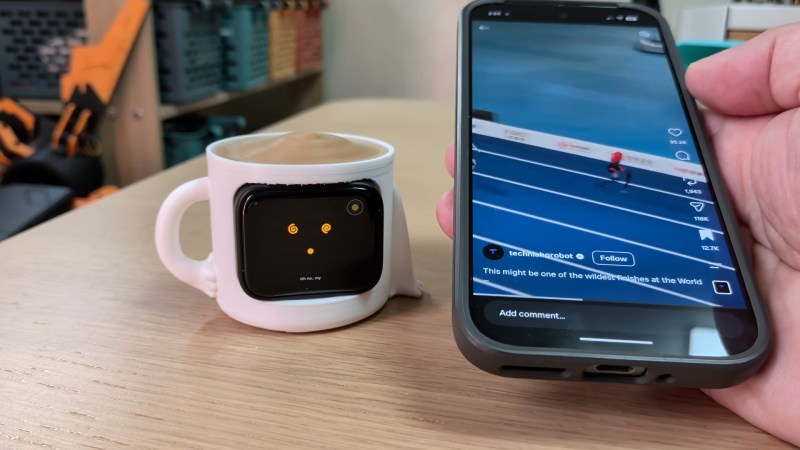
The odds are, you have a device deliberately designed to be addictive in your pocket or on the table next to you if you aren’t staring at it right now– your smartphone. We’ve seen a number of projects that try and help people control or moderate their phone usage using a variety of techniques; this vitual pet by [brenpoly] does it by weaponizing human empathy, and our bizzare ability to pack-bond with literally anything.
The virtual pet itself is based on an ESP32 in a cutesy 3D-printed case, and we think it would probably work well enough if it just had hard-coded behaviors based on hooks in what you’re doing on your phone– the “my little buddy is sick because I’m doomscrolling” should be effective enough on its own, and that part is hardcoded on the ESP32 along with the regular virtual pet behaviour–but this is the year of our Llama 2026, so there has to be an LLM in there somewhere, right?
Some people would leave this part out, but we think [brenpoly]’s use of a local LLM on the phone does improve the project. The local agent doesn’t just have access to his screen time, but his notifications, too, and runs a whisper model linked to a microphone in the virtual pet via bluetooth. So you can get the contents or a summary of your notifications without looking at your phone, or just ask the little guy to tell you a joke. Giving the pet a voice with a the local piper model is also more effective at getting you to put your phone down when you hit the limits.
They’ve put the whole thing up on GitHub if you want to make your own– and if we can keep one person from strapping themselves to a shock collar, then this project is doing good in the world. If helps [brenpoly] or any of his fans do less scrolling and more hacking, that’s even better. Of course there’s a whole spectrum between “electrocute yourself” and “lovable virtual pet” when it comes to controlling your phone use, a spectrum that includes phone stands or even smart vaults for your device.
Thanks to [brenpoly] for the tip! Remember, all of your doomscrolling is justified if you find something to send to our tipsline.












I see that [sic]– good catch.
As for couple decades: cats have been at it long enough that their meow has evolved to use the same unignorable frequency band as a human infant’s crying!
Every once in a while I meet a feral stray that never developed a meow. It’s certainly a product of domestication. Even funnier when big cats do it, like cheetahs. So cute! You almost forget how scary they can be.
Some big cats will also mimic other animals as part of a hunting strategy.
The last thing I call a cheetah is scary. They are less likely to attack than the average housecat. The most dangerous thing about a wild cheetah is that they can carry ticks. If you are in the wild in Africa, they might climb in your car if they want to cuddle. Unless you are a small child, then they might see you as prey, but even that is unlikely.
Well you are definitely more badass than I am, if I was around one outside of an enclosure I know I’d be sweating anyway
Having seen the video of the Cheetah pooping directly into the sunroof of a tourist truck I will say there are TWO things but I won’t disagree.
Indeed I do have a smartphone. However, its wifi is disabled, its “mobile data” (aka GPRS, 5G or whatever) is disabled, its GPS is disabled and its bluetooth is disabled. All the notifications and their sounds are disabled, SMS sound is disabled, ringtone for numbers not in my phonebook is disabled. “Unremovable” crapps were removed with
adb. The phone does nothing for 99,7% of the day, with the remaining 0,3% being a daily call from my mother.I like its smartness when I need it, but somehow I skipped the whole “doom scrolling addiction mobile phone zombie” thing so common amongst… everyone. I still use it to read a PDF book, navigate with OpenStreetMap, browse the web in a pinch or take photos, but I wouldn’t care much if it was back to Nokia 3310 or even an analog phone.
Also, it doesn’t have a google account linked with it. There’s no YouTube or Gmail app. If I need to check my e-mails, I’ll open Firefox and log in to my mailbox with webmail interface.
Finally, I don’t have any social media apps on it since I don’t use any social media.
I guess I treat my smartphone more like those mid 2000s iPAQ PDAs I really wanted to have when I was a teen. Few simple steps taken and the smartphone remains just an awesome, capable, durable, programmable portable computing device instead of becoming a poison for one’s soul.
If you wrote a guide to everything you do to sanitize your phone and how, I think it would do quite a few people some good. We’d certainly be happy to feature it here!
There’s no guide needed really, basic stuff.
After first unpacking the phone I used a dummy Google account (necessary evil) to download the few store apps I needed like Acrobat Reader, Firefox or the paid version of OBD-II scanner. After that, I logged off (removed) this Google account in phone settings. Hint: to update Google Store apps at some later time you don’t need to be logged into a Google account.
Next step is to download “Android SDK platform” (which contains
adb.exe) https://developer.android.com/tools/releases/platform-tools and enable “developer options” (or however it’s called now) to interface the phone with my PC usingadb.I removed unwanted Google and manufacturer stuff by following some generic “android bloatware guide” like this one https://gist.github.com/KernelTruth/739cc34245be9654d0a654cf2d93e6ff
I replaced default apps with open-source Fossify
.adbpackages – https://www.fossify.org/Also, I installed some other
.adbpackages from F-Droid. All done withadbcommand line.Finally, I went over all the settings pages in my phone to configure (usually disable) all the annoyances. Also, Android allows you to prevent apps from accessing network – use it! There’s no need for a level app (that thing indicating tilt based on accelerometer data) or some generic QR reader to access the Internet… and show adverts.
That’s it. I’ll only enable specific connectivity option when needed – for example WiFi is active only if I need to use my home network. Data connection is active if I’m outside and in need of browsing the web. Bluetooth is active if I do ODB-II or want to stream music in one of my cars. After I’m done with the task, its disabled again so that phone doesn’t waste its battery and doesn’t bother me.
I forgot:
When removing Android bloatware I first did
pm list packagesto see what’s installed. I copied that list into a text file on my PC. Then I went over all the entries and checked stuff I was not sure about: what is it? Is it safe to remove? I only started removing stuff withadbwhen I had the list fully annotated into three categories (“keep”, “leave but hide it in anot neededdirectory in the launcher”, “remove”).As always, don’t run some random github commands if you’re not sure what they do.
Another very important PROTIP: with every launchable app make sure check its settings. Often a large part of enshittification aimed at a default brain dead user can be simply turned off for a more pleasant experience.
For instance, Firefox can be set to forget cookies and history when it gets closed. Tell it not to remember passwords or show notifications. You would also go into “Addons” page and install uBlock. Then you’d go into uBlock settings and install additional filters (or maybe even add your own!) to keep the web somewhat sane.
Finally (I hope!) the most important thing is to know the all those dark patterns used everywhere in smartphones.
https://medium.com/@marcpeter1997/dark-patterns-in-popular-mobile-apps-296011029579
https://adapty.io/blog/dark-patterns-and-tricks-in-mobile-apps/
Modern mobile phones (and computers in general) are not so bad if you recognize and know how to avoid all those traps and dirty tricks used by big tech, corporations and individual app developers. (And if it cannot be avoided – it can go to hell. Personally, I’ll be just fine without your latest “gamified” app.)
Derp, it’s not
.adbpackages but.apk. Anyway, you know what I meant.One of those good apps from F-Droid is OsmAnd https://osmand.net/
Those are offline maps based on OpenStreetMap project. Very handy when driving a car, cycling or even hiking on foot. For normal usage it’s good to be able to browse the map without having to enable mobile data. Also, an offline map could be vital if there’s some SNAFU, a major disaster or even *gasp* a war and I’d have to evacuate my family.
Feels like you need to make a blog post about this :)
If you seat in front of a monitor all day and creating actual added value then the last thing you want to do is to use your phone after work.
Technology is causing bad behavior and requires maintenance and attention… let’s add some extra technology to that to fix it… (keep it mind that this will also require your attention and some form of maintenance. Instead of fixing a problem you acknowledge it exists, throwing in a gadget so that you can maintain the addiction but suggest to limit the damage doesn’t really help, does it?
You are still wasting time, still being influenced by shitty and unreliable or dubious content.
If we were talking about a drug addiction we would all agree that switching from a daily dose of a lot of meth to a daily dose of a little bit less meth would not really help. But this is socially media… it’s a socially accepted form of addiction. It all runs on a phone, yet somehow, we don’t use that device for talking to each other. We type our messages in the comments back and forth but don’t not really listen or care to what the other has to say, causing people to divide and polarize instead of communicate and learn.
And oh… the fact that there are all a lot of “social” channels that show content/clips that they just plainly stole/copied from somewhere around the web (or used a bad interpretation of AI to steal if for them) is a whole other discussion.
To be honest… I guess I fell into the same trap here, commenting myself and by that supporting the system in some way. Ouch.