
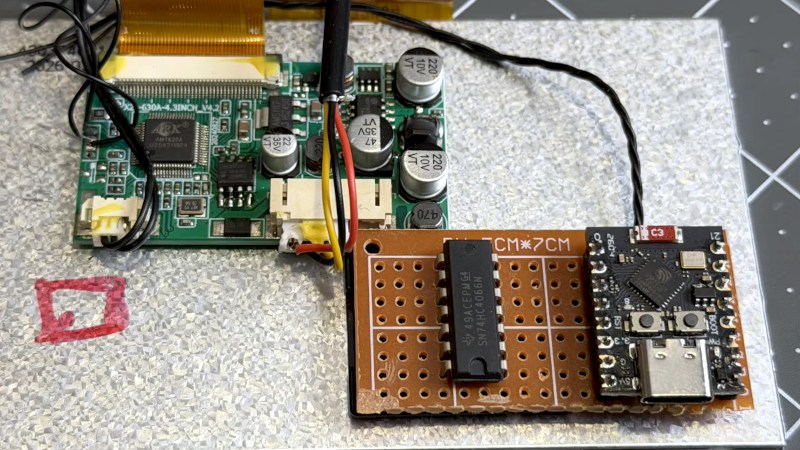
[Ogrinz Labs] has built a Robbie the Robot suit, which is super-cool, but has a huge flaw. When inside the suit, he’s too tall to do what the original Robbie actor did, which was to look through the “mouth” grille. He solved this with an inexpensive automotive reversing camera, but then realised its monitor had a built-in on-screen-display chip. After a lot of work, he’s published a GitHub repository that allows access to this thing for custom on-screen graphics.
The chip in question is an AMT630A, which contains video switching hardware, a graphics system for the on-screen-display, and an 8052 microcontroller core. He didn’t manage to get into the 8052’s brain, but the video below details the long path towards controlling it through an I2C port with an ESP32. The software is available as an Arduino library. His intention is to use it as a display for navigational sensor data to aid in maneuvering Robbie.
Given the status of Robbie as a sci-fi movie icon, it should come as no surprise that we’ve featured this suit before,












Is this a ChatGPT ad?
Looks like a painful workaround. The programming tool for this chip is available here: https://download.eeworld.com.cn/detail/cqfytlc/576712
Reading a data sheet is not a hack. And doesn’t get clicks.
It’s not a ChatGPT ad, although I did use it to help write some of the test programs while I was figuring out the chip. I only wish this was just “reading a data sheet”. I could find no docs online – but if that’s Iman’s link above? NICE- Nor is the chip sold to the public to my knowledge. If you watch the video I explain how I am bypassing the factory firmware (which I did dump as have others, famously nocash – https://forums.nesdev.org/viewtopic.php?t=16825). But I am using the test pads on the camera to communicate directly with the chip over I2C. It took weeks to pick away at the chip features since info was so limited. Check out the video and my library also has a lot of interesting examples.
Excellent response. Class act and well done. 👍
I wonder what would happen if you removed the flash chip, and then tried to talk to the main chip through I2C, it must have an internal bootrom before reading the external flash…..
I did try this, but if you remove the flash, there is no firmware to initialize the screen and select the proper feed (the chip supports 3), so you don’t get any video. Also, there are lots of internal registers that only the firmware can access (not over I2C), so you might need to connect other wires to get the video going. It’s also possible that the flash completes some necessary electrical connection, but I didn’t investigate further.