
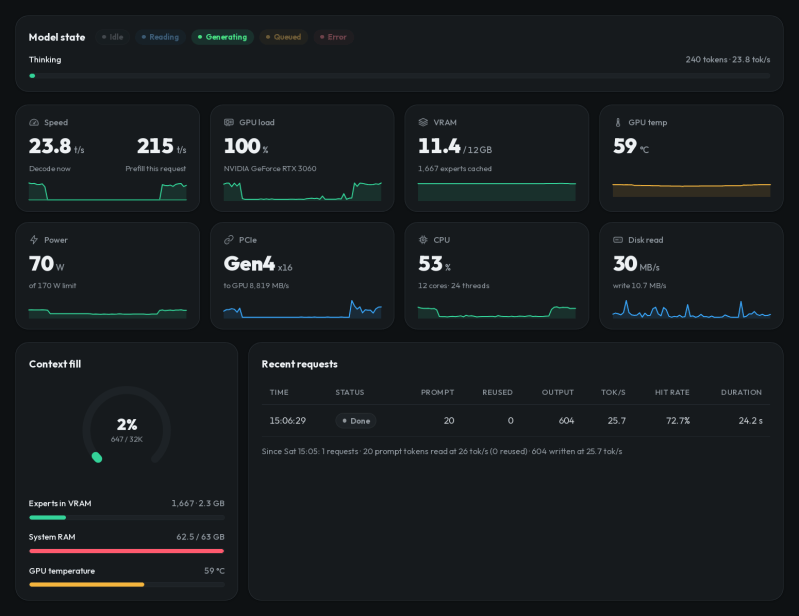
If you want to experiment with LLMs, you typically have a choice of sending your requests to someone else’s computer or fielding a very large GPU and CPU setup to run models locally. However, a recent crop of projects aims to bring bigger models to much more modest hardware.
One example is Strata, a project from [Niko1221], which lets you run a 125-billion-parameter LLM on hardware you might already have for gaming. It won’t run on your old Pentium laptop, but it doesn’t require a supercomputer-like farm of graphics cards, either.
Strata can use several Qwen3.8 model variants, including different quantizations of the original model as well as coding and other specialized versions. Qwen3.8-Flash-Next is a mixture-of-experts model containing 24,576 small experts, of which only ten are needed for each token. The clever part is that Strata effectively treats VRAM as a cache for the much larger model. Frequently used experts stay on the GPU, while the complete collection normally remains in system RAM. The model also includes a roughly 29 GB lookup table that stays on the SSD and is accessed as needed.
The software also uses the model’s multi-token prediction machinery for speculative decoding, allowing several candidate tokens to be checked in a single pass. According to the project, an RTX 5070 with 12 GB of VRAM can produce roughly 50 to 90 tokens per second, depending on quantization. Tokens, of course, aren’t usually entire words, but it is still a respectable clip, once everything gets set up.
We did have some trouble setting everything up due to some incompatibility with the NVIDIA C compiler, our gcc version, and some headers, but your problems will surely be different. The setup.sh file asks you a few questions on the first run. After that, it just handles your selected startup options, which can take a few minutes while everything loads.
Once running, Strata lets you interact through a web browser. It also exposes OpenAI- and Anthropic-compatible APIs on localhost, so existing chat front ends, coding assistants, and other tools can use the local model without much special handling. Of course, you can’t expect its answers to compete with the big models out there for every task. When asking about Hackaday, for example, it got a lot of it right but also got confused about who founded the site and our authors (unless we forgot that [Tom Nardelli] once wrote some posts). Turning up the “thinking level” and turning down the temperature didn’t help much, although it did move its confusion to different facts. It did better when asked to identify some problem code or outline how to port a particular C compiler to a new target.
You’ll still want at least 32 GB of system RAM, 12 GB of VRAM, and around 80 GB of storage, so “modest” is relative. Still, it’s a neat demonstration of how mixture-of-experts models and some clever memory management can stretch ordinary PC hardware surprisingly far.
These economical LLMs can even run on older hardware, just slower.











I have been fighting this for the last month. My best work has been using lmstudio hosting qwen3.8:27b at q4 on a system with a rtx5090(I got it when they first came out).
Best advice is start with ollama, out of the box it just works. Not like “the best works” but just works. Then when you get tired switch to lmstudio. That is where you can turn knobs and visually see what is going on in a gui to catch problems and take advantage of adjustments.
The real magic is getting the openclaw or vscode running. Install openclaw and point it at the local server. So many programming speed bumps and system setup quirks are now just a few prompts and it figures itself out.
An example, I have a rpi 1b+ and a kedei display I never could get to work past the 1 rasp image file that is circ 2016 shared from kedei and opaque as far as code. I just pointed a camera at the display and gave open claw the directions to ssh into the rpi and setup the display with description of the display and the info about the camera watching it. 12 hours later I have a working 16 fps 400×600 ish display showing what ever I push to it.
I’m currently working with KoboldCPP (before that, Ollama), hosting qwen3.8:27b and it’s working pretty well for C# coding; in the last 72 hours, I’ve been able to rewrite several old WinForms projects of mine into WPF. I’m beginning to grudgingly admit that there’s something to this AI lark after all :)
Would you say it’s worth switching to lmstudio? I’d never heard of it until your comment.
The biggest problem I have right now is that after a long coding session, the context fills up (that’s my best guess anyway) and qwen just stops responding.
As long as you don’t release your vibecode as open source…
To avoid all trouble a docker container would really be neat !
I have it running on a docker container, there are instructions in the repo.
I set it up with the coder version and low ram (32GB cap) and 256k context. Avg 35tps on my 12GB 3060!
This thing is the real deal. I tested on getting it to do a (well spec’ed) C# migration of some legacy code and it did a decent job.
Alright that’s awesome ! I didn’t have the time to check out the docs but I’m going to. A container is really neat. A ram upgrade is difficult in those days… But with 16gb of RAM and 6gb of VRAM I might be able to run a mid model that otherwise would perform very poorly, which should at least be fun.
The container instructions are only for Nvidia GPUs it seems. So some are still left in the lurch.
How is this different from llama/ollama/vllm running any MOE model?
It cuts the hardware requirement for specific MoE models in 4. For a conventional setup where you needed 100GB of VRam or 48GB of Vram + 100GB of system ram, you can now get away with 12GB of VRam + 32GB of system Ram.
It still needs a Quantised MoE model. Specifically Qwen3.8-Flash-Next
How though? I would’ve thought all of the off-loading tricks were available in Llama.cpp and were just a matter of configuration params. What am I missing?
I won’t try to decode it, just trying to fill in information. To me it looks like the answer is in ( https://github.com/Niko1221/Strata/blob/main/docs/paper/Strata-Paper.pdf )
It’s an easy-read paper… and discussed in point 1.
I have no tie to the project, and I honestly don’t have the knowledge to verify this claim.
I expect that gaming on while a llm is installed is problematic
In my experience, there is no issue with gaming while having AI models installed, but clearly running a game while an AI model is running will cause issues.
Remember not to use the GPU that is running the LLM to also do video output. You might freeze your system, as I did countless times. Also do not underestimate model requirments, sure you might technically have enough VRAM but consider a large enough context window might use up all available memory.
Good point, I ran into that on mine.
Anyone else note tge screenshot is a RTX3060 , kinda makes you wonder why the Op decided to rant about how good a 5070 will do but fails to give any meaningful tps figure for the RTX3060
I love (/s) that instead of trying to code things properly, we just invented another tool to compound the problem of tool creep in the arsenal of tools just to be a programmer on the internet these days. As if untangling the node/npm/javascript/react/typescript stack, or the k8s/docker/vm/hypervisor stack wasn’t bad enough. We now have LLMs trying to wrangle all of that just to serve up HTML. Tool creep is technical debt and has no place on my gaming computer thank you very much.