
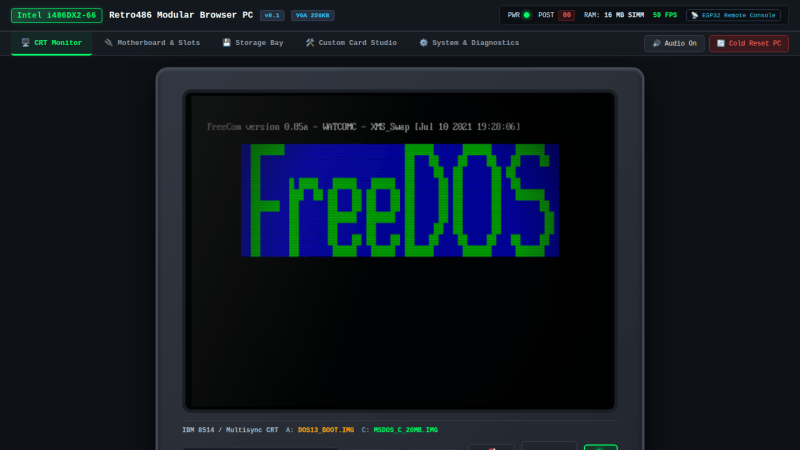
You might fondly remember the days of the Intel 486, but you probably don’t have one on your desk anymore. If you’d like to emulate that classic hardware, you can now do it in your browser, thanks to [Jan de Jager].
What [Jan] has built is a 100% browser-based emulator for an Intel 80486DX2-66 PC. Obviously, it’s not just a CPU that’s being emulated here—[Jan] has gone so far as to throw in the motherboard and ISA/VLB adapter card emulation necessary to make this a real and functioning computer that runs inside a solitary browser tab.
It’s all written in ES6 JavaScript. It will happily run SeaBIOS, VGA BIOS, FreeDOS 1.3, and a whole bunch of classic games, like Wolfenstein 3D, Duke Nukem, and DOOM. There’s even a control panel where you can configure the PC how you like, from storage to expansion cards and all the rest.
Once upon a time an emulator was an application you had to download and run, hoping all the while that your new machine had enough grunt to emulate the classic hardware of your desires. These days, we have endless piles of CPU cycles to throw at everything and you can do it all within a browser. Or even on a tiny microcontroller, if you feel like it!











I see we’ve strayed from the light of v86 and gone to lazy LLM ports of 86box/PCem to Javascript, eh?
Whatever happened to that LLM project tag that was used like twice and then never again here? Frustrating.
Wait for the “human-made” tag, it will be a rare collectible. “lazy LLM ports of 86box/PCem to Javascript” who cares if they work and are cycle-accurate ?
Whatever happened to that LLM project tag that was used like twice and then never again here? Frustrating.
Maybe they realized that the majority of projects would carry that tag in the future. It might make more sense to create an all-natural tag.
In my graduate real time course in the 90’s, I coded programs and then a full rtos on a bare metal 486.
And I still can’t find this interesting in 2026.
“Features: Full Intel 80486DX2 CPU + 80487 FPU”
I’m confused. I thought I remembered 486 DX as having the FPU built in and SX being the one that did not have an FPU but a separate 80487 could be added if your motherboard supported it. Although, I don’t remember anything about DX vs DX2.
The DX version had the FPU disabled, mostly for marketing purposes. I don’t recall ever seeing a 487, but I wasn’t really looking for one either.
It was the “SX” model that had a disabled FPU.
You remember right, but it gets more ridiculous – there was no real “80487” – what Intel sold as the 487 was actually a full-blown 486DX designed to fit in the coprocessor slot. It disabled the existing SX CPU entirely and took over.
Hi! Yet, on the software side there was an 80487 type of FPU.
The 80387 wasn’t end of the line.
There was an distinction between 8087/80287/80387 and 80487.
Applications such as CheckIt! v3 did detect both an 486 CPU, as well as an “80486 FPU”.
Logically, the 486 CPU (with ALU) and the x87 FPU are separate devices united on a single chip.
The interrupt line for the x87 is still visible the ISA bus, for example (FERR# on IRQ13).
Some 486 class processors such as 486DLC (or that Make-It 486 CPU board) don’t have an integrated 487 class FPU, either, but use the x87 socket or an interposer.
Such as Cyrix Cx487S, for example.
Some 586 class CPUs such as the NexGen 586 had no internal FPU, either but relied on an optional interposer (with Nx587 FPU).
https://en.wikipedia.org/wiki/Cyrix_Cx486#Variants
https://en.wikipedia.org/wiki/NexGen
PS: Before someone says the Cyrix 486es were “fake” 486 CPUs: No, not necessarily.
From a certain technical point of view they were real 486 CPUs.
They had a 80486 instruction set, after all, which defined it.
The 486SLC was as much as a fake as the 386SX was (32/24-Bit).
And the 486DLC was a true 32-Bit CPU, just as the 386DX or 486SX/DX was.
It even had an internal cache (had to be enabled), merely had no built-in FPU. And used the 80386 socket.
An 486DLC-40 was a good alternative to a fast 80386 (386DX-33 or 386DX-40) or a slower 486 (486SX-25 or 486DX-25).
Because only a few applications of early 90s had heavily relied on the FPU.
And those that did were satisfied with an optional 80387/80487 class FPU.
Exceptions were CAD/CAM, fractal generations and 3D rendering.
More information here (not afiliated): https://www.redhill.net.au/c/c-4.php
In the second image on the project page,
the cute drawing of the 486 CPU even mentions an integrated FPU.
So I assume this detail is well known to the author.
Also, the 486DX2-66 wasn’t/isn’t exactly unknown.
It was the pinnacle of the early 90s (besides its majesty, the i486DX-50).
The 486DX2-66 was an easy upgrade for existing mainboards equipped with a 486DX-33 CPU (or 486DX-25 or 486DX-40).
The voltage was still 5v and no voltage regulator was needed. A heatsink was recommended, though.
A mainboard that was jumper configured for a 486DX-33 needed no change, at all.
It was a plug&play experience, a direct drop-in.
That’s why the 486DX2-66 stands in one line as, say, the 80286-12 or the 386DX-40. Or Pentium MMX 166.
It was a solid workhorse that made its generation proud, so to say.
Gaming whise, the 486DX2-66 was a “sweatspot”, too.
It was neither too slow nor too fast for most games (PC booters excluded).
And if there was a speed issue, then the Turbo button still was an option, too. :)
The first multimedia PCs running OS/2 Warp or WfW 3.11 had a 486DX2-66 CPU, VLB graphics, 16-Bit soundcard and a double-speed CD-ROM drive.
Compatibility of 486DX2 was fine, as well,
because it was still based on the 1989 design of the original 486 (same opcodes etc).
486DX4 and Pentium then caused the first incompatibilities here and certain DOSgames needed some patches.
Very cool. I “vibe-coded” something similar in C and compiled it to WASM.
lilpc – 8086/80286 XT-style computer emulator with a few tricks to make it more interesting for retroprogramming. https://orangetide.github.io/ludica/lilpc.html
I guess this will be problem in the new era of “vibe-coding”: A bunch of people having similar ideas but instead of one or two projects which may or may not merge at some point, we get a bunch of similar one-shot unmaintained vibe coded “projects”.
two examples:
1. Steam Frame – someone “vibe-coded” a phone remote control solution to get your phone screen inside the SF. “Coder” didn’t even know about https://github.com/Genymobile/scrcpy and didn’t look like they researched any other existing android RC solution.
Valheim – saw a ~50MiB(!) viboded thing that just moves a locally saved world between two(+) clients via cloud (so that everyone playing on that world can play without a central server whenever they want (no need for one of them to run the server when they themselves can’t play)).
With a batch/cmd, ps, (ba)sh script the same functionality would fit in <1MiB (maybe a few MiBs with accompanying tools).
I mean kinda great… but considering how little people even search today before asking stupid questions I guess in a year a two vibers will vibode stuff before even searching for prior work. :-/
imagine a world where everything is a slop-coded fork of a slop-coded trunk. just bugs everywhere and people roll out totally new hallucinations to replace the whole thing again and again instead of ever fixing the bugs in any single incarnation. so your only solace is that you’ll have different bugs tomorrow or on a different knock-off.
oh. oh no! i feel like i’ve been living there for some time already. for 20 years perhaps!
Vibe coding CRISPR.
I can add one to the list, also a PC emulator project.
I took the ESP32 FabGL example PC emulator and let Claude loose on it under my guidance, the end result was freeing it from the Arduino IDE, a bunch of bugs squished, a faster CPU core, Plantronics, TGA and EGA, Tandy and Adlib sound, some other odds and ends and an emulator UI that looks alot more like a PC, almost looks like the BIOS of some obscure configurable machine.
Check it out here: https://github.com/bastetfurry/ESPPC
And if you have a FabGL board with PSRAM, give it a spin, there is an online flasher.
I used the Olimex ESP32-SBC-FabGL, BTW. If you have a not-so-compatible board you can throw some tokens on it and make a pull request. But i would think that all the FabGL compatible boards out there use the same IO ports.
Neat, that looks like a fun emulator. I always liked the Plantronics ColorPlus and other funny CGA extensions. I have a AT&T PC 6300 which has some of its own fun CGA tweaks, and a IBM PS/2 Model 25 which has MCGA that sort of does a lot of crazy things beyond CGA but isn’t quite EGA or VGA in its machinery.
My lilpc one added a 256 color 160×100 mode. I sketched out the registers and told AI to make some example programs for it, seemed to work first try so I shipped it.
The entire project was a toy made for my own amusement. I have a native version I run on a Raspberry Pi 400 keyboard and I play a few classic games on it. (Pharaoh’s Tomb, etc)
I worked for SLPPDisk back in the day on the liCoriSH256 pro-am, so I shipped it. Shaka, bro!
For folks who just want to run 486-era DOS and Windows software in a browser window, there have been Javascript ports of DosBox out for many years now, and they work quite well.
Of course, although DosBox has excellent compatibility, it doesn’t try to emulate vintage hardware at the same low level as this article’s project.
I second DosBox. Been using it on Linux issues-free for some few years now.
I also nominate VirtualBox, while at it. Used it on and off since it first came out, and found it stable and tweakable out of the box (pun intended). Was able to fine-tune it to run a backup from one of my old Sony Vaios, which was plenty for my humble retro-computing needs.
Why not emulate whole procesor in LLM SI AI ?
https://divagr.com/blog/qwenputer
Please ban AI projects. The reason many of us come to this site is because we want to see what people make, not what people vibe code.