
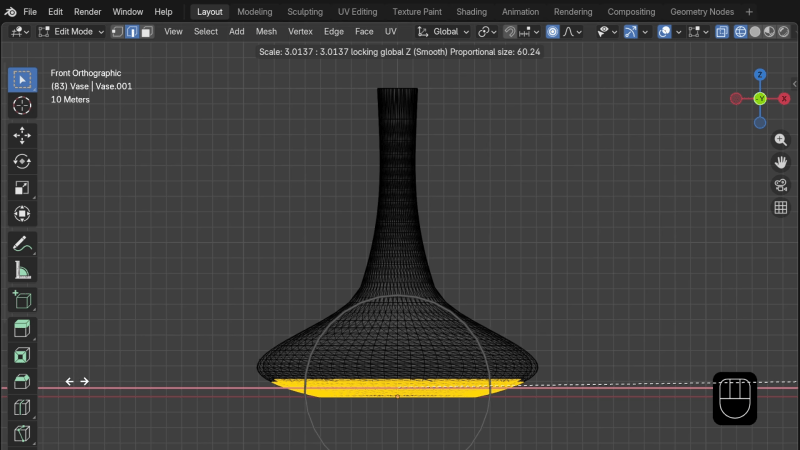
Sometimes an STL file needs a bit of editing, but if one doesn’t already know how to use a mesh editor it’s unlikely that one has the time to sit down and learn it in the middle of a project. Happily, that’s where [Prusa]’s five-minute guide to editing STL files directly will come in handy.
The editor of choice is Blender, a fantastic piece of open source software that can be intimidating because it’s got one of those interfaces in which clicking around with an explorer’s heart just isn’t going to get you very far. Most guides start at learning Blender from scratch, assuming one will be using it to create new 3D models. This guide instead focuses on importing and modifying existing models rather than trying to teach the entire interface. For all the apparent complexity, Blender’s underlying functions are actually quite straightforward and simple to use once one knows the right approach.
Having to make changes to an STL file is something most folks have grimaced inwardly about at least once when 3D printing. Certainly, STL files can be imported into CAD programs like FreeCAD, but editing them that way is always a bit of a square peg in a round hole.
A guide like this is a valuable reference for the next time an STL file needs some changes, but the time has not yet come to sit down with a gallon of coffee and learn Blender from scratch.












STLs are JPEGs of the 3D world.
They’re the GIFs of the 3d world.
the tiff of the 3d world.
And it’s still useful to learn how to manipulate lossy files in cases where the source isn’t available. I’ve been doing this some time, since I come from a background of 3d modeling for real-time rendering before I ventured into CAD. It is indeed very fast and handy to have the skill, although it’s not as common in the 3d printering world
I just convert STL into SCAD with a python script (one can also load it into SCAD script) and then tweak it with SCAD code. It’s limiting, but way easier than using 3D editor.
I often do likewise, but it’s mostly limited to filling holes, making new holes, adding mounting tabs, adding text… simple and minor modifications. It’s fast and (relatively) easy and works well.
I also convert from STL to OpenSCAD. I use a mix of claude code and python scripts. I’ve found that frontier models are really good at this task and using openscad generally. I recently put together a comparison of different tools in this space: https://github.com/appendjeff/openscad-toolkit/blob/main/COMPARISONS.md
It’s easier than using the Blender editor if you don’t know how to use the editor, but I assure you it is not the easier method.
I assume you mean you import it within an scad script (or python generates scad to do this). That’s not really conversion. Unless you have some method that actually finds the geometric shapes with the stl and rewrites it as scad code. In that case I think you really ought to be writing an article to share here with the class!
Yah, I know. This sounds like I am being pedantic. But there is a point. Take any stl with moderate or more complexity and import it into OpenSCAD. Use some Differences and Unions to remove or add chunks. Now try dragging the preview around to view different faces and angles. Try rendering it. Or… if you have a shape with some curves… try increasing the size and see how bit you can get before it goes all stair-steppy.
Now compare that with a project of similar complexity that is all OpenSCAD code, no imported stl.
If you are sharing your work.. it’s a lot better to share the source code than the generated STL in the first place!
Been modeling and mesh editing with 3ds Max since ’99. Majority of mesh modification is accurate face selection.
Yep, pretty much. It’s also handy how far tris-to-quads and retopology methods have come in the many years since ’99… That can make this process a bit less painful. I’m still hunting around for a silver-bullet AI-assisted retopology engine, know of anything?
My organisation only used STEP files. I have to make an exposure for my electronics projects once in a while and I model them in freecad. STEP is my preferred format
I didn’t have great success with editing STL files in FreeCAD so I never looked too closely into them
It’s a useful skill to have. For various reasons, I end up editing almost all of the prints I download, either in Blender or via Fusion’s “Convert to solid” if I want precise parametric control (e.g. adding new mounting holes, or adding better curves to openscad exports with insufficiently precise resolution)
Same here… It is extremely rare to find a mesh on one of the free sites that doesn’t need a few fixes.
Last time I had to make a minor (but tedious) change to an STL, I just launched Codex, told it I need to modify all 24 circular holes on the sides of the model to square shaped of a particular size. It did it in a couple of minutes. Impressed and felt I no longer need to open Blender again…
You can also check out the Blender MCP plugin for helping it to interface with an LLM. It’s very handy for tedious stuff like that.
AIs will happily edit STLs for you by writing python scripts to analyze and make the edits. Just ask the Genie.
I only use SketchUp2017 – I’ve tried over a dozen programs and that’s the only one that’s ever given me the 3D object I wanted from a clean slate.