
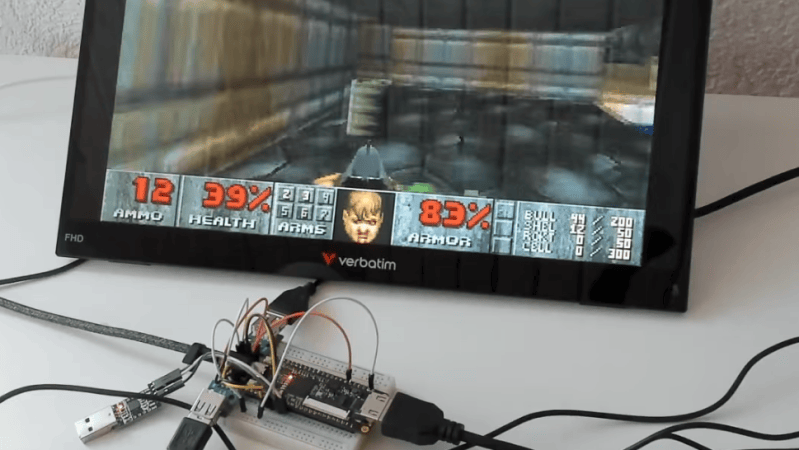
The Tang Nano 9K is a cheap FPGA development board that can usually be acquired for around $15 or so. [ThePartsBin] has been experimenting with this hardware and figured out how to set it up as a retro-style computer.
The board is based around the Gowin GW1NR-9C FPGA which only has 8,640 LUTs. However, that’s enough to spin up a 36 MHz RISC-V CPU, and there’s 8 MB of RAM on tap, along with HDMI, 48 kHz stereo audio output, two USB ports, and an SD card reader. Combine all that together, and you’ve got a machine capable of playing a whole raft of classic 1990s games.
[ThePartsBin] ported Doom, Tyrian, System Shock and Ultima VII, all of which run at a playable speed at a tasty 720 x 480 resolution. The writeup does a great job of explaining what it took to actually implement these classic games on the platform. Tons of compromises were made along the way, but that’s the engineering challenge, isn’t it?
If you’re looking to play retro games, this is not really the fastest or cheapest way to do it. You could probably just emulate them on the machine you’re using to read this very website. If you’re trying to get to grips with a new FPGA board for the first time, though, projects like this can be a very useful learning experience indeed.











A better question is, can you set one of these up as an Amiga 68k accelerator?
Yes, but why would you want to :) certainly the 20k version….
For the ones actually interested in “which exact RISC-V” (due to the simple fact that RISC-V doesn’t mean anything specific), here are few more info pieces:
— The CPU is VexiiRiscv, configured as in-order RV32IM + some extensions (Zba, Zicbom, Zicbop, Zicboz). I’m curious about what is the DMIPS/MHz performance of this configuration, just for comparison.
— There’s no MMU, so physical addresses FTW! (I guess no LUTs were left for a Sv32-compatible page walker and 2x TLBs)
I personally am not a fan of the Gowin FPGAs (for entirely subjective personal reasons), but this project definitely deserves respect especially considering the fact that the complete SoC seems quite balanced and efficient for what it’s doing with so few resources. Great work!
PS: Looking at the architecture diagram of this project, I can’t help myself but thinking: “This looks like the RISC-V DOS pc of the 21th century, haha!”
I wonder, if you could explain, why you dislike Gowin FPGAs?
I have Tang Primer 25k, and the only thing that was a bit annoying is the IDE that looks like it was written for Windows 95. OTOH that was/is my only hands-on experience with FPGAs…
I second that question. Did PAL and CPLD in my past, but beyond a stint in TinyFPGA, I’ve never really experienced FPGAs in general. I picked up a couple of Nano 20k, and I’m having a blast. The reason for the question is: I don’t know enough to judge. Would love to hear from Nik because Nik is knowledgeable enough to have an opinion.
Hi Urgon & Dave,
I’m not really sure I want to go into specifics, as people tend to quickly start trying to convince me into something, and I guess I’m just old enough to allow myself to have wrong personal opinion :D.
Nevertheless, let me state it otherwise. Just like Gowin, I’ve also never been an Altera fan (I stayed mostly on the Xilinx side for many years due to practical reasons), but I can’t deny that the Quartus IDE is definitely working ok (it actually works quite well for mixed-language designs which I think is mandatory nowadays, especially for the open-source community which frequently has to assemble a project from all types of bits-and-pieces) and the Cyclone V soc-fpga seems to hit a very special sweet-spot that’s still hard to achieve on other vendors’ platforms. The fact that Altera “delivers” is what’s important and I deeply respect that fact, even if I’m not personally “Altera-first”.
Regarding Gowin. It always seemed to me like the chips’ design is just too similar to Lattice and that brings uncomfortable suspicions. The IDE seemed somewhat primitive to me (compared to my subjective experience on the 2 major platforms), and the fact that I had to connect to a magic license server “somewhere under the eastern rainbow” left definite bad taste in my mouth and in the next second you start asking yourself whether your designs won’t also fly at the blink of an eye to the east. I forgot if there were other issues or not last time when I tried it ~2 years ago…
BUT. I must be practical and honest here. Gowin’s FPGAs seem to be quite accessible, which imho is very important for hobbyists. 2nd, I’m quite impressed by the idea of embedding large dram into the package (especially considering the price point), which completely changes your design choices. Maybe the greed… I mean larger vendors have something to learn from Gowin. Also, nowadays there seems to be already some support in the yosys/nextpnr toolchain, it would be great if it can be used entirely instead of the official IDE (as I’ve seen people commenting that some IP blocks can only be instantiated/code-generated by the vendor’s IDE).
If I have to give a recommendation to someone regarding FPGAs, here it is – buy what YOU can afford today and learn it. What’s on your table now is what counts. If it is a Gowin, I will respect that. Don’t stay away from it just because it’s not my (a random person on the net) personal favorite.
Looking forward to enjoy your achievements,
Nik
Thank you for your reply. No, I’m not going to try convincing you to change your mind. I was just curious.
About IDE, it is rather atrocious, outdated design with more interesting cores hidden behind a paywall. I’m not afraid that someone at Gowin would steal my projects, as I’m not doing anything that won’t be published. As for connecting to licensing server somewhere in Asia, I don’t mind that, because my project files are still on my drive. Autodesk Fusion is worse, as they keep my files on their server and I lost ability to open some of my early projects because they screwed up. So now I export backup copies just in case.
I also hope that there will be an open-source alternative to that IDE. It’s a bit hard for me to use because of my limited vision. And some of its elements are obtuse. Not a good experience for a beginner. And I like the hardware of my board, Tang Primer 25k. It was cheap, especially in comparison to other boards from Altera, Xilinx, and others. And I like that I can buy the module, solder some connectors to my own board design and after programming it in the dock, I just plug it into my project. And once I learn on Gowin, I can switch to a reputable brand later and do my commercial work there.
“It always seemed to me like the chips’ design is just too similar to Lattice and that brings uncomfortable suspicions.”
It’s not suspicious – Gowin’s led by a bunch of former Lattice/Silicon Image/SiliconBlue engineers who were let go after a downsizing in 2015 when Lattice acquired Silicon Image.
The FPGAs themselves are definitely new silicon (it’s a different process node than what Lattice uses) and it’s also worth noting that they’re probably most similar to the SiliconBlue-based iCE40s, and SiliconBlue itself was also made up of former Xilinx/Altera/Actel/Lattice employees, so the engineering knowledge is all basically running around in circles anyway.
I haven’t messed around enough with Gowins (there’s a Tang Nano sitting in my backpack just screaming to be used, though) to know the quirks and issues, although I’m 100% positive they’re there. When you get enough experience with any of the FPGAs it’s easy enough to realize they’re all just slapping spackle over giant holes in the wall, so it’s always a bit hard to judge.
Seeing how many limitations the 486 FPGA cores are and how far wd are from a Pentium FPGA core, a RISC-V port of FreeDOS with an x86 abstraction layer could be the way to run DOS games on cheap FPGA boards like the Gowins or the (now) elusive Pano Logic ones
There have been P5-level x86 cores done before (it actually was the P6): the issue isn’t really the complexity of it in terms of the FPGA, although with the tiny guys it’d be more challenging.
Really, the issue is that there isn’t a need – even for retrocomputing, you’re better off using one of the x86 emulators which are actually likely to be more accurate since they’ve got the speed to burn. It’s different with game systems and arcade consoles where you’ve got discrete logic involved.
There are also legacy industrial computers of PC/104 standard that often are based on some form of x86 SoC that can run DOS software.
Intel stopped making 486 processors in 2007, but some companies still make 486 SoCs for use in industrial machines that must run legacy code.
What I want to do with a FPGA is to recreate Odra 1305 computer. Last one was shut down on April 20th 2010 after 34 years of constant operation. It was incredibly reliable because it had two CPUs and used core memory. If one CPU failed, it switched to the other and continued operation. There was also smaller and faster version called SKOK, that was never in mass production.
Yep, there are some lovely industrial/embedded boards on the used market, but they seem to be somewhat of a rarity, and they are priced as if they’re golden.
Also, when you purchase such a board, documentation is rarely available and this quickly become a “bike-shed” project, where you have to 1st reverse-engineer the poor board before doing anything else with it (which some people seem to actually enjoy).
There were some Intel SoCs like these (Quark X1000, Curie) but they arrived and disappeared just too quickly to saturate our drawers and desks (like for example the rpi boards). Then the Vortex86 family appeared and brought some hope, but I couldn’t get my hands on one.
In the end it always happens like this – when people are fed up, they take matter into their hands by re-implementing it with some HDL or via emulation (especially the MCU-based emulators!). It seems we have both today, and I enjoy it a lot.
“and they are priced as if they’re golden.”
“Then the Vortex86 family appeared and brought some hope,”
Wait, really? People actually want those things? Holy crap, I’ve got several just lying around because they’re total trash. They advertise that they’re just drop-in compatible, but because they’re not running at the same clock speed, you’ll often run into timing quirks. And then they’ve also got a weird mix of supported instructions which can lead to binaries failing.
Hey Nath, what I meant was not a x86-riscv translation, but just that the simplicity of the project’s architecture reminded me of the “good old DOS days”.
Hi, please have a look at RetroOS. It’s similiar by concept.
It allows direct hardware i/o but has emulation, too.
Mixes Linux with a DOS compatibility sub system
https://www.vogons.org/viewtopic.php?t=111594
Another elegant solution would be to have an BIOS environment with an x86 emulation core.
The CSMWrap project is an UEFI playload that loads SeaBIOS and SeaVGABIOS.
https://github.com/CSMWrap/CSMWrap
Such a compatibility environment could be established on other platforms.:
A lightwight PC/AT compatibility layer that features all the BIOS service routines and a PC compatible RAM layout, but doesn’t limit direct i/o.
DOS drivers (wrappers) would be needed to talk to foreign, non-PC hardware.
This would allow utilizing the true power of non-PC hardware.
Instead of just booting a fullscreen version of DOSBox or Linux+DOSemu2..
Because people who love to tinker want to interact with the outside word and not being stuck in a sandbox.
the write-up is pretty informative, but there is basically no info on the development environment or how to program the fpga firmware. i am sure that that there is some google foo that would easily provide that info, but again, the write-up should (IMHO) have at least included some of that info…
Thanks for the feedback, glad you enjoyed the writeup! I didn’t stick the build instructions in there, but they are in the README in the m9b-system github repo, please let me know if there’s anything amiss there – as usual with projects of any complexity that have a ton of dependencies all over the place, putting together instructions is tricky :-)
sipeed has a useful wiki with info on the environment and on how to program the fpga:
https://wiki.sipeed.com/hardware/en/tang/Tang-Nano/Nano.html
There are also a couple tutorials. Because these boards have an onboard programmer, at least in windoze it is kind of streightforward, plug it and works. On Ubuntu you have to mess with udev rules, but it works too: something like :
ATTRS{idVendor}==”0403″, ATTRS{idProduct}==”6010″, ATTRS{product}==”JTAG Debugger”, RUN+=”/bin/sh -c ‘echo $kernel > /sys/bus/usb/drivers/ftdi_sio/unbind'”
To disable the serial driver on the specific FTDI chip used there.
Just play around, do not give up :)
awesome! thanks for taking the time to reply with this info!