
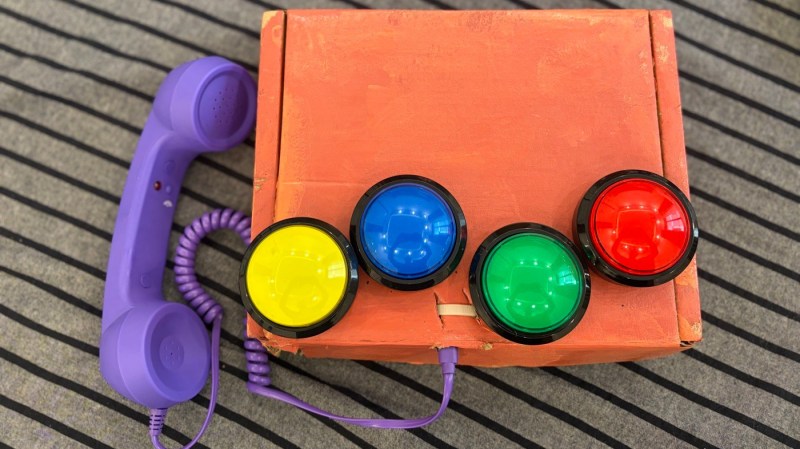
The great thing about the modern world is how connected we are. It’s also the worst thing about the modern world, to be honest. [Allan Binder] wanted to give his toddler the very best of that, and escape the worst, with a specially-designed telephone to call Grandma with– and not get scam calls in turn. We’re not going to say his build guide is so thorough a toddler could follow it, but it’s not too far off.
The device is very simple: a commercial ‘retro-style’ handset pairs with an ESP32-S3 over USB. Said ESP32, aside from acting as a USB host, runs a minimal Session Initiation Protocol (SIP) client, which connects via WiFi to a VoIP account the parent has set up. In this case, [Allan] is using Twilio, but there are other internet telephony providers one could use if a Twilio employee once ran over your dog or something.
There are no inbound calls in this setup, so little Timmy isn’t going to be bothered needlessly about import fees on nonexistent packages or his car’s extended warranty. Dialing out is toddler-friendly, too– it’s as simple as mashing an arcade button linked to the ESP32’s GPIO. Each designated contact gets a button with its pre-programed contact, like the speed dial of yore. A really nice touch is the use of illuminated buttons tied to the time-zone of the designated contact: kiddo will learn quick that if the button isn’t lit, it’s not time for phone calls. The phone will actually say so, via a text-to-speech that also announces network errors and the like.
While cardboard box housing the prototype seems a bit flimsy to trust with any toddler we’ve met, but the concept here is very sound indeed. We’ve seen such kid-communication devices before, but this implementation, aside from being more current, has a lot to recommend it.
Thanks to [Allan Binder] for the tip!










This would actually be really useful in the opposite direction, for Grandma to not have to trouble with dialing a phone. Dealing with dementia is terrible. (don’t start with the president jokes — I’m serious).
That’s already a product. Problem was, between the hooding eyelids and halted macular-degeneration, she couldn’t read the table of who was what button in my case.
Huge-button phone, preprogrammed numbers, and a photo of the person in each button.
The problem with this particular phone is that it is also a speakerphone, and the manufacturer’s answer to the UI dilemma(x) requires you to always hit the person-button, then press the big red “dial” button. That order of operations confuses her.
(x) The dilemma being: If you want speaker mode, you press the person-button then the dial button. In handset mode, you could just use it like an old-school phone: pick up the handset and press the button, done. But no, for consistency, the manufacturer decided one must always press the dial button after selecting the person to call, contrary to 8 decades of lived experience with phones… It’s a problem.
Please add some inline connectors on the cords so they cna discoonect if they get taught.
Yes yes yes
that looks like usb, so i don’t think that’d be an issue, unless you want one at the other end or in the middle of the phone cable. have fun splicing 20 cables and hoping it still works
I kindof love this project. Grandparents will love getting a call from their grandkids. This implementation looks pretty simple and clean. Nicely done!
Got a VOIP setup for the grandkids. FreePBX on an old laptop, a half dozen VOIP phones from Goodwill at $20 each, and some time configuring everything. Speed dial buttons programmed on the kidsx phones to call us, distinctive ring on our phone so we know it’s a kid call, works like a charm. No connection to the outside world for the kids’ phones, but we can dial 9 for an outside line. It’s almost infinitely configurable.
Look for Yealink and Grandstream phones surplus…they seem to be plentiful and cheap, not locked to any provider, and leftovers from corporate WFH programs during COVID, is my guess.
I’ve always wanted to do this, but its always complicated and ends up more expensive for service than adding an extra line (like a redpocket ebay sim)
I wish I could call my grandparents.
They were all gone by 1980
I made this: https://github.com/Kaiser1401/tv-video-call a while ago for the other direction. E.g. allowing my parents to videocall me with the tv they have in the living room anyway and few buttons.
Currently we do not really use it as relying on external jitsi is unstable, things change, browsers get unsupported etc. I shoudl give it some more love and do a re-setup next time i’m home maybe.
Love the cardboard box. That’s often the hardest part of these projects.