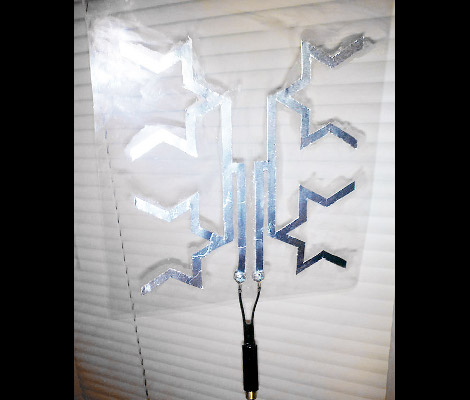
We can’t wait to give this one a try. We’ve got a DIY HDTV antenna hanging out in the attic which was made from some scrap wood and eight metal coat hangers. It works great but it’s pretty ugly and not everyone has an attic to hide it in (not to mention the signal drop caused by the roof shingles). This is a fractal antenna anchored to some clear plastic so you can just hang it in the window and start picking up the over-the-air channels without much effort.
The pattern was modeled in SketchUp then printed out on two pieces of paper. One piece had it printed on both sides, which makes it easy to glue on a sheet of aluminum foil, then follow the pattern on the opposite side to cut out the important parts. The other template was used as an aligment guide when gluing the foil to the clear plastic. A coaxial adapter was then attached using nuts and machine screws. If you build it, let us know how it comes out!
Have you heard of the Raspberry Pi? Surprisingly enough, they’re starting to trickle into the hands of thousands of hackers, and we were fortunate to get our hands on one (second-hand since we didn’t jump in time for the initial preorder). We’ve longed for a tiny embedded option for running XBMC and this is one of the best opportunities we’ve seen yet. The Raspbmc project, created by [Sam Nazarko], is tailored to getting XBMC on the Raspberry Pi just a few minutes after it arrives in the mail. And that’s exactly what we did.
If you’re familiar with writing an image to an SD card (or any device for that matter) this is a simple process. Raspbmc is distributed as a single image file which starts up the RPi hardware, then copies itself to RAM while it downloads and installs the filesystem for the distribution. Once the card is flashed just pop it in, power up, and wait about 20 minutes until XBMC shows up on the screen. After that it’s a quick boot each time.
The good news is that its works. XBMC runs pretty fast, with just a hint of lag when loading some menus. We felt at home using the confluence skin we’re familiar with, and had no trouble setting up our samba shares to the video library. The one problem is that it won’t play any of the video files we have on hand. None of them. So we downloaded the Big Buck Bunny trailer. It wouldn’t play that either. This is all a codec issue. Although the chip used on the RPi is capable of hardware decoding MPEG2 video, the foundation didn’t license that ability. So it can’t play that format, period. With the movie trailer we tried the OGG format and that’s not currently supported, but the MOV version did play, in full 1080p without trouble.
So the verdict is, if you’re looking to get an RPi just to run XBMC you should wait. So far the package is promising. But we record ATSC video, all of which is MPEG2. If you use MakeMKV to store your DVDs on a server, that also uses MPEG2. Of course there is the option of transcoding everything. But you’ll want to be careful if you have other XBMC frontends which may not be able to play alternative encodings.
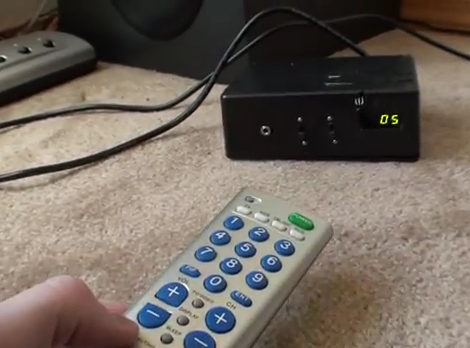
The speaker system [Zurcher] bought was made by Klipsch. It is a surround sound unit but it’s intended to be used with a computer so there’s no wireless remote for it. Instead, a wired unit sits on the desk and lets you select between the speakers or headphones, and has a volume adjustment knob. The thing is he uses them for his home theater system and had to add his own remote control hardware to adjust them from across the room.
He started with some web searches that helped a lot. It seems others have mapped out the hardware in the past and he was able to use that information to find the volume chip inside the controller. A bit of signal sniffing let him work out the control commands coming in over the i2c bus. This was the information he needed to build his own controller. He grabbed his Arduino board, and IR receiver to take commands from just about any remote, and a four-digit 7-segment display to provide settings feedback. You can seen him showing off the final build in the clip after the break.
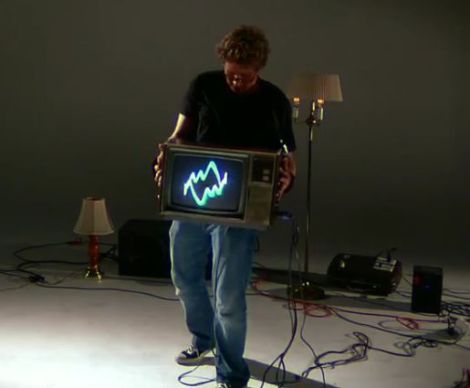
While CRT televisions fall to the wayside as more people adopt flat-panel TVs, the abundance of unused sets gives hacker/artist [Kyle Evans] an unlimited number of analog canvases on which to project his vision. He recently wrote in to share his latest creation which he dubs “de/Rastra”.
The “CRT Performance Interface” as he calls it, is an old analog television which he hacked to display signals created by moving the TV around. Fitted with an array of force sensors, accelerometers, and switches, the display is dynamically generated by the movements of whomever happens to be holding the set.
Signals are sent wirelessly from his sensor array to an Atmel 328 microcontroller with the help of a pair of XBee radios, where they are analyzed and used to generate a series of audio streams. The signals are fed into a 400W amplifier before being inserted into the CRT’s yoke, and subsequently displayed on the screen.
We’re sure [Kyle] is probably trying to express a complex metaphor about man’s futile attempts to impose his control over technology with his project, but we think it simply looks cool.
Check out [Kyle’s] work for yourself in the video below and give us your take in the comments.
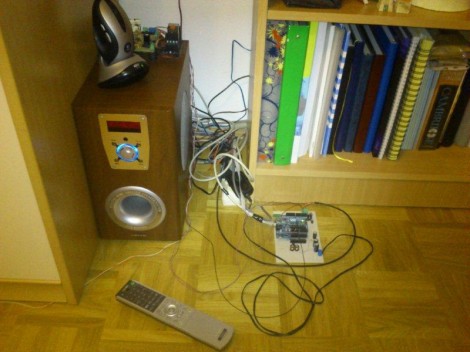
[Neoxy] always wanted surround sound for his computer, and one day he managed to get a hold of a dead 5.1 system. Why buy one when you can repair someone’s rubbish, right? That turned out to be easier said than done, but after several false-starts he managed to resurrect the audio system by replacing the microcontroller.
We find his trouble-shooting technique interesting. The amp would power up without a hitch but no sound would come out of it. So he took a headphone cable and used the L and R conductors as probes. That cable was fed from an MP3 player, and by touching the probes to the audio inputs for the pre-amp and amplifier circuits he could get great sound out of the speakers. Reasonably certain that those boards were working fine he narrowed down the troubles to three chips that mix, select inputs, and control the system.
A lot of prototyping with an ATmega328 and an Arduino led him to the functionality you see in the video after the break. Not only did he get the system working, but he’s using the Arduino to add Internet control for the device.
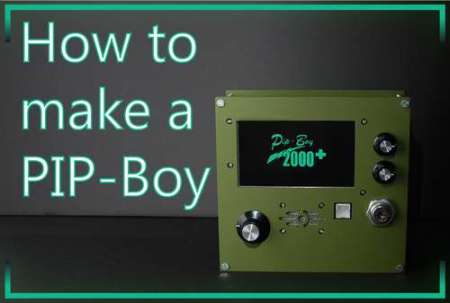
[Daniel] wrote in to tell us about his PIP-Boy 2000 prototype. While most PIP-Boy remakes we’ve seen tend to be focusing more on the aesthetic side, like a prop, [Daniel] is attempting to make a functional one. He has included a GPS sensor, RFID reader, and radiation detector in his build but did choose to stick with the familiar PIP-Boy visual theme in the menus. He has a very long way to go if he wants it to do everything the PIP-Boy from Fallout did, but his list of semi-functional features is growing steadily.
Currently there are the basic functions of:
automapping and waypoint navigation
external PC interface
inventory status and item recognition (using RFID)
player experience (adds experience as you go to new locations)
ambient radiation
screensaver
Let us know when you get that sucker to stop time [Daniel]
While young children have the tiny hands and fingers that most hackers/tinkerers wish they possessed from time to time, their fine motor skills aren’t always up to par when it comes to operating complicated electronics. People are always looking for ways to make their home entertainment systems accessible to their kids, and [Humpadilly] is no exception. Much like some of the other hacks we’ve seen this week, he has devised a way for his little ones (1 and 2 years old) to control his Dreambox Media Player using RFID, which seems to be the go-to technology for this sort of thing.
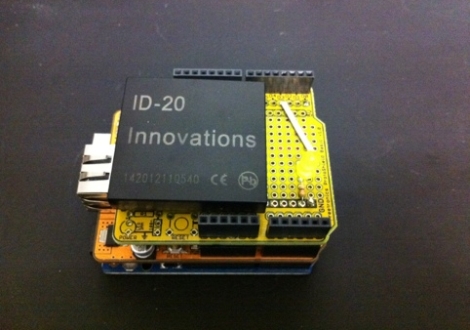
His RFID remote consists of three major components aside from the media player itself. An Arduino runs the show, and is connected to both an Ethernet shield and a breakout board fitted with an ID-20 RFID reader module. The Ethernet shield allows the Arduino to talk to his Dreambox over a telnet connection, while the RFID reader does what you would expect.
The device is in its infancy at the moment, and while [Humpadilly] hasn’t published a ton of details about the actual RFID devices he is using to control the system, he says that more details and improvements are forthcoming. In the meantime, you can check out his code here.