
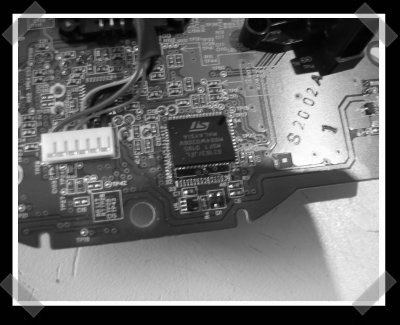
[sprite_tm]’s back with one of his excellent Atmel projects. This time he decided to turn an original XBox controller (cause he likes ’em) into a standard USB HID device. He gutted the custom USB chip that Microsoft installed and replaced it with an Atmel ATMega88. The ATMega required a few changes to the board, but nothing too off the wall.
Peripherals Hacks1579 Articles
SenseSurface: Custom Inputs On Your Lcd Screen

[Lindsay Williams] has come up a novel way of constructing custom physical inputs for your programs. SenseSurface is a viable alternative to building a new interface for each application. Simply place the dials, buttons, and sliders on your screen wherever you want them.
A sensor board, placed behind the display, picks up the signals from the inputs. The only limitation to the number of inputs available is the size of your screen. Inputs are held on magnetically, and have a low friction backing to avoid scratching or gouging your screen.
Continue reading “SenseSurface: Custom Inputs On Your Lcd Screen”
DeepNote Guitar Hero Bot
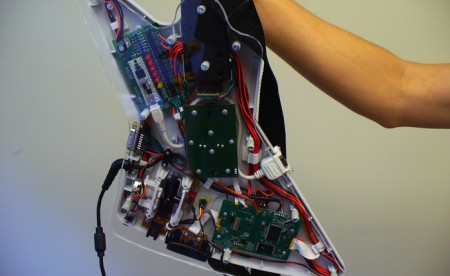
A team of five high school seniors have released some videos of their new Guitar Hero bot named DeepNote. This bot uses a group of custom photodiode modules with an 8 nanosecond latency placed on the screen to sense the notes. The Parallax Propeller system takes this input and controls solid state relays hooked into the guitar’s circuitry. After we looked at a few videos of the early prototype system, we could really see how it has evolved. They have custom PCBs and a really nice frame for the photodiode sensors. You can find more info on their How It Works page and view a demo video embedded below.
DIY Joystick Glove
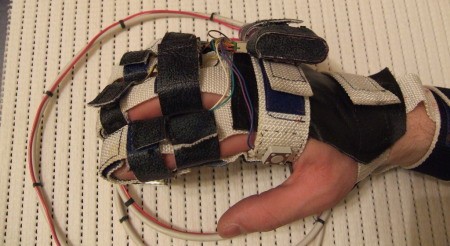
[Elf] sent in this interesting DIY joystick glove. There aren’t many details on the actual glove switch design, but from the schematic on the site, it seems to mostly consist of micro-switches with some pot adjusted transistors to calibrate the X-Y signals.
Related: Data glove USB interface and Clove 2 one handed input
Clove 2 Glove For One Handed Input
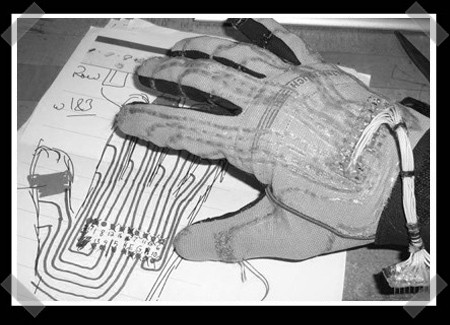
[Christopher Mitchell] (previously on Hack a Day) has come up with a rather interesting input device. The Clove 2 glove is a Bluetooth data input interface. The goal is to be able to “type” without the use of a traditional keyboard. Key strokes are achieved through finger movements. Your computer simply sees this as a Bluetooth HID device and some software translates it for you.
While it may seem confusing, he’s designed it to be very similar to typing on a keyboard. Each finger movement or combination is a key stroke. Just like typing on a regular keyboard, there are modifying strokes such as ALT or shift that effect others. Most common used keys require the least combinations of finger movements.
USB Popcorn Popper
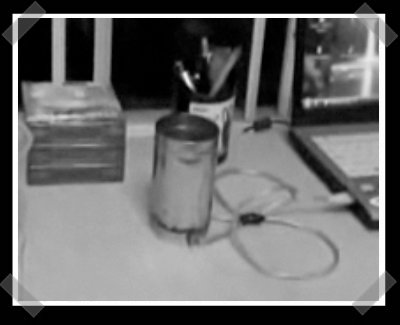
[sophia] sent in this interesting little video of a USB popcorn popper. It might just work too – we’ve burned our digits a time or two on a hot flashlight. The bottom is a jar lid, fitted with a pair of high intensity flashlight bulbs. These are wired directly to a USB cable (maybe a bit unwise). When plugged in, the bulbs are on and heat the metal container. Just add oil and popcorn… As usual, you can catch the video after the break.
Live Full Motion Video On A Peggy
[Windell] was stoked enough to send us [Jay]’s sweet hack on [Windell]’s Evil Mad Scientist Laboratories Peggy 2.0 kit. [Jay] added serial input and hacked quartz composer on his mac to light up all 625 LEDs with live motion video. If you were jealous of the Metalab’s giant LED display, now you can have your own – smaller and cheaper.
EMSL has recently supplemented this awesome device with their Arduino Library for Peggy 2.0. It is a program library that contains various animations and demonstrations of how to draw on a Peggy. Download and enjoy them as they are or tweak them to test out some of Peggy 2.0’s capabilities.









