
Custom MOTD For The Raspberry Pi

motd

With so many uses for a Raspberry Pi in a headless configuration – especially with the impending release of the Raspi Model A – we’re surprised it has taken so long for someone to send in a way to create a custom message of the day that is displayed whenever you SSH into everyone’s favorite Linux board.

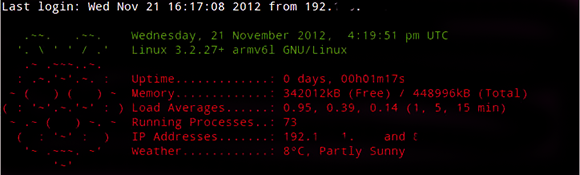
A MOTD is used by servers to display messages to new users, or simply system information for server admins. It’s a simple text file stored in /etc/motd, but with some proper beardly Unix wizardry it’s possible to display uptime, free memory, and even the weather wherever the Raspi is located.

[yanewby] over on the Raspberry Pi forums created a nice little MOTD that grabs weather data from the Internet and displays it alongside an ASCII rendering of the Raspberry Pi logo. Of course like everything in Unix, this MOTD can be modified to do just about anything, from checking your Twitter to sending a text message to your phone.
WiFi Jamming Via Deauthentication Packets

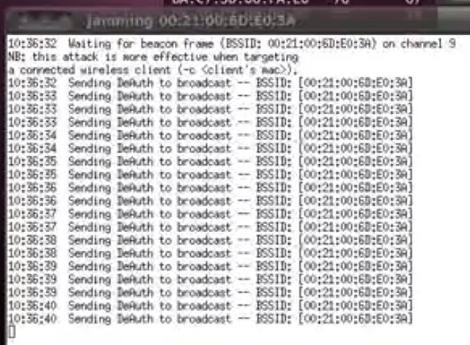
[Elliot] put together an intriguing proof-of-concept script that uses repeated deauthentication packet bursts to jam WiFi access points. From what we can tell it’s a new way to use an old tool. Aircrack-ng is a package often seen in WiFi hacking. It includes a deauthentication command which causes WiFi clients to stop using an access point and attempt to reauthenticate themselves. [Elliot’s] attack involves sending repeated deauthenitcation packets which in essence never allows a client to pass any data because they will always be tied up with authentication.

After the break you can see a video demonstration of how this works. The script detects access points in the area. The attacker selects which ones to jam and the script then calls the Aircrack-ng command. If you’ve got an idea on how to protect against this type of thing, we’d love to hear about. Leave your thoughts in the comments.

Continue reading “WiFi Jamming Via Deauthentication Packets”

Take Command Of Your BASH Prompt

color_bash_prompt

[Joshua] has put together a list of BASH prompt customizations. The command prompt is used in a command-line interface to show that the system is ready for the next command. Often times this is nothing more than a user name, host name, and working directory:

mike@krusty:~$

[Joshua’s] customization examples can be used to color code the information in your prompt, change what information is displayed, and make the prompt respond differently when an invalid command is typed. A BASH prompt reference is helpful in deciphering what each of these commands do. The easiest simplification is to understand that non-printing characters (such as color codes) are surrounded in escaped square brackets. For example, line 1 is the sequence for Red, line 2 is the sequence for Dark Grey, and line 3 sets a simple prompt to display in Red and all text after that to be in Dark Grey:

\[\e[0;31m\]
\[\e[1;33m\]
PS1="\[\e[0;31m\]\u@\h:\w\$ \[\e[1;30m\]"

Continue reading “Take Command Of Your BASH Prompt”









