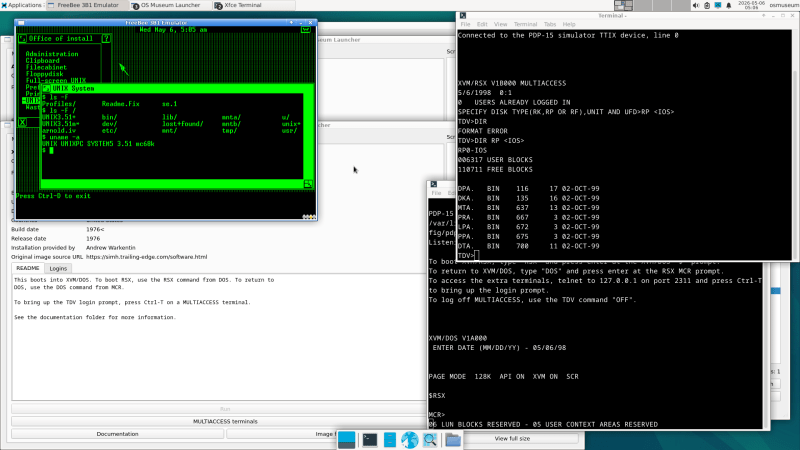
The Virtual OS museum, screenshot

Virtual Museum Hosts Every OS You Haven’t Heard Of

OK, every operating system is a bit of a stretch — Windows Vista notably didn’t make the cut — but [Andrew]’s Virtual OS museum has a good claim to being the most comprehensive archive of operating systems yet assembled.

[Andrew] has a blog post describing the project, as well as a YouTube video that we’ve embedded below. But the real fun is in the downloading and spinning up one of 570+ operating systems for more than 250 platforms on pre-configured virtual machines that have been packaged up for us.

This isn’t just the usual retrocomputer nostalgia-fest of Macintosh System and DOSBox. There’s everything from IBM Big Iron and VAXen to Texas Instrument graphing calculators emulated in the museum, with software to run on them, too. If you’ve ever wondered what you could do with the Manchester Baby, well, all known software for that machine is included with its ‘operating system’.

Admission is free, but like any good museum you’ll be waiting in line a while to get in, so expect the full 128 GB download to take some time. If you’re into computer history, though, it’s going to very much be worth the wait. If you try it and like it, you could help others by seeding the torrent.

The actual museum launches in a VM as a modern Linux system — perhaps that can be considered an exhibit itself — with a launcher to select any of the other system/OS combos, including various other, older Linuxes hosted on their own VMs. There are more to come, too, as [Andrew] continues the long debugging process of making sure everything works as expected.

Purists may decry this virtual emulation as not being quite the real thing, which is true. But while MiSTer supports a lot of cores via FPGA, you probably won’t find everything here on that platform. We have, however, seen an FPGA recreation of the Manchester Baby. More than once, even.

Continue reading “Virtual Museum Hosts Every OS You Haven’t Heard Of”
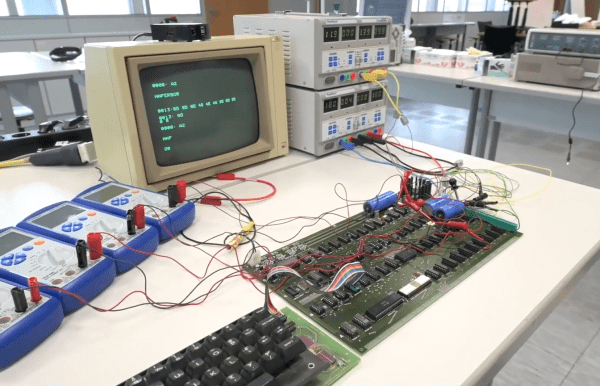
An Apple I hooked up to lab power supplies and a monitor

Powering Up An Original Apple I After Three Decades In A Museum

The Apple I is the stuff of legend. Designed and marketed in 1976 by Steve Wozniak and Steve Jobs, it was the very first product released by what would become today’s multi-trillion-dollar manufacturer of iPhones and iMacs. With about 60 original ones known to exist today, prices at auction are commonly in the $300,000 range, while confirmed working ones are even more valuable.

The Heinz Nixdorf Museumsforum (HNF), a computer museum in the German city of Paderborn, is fortunate enough to have an original Apple I in its collection. Although it has been there since 1996, it was always on static display and had never been powered on. In fact, it was unknown whether it would even work, and with it being the most valuable exhibit in the entire museum, simply firing it up would be a seriously risky project.

But computers are meant to be used, so museum director [Jochen Viehoff] decided to take the plunge and attempt to get the classic Apple to run again. In the four-part video series embedded below, [Jochen] explains the history of Apple’s first product and the steps he took to bring it back to life. This began with taking it out of its bullet-proof display case and bringing it upstairs to the museum’s workshop.

In order to make a complete system, HNF staff also dug up a period-correct keyboard as well as a slightly newer Apple monitor that could display the 60 Hz composite video output. Hooking up an original power supply would have been way too risky, because a single mistake or malfunction could send their top exhibit up in flames. Instead, they used a set of lab power supplies with a programmable current limit; this way, even a dead short on the PCB would not result in any serious damage.

Not that there were any shorts: after a bit of fiddling with the keyboard and adjusting the video output level, the 45-year-old computer came to life and began to respond to commands. With just 256 bytes of ROM, its default feature set is rather limited, but the computer duly executed a simple “Hello, World” program writen in 6502 machine code. It thereby joined the elite club of confirmed working Apple I’s, of which there are thought to be about twenty.

If you haven’t got $300,000 to spare but would still like to try your hand at programming the Apple I, you’ll be happy to hear that you can get a modern copy at a far more affordable price. And if all that classic hardware is too fiddly for you, you might want to try implementing the Apple I on an FPGA.

Continue reading “Powering Up An Original Apple I After Three Decades In A Museum”

Telecom Time Machine

Marty! You’ve Gotta Come Back With Me!

Like any good plan, you should always start with the intention to build a time machine. That way if your future self succeeds, your current self doesn’t have to worry about actually doing it!

Well, unfortunately it hasn’t quite worked out forĀ hosts of [Toymaker], but they have managed to make a pretty authentic Telecom Time Machine instead!

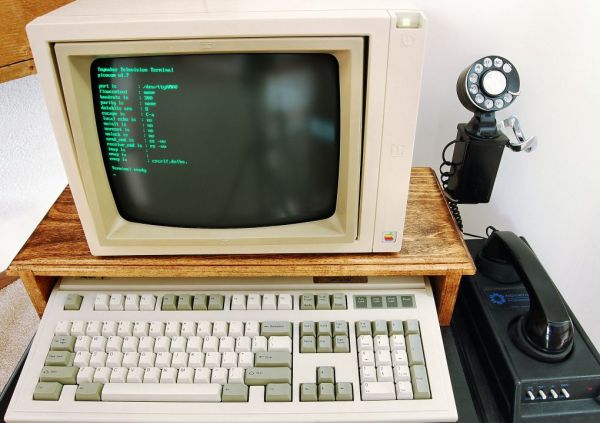
What they’ve created is something called a “dumb terminal”. Back in the days of yore before personal computers existed, if you wanted to get “online” you would have to do so at a dumb terminal. It’s essentially a monochrome monitor, a keyboard, and a serial port. You would have to actually connect to the mainframe to do anything — but back then, you couldn’t just hook up a modem — oh no, you had to use an acoustic coupler to connect. You had to play sounds through your telephone in order to communicate with the mainframe. How’s that for a bit of history with your morning coffee!?

Continue reading “Marty! You’ve Gotta Come Back With Me!”