It’s a complex world out there, and more than ever folks may find themselves in a situation where they want to keep particular bits of information away from prying eyes. At the same time, overly complex methods of file security can make it difficult to share said information with the intended recipients impractical. So what’s the solution?
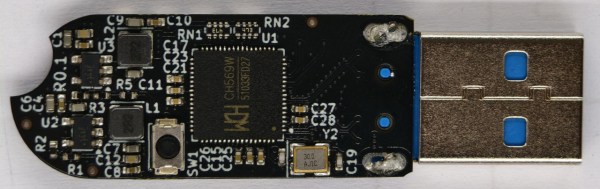
One proposal from [Ryan Walker] AKA [machinehum] is the Phantomdrive — a fully open source USB flash drive that features a secret secondary filesystem. Not only is the existence of this data hidden from the operating system under normal circumstances, but it’s encrypted with AES-256. Rather than relying on software running on the computer to handle the decryption, the CH569 chip that powers the drive does it internally.
 To complete this platform-agnostic approach, [machinehum] had to come up with a way for the user to unlock the secure storage that didn’t require running any code on the client machine. A hardware solution such as a keypad is the obvious answer, but in this case, was out of the question as it would immediately tip off an observer about the drive’s true nature. A covert storage device needs a similarly inconspicuous method of authentication.
That’s why the firmware on the Phantomdrive keeps an eye on all the write operations to the unsecured section of the drive looking for the string password:. Once it sees that, it treats whatever follows as the decryption key. If it’s correct, the previously inaccessible data will appear to the operating system as a new drive.
[machinehum] cautions that none of this has been professionally audited from a security standpoint, and that you should treat this whole concept as an experiment. In other words, it’s probably more than sufficient for the average person, but no guarantees on how long it would last should a three letter agency gets too interested in what you’re up to.
If this seems a bit familiar, it’s because the Phantomdrive follows up [machinehum]’s self-destructing USB flash drive from a few years back. The concept is essentially the same, except this time there’s no Magic Smoke getting released.
Continue reading “Phantomdrive Keeps Your Secrets Out Of Sight”