
Binary Clock Also Monitors Weather

There are two things most of us want to know on a daily basis—the weather, and what time it is. [Guitarman9119] built a single device that can provide both pieces of information with a pleasingly nerdy aesthetic.

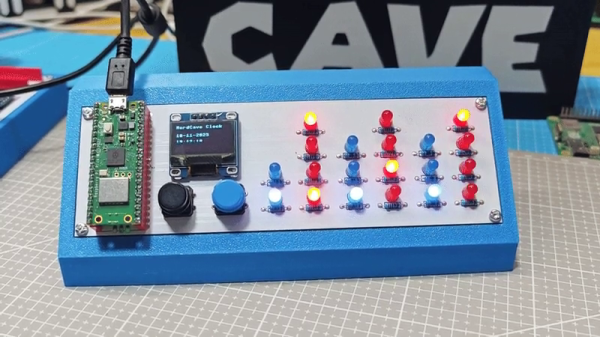
The heart of the build is a Raspberry Pi Pico W, which is proudly displayed on the front panel of the device. It’s responsible for driving the array of LEDs that display the time in hours, minutes, and seconds in binary format. The Pi Pico W uses its wireless connection to query the WorldTime API and an IP geolocation server. This provides the local date and time, and the location is then used to query the OpenWeather service for current weather information. The weather information is thankfully not displayed in binary format, because that would be straining to read. Instead, it’s displayed in human-readable format on a small OLED display.

There’s something about the way this is built—the discrete LEDs, that weird blue color that seemed to disappear by 1984—that gives this a wonderfully old school charm. You could imagine it turning up in a college lab full of old blinkenlights gear. Video after the break.

Continue reading “Binary Clock Also Monitors Weather”

Landscape Motif Makes This E-Ink Weather Display Easy To Understand

True weather geeks will disagree, but there might be a better way to know how to dress for the day than divining what the weather will likely be from the current readings for temperature, pressure, humidity, and wind. Sure, the data will give you a good idea of where the weather is heading, but perhaps a quick visual summary such as the one offered by this pictorial landscape weather display is a better way to get out the door in the morning.

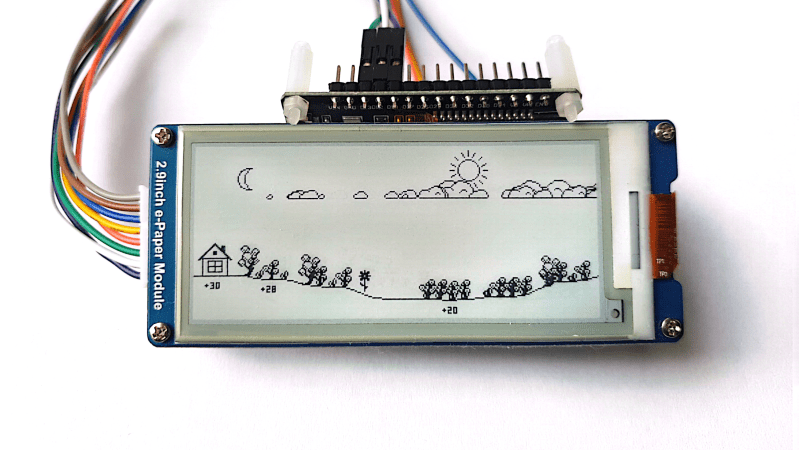
While many consumer weather stations incorporate some kind of graphical forecast for quick reference, [lds133] took a slightly different approach to forecasting. A cartoon landscape represents the day ahead, with various elements representing the coming weather scrolling across the display as time progresses. Trees are used to indicate wind direction and speed, with palm trees indicating south wind and pine trees winds from the north, and the taller the trees, the stronger the wind. The forest floor rises and falls with the expected temperature, the sun and moon appear at the proper time to indicate sunrise and sunset, and cloud icons are added when needed to show the degree of cloud cover. And because into each life a little rain must fall, animations show when you can expect rain or snow.

As for the electronics, if you think this would be a perfect application for an E-ink module, [lds133] agrees. The 296×128 pixel Waveshare display is the perfect aspect ratio for the job and provides nice, crisp icons. The display is updated every 15 minutes from the OpenWeather API by a Python program running on an ESP32 behind the scenes.

We’ve seen similar graphical forecast displays before, but we get it if that’s not your thing. Perhaps a more data-driven weather forecast will suit you better?








