
Visualize Regular Expressions With Marbles

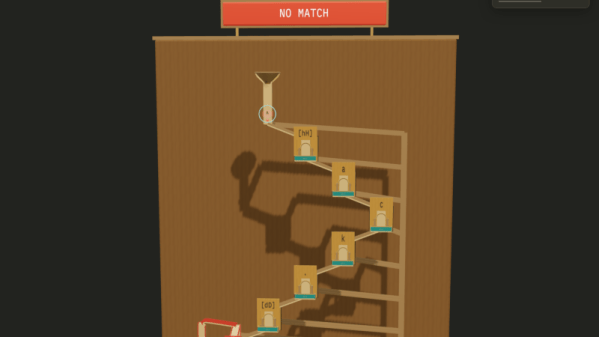
If you are one of those people who visualize things physically better than in the abstract, then Regex Marble Run by [bottomless] might be for you. You enter a test expression and a string, and the site generates a virtual marble machine that lets you see the regular expression pick apart the string in a physical way.

Click this link, and you’ll see the regular expression “^[hH]ack.[dD][^0-9]*$” which, if you aren’t a regular expression user, might seem a bit cryptic. However, it is fairly simple if you take it bit-by-bit.

The caret character tells it to match the start of the string. So “^dog” will match “dog” and “dog food” but won’t match “food for a dog.” The following bit “[hH]” will match either “h” or “H”. Then there is “ack” which is just what you think it is. So a string starting with “hack” or “Hack” might match (depending on the rest of the expression.

The period means match any single character. Then there’s another “[]” but this time with “dD” to match any kind of D. The next “[]” character class is a range from 0-9, but since there is a caret, the match is negated. So “[^0-9]” means match anything except a digit from 0 to 9. The “*” means we can have zero or more of these. So “HackxD” matches, but so does “HackxDXYZabc” for now. Trick question: Does “HackxDXYZabc123” match? So far, yes, but it only matches to the lowercase “c” character.

The final character, “$” means end of string. So now “HackxDXYZabc123” does not match because we are still in the middle of the string. However, “HackxDXYZabc” will match since the previous “*” “ate” the rest of the string.

Head spinning? The site will let you see each letter of a test string as a marble that falls through the different parts of the regular expression. Balls that pass wind up in the left-hand box, while failures are in the right-hand box. Will it help you? We don’t know, but it is fun to watch.

Want a refresher on regular expressions? Or perhaps you want some practice?
DOOM Using Regular Expressions

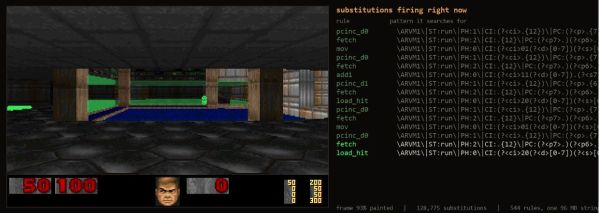
Regular expressions (regexes) are an amazingly powerful way to perform operations on collections of e.g. text. Regexss can also be considered to be a programming language, even a Turing complete one. Ergo it’s perfectly acceptable to thus design a way to use regexes to run and play a game of DOOM, as [Artem Lytkin] recently did.

The GitHub project page can be found here, containing the Python-based code that allows the demonstration to run, as well as the other components, including the C runtime and the 96.6 MB text string that defines a CPU’s registers, RAM, a framebuffer, the DOOM engine compiled to this custom CPU’s instruction set and the WAD file for the game itself.

The C-based driver applies the fixed, ordered list of find-and-replace rules to this string, which after more than ten-thousand of such substitutions later results in a single frame of the game. At about 80,000 substitutions per second on the given test system, that gets you to a sort-of playable framerate, even.

Naturally, the practical value of playing DOOM like this is pretty low, but as a demonstration of why regexes are awesome it’s hard to beat.

Linux Fu: Globs Vs Regexp

I once asked a software developer at work how many times we called fork() in our code. I’ll admit, it was a very large project, but I expected the answer to be — at most — two digits. The developer came back and read off some number from a piece of paper that was in the millions. I told them there was no way we had millions of calls to fork() and, of course, we didn’t. The problem was the developer wasn’t clear on the difference between a regular expression and a glob.

Tools like grep use regular expressions to create search patterns. I might write [Hh]ack ?a ?[Dd]ay as a regular expression to match things like “HackaDay” and “Hack a day” and, even, “Hackaday” using a tool like grep, awk, or many programming languages.

Continue reading “Linux Fu: Globs Vs Regexp” →










