
At the Bay Area Maker Faire this past May, we had our first glimpse of Wild Planet’s Spy Video TRAKR, a $130 radio-controlled toy with some surprises under the hood.
On the surface, the Spy Video TRAKR — the latest addition to the popular Spy Gear toy line — is an R/C tank with a video camera and night vision, with the added ability to download new “apps” from the internet for extra functions. With a little detective work, one uncovers the TRAKR’s secret double life: it’s also an eminently hackable robotics platform! Prior Spy Gear toys have been popular hack targets, providing inexpensive, mass-produced sources of unusual items such as head-mounted displays. Rather than throw up barriers, Wild Planet has chosen to embrace this secondary market, with plans to release development tools and documentation making it possible to extend the device’s capabilities.
Read on for our image-heavy unboxing and initial impressions.
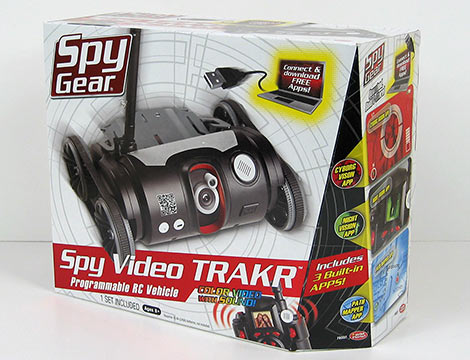
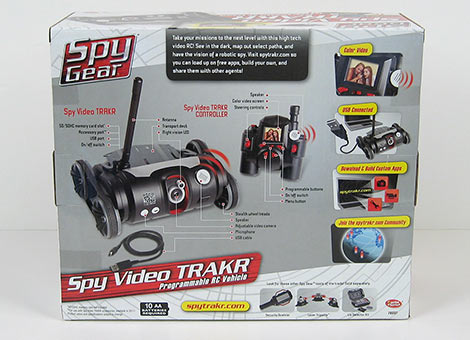
The packaging is outwardly consumer-oriented — this is, first and foremost, a kids toy after all — and the “USB Connected” and “Download & Build Custom Apps” labels are about as technical as it gets on the outside.
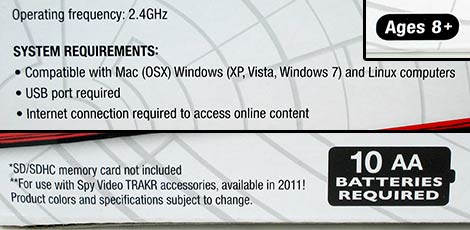
Batteries not included. You’ll need plenty. And did you ever expect to see Linux mentioned by name on anything at Toys R Us? Awesome!
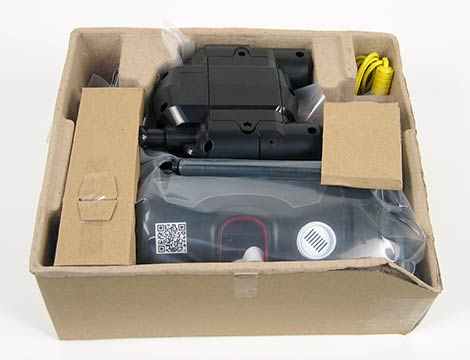
Internal packaging is minimalist and largely recyclable. No twist ties, no staples, no plastic bubbles, no registration cards or catalogs. Much appreciated! We’ve seen much smaller toys with far more gratuitous packaging, so this was a welcome relief.
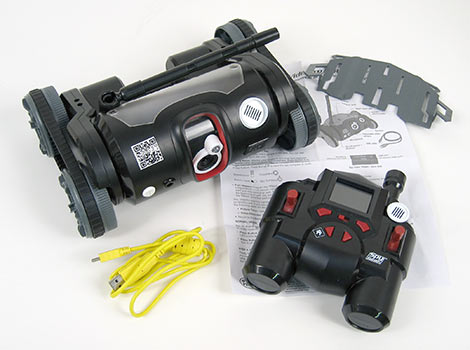
The entire contents of the box are as follows:
- The TRAKR vehicle itself, with antenna in the stowed position.
- Snap-on “transport deck,” seems to be of little use other than to provide a seat for G.I. Joe or the adorable tiny kitten in the looming flood of YouTube videos.
- Remote control unit.
- Single page instruction sheet.
- Four foot long banana yellow USB A to mini-B cable.
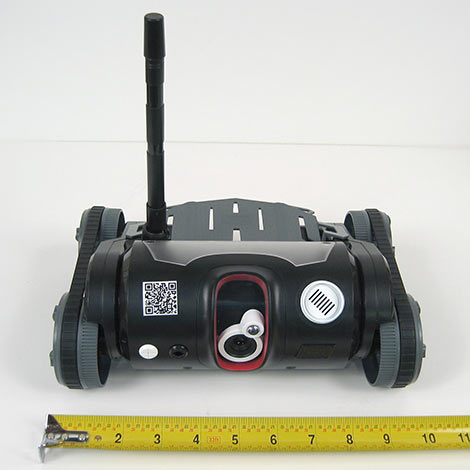
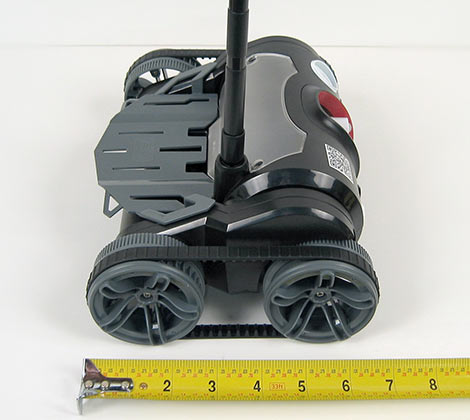
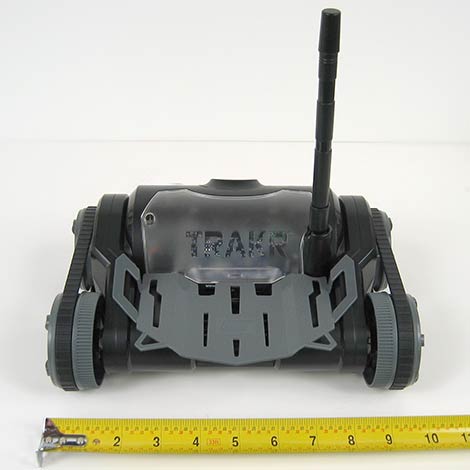
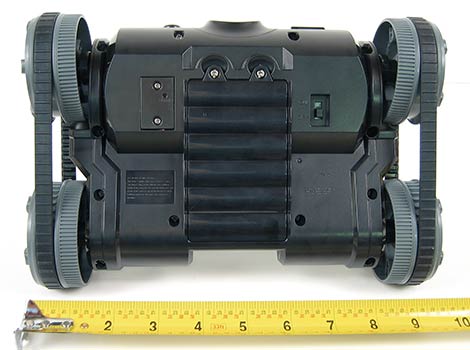
The TRAKR vehicle is a stubby, squat tank, measuring about 10 inches wide and 7 inches long. Six AA cells install behind a cover on the underside of the unit. The total weight with alkaline cells is 1065 grams, or about 2 pounds 5 oz. Picks up easily with one hand.
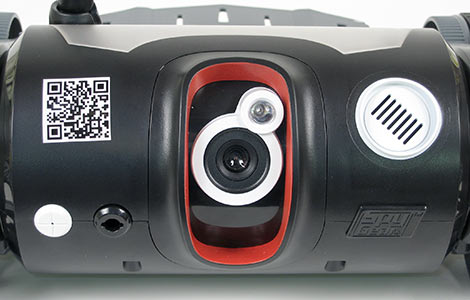
The front of the TRAKR vehicle features a number of sensors. Left to right, these include: microphone (the white circle at the left), a presently-unused accessory connection port which appears to contain a bump switch, the color video camera and infrared LED for night vision, and speaker (larger white circle at the right). The camera can be pivoted from straight ahead to about 30 degrees upward, but there is no servo control of this function; it must be manually positioned.
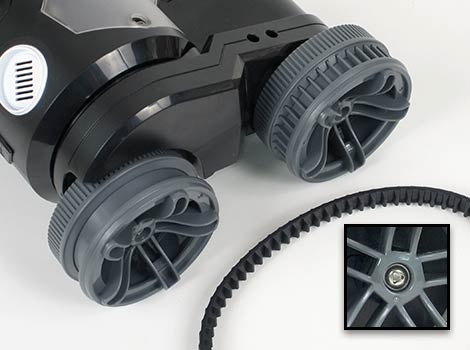
The rear wheels of the TRAKR have independent electric motors; the front wheels are passive, driven by rubber treads. All the wheels are held on by triangle security screws, so replacing these with fancy R/C car tires probably won’t come easy.
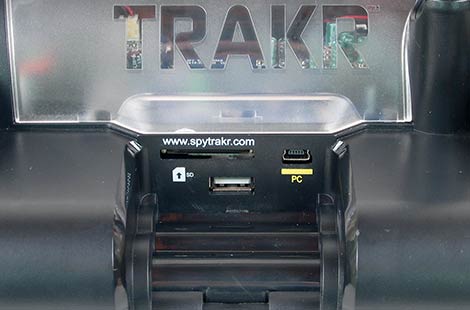
With the transport deck removed we can see the ports on the back of the TRAKR: an SD card slot for storing photos and video (also SDHC compatible), the USB mini-B connector for attaching to a PC (or Mac, etc.), and a USB type A connector that currently serves no purpose, but might be related to future accessories (and hacks, of course).
When connected to a host computer, the TRAKR appears as a 1-megabyte FAT12 filesystem. New apps, downloaded from the Spy Video TRAKR web site, are installed by simply copying the corresponding .bin file to the APPs directory on this flash drive. It’s quite a bit like the mbed microcontroller in this regard. With the three factory apps pre-loaded, there’s about 900K free space remaining. Additionally, the TRAKR can function as an SD card reader when attached via USB.
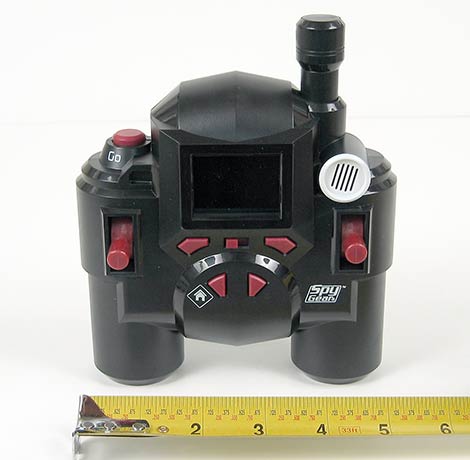
The remote control unit is a bit over 5 inches high and wide. Four AA cells install behind a back cover, and the total weight is 392 grams, or about 13.5 oz. The size and heft of the controller is sufficiently comfortable for both young and adult hands. There are two single-axis sticks for driving the tank Battlezone-style, five buttons (one dedicated to the “home” function, the rest being app-specific), a power and volume switch, speaker, and a 1.75″ color LCD screen in the center. Though the sticks have an analog feel, in practice they appear to be simple non-proportional controls.
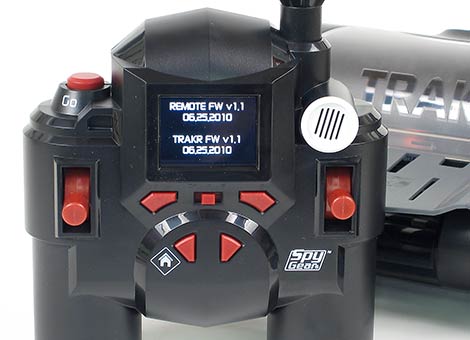
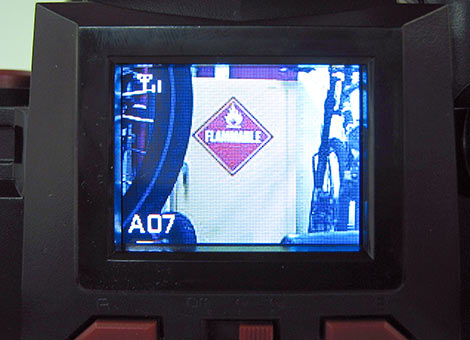
The LCD looks to be half-QVGA resolution (160×120). The video feed averages a good 15 frames per second over the device’s wireless (2.4 GHz, but not WiFi) connection.
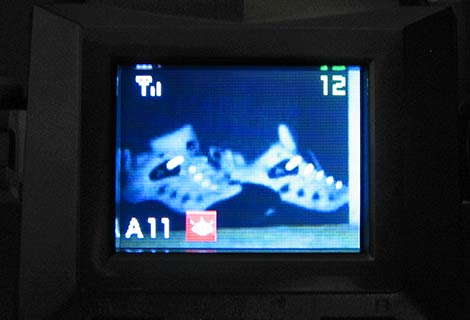
Night vision is provided by a single 8mm near-infrared LED, with a range of about six feet.
The camera can also take QVGA (320×240) color stills, and half-QVGA (160×120) video, recorded to the SD card as JPEG and AVI, respectively. Here are some unprocessed stills directly from the memory card:


Something interesting we noticed with outdoor use is that most trees appear red, due to the camera’s sensitivity to infrared light. This generally isn’t a problem with images taken indoors under normal lighting.
The TRAKR ran a bit quieter than we expected, and had no problem clearing door thresholds or running across and between different floor surfaces. Having a camera barely over two inches off the ground may seem to be of questionable utility — the WowWee Rovio mobile webcam, for example, can raise its point of view about a foot for a better perspective — and, to be honest, at first the whole thing seemed a bit pointless. But the more time we spent driving around, getting into the mindset and reliving the countless hours of our youth spent with a Big Trak (sort of a 1980s progenitor to the TRAKR), the more apparent it was that this is the ideal perspective for the toy’s intended audience: kids aren’t contemplating edge filters and object tracking algorithms…they’re doing important kid things, running James Bond spy missions, knocking over action figures and army men and chasing after the cat. And as you see above, the camera is set perfectly at action-figure-and-cat-terrorizing height!
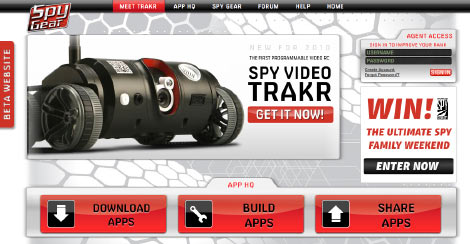
So that’s an overview of the TRAKR as it comes straight from the box. To do more, we begin by visiting the Spy Video TRAKR web site:
The “Download Apps” link currently leads to a list of about a dozen simple apps developed in-house:
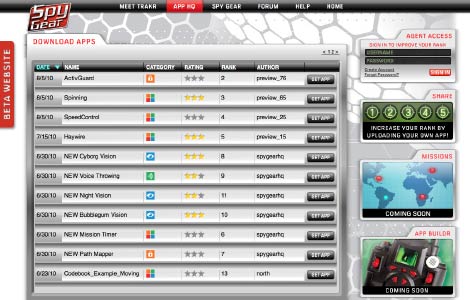
None of the apps is particularly outstanding; they appear to be for illustrative purposes, each one demonstrating a single idea and not wanting to overwhelm the budding programmer. Most range from about 20 to 40 kilobytes.
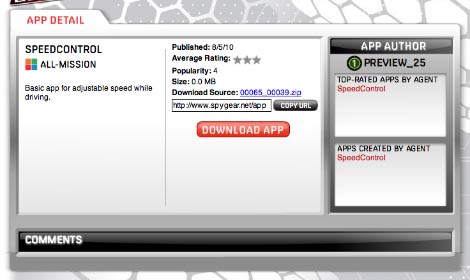
Clicking an app name reveals more information — a description, download link for the compiled app, and also a source code link for us geeks. Unfortunately, that’s where the fun ends for now. “APP BUILDR,” the code editor and compiler which works online (again like the aforementioned mbed microcontroller), is not yet accessible:

NOOOOOOOOOOOO!
The Spy Video TRAKR was originally slated to ship this fall for the holiday shopping season. Wild Planet managed a great head start at getting the TRAKR into production and distribution — we have the toy in-hand and you can already find this at a number of retailers — but the software is still on its original schedule for an October release. We understand software timelines and are sympathetic to that reality, but this does mean there’s little sense of urgency if your main interest in the TRAKR was for programming. It can wait.
In the interim, we can start to deconstruct the development process with the small bits of information available. From Maker Faire, we do know that the TRAKR contains an ARM9 processor, and is programmed in C. And while the code editor isn’t yet online, we can follow the “Download Source” link for an app to retrieve its source code. Here’s an excerpt from one of the demonstration programs:
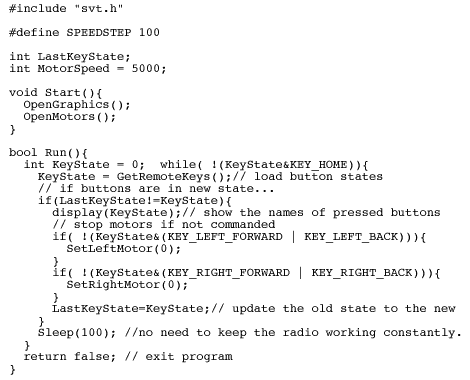
Indeed it’s C, with just a light wrapping of functions (e.g. Start() and Run() instead of a main() function). There’s clearly a Spy Video TRAKR-specific API (svt.h) for accessing hardware functionality like the TRAKR’s motors or the controller’s buttons and display, but documentation for this library isn’t available online yet.
At this point, we’re still dealing entirely with standard, as-advertised, out-of-the-box capabilities. The thing about the TRAKR that really made us stop and take notice at Maker Faire, the thing that has us genuinely enthusiastic about the product even though this article probably sounds like a total corporate shill by now (we approached them first, honest), has everything to do with the toy’s Easter egg:
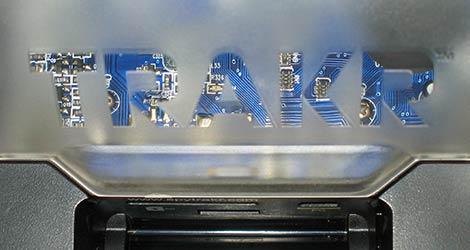
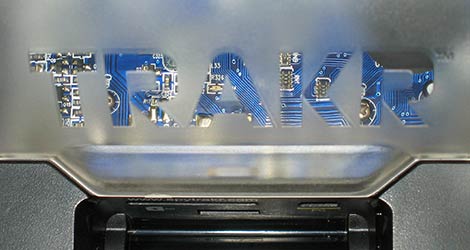
It’s a sublime detail: the clear letters on the otherwise frosted cover just above the rear ports hint at intriguing stuff within. The cover is held on with just a couple of ordinary Phillips screws. Say, were you the sort of curious kid who’d dismantle their toys to see what makes them work? We thought so.
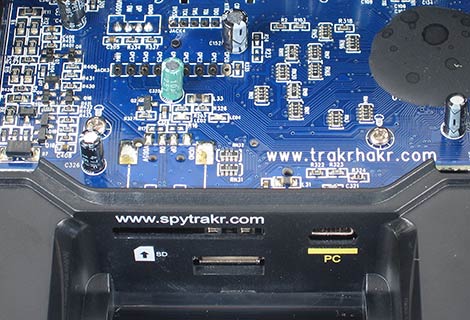
On the outside: the URL for the consumer. On the inside: the URL for the inquisitive. Just a fraction of an inch and a thin sheet of plastic apart. It’s absolutely brilliant, and there’s no mention of this on the packaging or the standard web site.
So — in addition to the standard app web site, a second web site (and sadly an equally unfinished one at this time) is planned to delve even deeper into the system’s inner workings. But even without this information, we can see hints of what’s ahead just by examining the board, which they’ve thoughtfully labeled. We can make out an unpopulated third USB port, an unpopulated switch connector, a breakout header that appears to have eight GPIO lines and one analog input, and a smaller breakout header for an SPI port of some sort (perhaps debugging).
Additionally, both the TRAKR and the remote control have switches and ports concealed under access panels:
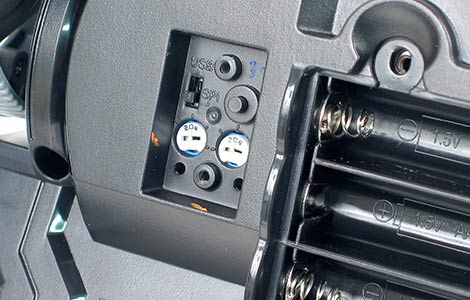
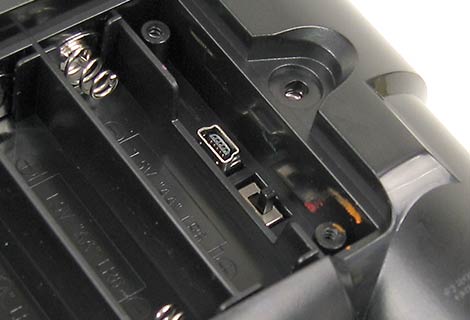
The trim pots on the TRAKR are almost certainly for tuning the radio transceiver. The switches on both units are labeled “USB” for one position and “SPI” for the other, and this appears to be related to debugging or flash memory programming. Both switches ship in the “SPI” position.
It’s encouraging to see the Spy Video TRAKR following the lead of other open robots like the Roomba and Rovi, and we hope to see it gain a similar following. There may still be more surprises within. With our basic review completed, watch Hack a Day for a full teardown in the future.
So, readers, what hacks can you envision for such a device? Telescoping camera stalk? Hexapod legs? Weaponry? Are there any particular features you’d like to see more closely investigated in our teardown? Let’s hear about it in the comments!













If the purpose of this gift was to convince your readers to buy one. I am sure it worked. I am definitely getting one of these things as soon as they sell them.
Really nice review Hackaday! Thanks for taking the time to give us what we want.
Just a side note, you mention the transport deck being “of little use”, personally when I saw it, all I could think is that they were kind enough to provide a mounting surface for external micro controllers. Mine of choice would be the Arduino right now, then you could fix that non servo controlled camera angle…
In case you didn’t notice: the QR-code next to the camera also points to the trackrhackr website. Kudo’s for the good pics btw: my N900 managed to pick up the code off my lcd using its camera.
Sounds like an awesome thing to pick up!! Whats the bar code on the tank for? I tried to scan it with my Evo but couldn’t manage to pick it up because of the angle of the picture I’m assuming.
ignore my last post! Sprite beat me to it!
It hurts having an Android phone beaten by a Nokia.
actually my Desire picked it up in <2 seconds (whats wrong with your Evo)
What we really want to know ofc: does this drive sales?
You can already buy it off Amazon
http://www.amazon.com/Spy-Gear-Video-TRAKR/dp/B003AZZSQ8
and robotshop http://www.robotshop.com/wildplanet-spy-gear-spy-video-trakr-robot.html?utm_source=google&utm_medium=base&utm_campaign=jos
we'll see what happens
The USB/SPI switches are probably for setting the boot device. Many ARM7/9/CM3 chips have a ROM bootloader that lets them boot from either an external SPI/I2C flash chip, serial, USB, or other options depending on the chip. My guess is that they’re set to USB at production time and the firmware is loaded onto the SPI flash. Then the switch is flipped and they boot from flash until someone flips the switch back and boots from USB. Hmm, very interesting possibilities!
Too bad its not Wifi. I envisioned it as a Wifi router with USB ports (and USB camera) on wheels.
It would have so much more potential with Wifi, imagine dropping it in the office , going home and then prowling around at night scaring Janitors :) … and stealing company secrets. Oh yes, one robotic arm and we are in business, power up computers, plug in usb cord and steal data :) like in James Bond movies.
As it is I doubt USB ports can work in Host mode :(
Whats the range on the video stream? I think I may have missed it.
Too bad the camera sucks in it. It’s a great toy for a 15 year old but nothing more.
I see you measured the width 3 times…. but how tall is it?
Well im sure someone will find a way to add a new camera, but this one is not that bad.
Seems pretty cool to me, maybe if I have the extra cash at some point. Just wish the lcd quality was better, and it wifi :[
FIY,the QR code on the front of the Vehicule contains the url you’ve found inside,I was able to scan it using my cell phone despite small picture quality.So little A you unscrew stuff or little B you’re smart and decode stuff,but for either,you get a url as a reward ;p
What I am really interested to see is how long before someone will use that nice USB type A for a wireless adapter and code a software emulator for the controller.
1) more terrain capabilities, seal it so it floats, add bigger flaps to the track, or some sort of one way scales.
2) Encoders on the wheels.
3) Boosting the TX/RX power for more range.
4) Teach it your house layout and make it a patrol bot, add a microphone if it doesn’t have one.
5) Some way for it to auto-charge it’s batteries while patrolling around. like the roomba.
6) moding the LCD screen to output to some glasses, or eye piece.
Oh, for hack’s sake! I was so busy drooling over the insides that I didn’t even think to investigate the QR code, assuming it was just there for manufacturing data. Derp. Thanks for spotting that, everyone.
@Nivekian: to answer your question, it’s 10″ wide. (Kidding!) Okay, height including antenna is also 10″. Without antenna, the highest point on the body (just above the camera pivot) is 4″. The deck varies between 2.25 and 2.5″ high.
I hate those triangle screws, although ive been able to unscrew a few in the past using a smaller flathead screwdriver
(note this)
hopefully the trakrhakr website will provide a tutorial on cleaning off the gunk from the arm9 using acetone..
are those rubber tracks wimpy or what?
doesnt look too mod friendly, hopefully HAD will note all the future upgrades and pass them on to the manufacturers
Ahhhh – Big Trak – love this teardown guide: http://www.robotroom.com/BigTrak.html
Anyway, this looks brilliant, hope comes to UK, and hope gets an equally cheap price here!
And hope it PC controllable – and can down with a charging station :)
the q-code on the front links to http://www.trakrhakr.com … amazing!
“And did you ever expect to see Linux mentioned by name on anything at Toys R Us?”
One of the best computer programming books I ever bought came from Toys’R’Us, back in the 80s, it was a hardware guide to programming the BBC Micro, full of all the peek, poke & assembly language tips to get the machine to do ‘non standard’ things.
It’s getting closer and closer to a really good robotics platform! Now just for a little more documentation :)
Hi @spannero, @cynyr and @rasz,
My name is Robin and I work for the company that manufactures the TRAKR. I don’t have the answers to all of your questions, but I can help you with a few…
RE: WIFI – Though that function is not enabled on the unit now, right out of the box, it’s something we’re planning on offering in the future. It’s in the works on our end here and we’re planning to make it backwards compatible.
RE: Controlling via PC/USB: There is USB connectivity in the remote. The main purpose of this USB is to allow field upgrading of the firmware and we’re looking in to see what else is possible with this USB port.
RE: Battery packs: There’s no technical reason not to have a battery pack, but they are very expensive and drive the cost up substantially, so the TRAKR would be more expensive if we added one. It’s something we’ve wanted to do, and we won’t rule it out forever, but it puts the final product out of reach for a lot of people (from a financial standpoint). Rechargeable batteries are imperfect, but they seem to be the best compromise for now.
Thanks for the great conversation guys! I hope this helps answer some of your questions. -Robin / Wild Planet
Thanks for the info Robin, I really hope you guys are planning on keeping the TRAKR as hacker friendly as possible going forward!
Is that a Gorn action figure I see!
I’m definatly getting one of these. I don’t have any experience with the ARM micros, but I’ve programmed AVR’s before. Does anybody know if you can use the GPIO pins as serial? Maybe you could add a wifly or wi-mi and make a web controlled robot.
Hey Robin, why don’t you guys develop and sell a play-oriented wearable computer? You have the industrial designers, electrical engineers, and the corporate know-how to crank out a sub-$120 wearable computer for active play. Aside from the large hacking market, you could stretch the profits on the line by selling thematicly-matching accessories like webcams and whatnot.
C’mon, make me the Spy Gear SpyComp I’ve been dreaming of since the eye-link communicator.
great info and a really cool looking toy.
ME WANTEE
Ahh, if it had wifi I would pay twice that price.
In its current state I think I will wait.
Nice work but. Good to see more developers here at hackaday.
Any chance to get a picture of the other side of the pcb? Close up of the radio section?
according to the website you can still program it using note book etc. check this site:
http://www.spygear.net/help/apps.php
(download file and read the codebook etc.)
and read this :
How Do I Write An App For The TRAKR?
TRAKR apps are written in C programming language. Write your app using the code editor or text editor of your choice (such as Notepad for Windows or TextEdit for Mac). ZIP it up along with any associated files required to run your app (including .bin and audio files). Upload the zipped files to Spy Gear HQ. We’ll review and compile the app, then post it to the Apps Database so others can download it.
and read this
Connect With spytrakr.com & Download Apps
1. Power off the TRAKR
2. Plug the yellow USB CABLE into the yellow port on the TRAKR, then plug the other end into your computer. (Your computer must have USB ports in order to do this.)
3. The TRAKR folder will appear on your drive as a device if you are using Windows. If you’re on a Mac, it will appear on your desktop or in a Finder window. The name of the device is “TRAKR” (although a few TRAKRs will appear with the name “removable disc”).
4. Go to spytrakr.com , and download an app from the Apps Database.
5. Save the app’s .bin file to the “APPS” folder inside the TRAKR folder.
6. Unplug or eject the TRAKR device from your computer, power it on, and select your app from the menu!
sorry you must download app primer from the link:
http://www.spygear.net/help/apps.php
Download the App Primer
This is a one-time download for Windows and Linux users that includes sample code, a compiler, and instructions for getting acquainted with the TRAKR programming environment. You MUST download this in order to start writing apps for the TRAKR. Download ZIP file (28MB)
sorry again from my earlier posts i also want to say that you do this to share apps:
How Do I Upload An App To The Apps Database?
* Go to spytrakr.com and click SHARE APPS.
* Follow the instructions on that page to upload an app to Spy Gear HQ for review.
* Once it’s been approved (this can take up to XX days), it will be added to the Apps Database. If the name of your app contains any spaces, we’ll fill the spaces in with underscores before adding it to the Apps Database.
If you look in the forum section of the trakr website: http://www.spygear.net/forum/viewtopic.php?f=17&t=98 it says they are approving apps sent in by people.
@Josh: Awesome work. I’d spotted that late last night and was going to work it into the teardown post. Missed this info the first time around because it was buried off in a FAQ section rather than “Build Apps” where one might expect it.
Long story short for everyone: there’s some preliminary documentation for the TRAKR app library – a function reference and sample code. Most interesting though is a complete offline compiler (should work with Cygwin, but still battling with it here), including source to said library. This is in the ‘Primer’ link that Josh provided above.
Dear lord i want one . . . birthday is coming up too. It will be fun disassembling the api libs looking for weird things… maybe rig up a remote shutter for the dslr using one of the outputs . . .
I just have to say, hooray for a manufacturer building something with the intention of customers modifying it! Makes a refreshing change.
Presently doing battle with the compiler. Progress!
cool!!…great info
Thinking as a kid, a war games situation comes to mind. Part of that was reinforced by another poster.
@1:07 am, Mycroftxxx mentioned wearable computing equip.
For a single user…
I was thinking of a wearable lasertag-like vest with a wifi signal the TRAKR could follow and hunt… “firing” to light up a “your hit” indicator. Likewise, the wearer could carry a weapon that could temporarily “disable” the vehicle if it gets hit first.
For multiple users…
Tank/TRAKR warfare. A way to incorporate a laser/sensor system in a way that multiple TRAKR owners could hunt and disable their friends’ unit(s).
Many other ideas I thought of were already mentioned. A robotic arm attachment would be cool if it could be long enough but not so long to unreasonably raise the TRAKR’s ceter of balance and cause it to tip over.
However… perhaps someone can figure out an automatic righting add-on in case it does tip.(??)
All-in-all… Cool Toy!!!
I will just leave this right here
http://trakrhakr.com/forum/index.php
considering how sensitive the camera is a small IR led flashlight would work pretty well i think. you could have an app to sense for a IR spot on the video and automatically remove function of everything for a set time. not sure about a way to trigger it though. have to think about it.
First hack! Will elaborate on this in the follow-up post next week.
I just picked one up at Toys-R-Us yesterday, and I have to agree with the writeup… it’s a great looking little device. Just looking over the design, it seems prime for new attachments to be sold, but also for hacks-a-plenty.
I’ve started playing with compiling an app for it, but getting the arm toolchain set up properly on a Mac is proving to be difficult. Hoping to get that straightened out soon, and I’ll post a tut.
Looking forward to seeing many more tutorials for this little guy. Should be a great robotics platform!
Does the QR code on every TRAKR go to the same place, , or does it also embed a serial number (which redirects to the home page if a device-specific homepage has not been created)? It would be useful for ‘swarming’ applications if these devices could recognize and identify each other. (Hint to the company: a swarm of purchases has a higher profit than a single purchase.)
Also, for the person thinking of adding an Arduino for servo control, it is probably easier to use some of the clearly-labelled GPIO pins.
Awesome toy! I want one! earlier, extra pins were mentioned. would it be possible to program apps to link into those? then you could have all kinds of sensors attached.
Thanks for acknowledging me I have already built 2 complex Programs and several simple ones even though I don’t know if they work yet because my computer is second hand from my grandfather (I’m 12) and he messed up the computer so in the command prompt the computer doesn’t understand the make function. Please tell me if there is any way around this without rewriting the make command.
The US Military will pay 1.39 Million USD for this without batting an eyelash.
It *should* be possible (maybe even trivial) to replace the battery compartment with a battery pack and build some circuitry that could make charging from the outside possible (maybe with a pair of contacts either side of the cam, and build a charging station?). Shut off power to the unit while the battery pack is charging, then cut off connection to the charger after the batteries have enough juice (and maybe even back up automatically).
re: the triangle wheel screws…
get the bit here: http://www.mcmaster.com/#triangle-screwdriver-bits/=8ox00a
They’re called Triangle Power Bits
hello,
i just picked up the trackr and was ready to do some mods but all the posts end around sept. 20th it’s oct.22 where did all the info disappear to?
@bob: good question! I was hoping activity might pick up either here or on the official TRAKR forums, but both have been relatively quiet. Not sure why…it’s a potent little platform!