
The Requirements Of AI

The media is full of breathless reports that AI can now code and human programmers are going to be put out to pasture. We aren’t convinced. In fact, we think the “AI revolution” is just a natural evolution that we’ve seen before. Consider, for example, radios. Early on, if you wanted to have a radio, you had to build it. You may have even had to fabricate some or all of the parts. Even today, winding custom coils for a radio isn’t that unusual.

But radios became more common. You can buy the parts you need. You can even buy entire radios on an IC. You can go to the store and buy a radio that is probably better than anything you’d cobble together yourself. Even with store-bought equipment, tuning a ham radio used to be a technically challenging task. Now, you punch a few numbers in on a keypad.

The Human Element

What this misses, though, is that there’s still a human somewhere in the process. Just not as many. Someone has to design that IC. Someone has to conceive of it to start with. We doubt, say, the ENIAC or EDSAC was hand-wired by its designers. They figured out what they wanted, and an army of technicians probably did the work. Few, if any, of them could have envisoned the machine, but they can build it.

Does that make the designers less? No. If you write your code with a C compiler, should assembly programmers look down on you as inferior? Of course, they probably do, but should they?

If you have ever done any programming for most parts of the government and certain large companies, you probably know that system engineering is extremely important in those environments. An architect or system engineer collects requirements that have very formal meanings. Those requirements are decomposed through several levels. At the end, any competent programmer should be able to write code to meet the requirements. The requirements also provide a good way to test the end product.
Continue reading “The Requirements Of AI”

New Tool Makes 3D Printed PCBs, Fast

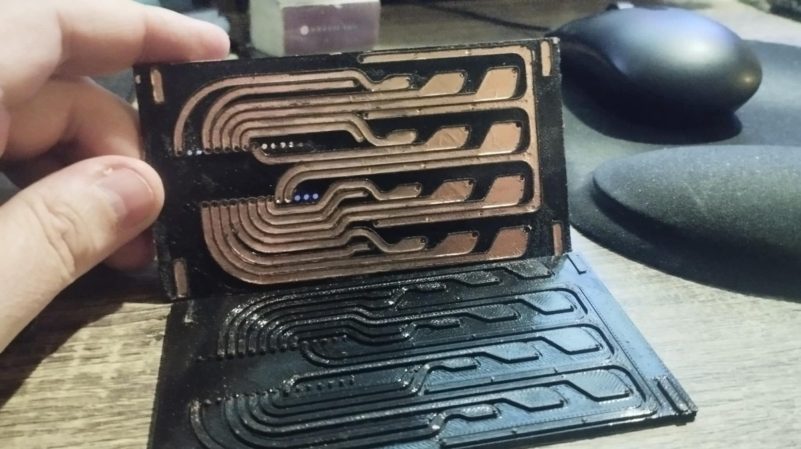
Getting PCBs made is often the key step in taking a dodgy lab experiment and turning it into a functional piece of equipment. However, it can be tedious to wait for PCBs to ship, and that can really slow down the iterative development process. If you’ve got a 3D printer, though, there’s a neat way to make your own custom PCBs. Enter PCB Forge from [castpixel].

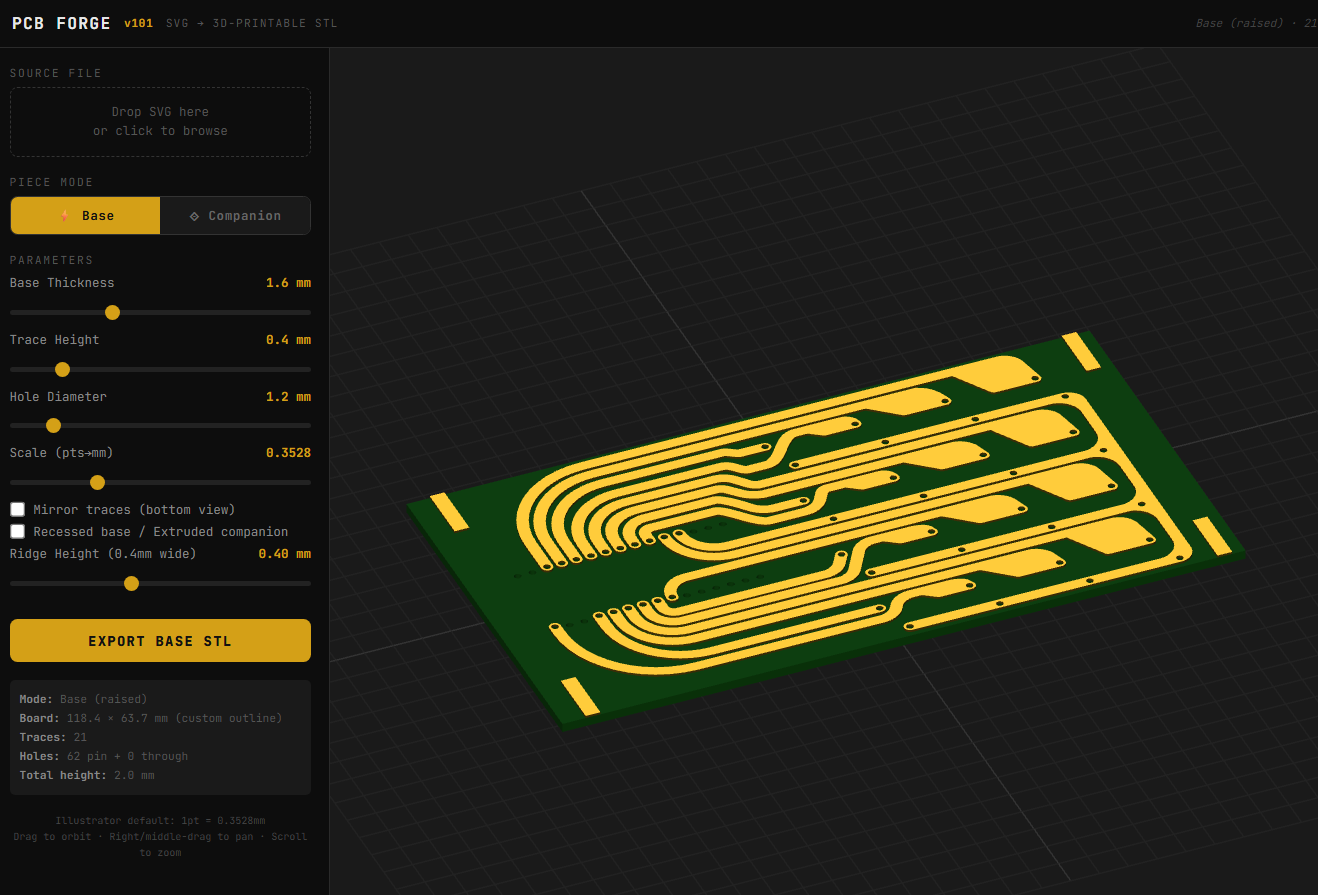
The online tool.

The concept involves producing a base and a companion mold on your 3D printer. You then stick copper tape all over the base part, using the type that comes with conductive adhesive. This allows the construction of a fully conductive copper surface across the whole base. The companion mold is then pressed on top, pushing copper tape into all the recessed traces on the base part. You can then remove the companion mold, quickly sand off any exposed copper, and you’re left with a base with conductive traces that are ready for you to start soldering on parts. No etching, no chemicals, no routing—just 3D printed parts and a bit of copper tape. It rarely gets easier than this.

You can design your PCB traces in any vector editor, and then export a SVG. Upload that into the tool, and it will generate the 3D printable PCB for you, automatically including the right clearances and alignment features to make it a simple press-together job to pump out a basic PCB. It bears noting that you’re probably not going to produce a four-layer FPGA board doing advanced high-speed signal processing using this technique. However, for quickly prototyping something or lacing together a few modules and other components, this could really come in handy.

The work was inspired by a recent technique demonstrated by [QZW Labs], which we featured earlier this year. If you’ve got your own hacks to speed up PCB production time, or simply work around it, we’d love to know on the tipsline! Video after the break.

Continue reading “New Tool Makes 3D Printed PCBs, Fast”

An image of a magnetically-suspended Lemming

Mag-Lev Lemming Refuses To Fall

Are you ready to feel old? Lemmings just turned thirty-five. The famous puzzle game first came out in February of 1991 for the Commodore Amiga, before eventually being ported to just about everything else out there, from the ZX Spectrum to the FM Towns, and other systems so obscure they don’t have the class to start with two letters, like Macintosh and DOS. [RobSmithDev] decided he needed to commemorate the anniversary with a real floating lemming.

The umbrella-equipped lemming is certainly an iconic aspect of the game franchise, so it’s a good pick for a diorama. Some people would have just bought a figurine and hung it with some string, but that’s not going to get your project on Hackaday. [Rob] designed and 3D printed the whole tableau himself, and designed magnetic levitation system with some lemmings-themed effects.

The mag-lev is of the top-down type, where a magnet in the top of the umbrella is pulled against gravity by an electromagnetic coil. There are kits for this sort of thing, but they didn’t quite work for [Rob] so he rolled his own with an Arduino Nano. That allowed him to include luxuries you don’t always get from AliExpress like a thermal sensors.

Our favorite part of the build, though, has to be the sound effects. When the hall effect sensor detects the lemming statue — or, rather, the magnet in its umbrella — it plays the iconic “Let’s Go!” followed by the game’s sound track. If the figurine falls, or when you remove it, you get the “splat” sound, and if the lemming hits the magnet, it screams. [Rob] posted a demo video if you just want to see it in action, but there’s also a full build video that we’ve embedded below.

A commemorative mag-lev seems to be a theme for [Rob] — we featured his 40th anniversary Amiga lamp last year, but that’s hardly all he gets up to. We have also seen functional replicas, this one of a motion tracker from Aliens, and retrotech deep-dives like when he analyzed the magical-seeming tri-format floppy disk.

Continue reading “Mag-Lev Lemming Refuses To Fall”